Learn Coding Visually
Learn to code with interactive, live-preview playgrounds — HTML, CSS, JavaScript, React & more.
 HTML Playground42 lessons · Click-based · Live preview
 CSS PlaygroundLearn CSS with a live editor
 JavaScript Playground60 lessons · DOM · Async · Canvas
 React PlaygroundLearn React with a live code editor
 GSAP PlaygroundLearn GSAP animation interactively
 SVG Playground44 lessons · shapes · paths · animation
 SCSS Playground45 lessons · Sass modules · tokens
 Tailwind PlaygroundLearn Tailwind CSS with a live editor
 Bootstrap 5 Playground50 lessons · live preview
Custom Audio Player With Playlist — Free HTML CSS JS Snippet
Custom Audio Player With Playlist · Misc · Plain HTML, CSS & JS · Live preview
What's included
Features
About this UI Snippet
Custom Audio Player With Playlist — HTML5 Audio Element With Custom Controls
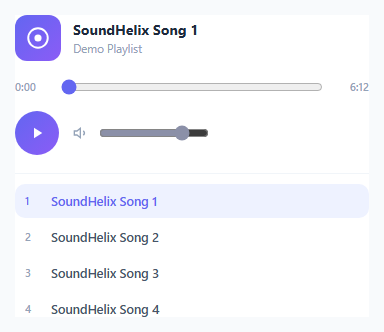
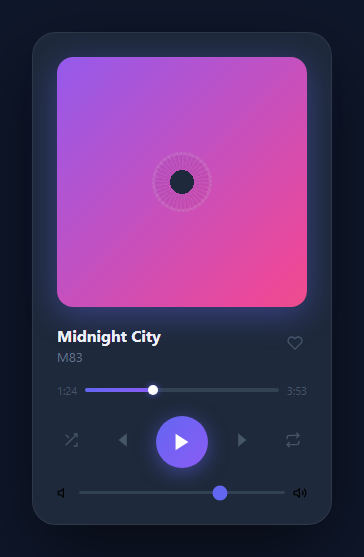
Browsers ship a default <audio> control, but most products replace it with a fully custom UI while still relying on the real HTMLMediaElement underneath for actual playback. This snippet builds exactly that: a styled play/pause button, seek bar, volume slider, and clickable playlist, all wired to a genuine <audio> element's native events and properties.
A real audio element drives everything
The <audio id="apAudio"> element is the actual playback engine — every custom control is just a styled proxy that reads or writes its properties. The play/pause button calls audio.play() and audio.pause() directly; there is no separate playback simulation happening in JavaScript.
Seek bar synced via timeupdate
The audio element fires a timeupdate event many times per second while playing. The handler reads audio.currentTime and audio.duration, converts the ratio into a 0-100 percentage, and sets that as the seek <input type="range">'s value — keeping the visual bar in sync with real playback position. An isSeeking flag pauses this sync while the user is actively dragging the slider, so the bar doesn't fight the user's own drag input; releasing the slider (the change event) sets audio.currentTime to the chosen position, performing the actual seek.
Volume bound directly to audio.volume
The volume slider's input event sets audio.volume directly (a 0 to 1 float) on every drag movement, so volume changes take effect immediately and continuously rather than only on release.
A clickable playlist that swaps the real source
TRACKS holds the playlist data; clicking any item calls loadTrack(index), which sets audio.src to that track's URL, updates the visible title, and re-renders the list so the newly active track gets the .ap-active highlight. Because this is a demo, every track points at the same public demo MP3 with a different display title — in a real deployment each entry would point at a distinct file, and the exact same loadTrack() logic would work unchanged.
Auto-advance on end
The ended event listener automatically loads and plays the next track in the list (wrapping back to the first after the last), turning the individual player into a genuine playlist experience rather than a single-track player.
Build with AI
Build, Understand, Optimize, and Extend It With AI
Hand this snippet's HTML, CSS, and JavaScript to an AI coding assistant like Claude and ask it to adapt "Custom Audio Player With Playlist" to your project — restyle it to match your design system, wire it up to real data instead of the static example, or port it to the framework you're building in.
Prompt to recreate it
Copy this into your AI assistant of choice to build the effect from scratch, or as a jumping-off point for your own variant:
Build a misc component called "Custom Audio Player With Playlist" using plain HTML, CSS, and vanilla JavaScript — no framework, no build step.

Requirements:
- Match the structure and behavior of the "Custom Audio Player With Playlist" snippet from the UI Snippets Library.
- Keep the markup semantic and the styling self-contained (no external dependencies beyond what the original snippet uses).
- Keep the JavaScript vanilla, with no framework runtime required.
- Make it easy to restyle via CSS custom properties or class overrides so it can be dropped into a real project.
Want to tighten it up first? Run this prompt through the AI Prompt Studio to score it across 8 quality dimensions, catch anti-patterns, and tune the wording for Claude, ChatGPT, or Gemini before you paste it in.
Source Code
<div class="ap-card">
  <audio id="apAudio" src="https://www.soundhelix.com/examples/mp3/SoundHelix-Song-1.mp3" preload="metadata"></audio>

  <div class="ap-now-playing">
    <div class="ap-art">
      <svg width="26" height="26" viewBox="0 0 24 24" fill="none" stroke="#fff" stroke-width="1.8"><circle cx="12" cy="12" r="9"/><circle cx="12" cy="12" r="2.4" fill="#fff"/></svg>
    </div>
    <div class="ap-meta">
      <span class="ap-track-title" id="apTrackTitle">SoundHelix Song 1</span>
      <span class="ap-track-sub">Demo Playlist</span>
    </div>
  </div>

  <div class="ap-progress-row">
    <span class="ap-time" id="apCurrentTime">0:00</span>
    <input type="range" class="ap-seek" id="apSeek" min="0" max="100" value="0" step="0.1" />
    <span class="ap-time" id="apDuration">0:00</span>
  </div>

  <div class="ap-controls">
    <button class="ap-play-btn" id="apPlayBtn" aria-label="Play">
      <svg id="apPlayIcon" width="18" height="18" viewBox="0 0 24 24" fill="currentColor"><path d="M8 5v14l11-7z"/></svg>
    </button>
    <div class="ap-volume-row">
      <svg width="16" height="16" viewBox="0 0 24 24" fill="none" stroke="#94a3b8" stroke-width="2"><path d="M11 5L6 9H2v6h4l5 4V5z"/><path d="M15.5 8.5a5 5 0 010 7"/></svg>
      <input type="range" class="ap-volume" id="apVolume" min="0" max="1" value="0.8" step="0.01" />
    </div>
  </div>

  <ul class="ap-playlist" id="apPlaylist"></ul>
</div>*{box-sizing:border-box}
body{font-family:system-ui,-apple-system,sans-serif;background:#f8fafc;min-height:100vh;display:flex;align-items:center;justify-content:center;padding:24px}
.ap-card{font-family:system-ui,-apple-system,sans-serif;background:#fff;color:#1e293b;border:1px solid #e2e8f0;border-radius:18px;padding:22px;max-width:400px;width:100%;margin:0 auto;box-shadow:0 12px 30px rgba(30,41,59,0.06)}
.ap-now-playing{display:flex;align-items:center;gap:12px;margin-bottom:16px}
.ap-art{width:46px;height:46px;border-radius:12px;background:linear-gradient(135deg,#6366f1,#8b5cf6);display:flex;align-items:center;justify-content:center;flex-shrink:0}
.ap-meta{display:flex;flex-direction:column;gap:2px;min-width:0}
.ap-track-title{font-size:14px;font-weight:700;white-space:nowrap;overflow:hidden;text-overflow:ellipsis}
.ap-track-sub{font-size:11.5px;color:#94a3b8}
.ap-progress-row{display:flex;align-items:center;gap:10px;margin-bottom:14px}
.ap-time{font-size:11px;color:#94a3b8;font-weight:600;width:34px;flex-shrink:0}
.ap-time:last-child{text-align:right}
.ap-seek{flex:1;accent-color:#6366f1}
.ap-controls{display:flex;align-items:center;justify-content:space-between;gap:14px;margin-bottom:18px}
.ap-play-btn{width:44px;height:44px;border-radius:50%;border:none;background:linear-gradient(135deg,#6366f1,#8b5cf6);color:#fff;display:flex;align-items:center;justify-content:center;cursor:pointer;flex-shrink:0;transition:transform .1s}
.ap-play-btn:active{transform:scale(.93)}
.ap-volume-row{display:flex;align-items:center;gap:8px;flex:1}
.ap-volume{flex:1;accent-color:#8b90a8;max-width:110px}
.ap-playlist{list-style:none;margin:0;padding:0;border-top:1px solid #f1f5f9;padding-top:10px;display:flex;flex-direction:column;gap:2px}
.ap-playlist-item{display:flex;align-items:center;gap:10px;padding:9px 10px;border-radius:10px;cursor:pointer;font-size:12.5px;font-weight:600;color:#475569;transition:background .12s}
.ap-playlist-item:hover{background:#f8fafc}
.ap-playlist-item.ap-active{background:#eef2ff;color:#6366f1}
.ap-playlist-index{width:16px;flex-shrink:0;font-size:11px;color:#94a3b8}
.ap-playlist-item.ap-active .ap-playlist-index{color:#6366f1}var audio = document.getElementById('apAudio');
var playBtn = document.getElementById('apPlayBtn');
var playIcon = document.getElementById('apPlayIcon');
var seek = document.getElementById('apSeek');
var currentTimeEl = document.getElementById('apCurrentTime');
var durationEl = document.getElementById('apDuration');
var volume = document.getElementById('apVolume');
var trackTitle = document.getElementById('apTrackTitle');
var playlistEl = document.getElementById('apPlaylist');
var TRACKS = [
{ title: 'SoundHelix Song 1', src: 'https://www.soundhelix.com/examples/mp3/SoundHelix-Song-1.mp3' },
{ title: 'SoundHelix Song 2', src: 'https://www.soundhelix.com/examples/mp3/SoundHelix-Song-1.mp3' },
{ title: 'SoundHelix Song 3', src: 'https://www.soundhelix.com/examples/mp3/SoundHelix-Song-1.mp3' },
{ title: 'SoundHelix Song 4', src: 'https://www.soundhelix.com/examples/mp3/SoundHelix-Song-1.mp3' },
];
var activeIndex = 0;
var isSeeking = false;
var PLAY_ICON = '<path d="M8 5v14l11-7z"/>';
var PAUSE_ICON = '<path d="M6 5h4v14H6zM14 5h4v14h-4z"/>';
function formatTime(seconds) {
if (!isFinite(seconds) || isNaN(seconds)) return '0:00';
var m = Math.floor(seconds / 60);
var s = Math.floor(seconds % 60);
return m + ':' + (s < 10 ? '0' : '') + s;
}
function renderPlaylist() {
playlistEl.innerHTML = '';
TRACKS.forEach(function (track, i) {
var li = document.createElement('li');
li.className = 'ap-playlist-item' + (i === activeIndex ? ' ap-active' : '');
li.innerHTML = '<span class="ap-playlist-index">' + (i + 1) + '</span><span>' + track.title + '</span>';
li.addEventListener('click', function () {
loadTrack(i);
playAudio();
});
playlistEl.appendChild(li);
});
}
function loadTrack(index) {
activeIndex = index;
var track = TRACKS[index];
audio.src = track.src;
trackTitle.textContent = track.title;
renderPlaylist();
}
function playAudio() {
audio.play();
}
function updatePlayIcon() {
playIcon.innerHTML = audio.paused ? PLAY_ICON : PAUSE_ICON;
playBtn.setAttribute('aria-label', audio.paused ? 'Play' : 'Pause');
}
playBtn.addEventListener('click', function () {
if (audio.paused) {
playAudio();
} else {
audio.pause();
}
});
audio.addEventListener('play', updatePlayIcon);
audio.addEventListener('pause', updatePlayIcon);
audio.addEventListener('loadedmetadata', function () {
durationEl.textContent = formatTime(audio.duration);
});
audio.addEventListener('timeupdate', function () {
if (isSeeking) return;
currentTimeEl.textContent = formatTime(audio.currentTime);
if (audio.duration) {
seek.value = (audio.currentTime / audio.duration) * 100;
}
});
audio.addEventListener('ended', function () {
var nextIndex = (activeIndex + 1) % TRACKS.length;
loadTrack(nextIndex);
playAudio();
});
seek.addEventListener('input', function () {
isSeeking = true;
var pct = parseFloat(seek.value) / 100;
if (audio.duration) {
currentTimeEl.textContent = formatTime(pct * audio.duration);
}
});
seek.addEventListener('change', function () {
var pct = parseFloat(seek.value) / 100;
if (audio.duration) {
audio.currentTime = pct * audio.duration;
}
isSeeking = false;
});
volume.addEventListener('input', function () {
audio.volume = parseFloat(volume.value);
});
audio.volume = parseFloat(volume.value);
renderPlaylist();
updatePlayIcon();Step by step
How to Use
- 1Load the snippetClick "Custom Audio Player With Playlist" in the sidebar to load its HTML, CSS, and JS into the editor panels. The preview updates instantly.
- 2Edit the codeModify any panel — HTML, CSS, or JS. The preview refreshes as you type. Use Reset in each panel header to restore the original.
- 3Preview on devicesClick the Mobile (375px), Tablet (768px), or Desktop buttons in the preview header to check responsiveness.
- 4Export in your formatClick "HTML" to download a standalone file, "JSX" for a React component, "Tailwind" for a React + Tailwind CSS component, "Tailwind HTML" for a standalone HTML file with Tailwind CDN, "Vue" for a Vue 3 SFC with <template>/<script setup>/<style scoped>, or "Angular" for a standalone Angular .component.ts file. "Copy all" copies the full code to clipboard.
- 5Save your versionClick "Save as", type a name, and press Enter. Your snippet saves to IndexedDB and appears in the Saved tab.
Real-world uses
Common Use Cases
Got questions?
Frequently Asked Questions
It uses a real <audio> element for all playback. Every custom control (play button, seek bar, volume slider) reads from or writes to that element's actual properties and events — there is no separate simulated playback state.
The timeupdate event keeps updating the seek bar many times per second during normal playback. Without pausing that sync while the user is actively dragging, the automatic updates would fight the user's drag input, making the slider feel unresponsive. isSeeking suppresses the automatic sync until the drag ends, at which point the change event performs the actual seek.
Edit the TRACKS array — each entry's src points to the file that track should play. The demo uses the same public demo MP3 with different titles for simplicity, but loadTrack() works identically with distinct URLs.