Learn Coding Visually
Learn to code with interactive, live-preview playgrounds — HTML, CSS, JavaScript, React & more.
 HTML Playground42 lessons · Click-based · Live preview
 CSS PlaygroundLearn CSS with a live editor
 JavaScript Playground60 lessons · DOM · Async · Canvas
 React PlaygroundLearn React with a live code editor
 GSAP PlaygroundLearn GSAP animation interactively
 SVG Playground44 lessons · shapes · paths · animation
 SCSS Playground45 lessons · Sass modules · tokens
 Tailwind PlaygroundLearn Tailwind CSS with a live editor
 Bootstrap 5 Playground50 lessons · live preview
Hero with Video Testimonial Player — Free HTML CSS JS Snippet
Hero with Video Testimonial Player · Heroes · Plain HTML, CSS & JS · Live preview
What's included
Features
About this UI Snippet
Hero with Video Testimonial Player — A Real Player, Framed as Social Proof
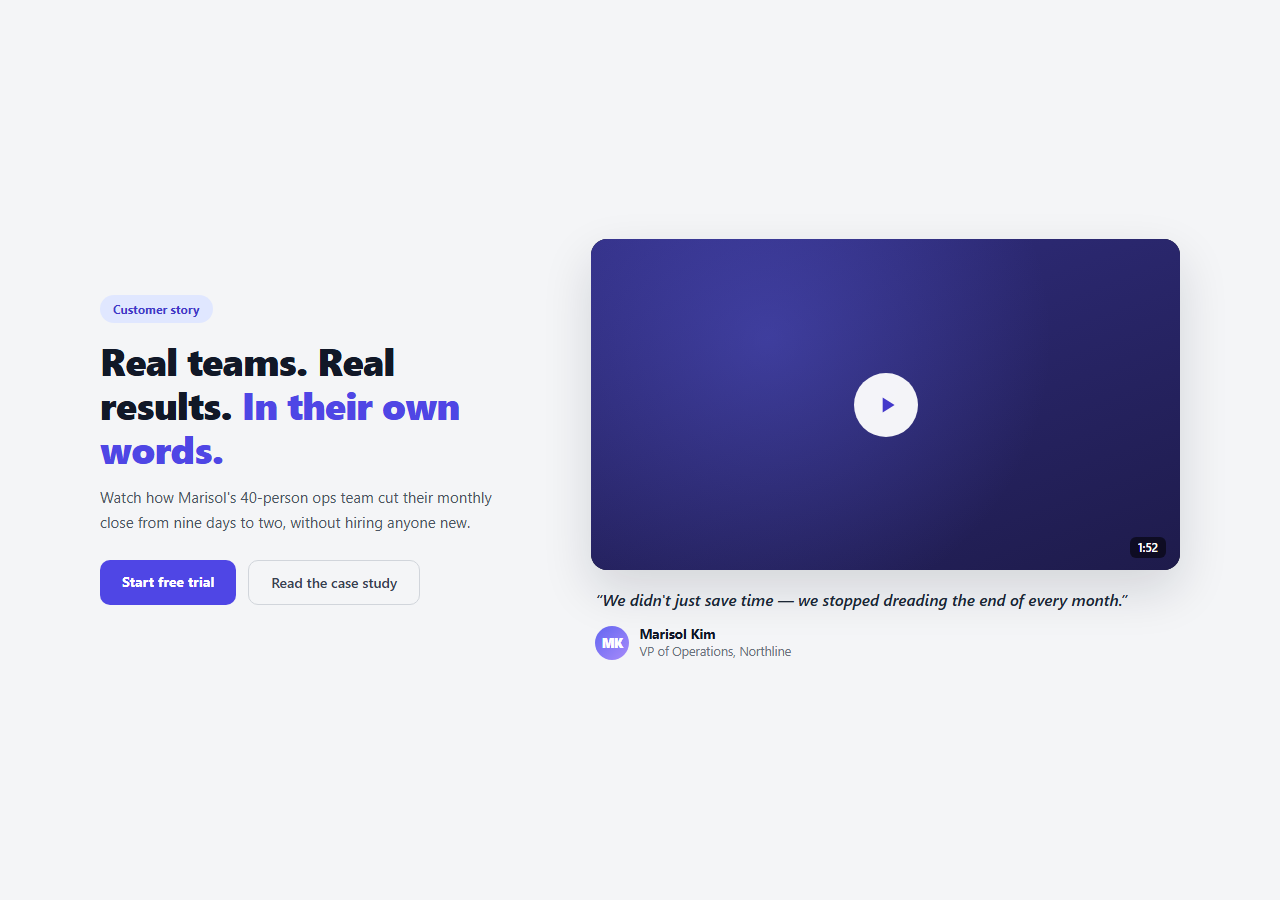
Text testimonials are easy to skim past; a video testimonial forces a moment of attention. This snippet frames a real HTML5 <video> element as a customer-story hero — a styled poster frame with a play button and duration badge, a quote pulled from the video as a caption, and named attribution beneath it, next to a standard headline-and-CTA column.
A real video element, not a mockup
Unlike a static "pretend to be a player" UI, .vth-player wraps an actual <video> element with native controls. The demo ships with a small public CC0 sample clip so the play behavior is genuine and testable in this tool — swap the src for your real testimonial video (hosted on your own CDN, S3, Mux, or Vimeo/YouTube if you switch to an iframe embed) before shipping.
Poster frame as the initial state
Before playback starts, a custom .vth-poster overlay sits on top of the video — a gradient background, a radial glow, a large circular play button, and a duration badge in the corner. This is more inviting than the browser's default video poster and lets you art-direct the pre-play state to match your brand, independent of whatever the first video frame happens to look like.
Click-to-play, not autoplay
Clicking either the poster or the play button calls video.play() and adds a .playing class that swaps the poster for the real <video> element (with its native controls now visible). Autoplay is deliberately not used — many browsers block unmuted autoplay anyway, and a testimonial video is exactly the kind of content a visitor should choose to start, not have thrust on them.
State tracks real playback events
The script listens for the video's own pause and ended events, not just the click that started playback. If the video ends, or is paused at time zero (the state right after a user scrubs back to the start and pauses), the poster reappears — so the UI stays honest about what the video element is actually doing rather than assuming it's always playing once clicked.
The quote as connective tissue
Below the player, a pulled quote in italic with a gradient-avatar attribution (name, title, company) reinforces what the video says in a format a skimming visitor can read in two seconds, even if they never press play. This is the same pattern text-only testimonial cards use — pairing it with the actual video gives skeptical visitors the option to verify the quote themselves.
Customizing it
Replace the src with your real testimonial video and set a real poster image or keep the CSS poster overlay. Update the quote, name, title, and company. If you're embedding from YouTube or Vimeo instead of hosting the file yourself, swap the <video> element for an <iframe> and adjust the play-state JS accordingly, or pair this pattern with a video modal if you'd rather open playback in an overlay instead of inline.
Build with AI
Build, Understand, Optimize, and Extend It With AI
You don't have to work out the video playback-state logic from scratch. Paste this snippet's HTML, CSS, and JS into an AI coding assistant like Claude and ask it to explain why the poster overlay listens to the video element's own pause and ended events instead of just tracking a boolean set on click, and why autoplay is deliberately avoided for a testimonial video. The same assistant is useful for adapting the pattern to your setup — ask it how to swap the hosted <video> element for a YouTube or Vimeo iframe embed while keeping the same poster and play-button UI, or how to lazy-load the video source only when the poster is clicked to avoid an unnecessary network request on page load. It's also handy for extending the effect: ask it to add a carousel of multiple testimonial videos with the same player pattern, or auto-pause the video if the visitor scrolls it out of view. Treat the code less like a finished artifact and more like a starting point for a conversation.
Prompt to recreate it
Copy this into your AI assistant of choice to build the effect from scratch, or as a jumping-off point for your own variant:
Build a customer-testimonial marketing hero in plain HTML, CSS, and JavaScript using a real HTML5 video element — no framework, no video library.

Requirements:
- A two-column hero: a copy column with a badge, headline, subheading, and two CTA buttons, and a player column with a video testimonial.
- The player column must use a genuine <video> element with native controls (not a static image pretending to be a player), given a real or placeholder src attribute.
- Before playback starts, show a custom art-directed poster overlay on top of the video: a gradient background, a large circular play button with a play icon, and a small duration badge in the corner — this overlay should look better than the browser's default poster image.
- Clicking either the poster background or the play button should call the video element's own play() method (wrapped to gracefully handle a rejected autoplay promise) and swap the poster overlay out for the now-visible video element with its controls.
- Track the video's actual pause and ended events (not just the initial click) so that if the video finishes playing, or is paused while scrubbed back to the very start, the poster overlay reappears — the UI must reflect genuine playback state, not just "was clicked once."
- Below the player, add a pulled-quote caption in italic text with a small circular avatar, a name, and a title/company line as attribution.
- Make the whole hero responsive, stacking to a single column with the player above the copy on narrow screens.
Want to tighten it up first? Run this prompt through the AI Prompt Studio to score it across 8 quality dimensions, catch anti-patterns, and tune the wording for Claude, ChatGPT, or Gemini before you paste it in.
Step by step
How to Use
- 1Paste the HTML, CSS, and JSA two-column hero renders with copy on the left and a styled video player with a poster overlay on the right.
- 2Click the poster or play buttonThe poster fades out, the native video element takes over, and playback starts.
- 3Pause or let it finishThe poster reappears if the video ends or is paused back at the start.
- 4Swap the video sourceReplace the src on #vthVideo with your real testimonial video file or CDN URL.
- 5Update the quote and attributionEdit the blockquote text, avatar initials, name, title, and company.
- 6Wire the CTAsPoint the primary button at signup and the secondary link at a case study page.
Real-world uses
Common Use Cases
Got questions?
Frequently Asked Questions
Yes — it uses a genuine HTML5 <video> element with a small public CC0 sample clip so playback is real and testable in this tool. Replace the src with your actual testimonial video before shipping; the poster overlay, play button, and playback-state logic all work the same way with your own file.
Most browsers block unmuted autoplay anyway, and a testimonial is exactly the kind of content a visitor should choose to start rather than have played at them. Click-to-play also avoids unexpected audio and keeps the poster's art-directed pre-play state visible until the visitor is ready.
The script listens to the video element's own pause and ended events, not just the initial click. If playback ends, or the video is paused while scrubbed back to time zero, the .playing class is removed and the poster overlay returns — so the UI reflects the video's actual state rather than assuming it stays playing forever once started.
Replace the <video> element with an <iframe> pointing at the embed URL, and adjust the JS: instead of calling video.play(), swap the poster for the iframe on click (most platforms don't expose a simple JS play/pause API without their own SDK). The poster, play button, and quote caption markup stay the same.
Hold a playing boolean in state. The click handler calls the video ref's play() method and sets playing to true; onPause and onEnded handlers (bound to the video element) set it back to false when appropriate. Bind the .playing class and poster visibility to that state. Export via JSX, Vue, or Angular in the panel.