Learn Coding Visually
Learn to code with interactive, live-preview playgrounds — HTML, CSS, JavaScript, React & more.
 HTML Playground42 lessons · Click-based · Live preview
 CSS PlaygroundLearn CSS with a live editor
 JavaScript Playground60 lessons · DOM · Async · Canvas
 React PlaygroundLearn React with a live code editor
 GSAP PlaygroundLearn GSAP animation interactively
 SVG Playground44 lessons · shapes · paths · animation
 SCSS Playground45 lessons · Sass modules · tokens
 Tailwind PlaygroundLearn Tailwind CSS with a live editor
 Bootstrap 5 Playground50 lessons · live preview
Hero with Mouse-Parallax Layers — Free HTML CSS JS Snippet
Hero with Mouse-Parallax Layers · Heroes · Plain HTML, CSS & JS · Live preview
What's included
Features
About this UI Snippet
Hero with Mouse-Parallax Layers — Real Depth From Live Cursor Position
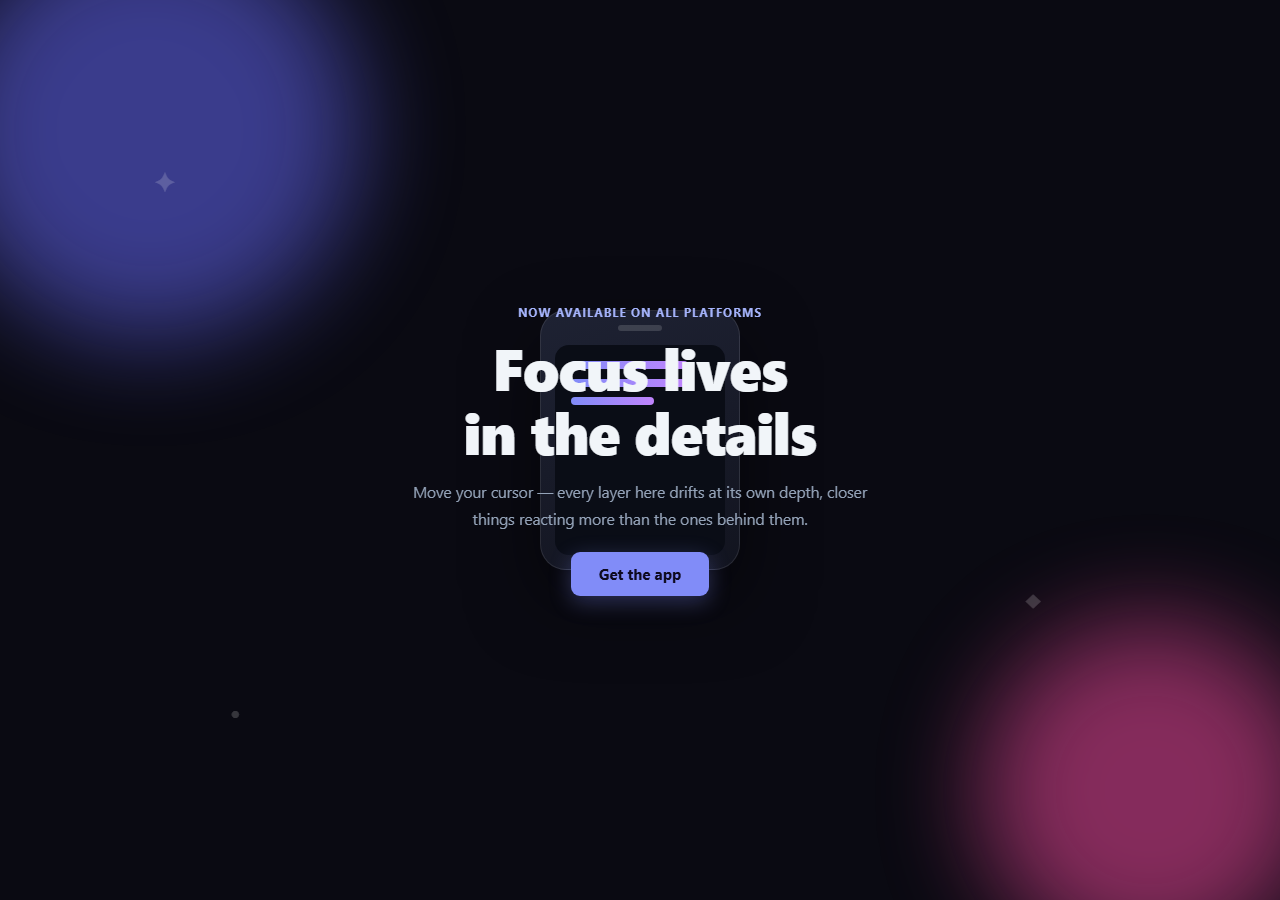
Parallax depth only reads as "real" when closer elements genuinely move more than distant ones in response to the same cursor movement — not when several layers loop independent CSS animations that happen to run at different speeds. This snippet computes every layer's offset from one shared cursor position on every animation frame, scaled by each layer's own depth factor.
One cursor position, three depth factors
onMove() normalizes the cursor's position within the hero to a -1..1 range on both axes (targetX, targetY) — center is (0,0), an edge is ±1. Three layers (.pml-layer-back, .pml-layer-mid, .pml-layer-device) each carry a data-depth attribute (0.02, 0.05, 0.09). Inside the render loop, every layer's pixel shift is currentX * maxShift * (depth * 10) — the *same* cursor position feeding three different multipliers, so the device mockup (highest depth) visibly moves several times farther than the background blobs (lowest depth) for identical cursor movement. That ratio, not just "some things move," is what makes it read as depth rather than three unrelated wobbles.
Eased toward the target, not snapped to it
Rather than setting each layer's transform directly to the raw cursor position, currentX/currentY chase targetX/targetY with simple exponential smoothing (current += (target - current) * 0.08) inside a requestAnimationFrame loop that runs continuously. This produces the soft, slightly-lagging drift real parallax has — a layer catching up to where the cursor now is, rather than teleporting to a new position on every mouse event.
Why `requestAnimationFrame` and not the `pointermove` handler directly
The pointermove listener only updates the lightweight targetX/targetY numbers; the actual DOM writes (layer.style.transform) happen inside the separate animate() loop, decoupled from event frequency. This means the visual update rate is capped to the display's real refresh rate regardless of how often pointermove fires, and the easing math has a consistent per-frame timestep to work against.
`translate3d` and `will-change` for cheap compositing
Every layer moves via translate3d(x, y, 0) (not top/left), which the browser can composite on the GPU without triggering layout, and will-change: transform hints the compositor to keep the layer on its own paint layer ahead of time.
A resting state on pointer leave
onLeave() resets targetX/targetY to zero, and because the same easing loop is always running, every layer glides back to its resting position rather than snapping — the leave state reuses the identical animation path as normal movement.
Customizing it
Add more layers with their own data-depth values (the loop reads them generically), tune maxShift or the 0.08 easing factor for snappier or dreamier motion, and swap the CSS-drawn device mockup for a real product screenshot. Pair it with parallax hero or hero parallax grid for scroll-driven parallax variants instead of cursor-driven.
Build with AI
Build, Understand, Optimize, and Extend It With AI
Rather than eyeballing the parallax feel by hand, paste this snippet's HTML, CSS, and JS into an AI coding assistant like Claude and ask it to explain exactly how one normalized cursor position feeds three different depth multipliers to produce layers that move proportionally rather than independently, and why the exponential smoothing step (current += (target - current) * 0.08) is what makes the motion feel like it's easing toward the cursor instead of snapping to it. The same assistant can help you tune the physics — ask whether the 0.08 smoothing factor is too slow or too snappy for a hero this size, or whether maxShift should scale down on smaller viewports so the device mockup layer doesn't drift off the visible area. It's also useful for extending the effect: ask it to add gyroscope-based parallax as a mobile fallback for devices without a mouse, replace the CSS-drawn device mockup with a real product screenshot while preserving the depth ratios, or add a subtle rotation to the device layer in addition to its translation. Treat the code less like a finished artifact and more like a starting point for a conversation.
Prompt to recreate it
Copy this into your AI assistant of choice to build the effect from scratch, or as a jumping-off point for your own variant:
Build a hero section in plain HTML, CSS, and vanilla JavaScript with three or more layered elements that move at different depths in real time based on live cursor position (no library, no CDN, no scroll involvement — this must be purely cursor-driven).

Requirements:
- A hero containing a headline, subheading, and CTA centered on top, with at least three background/foreground layers behind it: a "far" layer with large blurred blob shapes, a "mid" layer with a few small floating icon glyphs, and a "near" layer containing a CSS-drawn device or card mockup (built from divs and CSS, no image files required).
- Each layer element should carry a numeric "depth" value (e.g. as a data attribute) representing how far it should travel relative to the others — the near/device layer should have a noticeably larger depth value than the far/blob layer.
- On pointermove over the hero, compute the cursor's position as a normalized value roughly in the range -1 to 1 relative to the hero's center (using the hero's real bounding rect, not fixed dimensions) and store it as a lightweight "target" value — do not write directly to any layer's transform inside this event handler.
- Run a continuous requestAnimationFrame loop that eases a separate "current" value toward the target value each frame using simple linear interpolation (exponential smoothing), and on every frame applies each layer's transform as a translate3d offset computed from the shared smoothed cursor value multiplied by that specific layer's own depth value — so all layers respond to one shared cursor position, just scaled differently, producing a proportional sense of depth rather than independent unrelated motion.
- On pointerleave, reset the target values back to zero so all layers ease back to their resting centered position using the same animation loop, rather than snapping back instantly.
- Use translate3d (not top/left) for the transforms and add will-change: transform to the layers for GPU-cheap compositing.
Want to tighten it up first? Run this prompt through the AI Prompt Studio to score it across 8 quality dimensions, catch anti-patterns, and tune the wording for Claude, ChatGPT, or Gemini before you paste it in.
Step by step
How to Use
- 1Paste HTML, CSS, and JSThree layered elements sit centered at rest.
- 2Move the cursor over the heroEach layer drifts toward the opposite side, the device layer moving noticeably more than the back layer.
- 3Move the cursor to an edgeOffsets scale up smoothly, capped by maxShift and each layer's own depth.
- 4Move the cursor off the heroAll layers ease back to rest via the same animation loop.
- 5Add a new layerGive it a data-depth attribute — the render loop picks it up automatically.
- 6Tune the feelAdjust maxShift or the 0.08 easing factor in animate().
Real-world uses
Common Use Cases
Got questions?
Frequently Asked Questions
Every layer element carries a data-depth attribute (0.02, 0.05, 0.09 for the back, mid, and device layers). Inside the shared animation loop, each layer's pixel offset is computed as the same smoothed cursor position multiplied by maxShift and that layer's own depth factor — so all three layers respond to the identical cursor input, just scaled differently, which is what produces a real sense of relative depth rather than independent motion.
The pointermove handler only updates lightweight target values (targetX, targetY). A separate requestAnimationFrame loop eases a second pair of current values toward those targets on every frame using simple exponential smoothing (current += (target - current) * 0.08), and only the smoothed current values are ever written to a layer's transform — so the visual motion always trails slightly behind the raw cursor position instead of teleporting to it.
Decoupling the DOM writes from the pointermove event means the visual update rate is capped to the display's real repaint cycle rather than however often pointermove happens to fire (which can be very high-frequency on some devices), and it gives the easing math a consistent loop to run continuously against, including the ability to animate back to rest after the pointer leaves.
translate3d (even with a 0 z-value) promotes the element onto its own GPU compositor layer and animates without triggering layout recalculation or repaint of surrounding content, unlike changing left/top which forces the browser to recompute layout on every frame. Combined with will-change: transform, this keeps the parallax smooth even with several layers animating simultaneously.
Add a new .pml-layer element with its own data-depth value (a larger number moves more, a smaller number moves less) and put your shapes, icons, or mockup markup inside it with position: absolute or centered flex layout as needed. Since the animation loop selects all .pml-layer elements generically and reads each one's own data-depth, no JavaScript changes are required.