Learn Coding Visually
Learn to code with interactive, live-preview playgrounds — HTML, CSS, JavaScript, React & more.
 HTML Playground42 lessons · Click-based · Live preview
 CSS PlaygroundLearn CSS with a live editor
 JavaScript Playground60 lessons · DOM · Async · Canvas
 React PlaygroundLearn React with a live code editor
 GSAP PlaygroundLearn GSAP animation interactively
 SVG Playground44 lessons · shapes · paths · animation
 SCSS Playground45 lessons · Sass modules · tokens
 Tailwind PlaygroundLearn Tailwind CSS with a live editor
 Bootstrap 5 Playground50 lessons · live preview
Audio Frequency Equalizer Bars — Free HTML CSS JS Snippet
Audio Frequency Equalizer Bars · Charts · Plain HTML, CSS & JS · Live preview
What's included
Features
About this UI Snippet
Audio Frequency Equalizer Bars — Live Spectrum Visualizer With Web Audio API
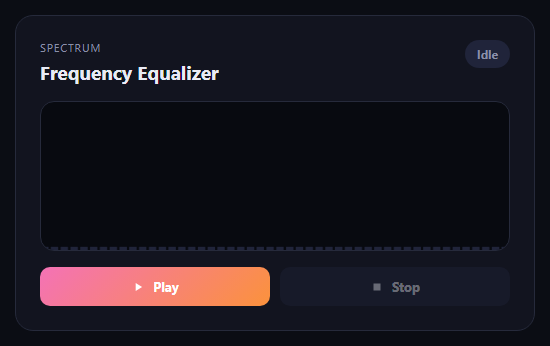
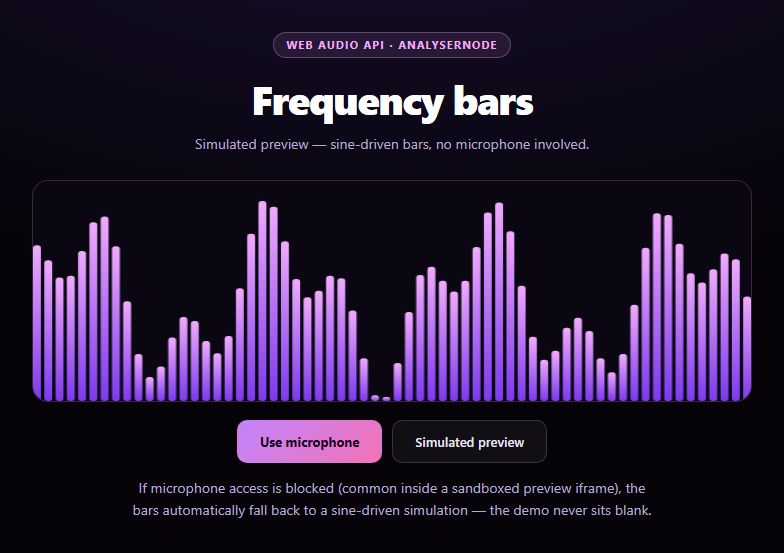
This snippet recreates the classic music-player equalizer bar visualization using nothing but the Web Audio API and a canvas — no audio files and no external visualization library. Pressing Play starts several synthesized oscillators at once and renders their combined frequency spectrum as a row of animated vertical bars.
A small chord of oscillators
Rather than a single tone, startPlayback() creates four OscillatorNode instances tuned to different frequencies (a simple chord), each connected into a shared GainNode for volume control. Feeding multiple frequencies into the analyser gives the bar chart visible variation across the spectrum instead of a single narrow spike, which is what makes it read as a genuine equalizer rather than a single pulsing bar.
Frequency-domain analysis
The AnalyserNode is configured with a small fftSize of 256, producing 128 frequency bins from analyser.getByteFrequencyData(). The draw loop samples a subset of those bins (one every few indices) to populate a fixed number of bars, so the bar count on screen stays constant regardless of the underlying FFT resolution.
Rendering with gradient bars
Each bar's height is proportional to its frequency bin's magnitude (0-255, normalized to the canvas height), redrawn every requestAnimationFrame tick. Each bar gets its own vertical gradient from pink to orange, giving the classic equalizer look while still being driven entirely by live audio data rather than a canned animation.
Full cleanup on Stop
Stop cancels the animation frame, stops and disconnects every oscillator in the oscillators array, disconnects the gain and analyser nodes, and closes the AudioContext — leaving no lingering audio processing or animation loop running after the user is done.
Build with AI
Build, Understand, Optimize, and Extend It With AI
Hand this snippet's HTML, CSS, and JavaScript to an AI coding assistant like Claude and ask it to adapt "Audio Frequency Equalizer Bars" to your project — restyle it to match your design system, wire it up to real data instead of the static example, or port it to the framework you're building in.
Prompt to recreate it
Copy this into your AI assistant of choice to build the effect from scratch, or as a jumping-off point for your own variant:
Build a charts component called "Audio Frequency Equalizer Bars" using plain HTML, CSS, and vanilla JavaScript — no framework, no build step.

Requirements:
- Match the structure and behavior of the "Audio Frequency Equalizer Bars" snippet from the UI Snippets Library.
- Keep the markup semantic and the styling self-contained (no external dependencies beyond what the original snippet uses).
- Keep the JavaScript vanilla, with no framework runtime required.
- Make it easy to restyle via CSS custom properties or class overrides so it can be dropped into a real project.
Want to tighten it up first? Run this prompt through the AI Prompt Studio to score it across 8 quality dimensions, catch anti-patterns, and tune the wording for Claude, ChatGPT, or Gemini before you paste it in.
Source Code
<div class="eq-card">
  <div class="eq-head">
    <div>
      <span class="eq-eyebrow">Spectrum</span>
      <h2>Frequency Equalizer</h2>
    </div>
    <span class="eq-status" id="eqStatus">Idle</span>
  </div>

  <canvas class="eq-canvas" id="eqCanvas" width="600" height="180"></canvas>

  <div class="eq-controls">
    <button class="eq-btn eq-btn-play" id="eqPlayBtn">
      <svg width="14" height="14" viewBox="0 0 24 24" fill="currentColor"><path d="M8 5v14l11-7z"/></svg>
      Play
    </button>
    <button class="eq-btn eq-btn-stop" id="eqStopBtn" disabled>
      <svg width="14" height="14" viewBox="0 0 24 24" fill="currentColor"><path d="M6 6h12v12H6z"/></svg>
      Stop
    </button>
  </div>
</div>*{box-sizing:border-box}
body{font-family:system-ui,-apple-system,sans-serif;background:#0b0d14;min-height:100vh;display:flex;align-items:center;justify-content:center;padding:24px}
.eq-card{font-family:system-ui,-apple-system,sans-serif;background:#12141f;color:#e9ebf5;border:1px solid #262a3b;border-radius:18px;padding:24px;max-width:520px;width:100%;margin:0 auto}
.eq-head{display:flex;justify-content:space-between;align-items:flex-start;margin-bottom:16px;gap:10px}
.eq-eyebrow{display:block;font-size:11px;letter-spacing:.08em;text-transform:uppercase;color:#8b90a8;margin-bottom:4px}
.eq-head h2{font-size:19px;margin:0}
.eq-status{font-size:12px;font-weight:700;background:#20243a;color:#8b90a8;padding:6px 12px;border-radius:999px;white-space:nowrap;transition:all .2s}
.eq-status.eq-live{background:rgba(74,222,128,.14);color:#4ade80}
.eq-canvas{width:100%;height:150px;background:#080a10;border-radius:14px;border:1px solid #262a3b;display:block;margin-bottom:16px}
.eq-controls{display:flex;gap:10px}
.eq-btn{flex:1;display:flex;align-items:center;justify-content:center;gap:8px;padding:11px 16px;border-radius:10px;border:none;font-size:13px;font-weight:700;cursor:pointer;font-family:inherit;transition:transform .1s, opacity .2s}
.eq-btn:active{transform:scale(.97)}
.eq-btn:disabled{opacity:.4;cursor:not-allowed}
.eq-btn-play{background:linear-gradient(135deg,#f472b6,#fb923c);color:#fff}
.eq-btn-stop{background:#20243a;color:#e9ebf5}var canvas = document.getElementById('eqCanvas');
var ctx = canvas.getContext('2d');
var playBtn = document.getElementById('eqPlayBtn');
var stopBtn = document.getElementById('eqStopBtn');
var statusEl = document.getElementById('eqStatus');
var audioCtx = null;
var oscillators = [];
var gainNode = null;
var analyser = null;
var rafId = null;
var dataArray = null;
var barCount = 48;
function drawIdle() {
ctx.clearRect(0, 0, canvas.width, canvas.height);
var gap = 3;
var barWidth = (canvas.width - gap * (barCount - 1)) / barCount;
ctx.fillStyle = '#20243a';
for (var i = 0; i < barCount; i++) {
var x = i * (barWidth + gap);
ctx.fillRect(x, canvas.height - 4, barWidth, 4);
}
}
function drawFrame() {
analyser.getByteFrequencyData(dataArray);
ctx.clearRect(0, 0, canvas.width, canvas.height);
var gap = 3;
var barWidth = (canvas.width - gap * (barCount - 1)) / barCount;
var step = Math.floor(dataArray.length / barCount);
for (var i = 0; i < barCount; i++) {
var value = dataArray[i * step] || 0;
var heightRatio = value / 255;
var barHeight = Math.max(4, heightRatio * canvas.height);
var x = i * (barWidth + gap);
var y = canvas.height - barHeight;
var gradient = ctx.createLinearGradient(0, y, 0, canvas.height);
gradient.addColorStop(0, '#f472b6');
gradient.addColorStop(1, '#fb923c');
ctx.fillStyle = gradient;
ctx.fillRect(x, y, barWidth, barHeight);
}
rafId = requestAnimationFrame(drawFrame);
}
function startPlayback() {
audioCtx = new (window.AudioContext || window.webkitAudioContext)();
analyser = audioCtx.createAnalyser();
analyser.fftSize = 256;
dataArray = new Uint8Array(analyser.frequencyBinCount);
gainNode = audioCtx.createGain();
gainNode.gain.value = 0.15;
var freqs = [130.81, 164.81, 196.0, 261.63];
oscillators = freqs.map(function (freq, i) {
var osc = audioCtx.createOscillator();
osc.type = i % 2 === 0 ? 'sawtooth' : 'triangle';
osc.frequency.value = freq;
osc.connect(gainNode);
osc.start();
return osc;
});
gainNode.connect(analyser);
analyser.connect(audioCtx.destination);
playBtn.disabled = true;
stopBtn.disabled = false;
statusEl.textContent = 'Playing';
statusEl.classList.add('eq-live');
drawFrame();
}
function stopPlayback() {
if (rafId) {
cancelAnimationFrame(rafId);
rafId = null;
}
oscillators.forEach(function (osc) {
try { osc.stop(); } catch (e) {}
osc.disconnect();
});
oscillators = [];
if (gainNode) { gainNode.disconnect(); gainNode = null; }
if (analyser) { analyser.disconnect(); analyser = null; }
if (audioCtx) {
audioCtx.close();
audioCtx = null;
}
playBtn.disabled = false;
stopBtn.disabled = true;
statusEl.textContent = 'Idle';
statusEl.classList.remove('eq-live');
drawIdle();
}
playBtn.addEventListener('click', startPlayback);
stopBtn.addEventListener('click', stopPlayback);
drawIdle();Step by step
How to Use
- 1Load the snippetClick "Audio Frequency Equalizer Bars" in the sidebar to load its HTML, CSS, and JS into the editor panels. The preview updates instantly.
- 2Edit the codeModify any panel — HTML, CSS, or JS. The preview refreshes as you type. Use Reset in each panel header to restore the original.
- 3Preview on devicesClick the Mobile (375px), Tablet (768px), or Desktop buttons in the preview header to check responsiveness.
- 4Export in your formatClick "HTML" to download a standalone file, "JSX" for a React component, "Tailwind" for a React + Tailwind CSS component, "Tailwind HTML" for a standalone HTML file with Tailwind CDN, "Vue" for a Vue 3 SFC with <template>/<script setup>/<style scoped>, or "Angular" for a standalone Angular .component.ts file. "Copy all" copies the full code to clipboard.
- 5Save your versionClick "Save as", type a name, and press Enter. Your snippet saves to IndexedDB and appears in the Saved tab.
Real-world uses
Common Use Cases
Got questions?
Frequently Asked Questions
A single sine tone only lights up one narrow frequency bin, which looks static. Playing a small chord of four different frequencies spreads energy across the spectrum so the bar chart shows visible, varied movement like a real equalizer.
Yes — replace the oscillator setup with an HTMLMediaElement source via audioCtx.createMediaElementSource(audioEl) and connect that into the same analyser chain; the drawing code needs no changes.
The draw loop computes a step size (dataArray.length divided by the desired bar count) and samples one frequency bin per bar at that interval, so barCount stays fixed even if fftSize is changed.