Learn Coding Visually
Learn to code with interactive, live-preview playgrounds — HTML, CSS, JavaScript, React & more.
 HTML Playground42 lessons · Click-based · Live preview
 CSS PlaygroundLearn CSS with a live editor
 JavaScript Playground60 lessons · DOM · Async · Canvas
 React PlaygroundLearn React with a live code editor
 GSAP PlaygroundLearn GSAP animation interactively
 SVG Playground44 lessons · shapes · paths · animation
 SCSS Playground45 lessons · Sass modules · tokens
 Tailwind PlaygroundLearn Tailwind CSS with a live editor
 Bootstrap 5 Playground50 lessons · live preview
Audio Metronome With Tap Tempo — Free HTML CSS JS Snippet
Audio Metronome With Tap Tempo · Misc · Plain HTML, CSS & JS · Live preview
What's included
Features
About this UI Snippet
Audio Metronome With Tap Tempo — Synthesized Click With BPM and Tap Controls
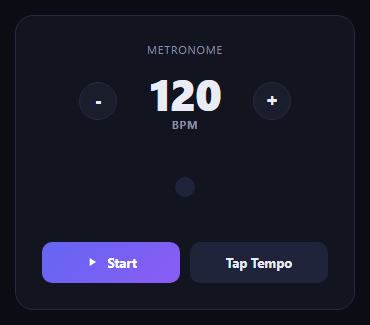
This snippet is a fully functional metronome: a BPM readout, plus and minus stepper buttons, a Start/Stop toggle, and a tap-tempo button that lets you set the tempo by tapping along to a rhythm — all driven by a synthesized click tone rather than an audio file.
The click sound
playClick() builds a fresh OscillatorNode and GainNode on every beat: a short square wave burst at 1000Hz with the gain ramped down exponentially over 50 milliseconds. That fast decay is what turns a continuous tone into a short, percussive "tick" rather than a beep, and creating a new node pair per tick means overlapping or rapid tempo changes never leave a stuck-on oscillator behind.
Timing with setInterval
The beat scheduler uses setInterval at 60000 / bpm milliseconds — a straightforward interval-based approach rather than a full lookahead audio scheduler. Every change to bpm (via the stepper buttons or tap tempo) calls restartIfRunning(), which clears the existing interval and starts a new one at the updated tempo, so tempo changes take effect immediately without needing to stop and manually restart.
Tap tempo averaging
Each tap pushes a performance.now() timestamp into a rolling tapTimes array capped at the last five taps. From the second tap onward, the gaps between consecutive taps are averaged and converted to BPM (60000 divided by the average gap in milliseconds), so tempo settles quickly but still smooths out small timing variation between taps. A 2-second inactivity timeout resets the tap history so an old, stale tap never skews the start of a fresh tapping session.
Visual pulse synced to audio
A small dot pulses (scales up and changes color) via a CSS class toggled in the same tick() function that plays the click sound, so the visual beat indicator and the audible tick are always triggered from the exact same function call and never drift out of sync with each other.
Build with AI
Build, Understand, Optimize, and Extend It With AI
Hand this snippet's HTML, CSS, and JavaScript to an AI coding assistant like Claude and ask it to adapt "Audio Metronome With Tap Tempo" to your project — restyle it to match your design system, wire it up to real data instead of the static example, or port it to the framework you're building in.
Prompt to recreate it
Copy this into your AI assistant of choice to build the effect from scratch, or as a jumping-off point for your own variant:
Build a misc component called "Audio Metronome With Tap Tempo" using plain HTML, CSS, and vanilla JavaScript — no framework, no build step.

Requirements:
- Match the structure and behavior of the "Audio Metronome With Tap Tempo" snippet from the UI Snippets Library.
- Keep the markup semantic and the styling self-contained (no external dependencies beyond what the original snippet uses).
- Keep the JavaScript vanilla, with no framework runtime required.
- Make it easy to restyle via CSS custom properties or class overrides so it can be dropped into a real project.
Want to tighten it up first? Run this prompt through the AI Prompt Studio to score it across 8 quality dimensions, catch anti-patterns, and tune the wording for Claude, ChatGPT, or Gemini before you paste it in.
Source Code
<div class="mt-card">
  <div class="mt-head">
    <span class="mt-eyebrow">Metronome</span>
    <div class="mt-bpm-row">
      <button class="mt-step-btn" id="mtDownBtn" aria-label="Decrease BPM">-</button>
      <div class="mt-bpm-display">
        <span class="mt-bpm-num" id="mtBpmNum">120</span>
        <span class="mt-bpm-unit">BPM</span>
      </div>
      <button class="mt-step-btn" id="mtUpBtn" aria-label="Increase BPM">+</button>
    </div>
  </div>

  <div class="mt-pulse-wrap">
    <div class="mt-pulse" id="mtPulse"></div>
  </div>

  <div class="mt-controls">
    <button class="mt-btn mt-btn-primary" id="mtStartBtn">
      <svg width="14" height="14" viewBox="0 0 24 24" fill="currentColor"><path d="M8 5v14l11-7z"/></svg>
      Start
    </button>
    <button class="mt-btn mt-btn-tap" id="mtTapBtn">Tap Tempo</button>
  </div>
</div>*{box-sizing:border-box}
body{font-family:system-ui,-apple-system,sans-serif;background:#0b0d14;min-height:100vh;display:flex;align-items:center;justify-content:center;padding:24px}
.mt-card{font-family:system-ui,-apple-system,sans-serif;background:#12141f;color:#e9ebf5;border:1px solid #262a3b;border-radius:18px;padding:26px;max-width:340px;width:100%;margin:0 auto;text-align:center}
.mt-eyebrow{display:block;font-size:11px;letter-spacing:.08em;text-transform:uppercase;color:#8b90a8;margin-bottom:14px}
.mt-bpm-row{display:flex;align-items:center;justify-content:center;gap:18px;margin-bottom:20px}
.mt-step-btn{width:38px;height:38px;border-radius:50%;border:1px solid #262a3b;background:#1a1d2c;color:#e9ebf5;font-size:18px;font-weight:700;cursor:pointer;display:flex;align-items:center;justify-content:center;transition:background .15s}
.mt-step-btn:hover{background:#20243a}
.mt-bpm-display{display:flex;flex-direction:column;align-items:center;min-width:100px}
.mt-bpm-num{font-size:44px;font-weight:800;line-height:1;letter-spacing:-.02em}
.mt-bpm-unit{font-size:11px;color:#8b90a8;font-weight:700;letter-spacing:.06em;margin-top:2px}
.mt-pulse-wrap{display:flex;align-items:center;justify-content:center;height:70px;margin-bottom:20px}
.mt-pulse{width:20px;height:20px;border-radius:50%;background:#20243a;transition:transform .08s, background .08s}
.mt-pulse.mt-tick{background:#6366f1;transform:scale(1.6)}
.mt-controls{display:flex;gap:10px}
.mt-btn{flex:1;padding:12px 14px;border-radius:10px;border:none;font-size:13px;font-weight:700;cursor:pointer;font-family:inherit;transition:transform .1s}
.mt-btn:active{transform:scale(.97)}
.mt-btn-primary{background:linear-gradient(135deg,#6366f1,#8b5cf6);color:#fff;display:flex;align-items:center;justify-content:center;gap:8px}
.mt-btn-primary.mt-active{background:#20243a;color:#e9ebf5}
.mt-btn-tap{background:#20243a;color:#e9ebf5}var bpmNum = document.getElementById('mtBpmNum');
var downBtn = document.getElementById('mtDownBtn');
var upBtn = document.getElementById('mtUpBtn');
var startBtn = document.getElementById('mtStartBtn');
var tapBtn = document.getElementById('mtTapBtn');
var pulse = document.getElementById('mtPulse');
var bpm = 120;
var isRunning = false;
var audioCtx = null;
var intervalId = null;
var tapTimes = [];
function clampBpm(v) {
return Math.max(30, Math.min(300, v));
}
function updateBpmDisplay() {
bpmNum.textContent = String(bpm);
}
function getCtx() {
if (!audioCtx) {
audioCtx = new (window.AudioContext || window.webkitAudioContext)();
}
return audioCtx;
}
function playClick() {
var ctx = getCtx();
var osc = ctx.createOscillator();
var gain = ctx.createGain();
osc.type = 'square';
osc.frequency.value = 1000;
var now = ctx.currentTime;
gain.gain.setValueAtTime(0.25, now);
gain.gain.exponentialRampToValueAtTime(0.0001, now + 0.05);
osc.connect(gain);
gain.connect(ctx.destination);
osc.start(now);
osc.stop(now + 0.06);
}
function tick() {
playClick();
pulse.classList.add('mt-tick');
setTimeout(function () {
pulse.classList.remove('mt-tick');
}, 90);
}
function startMetronome() {
if (isRunning) return;
isRunning = true;
startBtn.classList.add('mt-active');
startBtn.textContent = 'Stop';
tick();
var intervalMs = 60000 / bpm;
intervalId = setInterval(tick, intervalMs);
}
function stopMetronome() {
isRunning = false;
startBtn.classList.remove('mt-active');
startBtn.innerHTML = '<svg width="14" height="14" viewBox="0 0 24 24" fill="currentColor"><path d="M8 5v14l11-7z"/></svg> Start';
if (intervalId) {
clearInterval(intervalId);
intervalId = null;
}
}
function restartIfRunning() {
if (isRunning) {
clearInterval(intervalId);
var intervalMs = 60000 / bpm;
intervalId = setInterval(tick, intervalMs);
}
}
startBtn.addEventListener('click', function () {
if (isRunning) {
stopMetronome();
} else {
startMetronome();
}
});
downBtn.addEventListener('click', function () {
bpm = clampBpm(bpm - 5);
updateBpmDisplay();
restartIfRunning();
});
upBtn.addEventListener('click', function () {
bpm = clampBpm(bpm + 5);
updateBpmDisplay();
restartIfRunning();
});
tapBtn.addEventListener('click', function () {
var now = performance.now();
tapTimes.push(now);
// Only keep the last few taps for a responsive rolling average
if (tapTimes.length > 5) {
tapTimes.shift();
}
// Discard stale taps (more than 2s since last one) so an old tap
// doesn't skew a fresh tapping session
if (tapTimes.length > 1) {
var gaps = [];
for (var i = 1; i < tapTimes.length; i++) {
gaps.push(tapTimes[i] - tapTimes[i - 1]);
}
var avgGap = gaps.reduce(function (a, b) { return a + b; }, 0) / gaps.length;
var newBpm = Math.round(60000 / avgGap);
bpm = clampBpm(newBpm);
updateBpmDisplay();
restartIfRunning();
}
tapBtn.textContent = 'Tap Tempo';
clearTimeout(tapBtn._resetTimer);
tapBtn._resetTimer = setTimeout(function () {
tapTimes = [];
}, 2000);
});
updateBpmDisplay();Step by step
How to Use
- 1Load the snippetClick "Audio Metronome With Tap Tempo" in the sidebar to load its HTML, CSS, and JS into the editor panels. The preview updates instantly.
- 2Edit the codeModify any panel — HTML, CSS, or JS. The preview refreshes as you type. Use Reset in each panel header to restore the original.
- 3Preview on devicesClick the Mobile (375px), Tablet (768px), or Desktop buttons in the preview header to check responsiveness.
- 4Export in your formatClick "HTML" to download a standalone file, "JSX" for a React component, "Tailwind" for a React + Tailwind CSS component, "Tailwind HTML" for a standalone HTML file with Tailwind CDN, "Vue" for a Vue 3 SFC with <template>/<script setup>/<style scoped>, or "Angular" for a standalone Angular .component.ts file. "Copy all" copies the full code to clipboard.
- 5Save your versionClick "Save as", type a name, and press Enter. Your snippet saves to IndexedDB and appears in the Saved tab.
Real-world uses
Common Use Cases
Got questions?
Frequently Asked Questions
Every tap records a timestamp. From the second tap onward, the time gaps between the last up to five taps are averaged, and BPM is computed as 60000 divided by that average gap in milliseconds — so it smooths out small inconsistencies in your tapping.
setInterval is simple and accurate enough for a UI metronome at typical BPM ranges. Professional audio applications often use a lookahead scheduler (scheduling notes slightly ahead of time via the AudioContext clock) for tighter timing under heavy main-thread load, which would be a natural upgrade to this snippet.
The existing setInterval is cleared and a new one is started immediately at the updated tempo, so tempo changes apply on the very next tick without needing to stop and restart.