You Might Also Like
Learn Coding Visually
Learn to code with interactive, live-preview playgrounds — HTML, CSS, JavaScript, React & more.
 HTML Playground42 lessons · Click-based · Live preview
 CSS PlaygroundLearn CSS with a live editor
 JavaScript Playground60 lessons · DOM · Async · Canvas
 React PlaygroundLearn React with a live code editor
 GSAP PlaygroundLearn GSAP animation interactively
 SVG Playground44 lessons · shapes · paths · animation
 SCSS Playground45 lessons · Sass modules · tokens
 Tailwind PlaygroundLearn Tailwind CSS with a live editor
 Bootstrap 5 Playground50 lessons · live preview
Buy Now Pay Later Selector — Free BNPL Checkout UI
Buy Now Pay Later Selector · Forms · Plain HTML, CSS & JS · Live preview
What's included
Features
About this UI Snippet
Buy Now Pay Later Selector — Radio Cards With a Live Installment Schedule
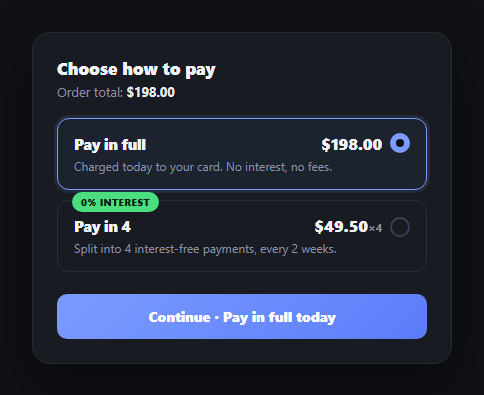
Offering "Pay in 4" alongside a full-payment option is now standard at checkout, and the interface challenge is showing the installment breakdown clearly the moment a shopper considers it — not burying it behind a tooltip. This snippet builds that BNPL selector as two radio cards, with the second revealing a dated payment schedule inline, a natural pairing with checkout form or multi-step checkout.
Two radio cards, one real form
Like this library's radio card group, each payment method is a <label> wrapping a visually hidden native radio and a styled .bnp-box — so the selection is keyboard-navigable and form-submittable by construction, with the checked-state styling handled entirely by the :checked sibling selector in CSS. No custom click-state JavaScript is needed for the core selection behavior.
The schedule is computed, not hardcoded
buildInstallments() divides the order total by four and generates four due dates two weeks apart starting today, formatting each with toLocaleDateString. Every installment amount and date is derived from ORDER_TOTAL and the current date rather than typed out — change the order total and the whole schedule (and the per-installment amount) recalculates correctly.
Reveal, don't just relabel
Selecting "Pay in 4" doesn't just highlight the card — it reveals a dedicated schedule panel (toggled via the hidden attribute) listing all four payments with their due dates, and marks the first as "Due at checkout" so it's unambiguous which payment happens right now versus later. This answers the two questions a shopper actually has before committing: how much, and when.
The submit button always states the real commitment
The primary button's label changes with the selection — "Continue · Pay in full today" versus "Continue · Pay in 4" — so the call-to-action itself confirms what's about to happen, rather than a generic "Continue" that leaves the payment plan ambiguous until the next screen.
Wiring it to a real BNPL provider
Replace the schedule computation with the actual plan returned by your BNPL provider's API (Klarna, Affirm, Afterpay all return an installment schedule with real dates and any provider fees), and gate the "Pay in 4" option behind that provider's approval check — show a brief loading state while the eligibility check runs, and fall back to "Pay in full" if the shopper isn't approved.
Build with AI
Build, Understand, Optimize, and Extend It With AI
You don't have to work out the schedule math or the disclosure UX pattern on your own. Paste this snippet's HTML, CSS, and JS into an AI coding assistant like Claude and ask it to explain exactly how buildInstallments() derives every payment amount and due date from the order total and the current date rather than hardcoding them, and why revealing a full dated schedule (with the first payment explicitly marked "due at checkout") communicates the commitment more clearly than just changing a badge or label. The same assistant can help optimize it — asking whether the fixed two-week installment cadence should instead come from a real BNPL provider's quote response, or whether the submit button's confirmation-then-reset sequence needs a genuine loading state once a real payment API is involved. It's also useful for extending the selector: ask it to add a third BNPL provider option with a different cadence, gate the BNPL option behind a live eligibility check, or add a small APR/fee disclosure required by regulation in some regions. Treat the code less like a finished artifact and more like a starting point for a conversation.
Prompt to recreate it
Copy this into your AI assistant of choice to build the effect from scratch, or as a jumping-off point for your own variant:
Build a "Buy Now Pay Later" checkout payment selector in plain HTML, CSS, and JavaScript with no library or CDN dependency.

Requirements:
- A form containing two radio-card options (built the accessible way: a label wrapping a visually hidden native radio input and a styled sibling card, with all selected-state styling driven by the CSS :checked sibling selector) — one for "Pay in full" showing the full order total, and one for "Pay in 4" showing the per-installment amount and a 0%-interest badge.
- Selecting "Pay in 4" must reveal a payment-schedule panel (toggled via the HTML hidden attribute) listing four installments, each with a computed due date (spaced two weeks apart starting from today) and amount — all four amounts and dates must be calculated from the order total and the current date at render time, not hardcoded strings, so changing the order total recalculates every installment correctly.
- The first installment in the revealed schedule must be visually marked as due immediately (e.g. "Due at checkout") so it's unambiguous which payment happens today versus in the future.
- The form's submit button label must update to state the exact payment commitment based on the current selection (e.g. "Continue · Pay in full today" vs "Continue · Pay in 4") rather than staying a generic "Continue" — so the call-to-action itself always reflects what the user is about to confirm.
- On submit, prevent the default form submission, show a brief confirmation state on the button reflecting the chosen plan, then after a short delay revert to the normal selection-dependent label.
Want to tighten it up first? Run this prompt through the AI Prompt Studio to score it across 8 quality dimensions, catch anti-patterns, and tune the wording for Claude, ChatGPT, or Gemini before you paste it in.
Step by step
How to Use
- 1Paste HTML, CSS, and JSTwo payment options render with "Pay in full" selected by default.
- 2Select "Pay in 4"A schedule panel reveals four installments, computed from the order total and today's date.
- 3Watch the submit buttonIts label updates to state exactly what will happen — pay in full today, or pay in 4.
- 4Switch back to full paymentThe schedule panel hides again and the button label reverts.
- 5Change the order totalUpdate ORDER_TOTAL — the installment amounts recompute automatically.
- 6Connect a real BNPL providerReplace buildInstallments() with the schedule your provider's API returns, gated by an eligibility check.
Real-world uses
Common Use Cases
Got questions?
Frequently Asked Questions
buildInstallments() divides ORDER_TOTAL by four for the per-installment amount, then generates four due dates spaced two weeks apart starting from today's date, formatting each with toLocaleDateString. Nothing about the schedule is hardcoded — change the order total and every installment amount recalculates, and the dates are always relative to whenever the page loads.
A shopper deciding on BNPL needs to see exactly how much and when each payment happens before committing — a relabeled badge doesn't answer that. The revealed schedule panel lists all four dated installments and explicitly marks the first as "Due at checkout" so there's no ambiguity about what charges immediately versus later.
Most providers return an actual installment plan (with real due dates and any provider fees) from an eligibility or quote API call made at checkout. Replace buildInstallments()'s local computation with that response, and gate showing the "Pay in 4" option behind the provider's approval check — show a brief loading state while checking eligibility, and hide or disable the option if the shopper isn't approved.
A generic "Continue" button leaves the actual payment commitment ambiguous until the next screen. Updating the label to state the exact plan — "Pay in full today" or "Pay in 4" — means the call-to-action itself confirms what's about to happen, reducing surprise (and support tickets) at the moment of commitment.
Hold the selected payment method in component state (radios still bind via value/checked or v-model), and derive the schedule panel's visibility and the submit button's label from that state. Compute the installment list in a memoized function fed by orderTotal, mirroring what buildInstallments() does directly to the DOM here.