You Might Also Like
Learn Coding Visually
Learn to code with interactive, live-preview playgrounds — HTML, CSS, JavaScript, React & more.
 HTML Playground42 lessons · Click-based · Live preview
 CSS PlaygroundLearn CSS with a live editor
 JavaScript Playground60 lessons · DOM · Async · Canvas
 React PlaygroundLearn React with a live code editor
 GSAP PlaygroundLearn GSAP animation interactively
 SVG Playground44 lessons · shapes · paths · animation
 SCSS Playground45 lessons · Sass modules · tokens
 Tailwind PlaygroundLearn Tailwind CSS with a live editor
 Bootstrap 5 Playground50 lessons · live preview
Voice Memo Recorder — Waveform UI HTML CSS JS
Voice Memo Recorder · Forms · Plain HTML, CSS & JS · Live preview
What's included
Features
About this UI Snippet
Voice Memo Recorder — Live Waveform, Pulsing Record Button & Playback Scrub
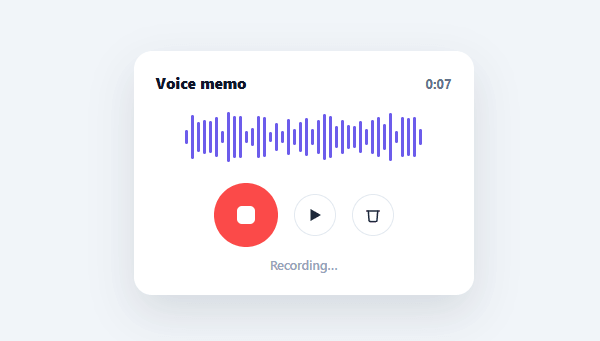
Voice messages have become a default communication mode in chat apps, support tools, and async-first workplaces, and the UI that sells the feature is the live waveform — bars jumping in time with your voice, then settling into a fixed shape you can play back. This snippet builds the complete front-end interaction (record, waveform, play, discard) in plain HTML, CSS, and vanilla JavaScript, ready to wire to the real MediaRecorder API.
A round-to-square morphing record button
The record button is a circle with a smaller white circle inside; clicking it toggles a .recording class that morphs the inner dot from a circle to a rounded square via border-radius transition — the same visual shorthand iOS and most voice-recording apps use for "tap again to stop." A pulsing box-shadow ring animates outward continuously while recording, reinforcing the active state independent of the dot's own shape change.
Two waveform phases, one set of bar elements
The same 40 bar <div>s serve two purposes. While recording, animateLiveBars() staggers each bar's height update by a small per-index delay and re-runs on a loop, producing an organic, left-to-right "wave" of motion rather than every bar jumping in perfect unison — a more convincing fake live-audio look. The instant recording stops, every bar's height is rewritten *once* from the recordedLevels captured during recording (cycled to fill all 40 bars), turning the live animation into a fixed, static waveform that represents "this take" — exactly like a real recorded memo's waveform freezing in place.
Playback that highlights bars as it goes
Pressing play starts a one-second interval that computes how many bars *should* be lit based on elapsed time over total duration (Math.round((elapsed / seconds) * BAR_COUNT)) and toggles the .live class on that many bars from the left — visually "filling in" the waveform as playback progresses, the same scrubbing-position feedback real voice-memo players give.
Discard resets everything explicitly
The discard button is a deliberate, separate action from re-recording: it stops any playback, clears the captured levels and timer, and resets every bar back to its resting height — so there's no ambiguity between "I want to record over this" (tap record again) and "I want to delete this and start fresh" (tap discard).
From simulated levels to a real microphone
Everything above works identically once the random randomLevel() calls are swapped for real input: navigator.mediaDevices.getUserMedia({ audio: true }) grants microphone access, a MediaRecorder captures the resulting stream into a blob for upload or playback, and a Web Audio AnalyserNode reads live frequency or time-domain data each animation frame to drive the exact same bar-height updates this demo already wires up. The UI layer — record button, waveform, play, discard — doesn't need to change at all.
Build with AI
Build, Understand, Optimize, and Extend It With AI
Instead of tracing the two rendering phases by hand, paste this snippet's HTML, CSS, and JS into an AI coding assistant like Claude and ask it to explain exactly how the same 40 bar elements serve two different visual jobs — animateLiveBars' staggered per-index setTimeout wave while recording, versus the one-time static rewrite from recordedLevels when stopRecording runs — and why recordedLevels needs to be cycled with a modulo when there are fewer captured samples than bars. It's also worth asking why discard is implemented as an entirely separate handler from stop-then-record rather than folding into the same button. For extending it, have it replace randomLevel() with real getUserMedia plus an AnalyserNode reading actual microphone amplitude, add a maximum recording length that auto-stops, or wire real playback with an actual audio element synced to the bar highlighting. Treat the code less like a finished artifact and more like a starting point for a conversation.
Prompt to recreate it
Copy this into your AI assistant of choice to build the effect from scratch, or as a jumping-off point for your own variant:
Build a voice memo recorder UI in plain HTML, CSS, and vanilla JavaScript with no libraries, simulating microphone capture with randomized data so the interaction can be fully built before wiring in the real MediaRecorder API.

Requirements:
- A fixed set of vertical bar elements (e.g. 40) laid out in a row, all starting at a minimal resting height.
- A record button whose inner shape morphs from a circle to a rounded square when toggled into a recording state (the universal "tap again to stop" visual cue), with a continuously pulsing outward box-shadow ring animation active only while recording.
- While recording: run a repeating timer that increments and displays an elapsed mm:ss counter, and separately animate the bars with staggered per-index delays so they update in a left-to-right wave rather than all jumping in unison, using randomized height values to simulate live audio levels; also push each generated level into an array as it's captured.
- When recording stops: freeze the bars into a single static waveform shape derived from the array of levels captured during that recording (reusing/cycling through the captured values if there are fewer levels than bars), reveal separate Play and Discard controls, and show the total recorded duration as status text.
- A Play control that, when clicked, runs a per-second timer that progressively marks a proportional fraction of the bars (left to right) as "active" based on elapsed time versus the total recorded duration, stopping and resetting that active-marking automatically once playback reaches the end.
- A Discard control that is a distinct action from re-recording: it must stop any in-progress playback, clear all captured level data and the elapsed time, and reset every bar back to its original resting height and color.
Want to tighten it up first? Run this prompt through the AI Prompt Studio to score it across 8 quality dimensions, catch anti-patterns, and tune the wording for Claude, ChatGPT, or Gemini before you paste it in.
Step by step
How to Use
- 1Paste HTML, CSS, and JSA voice memo card renders with a flat row of bars at rest and a red record button.
- 2Tap recordThe button morphs and pulses, the timer counts up, and bars animate in a left-to-right wave to simulate live audio.
- 3Tap record again to stopThe waveform freezes into a fixed shape from the captured levels, and Play and Discard buttons appear.
- 4Tap playThe recording "plays" for its recorded duration, with bars lighting up from left to right as time elapses.
- 5Tap discardEverything resets to the initial flat-bar, "Tap to start recording" state.
- 6Wire up real audio captureReplace the simulated timer/levels with the MediaRecorder API and Web Audio AnalyserNode for real microphone levels, feeding the same bar-height update calls.
Real-world uses
Common Use Cases
Got questions?
Frequently Asked Questions
Call navigator.mediaDevices.getUserMedia({ audio: true }) on record-start, pipe the stream into a MediaRecorder to capture the audio blob, and use a Web Audio AnalyserNode's getByteFrequencyData() on an animation frame to drive the live bar heights instead of the random randomLevel() values — the rest of the UI logic stays the same.
Store the MediaRecorder's resulting Blob, create an <audio> element (or Audio() instance) with its object URL, and call .play()/.pause() from the existing play button handler, syncing the bar-highlight progress to the audio element's timeupdate event instead of a fixed setInterval.
Once stopped, send the captured Blob via fetch with FormData to your upload endpoint, showing an upload-progress state (see the upload progress snippet) before revealing the play/discard controls.
In the recording setInterval, check seconds against a MAX_SECONDS constant and call stopRecording() automatically once reached, optionally showing a brief "Maximum length reached" status message.
In React, keep recording/playing/seconds/levels in useState and run the capture/playback loops in useEffect with cleanup on unmount; in Vue, use ref()/onUnmounted for the same timer cleanup; in Angular, use component fields with ngOnDestroy. The MediaRecorder and AnalyserNode integration is identical across frameworks since it's a browser API, not a UI-layer concern.