You Might Also Like
Learn Coding Visually
Learn to code with interactive, live-preview playgrounds — HTML, CSS, JavaScript, React & more.
 HTML Playground42 lessons · Click-based · Live preview
 CSS PlaygroundLearn CSS with a live editor
 JavaScript Playground60 lessons · DOM · Async · Canvas
 React PlaygroundLearn React with a live code editor
 GSAP PlaygroundLearn GSAP animation interactively
 SVG Playground44 lessons · shapes · paths · animation
 SCSS Playground45 lessons · Sass modules · tokens
 Tailwind PlaygroundLearn Tailwind CSS with a live editor
 Bootstrap 5 Playground50 lessons · live preview
Split Payment Calculator — Bill Splitter HTML CSS JS
Split Payment Calculator · Forms · Plain HTML, CSS & JS · Live preview
What's included
Features
About this UI Snippet
Split Payment Calculator — Tip Presets, People Stepper & Validated Uneven Split
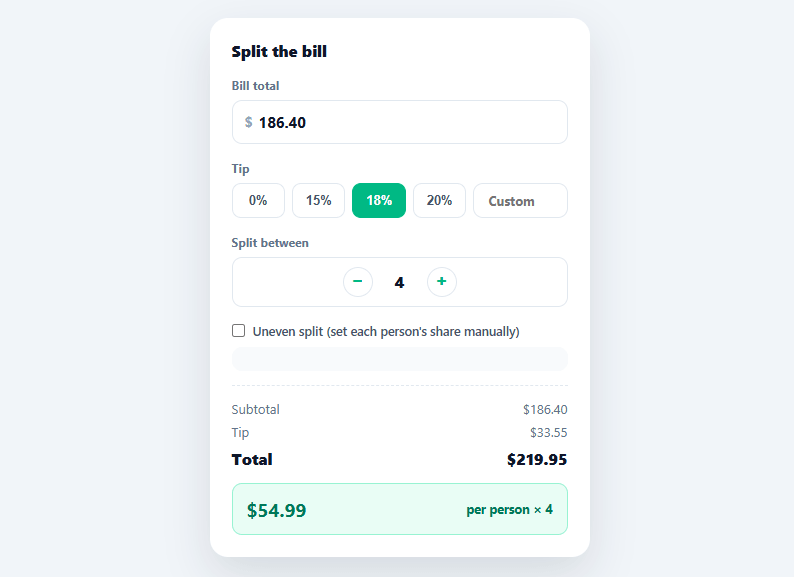
Splitting a restaurant bill fairly is simple math that's annoying to do by hand, especially with a tip and an odd number of people — which is exactly why every group-dinner app ships some version of this calculator. This snippet builds a complete bill splitter: quick tip presets with a custom override, a people stepper, an even split by default, and an optional uneven-split mode that validates percentages sum to 100% before showing per-person amounts.
Tip presets that share state with a custom field
Four preset buttons (0/15/18/20%) and a custom number input all write to the same tipPct variable. Clicking a preset clears the custom field and highlights the matching button; typing in the custom field clears every preset's active state instead — so the UI never shows a highlighted preset that disagrees with a manually typed percentage, a small consistency detail that's easy to get wrong when two inputs can set the same value.
A people stepper with sane bounds
The stepper clamps between 2 and 20 people, disabling the relevant button at each boundary rather than letting the count go to 1 (at which point "splitting" stops meaning anything) or to an unreasonably large number. Every increment or decrement immediately recalculates the per-person amount and, if uneven mode is active, regenerates the share-percentage inputs for the new headcount.
Uneven split with real validation
Toggling "Uneven split" reveals one percentage input per person, defaulting to an even 100 / people split that's then free to be adjusted. calculate() sums every entered percentage and refuses to show per-person dollar amounts until that sum rounds to exactly 100% — instead surfacing a specific error ("Shares add up to 92% — should total 100%") so the user knows exactly how far off they are, rather than silently showing wrong numbers or blocking the whole calculator.
One calculate function, every output
Every visible number — subtotal, tip, grand total, and the per-person breakdown in both modes — flows through a single calculate() call triggered by every relevant input. There's no per-field update logic to keep in sync; changing the bill total, the tip, the people count, or any individual share simply re-runs the same function against the current state.
Rounding, the part most bill splitters get wrong
Dividing a grand total evenly across several people in floating-point arithmetic can leave the displayed shares off by a cent from the actual total — three people splitting $10.00 each get $3.33, and $3.33 × 3 is $9.99, not $10.00. This demo accepts that tiny float-formatting reality for clarity; a finance-grade version should round every share with toFixed(2), sum the rounded values, and silently add or subtract the few-cent remainder to the largest share so the displayed numbers always reconcile exactly with the bill.
Build with AI
Build, Understand, Optimize, and Extend It With AI
You don't need to trace how tip presets, the custom field, and calculate() all stay reconciled by hand. Paste this snippet's HTML, CSS, and JS into an AI coding assistant like Claude and ask it to explain exactly how buildUnevenList regenerates share inputs defaulted to an even percentage, or why the uneven-split validation checks that shares round to exactly 100 rather than checking for an exact float match. The same assistant can help optimize it, for example flagging the floating-point rounding issue called out in the FAQ, where per-person shares can be a cent off from the actual total, and walking through the largest-remainder fix. It's also useful for extending the feature: ask it to add a split-by-dollar-amount mode as an alternative to percentages, support multiple currencies with toLocaleString, or add a "round up to the nearest dollar" tip button that back-solves the required percentage. Treat the code less like a finished artifact and more like a starting point for a conversation.
Prompt to recreate it
Copy this into your AI assistant of choice to build the effect from scratch, or as a jumping-off point for your own variant:
Build a bill-splitting calculator with tip presets, a people stepper, and an uneven-split mode in plain HTML, CSS, and JavaScript, no framework, no libraries.

Requirements:
- A bill total number input, four preset tip percentage buttons plus one custom percentage input, all writing to a single shared tip percentage variable. Selecting a preset must clear the custom input and highlight only that preset; typing in the custom input must clear every preset's highlighted state, so the UI never shows a highlighted preset that disagrees with a typed value.
- A plus/minus stepper for the number of people splitting, clamped between 2 and 20, disabling the relevant button at each boundary.
- A single calculate function that recomputes the subtotal, tip amount, and grand total on every relevant input change, and formats every dollar amount to exactly two decimal places.
- A toggleable "uneven split" mode that, when enabled, generates one percentage input per person defaulting to an even share (100 divided by the person count), and regenerates that list automatically whenever the person count changes while the mode is active.
- In uneven mode, sum all entered percentages and refuse to display any per-person dollar amounts unless that sum rounds to exactly 100 — instead show a specific message stating what the shares currently sum to, not a generic invalid-input message.
- Apply each person's percentage share to the grand total (bill plus tip), not just the pre-tip subtotal, so tip is distributed proportionally along with the bill.
- As a documented improvement in a code comment, describe the largest-remainder rounding technique needed to make individually-rounded per-person shares sum exactly back to the grand total instead of being off by a cent due to floating-point division.
Want to tighten it up first? Run this prompt through the AI Prompt Studio to score it across 8 quality dimensions, catch anti-patterns, and tune the wording for Claude, ChatGPT, or Gemini before you paste it in.
Step by step
How to Use
- 1Paste HTML, CSS, and JSA bill-splitting card renders with a $186.40 example total, an 18% tip selected, and a 4-person even split.
- 2Adjust the bill total or tipEdit the total field or pick a different tip preset (or type a custom percentage) — the subtotal, tip, and total update instantly.
- 3Change the headcountUse the +/− stepper to change how many people are splitting; the per-person amount recalculates immediately.
- 4Turn on uneven splitCheck "Uneven split" to reveal a percentage input per person, defaulting to an even share.
- 5Adjust individual sharesChange any person's percentage — if the total doesn't sum to 100%, an error shows exactly how far off it is instead of a wrong dollar amount.
- 6Fix the shares to see amountsOnce the percentages sum to 100%, each person's exact dollar share (including their portion of the tip) displays.
Real-world uses
Common Use Cases
Got questions?
Frequently Asked Questions
Floating-point per-person division can leave the sum off by a cent due to rounding; compute every person's amount with toFixed(2), sum those rounded values, and add or subtract the few-cent difference to/from the largest share so the displayed amounts reconcile exactly with the grand total.
Add a toggle between "percentage" and "dollar amount" modes for the uneven-split inputs; in dollar mode, validate that the entered amounts sum to the grand total (with the same actionable error message pattern) instead of validating percentages summing to 100%.
Replace the hardcoded "$" in the input wrapper and output strings with a currency symbol from a selected locale, and use toLocaleString(locale, { style: 'currency', currency }) instead of a manual "$" + toFixed(2) concatenation for correct formatting per currency.
Add a button that computes the tip percentage needed to make the grand total a round number (Math.ceil(total) - total, converted to a percentage of the subtotal) and calls setTip() with that computed value.
In React, keep total, tipPct, people, and an array of share percentages in useState and derive every output with useMemo; in Vue, use ref()/computed(); in Angular, use component fields with getters. The 100%-sum validation logic ports directly into each framework's reactive model.