Source Code
<div class="fai-card">
  <div class="fai-head">
    <h3>Document settings</h3>
    <span class="fai-status" id="faiStatus">
      <span class="fai-status-icon" id="faiStatusIcon"></span>
      <span id="faiStatusText">All changes saved</span>
    </span>
  </div>

  <div class="fai-field">
    <label for="faiTitle">Title</label>
    <input type="text" id="faiTitle" value="Q3 Marketing Plan">
  </div>
  <div class="fai-field">
    <label for="faiDesc">Description</label>
    <textarea id="faiDesc" rows="4">Draft outline for the Q3 campaign, channels, and budget allocation.</textarea>
  </div>
  <div class="fai-field">
    <label for="faiOwner">Owner</label>
    <input type="text" id="faiOwner" value="Jordan Lee">
  </div>
</div>*{box-sizing:border-box;margin:0;padding:0}
body{font-family:system-ui,-apple-system,sans-serif;background:#f1f5f9;min-height:100vh;display:flex;align-items:center;justify-content:center;padding:24px}
.fai-card{background:#fff;border-radius:18px;padding:22px;width:100%;max-width:420px;box-shadow:0 18px 44px rgba(15,23,42,.12)}
.fai-head{display:flex;align-items:center;justify-content:space-between;margin-bottom:18px;gap:10px}
.fai-head h3{font-size:16px;font-weight:800;color:#0f172a}
.fai-status{display:flex;align-items:center;gap:6px;font-size:12px;font-weight:700;color:#94a3b8;white-space:nowrap}
.fai-status.saving{color:#6366f1}
.fai-status.saved{color:#16a34a}
.fai-status.error{color:#dc2626}
.fai-status-icon{width:13px;height:13px;border-radius:50%;flex-shrink:0;position:relative}
.fai-status.idle .fai-status-icon{background:#cbd5e1}
.fai-status.saving .fai-status-icon{border:2px solid #c7d2fe;border-top-color:#6366f1;animation:faiSpin .6s linear infinite;background:transparent}
.fai-status.saved .fai-status-icon{background:#22c55e}
.fai-status.error .fai-status-icon{background:#ef4444}
@keyframes faiSpin{to{transform:rotate(360deg)}}
.fai-field{margin-bottom:14px}
.fai-field label{display:block;font-size:12px;font-weight:700;color:#64748b;margin-bottom:6px}
.fai-field input,.fai-field textarea{width:100%;border:1.5px solid #e2e8f0;border-radius:10px;padding:10px 12px;font-size:13.5px;font-family:inherit;color:#0f172a;resize:vertical;transition:border-color .15s,box-shadow .15s}
.fai-field input:focus,.fai-field textarea:focus{outline:none;border-color:#6366f1;box-shadow:0 0 0 3px rgba(99,102,241,.15)}var DEBOUNCE_MS = 900;
var saveTimer = null;
var statusEl = document.getElementById('faiStatus');
var iconEl = document.getElementById('faiStatusIcon');
var textEl = document.getElementById('faiStatusText');
var failNext = false;
function setStatus(state, text) {
statusEl.className = 'fai-status ' + state;
textEl.textContent = text;
}
function scheduleSave() {
clearTimeout(saveTimer);
setStatus('idle', 'Unsaved changes');
saveTimer = setTimeout(performSave, DEBOUNCE_MS);
}
function performSave() {
setStatus('saving', 'Saving…');
// Simulated request — replace with a real fetch/PATCH to your backend.
setTimeout(function () {
if (failNext) {
failNext = false;
setStatus('error', 'Couldn\'t save — retrying…');
saveTimer = setTimeout(performSave, 1200);
return;
}
setStatus('saved', 'All changes saved');
}, 700);
}
['faiTitle', 'faiDesc', 'faiOwner'].forEach(function (id) {
document.getElementById(id).addEventListener('input', scheduleSave);
});
window.addEventListener('beforeunload', function (e) {
if (statusEl.classList.contains('idle') || statusEl.classList.contains('saving')) {
e.preventDefault();
e.returnValue = '';
}
});
setStatus('saved', 'All changes saved');Learn Coding Visually
Learn to code with interactive, live-preview playgrounds — HTML, CSS, JavaScript, React & more.
 HTML Playground42 lessons · Click-based · Live preview
 CSS PlaygroundLearn CSS with a live editor
 JavaScript Playground60 lessons · DOM · Async · Canvas
 React PlaygroundLearn React with a live code editor
 GSAP PlaygroundLearn GSAP animation interactively
 SVG Playground44 lessons · shapes · paths · animation
 SCSS Playground45 lessons · Sass modules · tokens
 Tailwind PlaygroundLearn Tailwind CSS with a live editor
 Bootstrap 5 Playground50 lessons · live preview
Form Autosave Indicator — Debounced Save Status UI
Form Autosave Indicator · Forms · Plain HTML, CSS & JS · Live preview
What's included
Features
About this UI Snippet
Form Autosave Indicator — Debounced Save, Error Retry & Leave-Page Guard
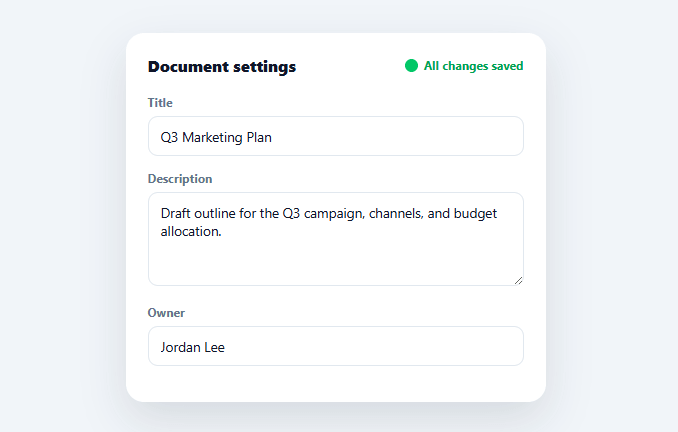
Notion, Google Docs, and every modern editor share the same small but trust-critical UI element: a status line that goes "Unsaved changes" → "Saving…" → "All changes saved" without the user ever pressing a Save button. This snippet builds that exact indicator with a real debounce, a simulated network call, an error-and-retry path, and a guard against closing the tab mid-save.
Debounce, not save-on-every-keystroke
Every input fires scheduleSave(), which immediately marks the status "Unsaved changes" and clears any pending save timer before starting a fresh one — so a save only actually fires 900ms after typing *stops*, not after every character. This is the same debounce pattern used for search-as-you-type, applied here to avoid hammering a save endpoint on every keystroke while still feeling instant from the user's perspective, since the "Unsaved changes" state appears immediately even though the real save is delayed.
Four distinct states, not just on/off
The indicator cycles through idle ("Unsaved changes," gray dot), saving (a spinning ring, indigo), saved (solid green dot), and error (red dot with a retry message) — each with its own color and icon treatment via one shared setStatus(state, text) function that swaps a single class plus the label text. Four states matter because a binary "saved/unsaved" indicator can't communicate that a save is currently *in flight*, which is exactly the moment a user is most likely to worry about losing their edit if they navigate away.
A real (simulated) failure path
performSave() includes a failNext flag the demo flips to show what an actual failed save looks like: the status turns red with "Couldn't save — retrying…" and automatically schedules another save attempt 1.2 seconds later. An autosave indicator that can only ever show success is dishonest about how real networks behave — showing the retry state, even briefly, builds correct trust that the app is actually handling failures rather than silently swallowing them.
Guarding against losing in-flight edits
A beforeunload listener checks whether the status is currently idle (unsaved) or saving (in flight, not yet confirmed) and, if so, asks the browser to show its native "leave site?" confirmation. Once a save resolves to saved, the guard is inert — so the warning only appears when it's actually protecting against real data loss, never as a blanket "are you sure?" on every navigation.
Why debounce beats both extremes
Saving on every keystroke wastes requests and can hammer a backend during fast typing; saving only on blur or a manual button risks losing work if the user closes the tab mid-edit without ever blurring the field. A short debounce — long enough to skip mid-word saves, short enough that "unsaved" never lingers for more than about a second after typing stops — is the practical middle ground every major editor converges on, and it's the one thing this pattern can't skip without reintroducing one of those two failure modes.
Build with AI
Build, Understand, Optimize, and Extend It With AI
You don't have to trace the debounce and beforeunload interaction by hand. Paste this snippet's HTML, CSS, and JS into an AI coding assistant like Claude and ask it to explain exactly why scheduleSave clears the existing saveTimer before starting a new one every time an input fires, and why the beforeunload guard checks specifically for the idle and saving classes rather than just checking a single "hasUnsavedChanges" boolean. The same assistant can help optimize it — ask whether the shared single saveTimer across three fields could miss a save if a user edits one field, waits, then edits another right at the debounce boundary, or whether the failNext simulated-failure flag should be replaced with a more realistic retry-with-backoff pattern. It's also a good way to extend the indicator: have it add a "saved 2 minutes ago" relative timestamp that updates on its own interval, per-field save status instead of one shared status, or a manual "save now" override that bypasses the debounce. Treat the code less like a finished artifact and more like a starting point for a conversation.
Prompt to recreate it
Copy this into your AI assistant of choice to build the effect from scratch, or as a jumping-off point for your own variant:
Build a debounced form-autosave status indicator in plain HTML, CSS, and JavaScript — no libraries, and the save request itself may be simulated with a timeout but the state machine around it must be real.

Requirements:
- A form with at least three fields (a text input, a textarea, and another text input) and a status indicator element in the header showing an icon and a text label.
- Define a single setStatus(state, text) function that is the only place allowed to change the status indicator's appearance — it must set one class name representing the current state and update the label text, so the icon, color, and text can never fall out of sync with each other.
- Support at least four distinct states: idle/unsaved (neutral color, static dot), saving (a spinning ring animation, accent color), saved (solid success-color dot), and error (solid error-color dot with a retry message) — each state must have its own CSS treatment keyed off the shared class name.
- Attach a single input listener to all three fields that immediately calls setStatus for the unsaved state, clears any existing pending save timer, and starts a new timer (roughly 800-1000ms) that will trigger the actual save — so typing across multiple fields keeps resetting the same one timer rather than scheduling multiple overlapping saves.
- When the save timer fires, switch to the saving state, then after a further simulated delay resolve either to the saved state, or — to prove the failure path is real — occasionally to an error state that shows a retry message and automatically schedules another save attempt a short time later.
- Add a beforeunload listener that checks whether the current status is unsaved or in-flight (not yet confirmed saved) and, only in that case, calls preventDefault and sets returnValue so the browser shows its native "leave site?" confirmation — once a save has resolved successfully, closing the tab must not trigger any warning.
Want to tighten it up first? Run this prompt through the AI Prompt Studio to score it across 8 quality dimensions, catch anti-patterns, and tune the wording for Claude, ChatGPT, or Gemini before you paste it in.
Step by step
How to Use
- 1Paste HTML, CSS, and JSA document settings card renders with three fields and a "All changes saved" status in the header.
- 2Edit any fieldThe status immediately switches to "Unsaved changes," then to a spinning "Saving…" about a second after you stop typing.
- 3Watch it resolveAfter the simulated request completes, the status returns to a green "All changes saved."
- 4Trigger the error pathSet failNext = true in the console before editing a field to see the red "Couldn't save — retrying…" state and its automatic retry.
- 5Try closing the tab mid-editWith unsaved or in-flight changes, the browser's native "leave site?" confirmation appears; once saved, it won't.
- 6Connect a real save endpointReplace the setTimeout in performSave() with a fetch PATCH/PUT call, resolving to 'saved' on success and 'error' on failure.
Real-world uses
Common Use Cases
Got questions?
Frequently Asked Questions
Replace the setTimeout block inside performSave() with a fetch PATCH or PUT request carrying the current field values; call setStatus('saved', 'All changes saved') in the .then() on success, and the existing error-retry block in the .catch() on failure.
Capture a snapshot of the form's values when a save completes, and in scheduleSave() compare the current values against that snapshot before starting the debounce timer — skip scheduling a save entirely if nothing differs (e.g. the user typed then undid their change).
Store a timestamp when a save resolves, and run a separate interval (every 15–30 seconds) that recomputes a relative time string ("2 minutes ago") and updates the status text, without touching the save logic itself.
Use a separate timer per field id instead of one shared saveTimer, keyed in an object, with each field able to specify its own delay before triggering an individual save call for just that field's data.
In React, keep status in useState and the debounce timer in a useRef, clearing it on unmount inside a useEffect cleanup; in Vue, use ref() with onUnmounted; in Angular, use a component field with ngOnDestroy for the same cleanup. The four-state model and beforeunload guard logic port directly into each framework's lifecycle hooks.