Source Code
<div class="demo">
  <label class="field-label" for="nlDate">Due date</label>
  <div class="nl-date-field">
    <input type="text" id="nlDate" class="nl-input" placeholder="e.g. tomorrow, next friday, in 3 days, aug 30" autocomplete="off" />
    <div class="nl-result" id="nlResult">
      <span class="nl-result-dot" id="nlDot"></span>
      <span class="nl-result-text" id="nlResultText">Start typing a date in plain English</span>
    </div>
  </div>

  <div class="nl-chips">
    <button type="button" class="nl-chip" data-value="today">today</button>
    <button type="button" class="nl-chip" data-value="tomorrow">tomorrow</button>
    <button type="button" class="nl-chip" data-value="next monday">next monday</button>
    <button type="button" class="nl-chip" data-value="in 2 weeks">in 2 weeks</button>
    <button type="button" class="nl-chip" data-value="end of month">end of month</button>
  </div>

  <input type="hidden" id="nlHiddenIso" name="dueDate" />
</div>
* { box-sizing: border-box; margin: 0; padding: 0; }
body { font-family: system-ui, sans-serif; background: #f8fafc; display: flex; align-items: center; justify-content: center; min-height: 100vh; padding: 24px; }
.demo { width: 380px; max-width: 100%; display: flex; flex-direction: column; gap: 12px; }
.field-label { font-size: 12.5px; font-weight: 700; color: #334155; }
.nl-date-field { display: flex; flex-direction: column; gap: 8px; }
.nl-input { width: 100%; padding: 12px 14px; border: 1.5px solid #e2e8f0; border-radius: 12px; font-size: 14px; font-family: inherit; color: #0f172a; background: #fff; }
.nl-input:focus-visible { outline: none; border-color: #6366f1; box-shadow: 0 0 0 4px rgba(99,102,241,0.13); }
.nl-result { display: flex; align-items: center; gap: 8px; padding: 10px 12px; border-radius: 10px; background: #f1f5f9; font-size: 12.5px; color: #64748b; transition: background 0.2s, color 0.2s; }
.nl-result.ok { background: #ecfdf5; color: #047857; }
.nl-result.err { background: #fef2f2; color: #b91c1c; }
.nl-result-dot { width: 7px; height: 7px; border-radius: 50%; background: #cbd5e1; flex-shrink: 0; transition: background 0.2s; }
.nl-result.ok .nl-result-dot { background: #10b981; }
.nl-result.err .nl-result-dot { background: #ef4444; }
.nl-result-text { font-weight: 600; }
.nl-chips { display: flex; flex-wrap: wrap; gap: 6px; }
.nl-chip { border: 1.5px solid #e2e8f0; background: #fff; color: #475569; font-size: 11.5px; font-weight: 600; padding: 6px 11px; border-radius: 999px; cursor: pointer; font-family: inherit; transition: border-color 0.15s, color 0.15s; }
.nl-chip:hover { border-color: #6366f1; color: #4338ca; }
.nl-chip:focus-visible { outline: 2px solid #6366f1; outline-offset: 2px; }const input = document.getElementById('nlDate');
const resultBox = document.getElementById('nlResult');
const resultText = document.getElementById('nlResultText');
const dot = document.getElementById('nlDot');
const hiddenIso = document.getElementById('nlHiddenIso');
const chips = document.querySelectorAll('.nl-chip');
const WEEKDAYS = ['sunday', 'monday', 'tuesday', 'wednesday', 'thursday', 'friday', 'saturday'];
const MONTHS = ['jan', 'feb', 'mar', 'apr', 'may', 'jun', 'jul', 'aug', 'sep', 'oct', 'nov', 'dec'];
function startOfDay(d) {
const copy = new Date(d);
copy.setHours(0, 0, 0, 0);
return copy;
}
// The core parser: takes free-text input and returns either a Date or null.
// Each branch handles one recognizable phrase shape; order matters because
// more specific patterns (e.g. "in 3 days") must be checked before generic
// weekday matching would otherwise misfire on a stray number.
function parseNaturalDate(raw) {
const text = raw.trim().toLowerCase();
if (!text) return null;
const now = startOfDay(new Date());
if (text === 'today') return now;
if (text === 'tomorrow') { const d = new Date(now); d.setDate(d.getDate() + 1); return d; }
if (text === 'yesterday') { const d = new Date(now); d.setDate(d.getDate() - 1); return d; }
if (text === 'end of month') {
const d = new Date(now.getFullYear(), now.getMonth() + 1, 0);
return d;
}
// "in N day(s)/week(s)/month(s)"
const inMatch = text.match(/^in\s+(\d+)\s+(day|days|week|weeks|month|months)$/);
if (inMatch) {
const n = parseInt(inMatch[1], 10);
const unit = inMatch[2];
const d = new Date(now);
if (unit.startsWith('day')) d.setDate(d.getDate() + n);
else if (unit.startsWith('week')) d.setDate(d.getDate() + n * 7);
else d.setMonth(d.getMonth() + n);
return d;
}
// "N day(s)/week(s) from now" / "N day(s) ago"
const relMatch = text.match(/^(\d+)\s+(day|days|week|weeks)\s+(from now|ago)$/);
if (relMatch) {
const n = parseInt(relMatch[1], 10);
const isWeeks = relMatch[2].startsWith('week');
const sign = relMatch[3] === 'ago' ? -1 : 1;
const d = new Date(now);
d.setDate(d.getDate() + sign * n * (isWeeks ? 7 : 1));
return d;
}
// "next <weekday>" / "this <weekday>" / bare "<weekday>" (assumes the next occurrence)
const weekdayMatch = text.match(/^(next\s+|this\s+)?(sunday|monday|tuesday|wednesday|thursday|friday|saturday)$/);
if (weekdayMatch) {
const targetDow = WEEKDAYS.indexOf(weekdayMatch[2]);
const isNext = !!weekdayMatch[1] && weekdayMatch[1].trim() === 'next';
const d = new Date(now);
let diff = (targetDow - d.getDay() + 7) % 7;
if (diff === 0) diff = 7; // "friday" said on a friday means the upcoming one, not today
if (isNext) diff += 7; // "next friday" skips an extra week ahead of the nearest one
d.setDate(d.getDate() + diff);
return d;
}
// "<month> <day>" e.g. "aug 30" or "august 30"
const monthDayMatch = text.match(/^([a-z]{3,9})\s+(\d{1,2})(?:st|nd|rd|th)?$/);
if (monthDayMatch) {
const monthIdx = MONTHS.indexOf(monthDayMatch[1].slice(0, 3));
if (monthIdx !== -1) {
const day = parseInt(monthDayMatch[2], 10);
let year = now.getFullYear();
let d = new Date(year, monthIdx, day);
if (d < now) d = new Date(year + 1, monthIdx, day); // roll to next year if the date already passed
return d;
}
}
// Fallback: let the browser's own Date parser have a try (handles ISO, "08/30/2026", etc.)
const native = new Date(raw);
if (!isNaN(native.getTime())) return startOfDay(native);
return null;
}
function formatDate(d) {
return d.toLocaleDateString(undefined, { weekday: 'short', year: 'numeric', month: 'short', day: 'numeric' });
}
function toIso(d) {
const y = d.getFullYear();
const m = String(d.getMonth() + 1).padStart(2, '0');
const day = String(d.getDate()).padStart(2, '0');
return `${y}-${m}-${day}`;
}
function updateResult() {
const value = input.value;
if (!value.trim()) {
resultBox.className = 'nl-result';
resultText.textContent = 'Start typing a date in plain English';
hiddenIso.value = '';
return;
}
const parsed = parseNaturalDate(value);
if (parsed) {
resultBox.className = 'nl-result ok';
resultText.textContent = 'Resolves to ' + formatDate(parsed);
hiddenIso.value = toIso(parsed);
} else {
resultBox.className = 'nl-result err';
resultText.textContent = "Couldn't parse that — try \"tomorrow\", \"next friday\", or \"aug 30\"";
hiddenIso.value = '';
}
}
input.addEventListener('input', updateResult);
chips.forEach((chip) => {
chip.addEventListener('click', () => {
input.value = chip.dataset.value;
input.focus();
updateResult();
});
});Learn Coding Visually
Learn to code with interactive, live-preview playgrounds — HTML, CSS, JavaScript, React & more.
 HTML Playground42 lessons · Click-based · Live preview
 CSS PlaygroundLearn CSS with a live editor
 JavaScript Playground60 lessons · DOM · Async · Canvas
 React PlaygroundLearn React with a live code editor
 GSAP PlaygroundLearn GSAP animation interactively
 SVG Playground44 lessons · shapes · paths · animation
 SCSS Playground45 lessons · Sass modules · tokens
 Tailwind PlaygroundLearn Tailwind CSS with a live editor
 Bootstrap 5 Playground50 lessons · live preview
Natural Language Date Input — Parse "next friday" / "in 3 days" into a Real Date
Natural Language Date Input — Type "next friday", Get a Real Date · Forms · Plain HTML, CSS & JS · Live preview
What's included
Features
About this UI Snippet
Natural Language Date Parsing — Turning Free Text into a Real Date
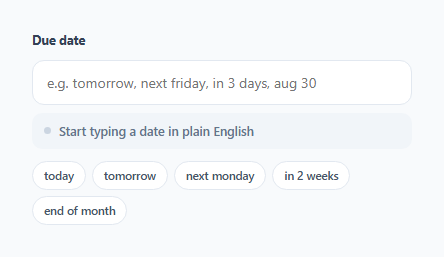
Traditional date pickers force users to click through a calendar grid even when they know exactly what they mean — "next friday" is faster to type than it is to find on a calendar widget, especially on mobile. This snippet implements a genuine natural-language date parser: type a phrase, and parseNaturalDate() resolves it to an actual Date object shown in both a human-readable format and a hidden ISO field ready for form submission.
Why pattern order matters
The parser checks patterns from most specific to least specific — literal keywords like "today" first, then structured patterns like "in 3 days", then weekday phrases, then month-day phrases, and only falls back to the browser's native Date constructor last. This ordering isn't arbitrary: a looser pattern checked first could accidentally consume input meant for a more specific rule (for example, if the weekday check ran before the "in N days" check and happened to match a stray word, the number would be lost). Each regex is anchored with ^ and $ so it only matches when the *entire* input fits that shape, preventing partial matches from producing a wrong date silently.
The trickiest case: "next friday" vs. plain "friday"
Real natural-language date libraries all have to make a judgment call here, and this one follows the most common convention: saying "friday" alone (with no "next") on any day still means *the upcoming Friday* — including today's date if today happens to be Friday, the code instead rolls forward a full week rather than resolving to "right now," since a bare weekday name almost always means the next occurrence. Adding the word "next" explicitly pushes the result one additional week further out — so on a Wednesday, "friday" means two days away, while "next friday" means nine days away. This distinction is encoded in the isNext check inside the weekday branch, adding exactly one extra week when the word "next" was present.
Rolling month-day phrases into the correct year
For a phrase like "aug 30" typed in September, the naive result would be a date nine months in the *past*. The parser checks whether the constructed date already fell before today and, if so, rolls the year forward by one — so writing a month-and-day phrase always resolves to the next upcoming occurrence of that date, never a stale one from earlier in the current year.
Falling back to the native parser as a safety net
Rather than rejecting anything that doesn't match a known phrase shape, the last branch hands the raw string to new Date(raw) — this lets ISO strings (2026-09-01), US-style slash dates (08/30/2026), and other formats the browser already understands pass through correctly, so the custom patterns only need to cover the *conversational* phrasing a calendar picker can't.
Keeping a real ISO value in sync for form submission
The visible input holds the free-text phrase the user typed, but a hidden <input type="hidden"> field is kept in sync with the parsed date's ISO form (YYYY-MM-DD) on every keystroke — this is the value that actually gets submitted with the form, so the backend never has to parse natural language itself; it only ever sees a clean, unambiguous date string.
Build with AI
Build, Understand, Optimize, and Extend It With AI
Ask an AI assistant to walk through why the parser checks phrase patterns in a specific order — most specific first, generic fallback last — and what would break if that order were reversed. It's also worth asking for additional phrase support (e.g. "next quarter", "in N business days" that skips weekends), or for a version that also accepts relative time components like "next friday at 3pm" and stores a full datetime instead of a date-only value.
Prompt to recreate it
Copy this into your AI assistant of choice to build the effect from scratch, or as a jumping-off point for your own variant:
Build a natural-language date input in plain HTML, CSS, and vanilla JavaScript — no external date library.

Requirements:
- A single text input where the user can type phrases like "today", "tomorrow", "next friday", "in 3 days", "2 weeks from now", "end of month", or a month-and-day phrase like "aug 30".
- A parsing function that resolves each recognized phrase shape to a real Date object, checking more specific patterns before generic ones so input is never mismatched.
- Correctly distinguish "friday" (resolves to the nearest upcoming Friday, rolling forward a week even if today is Friday) from "next friday" (one additional week beyond that).
- For month-day phrases, if the resulting date has already passed this year, roll the year forward by one so the phrase always resolves to an upcoming date.
- Fall back to the browser's native Date constructor for any input that doesn't match a custom phrase pattern, so ISO and slash-formatted dates still work.
- Show a live result area below the input that updates on every keystroke: a success state with the resolved, human-readable date when parsing succeeds, and a clearly different error state when it fails.
- Keep a second, hidden form field in sync with the successfully parsed date in YYYY-MM-DD format, separate from the visible free-text input, so a real form submission sends a clean date value.
- Include a handful of clickable suggestion chips that fill the input with example phrases.
Want to tighten it up first? Run this prompt through the AI Prompt Studio to score it across 8 quality dimensions, catch anti-patterns, and tune the wording for Claude, ChatGPT, or Gemini before you paste it in.
Step by step
How to Use
- 1Type a phrase into the fieldTry "tomorrow", "next friday", "in 3 days", or "aug 30" — the result box below updates live as you type.
- 2Watch the result indicatorA green dot and resolved date mean the phrase parsed successfully; a red dot means the parser did not recognize the input.
- 3Click a suggestion chipThe chips below the input fill in common phrases instantly, useful as both a shortcut and a hint for what the parser understands.
- 4Read the hidden ISO valueThe #nlHiddenIso input holds a YYYY-MM-DD value in sync with the parsed date — submit this field to your backend instead of the free-text phrase.
- 5Extend parseNaturalDate() for more phrasesAdd new regex branches following the existing pattern-order convention (specific phrases before generic fallbacks) to support phrases like "next quarter" or your own domain-specific shorthand.
Real-world uses
Common Use Cases
Got questions?
Frequently Asked Questions
No — a bare weekday name always resolves to the next upcoming occurrence, rolling forward a full week even if today matches. This matches how most people mean it conversationally ("let's meet friday" said on a Friday almost always means next week).
"friday" resolves to the nearest upcoming Friday. "next friday" adds one additional week on top of that, matching the common (if occasionally ambiguous) convention that "next" pushes past the nearest occurrence.
The result box turns red, shows a "couldn't parse that" message, and the hidden ISO field is cleared to an empty string — your form validation should check that hidden field is non-empty before allowing submission.
Yes — anything not matched by the custom phrase patterns is handed to JavaScript's native Date constructor as a fallback, which understands ISO dates and several other common formats.
Yes — add a new regex branch inside parseNaturalDate() following the existing pattern, placed before the native-Date fallback and after any more-specific patterns it might otherwise conflict with.
The visible field holds whatever free-text phrase the user typed, which is not a reliable value to submit to a server. The hidden field always holds the parsed, unambiguous YYYY-MM-DD value, so the backend receives clean structured data regardless of how the user phrased their input.