Source Code
<div class="dss-card">
  <svg class="dss-svg" viewBox="0 0 120 120">
    <circle class="dss-ring" id="dssRing" cx="60" cy="60" r="50"/>
    <path class="dss-tick" id="dssTick" d="M38 62 L54 78 L84 44"/>
  </svg>
  <h3 class="dss-title" id="dssTitle">Payment confirmed</h3>
  <p class="dss-sub" id="dssSub">Receipt #4821 sent to your inbox.</p>
  <button class="dss-btn" id="dssReplay">Replay animation</button>
</div>*{box-sizing:border-box;margin:0;padding:0}
body{font-family:system-ui,-apple-system,sans-serif;background:#0b0d16;color:#fff;min-height:100vh;display:flex;align-items:center;justify-content:center;padding:24px}
.dss-card{display:flex;flex-direction:column;align-items:center;gap:10px;width:min(340px,92vw);padding:38px 28px 30px;border-radius:20px;background:#10152a;border:1px solid rgba(255,255,255,.1);box-shadow:0 30px 70px rgba(0,0,0,.5);text-align:center}
.dss-svg{width:110px;height:110px;margin-bottom:8px}
.dss-ring{fill:none;stroke:#34d399;stroke-width:6;stroke-linecap:round;transform:rotate(-90deg);transform-origin:50% 50%}
.dss-tick{fill:none;stroke:#34d399;stroke-width:8;stroke-linecap:round;stroke-linejoin:round}
.dss-title{font-size:20px;font-weight:800;letter-spacing:-.01em}
.dss-sub{font-size:13.5px;color:#8a90a8}
.dss-btn{margin-top:16px;padding:10px 20px;border-radius:10px;border:1px solid rgba(52,211,153,.4);background:rgba(52,211,153,.12);color:#6ee7b7;font:600 13px system-ui;cursor:pointer;transition:background .2s}
.dss-btn:hover{background:rgba(52,211,153,.2)}gsap.registerPlugin(DrawSVGPlugin);
// drawSVG treats any stroke as a drawable segment: '0%' means invisible,
// '100%' fully drawn — the plugin measures true path length internally,
// even for the circle element (no manual dasharray math).
var tl = gsap.timeline();
function play() {
tl.clear()
.fromTo('#dssRing', { drawSVG: '0%' }, {
drawSVG: '100%', duration: 0.8, ease: 'power2.inOut'
})
.fromTo('#dssTick', { drawSVG: '0%' }, {
drawSVG: '100%', duration: 0.4, ease: 'power2.out'
}, '-=0.15')
.fromTo('#dssTick', { scale: 1, transformOrigin: '50% 50%' }, {
scale: 1.12, duration: 0.18, yoyo: true, repeat: 1, ease: 'power1.inOut'
}, '<0.05')
.from(['#dssTitle', '#dssSub'], {
opacity: 0, y: 14, duration: 0.4, stagger: 0.08, ease: 'power2.out'
}, '-=0.25');
}
play();
document.getElementById('dssReplay').addEventListener('click', play);Learn Coding Visually
Learn to code with interactive, live-preview playgrounds — HTML, CSS, JavaScript, React & more.
 HTML Playground42 lessons · Click-based · Live preview
 CSS PlaygroundLearn CSS with a live editor
 JavaScript Playground60 lessons · DOM · Async · Canvas
 React PlaygroundLearn React with a live code editor
 GSAP PlaygroundLearn GSAP animation interactively
 SVG Playground44 lessons · shapes · paths · animation
 SCSS Playground45 lessons · Sass modules · tokens
 Tailwind PlaygroundLearn Tailwind CSS with a live editor
 Bootstrap 5 Playground50 lessons · live preview
DrawSVG Success Check — Free GSAP Stroke Draw Snippet
DrawSVG Success Check · Animations · Plain HTML, CSS & JS · Live preview
What's included
Features
About this UI Snippet
DrawSVG Success Check — A Confirmation That Draws Itself
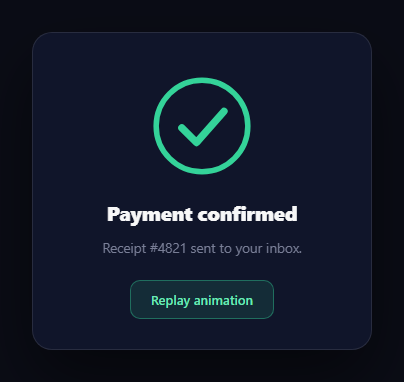
The drawn checkmark is the universal "it worked" moment — Stripe, banking apps, and checkout flows all trace a circle and stroke in a tick when payment lands. This snippet builds that success choreography with GSAP's DrawSVGPlugin (free on the CDN since 3.13): the ring sweeps around, the check draws in with a satisfying pulse, and the confirmation copy rises beneath it, all replayable from one timeline.
What DrawSVG replaces
The hand-rolled version of stroke drawing sets stroke-dasharray and stroke-dashoffset to the path's length and animates the offset — which means calling getTotalLength() yourself, handling elements that don't expose it, and doing percentage math for partial draws. drawSVG: '0%' → '100%' collapses all of that: the plugin measures true stroke length internally for *any* stroked element — including this <circle>, which has no native length API for the dash trick — and manages the dash values per frame.
Percentages describe segments, not just progress
drawSVG values define a visible segment with a start and end: '0%' is nothing, '100%' is everything, but '20% 80%' draws only the middle band, and animating '50% 50%' → '0% 100%' grows a stroke outward from its center. This demo uses the simple 0-to-full form, but the segment model is why DrawSVG can also do scanning highlights and comet-tail effects that plain dashoffset can't express cleanly.
The ring starts at 12 o'clock by rotation, not path surgery
A circle's stroke naturally begins at 3 o'clock. Rather than converting to a path that starts at the top, the CSS rotates the whole circle −90° around its center — so the draw sweeps from 12 o'clock clockwise, the direction users read "progress." It's the cheapest possible fix and keeps the SVG a semantic <circle>.
Choreography: overlap is what makes it feel designed
The timeline overlaps every beat: the tick starts -=0.15 before the ring finishes (motion never dies between phases), a scale pulse rides the tick via '<0.05' (starting just after the tick's own start), and the title/subtitle rise during the pulse's settle. yoyo: true, repeat: 1 turns the pulse into a there-and-back heartbeat in one tween. These position-parameter offsets are the difference between "steps playing in order" and one continuous confirmation gesture.
Replay is timeline hygiene
The replay button calls the same play() function, which begins with tl.clear() — wiping old tweens from the persistent timeline rather than stacking new ones onto it. Reusing one timeline keeps replays idempotent and interrupt-safe: clicking replay mid-animation restarts cleanly because fromTo re-asserts both endpoints every run.
Line caps do the visual polish
stroke-linecap: round on both elements gives the drawing rounded pen-tip ends while in motion — squared caps read as mechanical plotting; round caps read as handwriting. The tick's stroke-linejoin: round softens its corner the same way.
Customizing it
Recolor to your brand, swap the tick for a cross (error state) or your logo's path, or trigger play() from a real submit handler. Related: the timing-based animated success checkmark, payment context in payment success card, scroll-driven line drawing in scroll svg path draw, and self-tracing type in scroll text draw.
Build with AI
Build, Understand, Optimize, and Extend It With AI
Instead of puzzling out the timeline choreography by eye, paste this snippet's HTML, CSS, and JS into an AI coding assistant like Claude and ask it to explain exactly what the negative offset strings like minus 0.15 and the position parameter less-than 0.05 do to overlap the ring draw, the tick draw, and the pulse into one continuous gesture rather than three sequential steps. The same assistant can help you optimize it, for instance checking whether registering DrawSVGPlugin and building the timeline eagerly on page load (rather than lazily before the first play call) has any real cost worth avoiding. It's also useful for extending the animation: ask it to add an error-state twin that draws a cross instead of a checkmark, drive play() from a real async payment confirmation instead of running on load, or make the drawSVG segment scan back and forth for a loading-state variant. Treat the code less like a finished artifact and more like a starting point for a conversation.
Prompt to recreate it
Copy this into your AI assistant of choice to build the effect from scratch, or as a jumping-off point for your own variant:
Build a success confirmation animation in plain HTML, CSS, and JavaScript using GSAP's DrawSVGPlugin (load it and core GSAP from a CDN) — no manual stroke-dasharray or getTotalLength calculations.

Requirements:
- An inline SVG containing a circle element and a checkmark path, both using only stroke (no fill), with the circle rotated -90 degrees around its own center in CSS so its stroke sweep visibly starts at the 12 o'clock position instead of the default 3 o'clock.
- Animate the circle's stroke from completely undrawn to completely drawn using the drawSVG property going from 0% to 100%, working directly on the circle element with no manual path-length measurement or dasharray/dashoffset calculation of any kind.
- Immediately after (overlapping slightly, not strictly sequential) animate the checkmark path's stroke from 0% to 100% using the same drawSVG technique, so it appears to trace itself in right after the ring completes.
- Once the checkmark finishes drawing, play a brief scale pulse on it that grows it larger and back to its original size once (a yoyo-style back-and-forth), overlapping with the tail end of the checkmark's draw animation rather than waiting for it to fully finish.
- Fade and slide in a title and subtitle beneath the icon, staggered slightly, overlapping with the pulse's settle rather than starting only after everything else completes.
- Build the whole sequence on a single reusable GSAP timeline and expose a function that clears and replays that same timeline (not a freshly created one) so a "replay" button can restart the whole animation cleanly from any point without stacking duplicate tweens.
Want to tighten it up first? Run this prompt through the AI Prompt Studio to score it across 8 quality dimensions, catch anti-patterns, and tune the wording for Claude, ChatGPT, or Gemini before you paste it in.
Step by step
How to Use
- 1Add the GSAP CDNsInclude gsap and DrawSVGPlugin from the CDN panel.
- 2Paste HTML, CSS, and JSThe card plays its success sequence immediately.
- 3Watch the ringIt sweeps from 12 o'clock around the circle.
- 4See the tick landIt strokes in and pulses once as it completes.
- 5Hit ReplayThe timeline clears and runs again, interrupt-safe.
- 6Wire to real eventsCall play() from your form or payment handler.
Real-world uses
Common Use Cases
Got questions?
Frequently Asked Questions
Mechanically it drives the same dash properties, but it measures true stroke length internally for any stroked element — including circles, ellipses, and lines that don't expose getTotalLength for the manual trick — and its two-value syntax describes arbitrary visible segments ('20% 80%'), enabling center-out growth and scanning effects that raw dashoffset can't express without constant re-math.
SVG circles begin their stroke at the 3 o'clock position. The CSS rotates the circle −90° around its own center, so the sweep starts at 12 o'clock and runs clockwise — the direction users read as progress. It avoids converting the circle to a hand-authored path just to move its start point.
Two tweens on the same element with different properties: the drawSVG tween strokes it in while a scale fromTo with yoyo: true, repeat: 1 beats it 12% larger and back, positioned '<0.05' so it starts a moment after the draw begins. Separate tweens keep each independently tunable without touching the other's ease.
tl.clear() empties the persistent timeline and play() repopulates it, so replays never stack duplicate tweens or leak old ones. Because every step is a fromTo, both endpoints are re-asserted on each run — clicking replay mid-animation restarts cleanly rather than animating from a half-drawn state to stale targets.
Yes — drawSVG's two-value form defines the visible span: fromTo '0% 0%' → '0% 100%' is the standard draw, '50% 50%' → '0% 100%' grows from center, and tweening a fixed-width window like '0% 15%' → '85% 100%' sends a comet segment traveling along the path. All forms animate and reverse freely.
Register the plugin at module scope, inline the SVG, and build the timeline in a mount effect (useEffect, onMounted, ngAfterViewInit) with refs; expose play() from the component (React ref handle, Vue defineExpose, Angular public method) so submit handlers can trigger it, and kill the timeline in the cleanup. The card shell is plain flexbox that maps directly to Tailwind utilities.