You Might Also Like
Learn Coding Visually
Learn to code with interactive, live-preview playgrounds — HTML, CSS, JavaScript, React & more.
 HTML Playground42 lessons · Click-based · Live preview
 CSS PlaygroundLearn CSS with a live editor
 JavaScript Playground60 lessons · DOM · Async · Canvas
 React PlaygroundLearn React with a live code editor
 GSAP PlaygroundLearn GSAP animation interactively
 SVG Playground44 lessons · shapes · paths · animation
 SCSS Playground45 lessons · Sass modules · tokens
 Tailwind PlaygroundLearn Tailwind CSS with a live editor
 Bootstrap 5 Playground50 lessons · live preview
Mobile Notifications Screen — Free HTML CSS JS UI
Mobile Notifications Screen · Mobile · Plain HTML, CSS & JS · Live preview
What's included
Features
About this UI Snippet
Mobile Notifications Screen — Activity Inbox UI
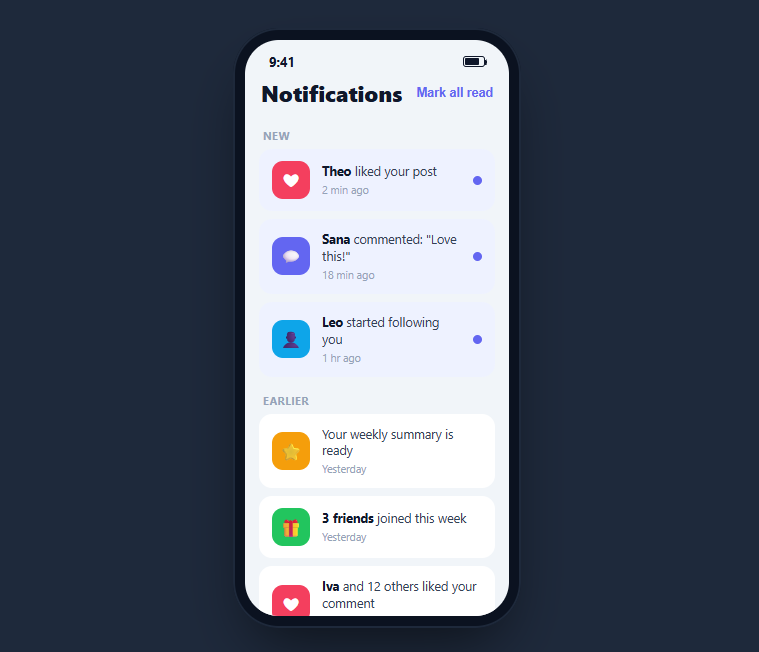
A notifications screen is a grouped inbox of activity — new items highlighted, older ones grouped below, each dismissible, with a "mark all read" shortcut and an empty state when you are caught up. This snippet builds a complete, interactive one inside a CSS phone frame: tapping an item marks it read, double-tapping dismisses it with a swipe-away, mark-all-read clears every unread dot at once, and empty groups and the whole list resolve to a friendly caught-up message — in HTML, CSS, and vanilla JavaScript with no dependency.
Grouped, with unread state
Notifications are split into "New" and "Earlier" groups. Unread items carry an unread class that tints their card and shows a blue dot on the right; read items are plain white with no dot. This two-tier styling is the standard way inboxes separate what needs attention from what you have already seen, and it is driven by a single class so the state is easy to flip.
Tap to read, one delegated listener
Instead of binding a handler to every row, a single click listener on the list uses event.target.closest('.mnt-item') to find which notification was tapped — event delegation, so newly added items would work automatically and there is only one listener to manage. Tapping an unread item removes its class and its dot, then re-evaluates the screen state.
Mark all read and a smart button
The header button clears the unread class and dot from every item at once. It also disables itself when there is nothing unread left, using the :disabled state to grey out — so the control accurately reflects whether there is anything to act on, rather than sitting active over an already-read inbox.
Swipe-to-dismiss and self-healing groups
Double-tapping a notification adds a swipe class that slides it off to the left and fades it, then removes it from the DOM after the transition. A shared updateState() function then hides any group whose items are all gone and reveals the all-caught-up empty state when the list is finally empty — so the screen never shows a stranded group header or a blank void.
Accessibility and performance
The mark-all-read control is a real <button> that disables itself when there is nothing unread, so its state is exposed to assistive tech through the native disabled attribute rather than styling alone. When you adapt this, make each notification a button or link so it is keyboard-focusable, reinforce the unread state with text — a "new" label or the count in the group header — rather than relying on the blue tint and dot, and announce changes through an aria-live region so marking read or dismissing is spoken. Performance is a deliberate win of the delegation approach: a single click listener on the list handles every current and future row via closest(), so there are no per-item listeners to attach or clean up, and marking read toggles one class and removes one dot node. Dismissal animates with a CSS transition and removes the node on completion, and updateState() does a couple of cheap querySelectorAll counts. For a very large inbox you would paginate or virtualize, but the delegated model already scales far past a typical screen of notifications.
Reusing it
Feed notifications from your API, persist read state, and replace the double-tap dismiss with a real swipe gesture using Pointer Events if you want touch-drag. Lift the list out of the phone frame for a responsive web notification center, or keep it framed beside a notification center panel to present a full activity feed.
Build with AI
Build, Understand, Optimize, and Extend It With AI
You don't need to trace every branch of updateState by hand to know what it touches. Paste this snippet's HTML, CSS, and JS into an AI coding assistant like Claude and ask it to explain exactly why the single delegated click listener on mntList uses event.target.closest instead of binding per-row handlers, or how the swipe class's transition and the setTimeout removal are kept in sync so an item never gets yanked from the DOM mid-animation. The same assistant can help optimize it — for instance checking whether querySelectorAll('.mnt-item') on every updateState call becomes a cost at hundreds of rows, and whether a running unread counter would be cheaper than recounting the DOM each time. It is just as useful for extending the behavior: ask it to swap the double-tap dismiss for a real Pointer Events swipe-to-delete, add an undo toast after dismissal, or group notifications by sender instead of by New and Earlier. Treat the code less like a finished artifact and more like a starting point for a conversation.
Prompt to recreate it
Copy this into your AI assistant of choice to build the effect from scratch, or as a jumping-off point for your own variant:
Build a mobile "notifications inbox" screen in plain HTML, CSS, and JavaScript using only DOM APIs and event delegation — no frameworks, no per-item listeners.

Requirements:
- A scrollable list of notification rows grouped under section headers (e.g. "New" and "Earlier"), where unread rows carry a distinct highlighted background and a small unread dot, and read rows are plain.
- Bind exactly one click listener on the list container, not on individual rows, and use event.target.closest to identify which row was tapped. Tapping an unread row must remove its unread styling and its dot.
- Add a "mark all read" button in the header that clears the unread state from every row in one action, and that becomes disabled (using the native disabled attribute, not just a CSS class) whenever there is nothing left unread.
- Support dismissing a row: on double-click (or a real swipe gesture if you choose to go further), add a class that animates the row sliding out and fading via a CSS transition, then remove it from the DOM only after that transition's duration has elapsed via setTimeout, not before.
- After every state change (read, mark-all, dismiss), run one shared update function that: hides any section header whose group no longer has notifications, and reveals a friendly empty state message once the entire list is empty.
- Keep notification icons and copy data-driven (id, icon, text, timestamp) so new items can be appended without any changes to the interaction code.
Want to tighten it up first? Run this prompt through the AI Prompt Studio to score it across 8 quality dimensions, catch anti-patterns, and tune the wording for Claude, ChatGPT, or Gemini before you paste it in.
Step by step
How to Use
- 1Paste HTML, CSS, and JSA grouped notifications inbox renders with New and Earlier sections.
- 2Tap an unread itemIts tinted highlight and blue dot clear as it becomes read.
- 3Mark all readThe header button clears every unread dot at once, then disables itself.
- 4Double-tap to dismissA notification slides off to the left and is removed from the list.
- 5Empty a groupWhen a group's items are all gone, its header disappears too.
- 6Clear everythingDismiss all notifications and an all-caught-up empty state appears.
Real-world uses
Common Use Cases
Got questions?
Frequently Asked Questions
The click handler is bound once to the list container and uses event.target.closest('.mnt-item') to find which row was tapped. This is event delegation: it works for any current or future item without per-row listeners, and there is only one handler to reason about. Tapping an unread item removes its class and dot.
After any read or dismiss action, updateState counts remaining unread items and disables the button when that count is zero, styled via the :disabled state. This keeps the control honest — it is only tappable when there is actually something unread to clear, rather than sitting active over an already-read inbox.
Double-tapping a notification adds a swipe class that translates it off the left edge and fades it out, and after the transition it is removed from the DOM. To support a real drag gesture, replace the double-click with Pointer Events that track horizontal movement and commit the dismiss past a threshold.
The shared updateState function runs after every change. It hides any group whose item list is empty and reveals the all-caught-up message when no items remain. That way you never see a stranded New or Earlier header with nothing under it, and an emptied inbox shows a friendly state instead of a blank area.
Hold notifications as an array with read flags and render grouped by section. Mark read by updating the item's flag and dismiss by filtering it out of state rather than removing DOM nodes. Derive the disabled button and empty state from the array. For dismissal animation, animate on exit with a transition group. Tailwind expresses the cards and highlights with utilities.
Track pointer events on each row: record the start x on pointerdown, translate the row by the horizontal delta on pointermove, and on pointerup either snap it back if the drag was small or commit the dismiss if it passed a threshold like a third of the width. Reuse the existing swipe class transition for the commit animation so the row slides fully off and is then removed. Keep the double-tap or a visible delete button as a fallback for keyboard and assistive users.