

Learn Coding Visually
Learn to code with interactive, live-preview playgrounds — HTML, CSS, JavaScript, React & more.
 HTML Playground42 lessons · Click-based · Live preview
 CSS PlaygroundLearn CSS with a live editor
 JavaScript Playground60 lessons · DOM · Async · Canvas
 React PlaygroundLearn React with a live code editor
 GSAP PlaygroundLearn GSAP animation interactively
 SVG Playground44 lessons · shapes · paths · animation
 SCSS Playground45 lessons · Sass modules · tokens
 Tailwind PlaygroundLearn Tailwind CSS with a live editor
 Bootstrap 5 Playground50 lessons · live preview
Wheel-Controlled Carousel — HTML CSS JS Snippet
Wheel-Controlled Carousel · Cards · Plain HTML, CSS & JS · Live preview
What's included
Features
About this UI Snippet
Wheel-Controlled Carousel — Turning Vertical Intent Into Horizontal Motion
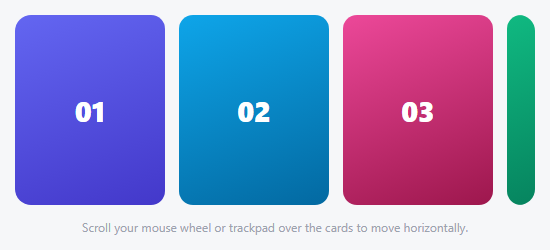
A normal page scroll moves the whole page vertically when your cursor happens to be over a carousel — annoying for a carousel that has its own navigation. This snippet flips that relationship: scrolling *over the carousel itself* (with a real mouse wheel or a trackpad) moves the *carousel* horizontally instead, and e.preventDefault() stops the page underneath from scrolling at the same time.
Reading whichever axis actually has signal
A wheel event carries both deltaY (what a plain vertical mouse wheel reports) and deltaX (what a trackpad's two-finger horizontal swipe reports) — and depending on the input device, only one of them is ever meaningfully non-zero. Rather than picking one axis and ignoring the other, this snippet compares their magnitudes and uses whichever is larger: Math.abs(e.deltaX) > Math.abs(e.deltaY) ? e.deltaX : e.deltaY. That's what makes both a plain vertical mouse wheel *and* a trackpad's horizontal swipe drive the exact same carousel correctly, without needing to detect which device is being used.
passive: false, and why it's required here
Modern browsers default wheel listeners to passive: true for scroll performance — but a passive listener's preventDefault() call is silently ignored, so the page would still scroll underneath. Explicitly opting out with { passive: false } is what makes the preventDefault() call actually take effect, at the cost of the browser no longer being able to assume the listener won't block scrolling — the correct, deliberate trade-off for a carousel that's meant to intercept the gesture entirely.
Build with AI
Build, Understand, Optimize, and Extend It With AI
Paste this snippet's HTML, CSS, and JS into an AI coding assistant like Claude and ask it to explain exactly why { passive: false } is required for e.preventDefault() to actually stop the page from scrolling, and what "passive" means for a wheel listener's relationship with the browser's scroll-performance optimizations. It's also worth asking the assistant to add Left/Right arrow key support and basic touch/swipe handling so the carousel isn't exclusively wheel-and-trackpad-only, or to add a momentum/deceleration effect after a fast scroll flick rather than moving exactly delta pixels per event.
Prompt to recreate it
Copy this into your AI assistant of choice to build the effect from scratch, or as a jumping-off point for your own variant:
Build a carousel in plain HTML, CSS, and vanilla JavaScript that is navigated entirely by the mouse wheel or trackpad scrolling over it, converting that vertical or horizontal scroll intent into horizontal carousel movement instead of scrolling the page — no library.

Requirements:
- A horizontally arranged row of card elements inside a fixed-width viewport container, moved via a CSS transform (translateX) with a smooth transition applied on every position change.
- A wheel event listener on the carousel's container that reads both the event's deltaY (vertical wheel/scroll intent) and deltaX (horizontal trackpad swipe intent), and uses whichever of the two has the larger absolute magnitude as the actual movement amount — so the same carousel responds correctly whether the input device is a plain vertical mouse wheel or a trackpad's horizontal two-finger swipe.
- The wheel listener must call preventDefault on the event to stop the underlying page from scrolling while the cursor is over the carousel, and must be registered with the passive option explicitly set to false, since passive listeners silently ignore preventDefault calls in modern browsers.
- The resulting horizontal offset must be clamped so the carousel can never scroll past its first or last card in either direction, with the valid bounds recalculated from the actual current container and content widths (recomputed on window resize, not hardcoded).
- No drag or touch handling is required for this snippet — it is specifically a wheel/trackpad-driven navigation pattern.
Want to tighten it up first? Run this prompt through the AI Prompt Studio to score it across 8 quality dimensions, catch anti-patterns, and tune the wording for Claude, ChatGPT, or Gemini before you paste it in.
Source Code
<div class="whc-wrap" id="whcWrap">
  <div class="whc-track" id="whcTrack">
    <div class="whc-slide" style="background:linear-gradient(160deg,#6366f1,#4338ca)">01</div>
    <div class="whc-slide" style="background:linear-gradient(160deg,#0ea5e9,#0369a1)">02</div>
    <div class="whc-slide" style="background:linear-gradient(160deg,#ec4899,#9d174d)">03</div>
    <div class="whc-slide" style="background:linear-gradient(160deg,#10b981,#047857)">04</div>
    <div class="whc-slide" style="background:linear-gradient(160deg,#f59e0b,#b45309)">05</div>
  </div>
  <p class="whc-hint">Scroll your mouse wheel or trackpad over the cards to move horizontally.</p>
</div>*{box-sizing:border-box;margin:0;padding:0}
body{font-family:system-ui,-apple-system,sans-serif;background:#f6f7f9;min-height:100vh;display:flex;align-items:center;justify-content:center;padding:24px}
.whc-wrap{width:100%;max-width:520px}
.whc-track{display:flex;gap:14px;overflow:hidden;border-radius:16px}
.whc-slide{flex:0 0 150px;height:190px;border-radius:14px;display:flex;align-items:center;justify-content:center;color:#fff;font-size:28px;font-weight:800;transition:transform .35s cubic-bezier(.25,.8,.3,1)}
.whc-hint{text-align:center;color:#9ca3af;font-size:12px;margin-top:14px}var wrap = document.getElementById('whcWrap');
var track = document.getElementById('whcTrack');
var slides = document.querySelectorAll('.whc-slide');
var CARD_W = 150 + 14;
var offset = 0;
var min, max;
function computeBounds() {
var trackWidth = slides.length * CARD_W - 14;
var viewportWidth = wrap.getBoundingClientRect().width;
min = Math.min(0, viewportWidth - trackWidth);
max = 0;
}
function render() {
track.style.transform = 'translateX(' + offset + 'px)';
}
// A wheel event's deltaY is what a normal vertical mouse wheel reports; most
// trackpads also report horizontal intent as deltaX during a two-finger
// swipe. Summing both means either gesture moves the carousel, instead of
// only working for whichever axis a given device happens to report.
var wheelTimer = null;
wrap.addEventListener('wheel', function (e) {
e.preventDefault();
var delta = Math.abs(e.deltaX) > Math.abs(e.deltaY) ? e.deltaX : e.deltaY;
offset = Math.max(min, Math.min(max, offset - delta));
render();
}, { passive: false });
window.addEventListener('resize', function () {
computeBounds();
offset = Math.max(min, Math.min(max, offset));
render();
});
computeBounds();
render();Step by step
How to Use
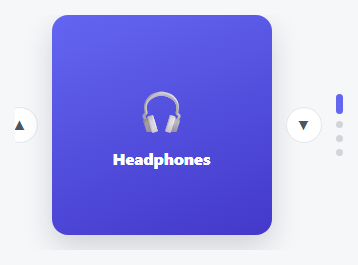
- 1Paste HTML, CSS, and JSFive cards appear in a row; the page underneath does not scroll if you scroll over the cards.
- 2Scroll a mouse wheel over the cardsThe track moves horizontally, one wheel notch of distance per scroll tick.
- 3Swipe on a trackpadA horizontal two-finger swipe moves the track the same way, using deltaX instead of deltaY.
- 4Scroll past either endThe track stops cleanly at its real bounds — it can't scroll past the first or last card.
- 5Resize the windowThe bounds recalculate so the clamp stays accurate at any container width.
Real-world uses
Common Use Cases
Got questions?
Frequently Asked Questions
The wheel event listener calls e.preventDefault(), and is registered with { passive: false } so that call actually takes effect — without that explicit flag, modern browsers treat wheel listeners as passive by default and silently ignore preventDefault, letting the page scroll anyway.
The movement amount comes directly from the wheel event's own delta value, which varies by device and OS scroll settings — to normalize it, multiply delta by a fixed sensitivity constant before applying it to offset.
Wheel events are a desktop input pattern (mouse wheel, trackpad) — for touch, pair this with drag/swipe handling like the Momentum Drag Carousel snippet, since touch devices don't fire wheel events during a finger swipe.
A trackpad's horizontal two-finger swipe reports its intent primarily through deltaX with little or no deltaY — always reading deltaY would make horizontal trackpad gestures do nothing, so comparing magnitudes lets whichever axis actually has signal drive the carousel.
Wheel-only interaction excludes keyboard and touch users — add Left/Right arrow key handlers that adjust offset by one card width, and ensure any content inside each card remains independently focusable and operable.