


Learn Coding Visually
Learn to code with interactive, live-preview playgrounds — HTML, CSS, JavaScript, React & more.
 HTML Playground42 lessons · Click-based · Live preview
 CSS PlaygroundLearn CSS with a live editor
 JavaScript Playground60 lessons · DOM · Async · Canvas
 React PlaygroundLearn React with a live code editor
 GSAP PlaygroundLearn GSAP animation interactively
 SVG Playground44 lessons · shapes · paths · animation
 SCSS Playground45 lessons · Sass modules · tokens
 Tailwind PlaygroundLearn Tailwind CSS with a live editor
 Bootstrap 5 Playground50 lessons · live preview
WOW.js Pricing Table Reveal — Per-Element Animation Snippet
WOW.js Pricing Table Reveal · Pricing · Plain HTML, CSS & JS · Live preview
What's included
Features
About this UI Snippet
WOW.js Pricing Table Reveal — Mixing Entrance Classes on One Instance
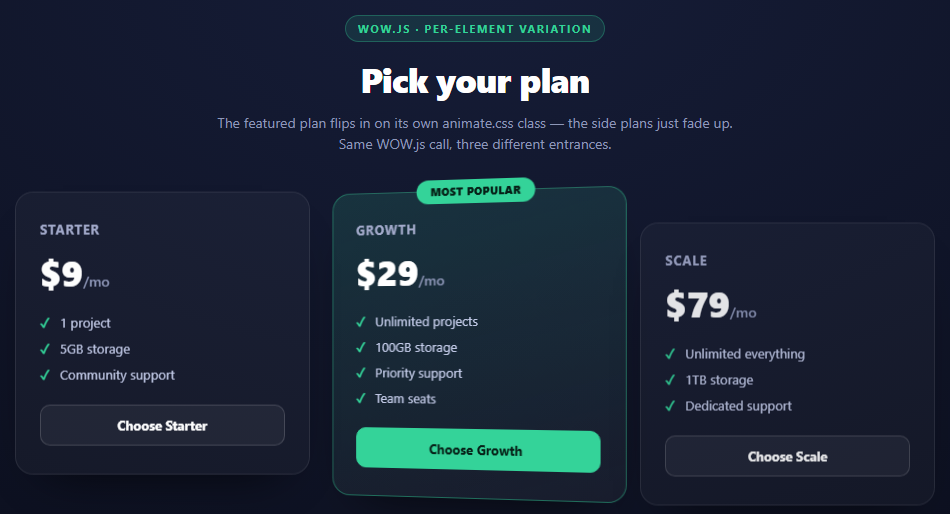
Both earlier WOW.js snippets in this set use the same animate.css class on every element. That leaves an obvious question open: does WOW.js require a single shared animation, or can each element pick its own? This snippet answers it directly — the Growth plan uses animate__flipInY while Starter and Scale use animate__fadeInUp, and all three are driven by one new WOW({ offset: 40, live: true }).init() call.
Why this works with zero extra configuration
WOW.js's scan logic operates on the .wow class alone. When it walks the DOM for elements to watch, it doesn't inspect *which* animate.css class is present — it just tracks the element, watches for it entering the viewport, and removes .wow when it does. Whatever animate.css class happens to be sitting on that specific element then runs on its own, because that's a completely separate CSS rule with no dependency on WOW.js's internals. This is the direct payoff of the class-toggle architecture explained in the scroll reveal cards writeup: since WOW.js's only action is removing one class name, and animate.css keys its animations off *other* class names, the two libraries never need to coordinate about which animation is playing where.
Why flipInY suits a featured plan specifically
animate__flipInY rotates the element around its vertical axis from 90° to 0°, using perspective to fake 3D depth. It reads as more "eventful" than a fade or slide, which is exactly the emphasis a pricing table wants to put on the plan it's nudging visitors toward — a subtle visual hierarchy cue delivered entirely through animation choice, at no cost beyond swapping one class name. Note the perspective: 1000px set on .wpr-card in the CSS: without a perspective value on an ancestor, a 3D rotation like flipInY renders flat with no sense of depth, so it's a required pairing whenever flipInY or flipInX is used.
The stagger still works across mixed classes
data-wow-delay is read the same way regardless of which animation class is present — WOW.js applies it as an animation-delay before removing .wow, and that mechanism is entirely independent of *which* @keyframes rule ends up running. That's why the featured plan can have a later delay (0.25s vs 0.1s and 0.4s framing it) and a different animation, without any special-casing in the WOW.js call itself — the delay and the animation choice are two orthogonal pieces of markup.
Selection state is plain JS, not WOW.js
The "Choose Plan" buttons demonstrate that WOW.js's job ends the moment the entrance animation has played. Post-reveal interactivity — marking a plan selected, disabling other buttons — is ordinary event-driven JavaScript with no further involvement from WOW.js or animate.css.
Build with AI
Build, Understand, Optimize, and Extend It With AI
This snippet is a good prompt for asking an AI to reason about library boundaries: paste it into an assistant like Claude and ask exactly why mixing animate__flipInY and animate__fadeInUp on cards driven by one new WOW() call requires no extra configuration — the answer should walk through WOW.js only ever toggling .wow and never inspecting which animation class is present. Then ask what would visually break if perspective were removed from .wpr-card, and why (the flip renders flat with no sense of rotation). To extend it: ask for a fourth "Enterprise" tier that flips in on a diagonal 3D axis using a custom animate.css-compatible keyframe, a version where the featured plan is chosen dynamically from a data attribute rather than hard-coded in markup, or a version that re-triggers the featured card's flip animation on hover using animate.css's utility classes for repeat.
Prompt to recreate it
Copy this into your AI assistant of choice to build the effect from scratch, or as a jumping-off point for your own variant:
Build a 3-tier pricing table using WOW.js (v1.1.2, from a CDN) and animate.css (v4, from a CDN) in plain HTML, CSS, and JavaScript.

Requirements:
- Three pricing cards (Starter, Growth, Scale) with plan name, price, a checklist of included features, and a "Choose Plan" button. The middle "Growth" card is visually featured — a badge, a tinted background, and a slight scale-up at rest.
- The two side cards must use class="wow animate__animated animate__fadeInUp"; the featured middle card must use class="wow animate__animated animate__flipInY" instead, demonstrating that different elements can use different animate.css classes under one shared WOW.js instance.
- Give .wpr-card (or equivalent) a perspective value (e.g. 1000px) so the flipInY rotation on the featured card renders with real 3D depth instead of collapsing flat.
- Stagger all three cards with individual data-wow-delay attributes (e.g. 0.1s, 0.25s, 0.4s), and initialize everything with a single new WOW({ offset: 40, live: true }).init() call — no per-card WOW.js configuration.
- Add a small vanilla JS click handler on the "Choose Plan" buttons that marks the clicked plan as selected (relabel the button, disable it) and resets any other previously-selected button — this logic should be entirely separate from and unrelated to the WOW.js/animate.css reveal.
- Style it as a dark, premium pricing section, with enough bottom page padding that the table starts below the fold so the reveal-on-scroll is demonstrated.
Want to tighten it up first? Run this prompt through the AI Prompt Studio to score it across 8 quality dimensions, catch anti-patterns, and tune the wording for Claude, ChatGPT, or Gemini before you paste it in.
Source Code
<div class="wpr-stage">
  <div class="wpr-head">
    <span class="wpr-tag">WOW.js · per-element variation</span>
    <h2>Pick your plan</h2>
    <p>The featured plan flips in on its own animate.css class — the side plans just fade up. Same WOW.js call, three different entrances.</p>
  </div>
  <div class="wpr-grid">
    <div class="wpr-card wow animate__animated animate__fadeInUp" data-wow-delay="0.1s">
      <div class="wpr-plan">Starter</div>
      <div class="wpr-price">$9<span>/mo</span></div>
      <ul class="wpr-list">
        <li>1 project</li>
        <li>5GB storage</li>
        <li>Community support</li>
      </ul>
      <button class="wpr-btn">Choose Starter</button>
    </div>
    <div class="wpr-card wpr-featured wow animate__animated animate__flipInY" data-wow-delay="0.25s">
      <div class="wpr-badge">Most Popular</div>
      <div class="wpr-plan">Growth</div>
      <div class="wpr-price">$29<span>/mo</span></div>
      <ul class="wpr-list">
        <li>Unlimited projects</li>
        <li>100GB storage</li>
        <li>Priority support</li>
        <li>Team seats</li>
      </ul>
      <button class="wpr-btn wpr-btn-primary">Choose Growth</button>
    </div>
    <div class="wpr-card wow animate__animated animate__fadeInUp" data-wow-delay="0.4s">
      <div class="wpr-plan">Scale</div>
      <div class="wpr-price">$79<span>/mo</span></div>
      <ul class="wpr-list">
        <li>Unlimited everything</li>
        <li>1TB storage</li>
        <li>Dedicated support</li>
      </ul>
      <button class="wpr-btn">Choose Scale</button>
    </div>
  </div>
</div>*{box-sizing:border-box;margin:0;padding:0}
body{font-family:system-ui,-apple-system,sans-serif;background:radial-gradient(120% 100% at 50% 0%,#161d38,#080a14);color:#fff;min-height:100vh;padding:48px 24px 420px}
.wpr-stage{max-width:920px;margin:0 auto;display:flex;flex-direction:column;gap:36px}
.wpr-head{text-align:center;max-width:540px;margin:0 auto}
.wpr-tag{display:inline-block;font-size:11px;font-weight:700;letter-spacing:.14em;text-transform:uppercase;color:#34d399;background:rgba(52,211,153,.12);border:1px solid rgba(52,211,153,.3);padding:5px 12px;border-radius:99px;margin-bottom:14px}
.wpr-head h2{font-size:clamp(24px,4.4vw,34px);font-weight:800;letter-spacing:-.02em}
.wpr-head p{font-size:14px;color:#8e97b8;margin-top:10px;line-height:1.5}
.wpr-grid{display:grid;grid-template-columns:repeat(3,1fr);gap:18px;align-items:start}
@media(max-width:760px){.wpr-grid{grid-template-columns:1fr}}
.wpr-card{position:relative;background:rgba(255,255,255,.04);border:1px solid rgba(255,255,255,.09);border-radius:18px;padding:28px 24px;box-shadow:0 24px 50px -30px rgba(0,0,0,.8);perspective:1000px}
.wpr-featured{background:linear-gradient(165deg,rgba(52,211,153,.14),rgba(255,255,255,.04));border-color:rgba(52,211,153,.4);transform:scale(1.04)}
.wpr-badge{position:absolute;top:-12px;left:50%;transform:translateX(-50%);background:#34d399;color:#062017;font-size:10.5px;font-weight:800;letter-spacing:.05em;text-transform:uppercase;padding:5px 14px;border-radius:99px}
.wpr-plan{font-size:13px;font-weight:700;color:#a3aacb;text-transform:uppercase;letter-spacing:.06em}
.wpr-price{font-size:36px;font-weight:800;margin:10px 0 18px}
.wpr-price span{font-size:14px;font-weight:600;color:#8e97b8}
.wpr-list{list-style:none;display:flex;flex-direction:column;gap:9px;margin-bottom:22px}
.wpr-list li{font-size:13px;color:#c3cbe8;padding-left:20px;position:relative}
.wpr-list li::before{content:'✓';position:absolute;left:0;color:#34d399;font-weight:800}
.wpr-btn{width:100%;padding:11px;border-radius:10px;border:1px solid rgba(255,255,255,.16);background:rgba(255,255,255,.05);color:#fff;font:700 13px system-ui;cursor:pointer;transition:background .18s}
.wpr-btn:hover{background:rgba(255,255,255,.12)}
.wpr-btn-primary{background:#34d399;color:#062017;border-color:#34d399}
.wpr-btn-primary:hover{background:#2bc28b}// One WOW.js instance drives all three cards. WOW.js doesn't know or care which
// animate.css class is on a given element — it only toggles the .wow class that keeps
// an element hidden. The side plans carry animate__fadeInUp; the featured plan carries
// animate__flipInY. Because the animation itself is 100% animate.css's responsibility,
// mixing classes per element costs nothing extra in the WOW.js setup below.
var wow = new WOW({ offset: 40, live: true });
wow.init();
document.querySelectorAll('.wpr-btn').forEach(function (btn) {
btn.addEventListener('click', function () {
var card = btn.closest('.wpr-card');
var plan = card.querySelector('.wpr-plan').textContent;
btn.textContent = 'Selected ✓';
btn.disabled = true;
document.querySelectorAll('.wpr-btn').forEach(function (b) {
if (b !== btn) { b.disabled = false; }
});
});
});Step by step
How to Use
- 1Add both CDN fileswow.min.js and animate.min.css power all three cards from one shared instance.
- 2Give each card its own animation classFeatured uses animate__flipInY, the side plans use animate__fadeInUp — mix freely.
- 3Add perspective for 3D flipsAny card using flipInX/flipInY needs perspective set on itself or an ancestor to show depth.
- 4Stagger with data-wow-delayEach card's delay is independent of which animation class it carries.
- 5Call new WOW({ offset: 40 }).init()One instance watches every .wow element regardless of its specific animation.
- 6Wire post-reveal interactivity separatelyButton clicks and selection state are plain JS — WOW.js's job ends at the reveal.
Real-world uses
Common Use Cases
Got questions?
Frequently Asked Questions
No. WOW.js only tracks the .wow class and removes it on scroll-into-view; it never inspects which animate.css animation class is also present. Each element can carry its own animation class independently, as this table demonstrates with flipInY on one card and fadeInUp on the other two.
animate__flipInY rotates the element in 3D around its Y axis. Without a perspective value set on the element or an ancestor, the browser has no vanishing point to render the rotation with depth, so it collapses to a flat, unconvincing flip.
Yes — flipInX rotates around the horizontal axis instead of the vertical one. Both need the same perspective setup; the choice is purely about which rotation axis reads better for your layout.
No, they're independent. data-wow-delay is applied as animation-delay regardless of which @keyframes rule the element's animate.css class points to, so you can freely combine any delay with any animation.
That scale is a static CSS rule, unrelated to WOW.js or animate.css — it makes the featured plan physically larger at rest, reinforcing the emphasis that flipInY adds during the entrance.
Duplicate a .wpr-card block, adjust its data-wow-delay to fit the stagger sequence, and pick whichever animate.css class suits its role — WOW.js and the grid layout both scale to any card count without other changes.