
Learn Coding Visually
Learn to code with interactive, live-preview playgrounds — HTML, CSS, JavaScript, React & more.
 HTML Playground42 lessons · Click-based · Live preview
 CSS PlaygroundLearn CSS with a live editor
 JavaScript Playground60 lessons · DOM · Async · Canvas
 React PlaygroundLearn React with a live code editor
 GSAP PlaygroundLearn GSAP animation interactively
 SVG Playground44 lessons · shapes · paths · animation
 SCSS Playground45 lessons · Sass modules · tokens
 Tailwind PlaygroundLearn Tailwind CSS with a live editor
 Bootstrap 5 Playground50 lessons · live preview
Glide.js Logo Carousel Autoplay — Marketing Logo Strip Snippet
Glide.js Logo Carousel Autoplay · Misc · Plain HTML, CSS & JS · Live preview
What's included
Features
About this UI Snippet
Glide.js Logo Carousel Autoplay — The Marketing Logo Strip Pattern
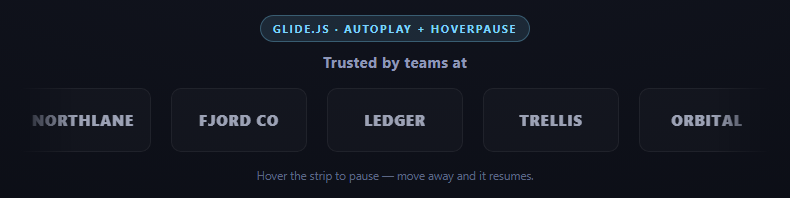
Every SaaS marketing page has one of these: a row of client logos slowly drifting sideways under a "Trusted by teams at" headline. It looks like a passive, ambient animation, but underneath it's the same type: 'carousel' plus autoplay combination as the testimonial slider — configured for a very different feel.
Why linear easing matters here specifically
js
animationDuration: 800,
animationTimingFunc: 'linear',
The testimonial slider used a default eased transition — appropriate for a slide that should feel like it's settling into place. A logo strip is the opposite: it's meant to read as *continuous, ambient motion*, closer to a ticker tape than a deliberate slide change. animationTimingFunc: 'linear' removes the ease-in/ease-out curve so the strip moves at a constant velocity throughout each transition, which is what makes back-to-back autoplay advances feel like one smooth drift rather than a series of distinct, decelerating snaps.
perView: 5 with responsive breakpoints
js
perView: 5,
breakpoints: { 900: { perView: 4 }, 640: { perView: 3 }, 420: { perView: 2 } },
breakpoints is Glide's built-in responsive config system: keys are max-width pixel values, and each maps to an options object that *overrides* the base config once the viewport is at or below that width. Glide attaches a resize listener internally and swaps configurations live — you never write your own window.matchMedia or resize handler. This matters a lot for a logo strip specifically, because showing 5 logos at once on a 380px-wide phone screen would squeeze each one down to an unreadable sliver; dropping to perView: 2 at the narrowest breakpoint keeps every wordmark legible.
The edge fade mask
-webkit-mask-image: linear-gradient(90deg, transparent, #000 8%, #000 92%, transparent)
This is plain CSS, not a Glide feature, but it's what sells the "infinite ticker" illusion: without it, logos would abruptly appear and disappear at the hard edges of the container as the carousel loops. Masking the strip with a gradient that fades to transparent in the outer 8% on each side makes logos fade in and out gently instead of clipping, which reads as continuous rather than mechanical.
hoverpause as an accessibility/UX safety valve
Autoplay for social-proof logos is a case where pausing on hover matters more than it might for a background animation: a user who wants to actually *read* a specific logo — check if their own company or a competitor is listed — needs the strip to stop moving under their cursor. hoverpause: true (the same option as the testimonial slider) makes that automatic with zero extra JS: Glide's Autoplay component already listens for mouseenter/mouseleave on the track and pauses/resumes accordingly.
Reusing it
Swap the text wordmarks for real logo images (SVGs work best, sized to a consistent height with object-fit: contain) and the mechanism doesn't change at all — perView, breakpoints, autoplay, and the mask technique apply identically. Pair this with the product gallery slider if you also need a manually-navigable, non-autoplaying multi-item slider elsewhere on the same page.
Build with AI
Build, Understand, Optimize, and Extend It With AI
The interesting contrast here is tuning the same type: 'carousel' + autoplay mechanism from the testimonial slider to feel like ambient background motion instead of discrete slide changes. Ask an AI assistant like Claude to explain exactly what animationTimingFunc: 'linear' changes about the motion curve compared to Glide's default easing, and why that specific choice matters for a "ticker" feel. Then ask it to walk through how the breakpoints option's resize-driven config swapping works internally, since that's a genuinely reusable pattern beyond just logo strips. Good extensions: swap in real SVG logos with object-fit: contain, add a subtle grayscale-to-color hover filter instead of just an opacity change, or make the strip pause permanently (not just on hover) once a user scrolls it into view for the first time. Pair with the product gallery slider to compare autoplay-driven ambient motion against manual peek-based navigation.
Prompt to recreate it
Copy this into your AI assistant of choice to build the effect from scratch, or as a jumping-off point for your own variant:
Build an infinitely auto-scrolling client logo strip using Glide.js (v3.6, from a CDN, both the JS and its core CSS file) in plain HTML, CSS, and JavaScript.

Requirements:
- Use Glide's required skeleton: outer div.glide, div.glide__track with data-glide-el="track", ul.glide__slides containing 8 li.glide__slide elements, each showing a bold uppercase text "wordmark" standing in for a client logo (no external image assets) inside a subtly bordered rounded tile.
- Initialize Glide with: type: 'carousel' (required for the loop to wrap seamlessly instead of stopping dead at the last logo), perView: 5, gap: 20, autoplay: 2000, hoverpause: true, animationDuration: 800, and animationTimingFunc: 'linear' — the linear timing function specifically, since it removes ease-in/ease-out so consecutive autoplay advances blend into one continuous drift rather than reading as discrete slide snaps. Call .mount() after constructing.
- Add a breakpoints option that reduces perView at narrower widths (e.g. 4 at 900px, 3 at 640px, 2 at 420px) so logos never get squeezed unreadably small on phones — explain that Glide's breakpoints system attaches its own resize listener and swaps in override options automatically, with no custom JS resize handler needed.
- Add a CSS mask-image (a horizontal linear-gradient fading to transparent in the outer ~8% on each side) on the outer glide wrapper so logos fade in and out gently at the container edges rather than hard-clipping as the strip loops.
- Style each logo tile to dim slightly by default and brighten to full opacity on hover, so a user hovering to read a specific logo also gets a visual highlight (in addition to hoverpause stopping the scroll).
- Keep all JavaScript in var/function style, no ES modules.
Want to tighten it up first? Run this prompt through the AI Prompt Studio to score it across 8 quality dimensions, catch anti-patterns, and tune the wording for Claude, ChatGPT, or Gemini before you paste it in.
Source Code
<div class="glc-stage">
<div class="glc-head">
<span class="glc-tag">Glide.js · autoplay + hoverpause</span>
<h2>Trusted by teams at</h2>
</div>
<div class="glide glc-glide">
<div class="glide__track" data-glide-el="track">
<ul class="glide__slides">
<li class="glide__slide"><div class="glc-logo">NORTHLANE</div></li>
<li class="glide__slide"><div class="glc-logo">FJORD CO</div></li>
<li class="glide__slide"><div class="glc-logo">LEDGER</div></li>
<li class="glide__slide"><div class="glc-logo">TRELLIS</div></li>
<li class="glide__slide"><div class="glc-logo">ORBITAL</div></li>
<li class="glide__slide"><div class="glc-logo">VANTAGE</div></li>
<li class="glide__slide"><div class="glc-logo">HARBOR & KIN</div></li>
<li class="glide__slide"><div class="glc-logo">MERIDIAN</div></li>
</ul>
</div>
</div>
<p class="glc-hint">Hover the strip to pause — move away and it resumes.</p>
</div>*{box-sizing:border-box;margin:0;padding:0}
body{font-family:system-ui,-apple-system,sans-serif;background:radial-gradient(120% 100% at 50% 0%,#151824,#080a10);color:#fff;min-height:100vh;display:flex;align-items:center;justify-content:center;padding:24px}
.glc-stage{width:min(760px,96vw);display:flex;flex-direction:column;align-items:center;gap:16px}
.glc-head{text-align:center}
.glc-tag{display:inline-block;font-size:11px;font-weight:700;letter-spacing:.14em;text-transform:uppercase;color:#7dd3fc;background:rgba(125,211,252,.12);border:1px solid rgba(125,211,252,.3);padding:5px 12px;border-radius:99px;margin-bottom:10px}
.glc-head h2{font-size:15px;font-weight:700;color:#8e97b8;letter-spacing:.02em}
.glc-glide{width:100%;-webkit-mask-image:linear-gradient(90deg,transparent,#000 8%,#000 92%,transparent);mask-image:linear-gradient(90deg,transparent,#000 8%,#000 92%,transparent)}
.glide__track{overflow:hidden}
.glc-logo{height:64px;display:flex;align-items:center;justify-content:center;font:800 15px/1 system-ui;letter-spacing:.05em;color:#cdd3ea;background:rgba(255,255,255,.03);border:1px solid rgba(255,255,255,.08);border-radius:10px;opacity:.75;transition:opacity .2s,color .2s}
.glide__slide:hover .glc-logo{opacity:1;color:#fff}
.glc-hint{font-size:11.5px;color:#5c6785}var glide = new Glide('.glc-glide', {
type: 'carousel',
perView: 5,
gap: 20,
autoplay: 2000,
hoverpause: true,
animationDuration: 800,
animationTimingFunc: 'linear',
breakpoints: {
900: { perView: 4 },
640: { perView: 3 },
420: { perView: 2 },
},
});
glide.mount();Step by step
How to Use
- 1Add both Glide.js CDN filesInclude glide.min.js and glide.core.min.css from the CDN panel.
- 2Paste HTML, CSS, and JSEight wordmark tiles render in a row and begin auto-scrolling immediately.
- 3Watch the continuous driftanimationTimingFunc: 'linear' plus a short autoplay interval reads as ambient motion, not discrete slides.
- 4Hover the striphoverpause: true stops the scroll so a specific logo can be read, then resumes on mouseleave.
- 5Resize the windowbreakpoints drops perView from 5 down to 2 at narrower widths automatically.
- 6Swap in real logosReplace the text wordmarks with SVG images at a consistent height — the Glide config needs no changes.
Real-world uses
Common Use Cases
Got questions?
Frequently Asked Questions
The default eased transition decelerates into each new slide, which reads as a deliberate, discrete "slide change" — appropriate for content like testimonials. A logo strip is meant to look like continuous ambient motion, and linear easing keeps velocity constant through the whole transition, so consecutive autoplay advances blend into one smooth drift instead of a series of distinct snaps.
breakpoints takes an object whose keys are max-width pixel values; Glide attaches its own resize listener and, once the viewport width drops to or below a given key, merges that key's options object over the base configuration. Here, perView drops from 5 to 4, 3, then 2 as the screen narrows, so logos never get squeezed down to unreadable slivers on small screens — no manual matchMedia or resize code is needed.
It's plain CSS, applied to the outer .glc-glide wrapper: a linear gradient mask that fades to transparent in the outer 8% on each side. Glide only manages slide positioning and timing, not visual edge treatment, so the fade is implemented independently in CSS — it makes logos appear to gently fade in/out at the edges instead of abruptly clipping as the loop advances.
A logo strip carries information a visitor might actually want to read — checking whether their own company, a competitor, or a recognizable brand is listed. Without hoverpause, the strip would keep moving under the cursor and make that impossible; hoverpause: true (built into Glide's Autoplay component) pauses on mouseenter and resumes on mouseleave with no extra code.
Yes, with no changes to the Glide configuration — swap each .glc-logo div's text content for an <img> (SVGs work best) sized to a consistent height with object-fit: contain, so mixed-aspect-ratio logos still align on one row.
Same reason as the testimonial slider: type: 'slider' is bounded and stops at the last slide, which would make autoplay dead-end instead of looping. type: 'carousel' wraps infinitely, which is required for the strip to appear to scroll forever.