Learn Coding Visually
Learn to code with interactive, live-preview playgrounds — HTML, CSS, JavaScript, React & more.
 HTML Playground42 lessons · Click-based · Live preview
 CSS PlaygroundLearn CSS with a live editor
 JavaScript Playground60 lessons · DOM · Async · Canvas
 React PlaygroundLearn React with a live code editor
 GSAP PlaygroundLearn GSAP animation interactively
 SVG Playground44 lessons · shapes · paths · animation
 SCSS Playground45 lessons · Sass modules · tokens
 Tailwind PlaygroundLearn Tailwind CSS with a live editor
 Bootstrap 5 Playground50 lessons · live preview
Muuri Draggable Dashboard Widgets — Live Reflow Snippet
Muuri Draggable Dashboard Widgets · Dashboards · Plain HTML, CSS & JS · Live preview
What's included
Features
About this UI Snippet
Muuri Draggable Dashboard Widgets — Reflow While Dragging, Not Just at Drop
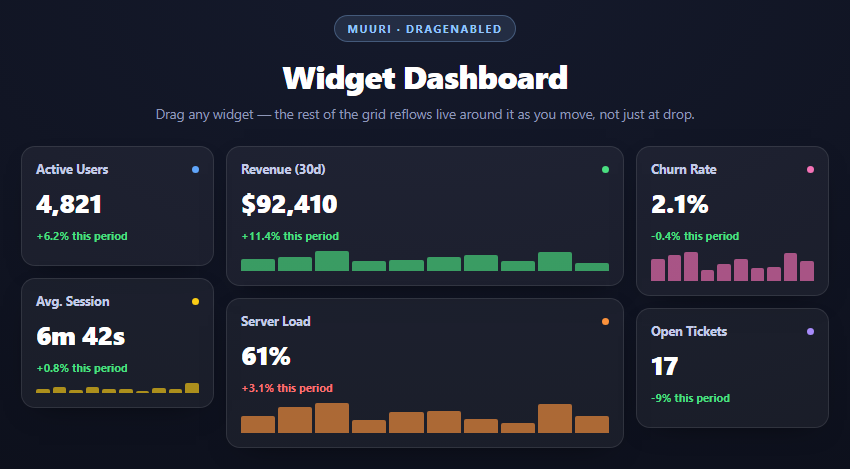
A lot of drag-and-drop libraries only tell you the final result: you drop an item, and *then* the rest of the list reorders. That works fine for a simple list, but it feels wrong for a dashboard of differently-sized widgets, where you want to see, in real time, where a widget will land as you drag it around — the same way OS-level window snapping previews a layout before you release the mouse.
dragEnabled and continuous re-sorting
new Muuri('#mdwGrid', { dragEnabled: true, ... })
Turning on dragEnabled does more than let you pick an item up — it activates Muuri's drag-sort heuristics, a background process that, while a drag is active, repeatedly checks which grid position the dragged item is currently closest to and re-triggers a full layout pass with the other items shifted to make room, *before* you let go. That's the mechanical difference from a drop-only reorder library: the other widgets are animating and repositioning live, frame by frame, as the cursor moves, not just once at the end.
dragSortHeuristics: { sortInterval: 40 } controls how often (in milliseconds) that background check runs. A smaller interval makes the reflow feel more immediately responsive to cursor movement but costs more layout recalculation; 40ms here is a reasonable middle ground — fast enough to feel live, not so fast it's calculating on every single mousemove.
dragStartPredicate and accidental-drag prevention
dragStartPredicate: { distance: 4 } requires the pointer to move at least 4 pixels before Muuri commits to starting a drag. Without this, a plain click (mousedown followed immediately by mouseup in roughly the same spot) could register as a zero-distance drag, which is a common source of "I just wanted to click the widget and it jittered" bugs. The distance threshold makes clicks and drags unambiguous.
Mixed widget sizes and the packing algorithm
Widgets here come in two widths — .w1 at 25% and .w2 at 50% — with independently varying heights set inline. Because Muuri's layout algorithm (with fillGaps: true) packs by finding the first available position that fits each item's actual measured dimensions, mixed sizes pack correctly without any manual grid-span bookkeeping: you don't declare "this widget spans 2 columns," you just make the DOM element wider, and Muuri measures it and packs around that.
z-index layering during drag
The stylesheet bumps z-index on .muuri-item-dragging (the item currently held) and .muuri-item-releasing (an item still animating into its settled position after drop) — both are classes Muuri toggles automatically. Without this, a dragged widget can visually disappear behind others mid-drag since normal DOM order/stacking doesn't account for which element the user is actively moving.
Reusing it
Swap the fixed .w1/.w2 width classes for a size picker so users can resize widgets themselves — Muuri repacks around a size change the same way it repacks around a drag, since both are just "an item's dimensions changed, recompute layout." Pair this with the filterable masonry grid if the dashboard also needs category filtering on top of manual rearrangement.
Build with AI
Build, Understand, Optimize, and Extend It With AI
The distinctive behavior here is live reflow during a drag rather than only at drop, so that's the best thing to probe with an AI assistant like Claude — ask it to trace through what dragSortHeuristics actually does on each tick and why a lower sortInterval trades responsiveness for computation cost. Then ask what would break (or feel worse) if dragEnabled were true but dragSortHeuristics were disabled entirely — the grid would still let you drag, but nothing would preview until drop. Good extensions to try: add a resize handle on each widget that toggles its width class and calls grid.refreshItems().layout() to repack, persist widget order to localStorage keyed by a stable id on each item, or add a "reset layout" button that restores the original widget order and sizes. Pair with the filterable masonry grid to combine live drag with category filtering on the same grid.
Prompt to recreate it
Copy this into your AI assistant of choice to build the effect from scratch, or as a jumping-off point for your own variant:
Build a draggable, live-reflowing dashboard of dashboard widgets using Muuri (v0.9, from a CDN) in plain HTML, CSS, and JavaScript.

Requirements:
- Generate 6 widgets from a JS array, each a card with a title, a colored status dot, a large metric number, a percentage delta line (colored green for improvement, red for decline), and a small procedurally-generated bar sparkline (random bar heights). Give widgets two different widths (e.g. 25% and 50% of the grid) and varying heights so the grid is a genuine mixed-size masonry, not uniform tiles.
- Initialize Muuri on the grid container with dragEnabled: true, a dragStartPredicate with a distance threshold (so a plain click isn't misread as a drag), layoutDuration/layoutEasing for the settle animation, dragSortHeuristics with a sortInterval controlling how often the live drag-sort recalculation runs, and layout: { fillGaps: true }.
- The key behavior to get right: while a widget is being actively dragged (before the user releases it), the OTHER widgets must visibly shift and animate into a previewed new arrangement in real time, not just snap into place after the drop. This is what dragEnabled plus the drag-sort heuristics produce — make sure the explanation content for this snippet is clear about why this differs from a library that only reorders on drop.
- Style muuri-item-dragging and muuri-item-releasing (classes Muuri applies automatically) with elevated z-index so the actively dragged widget stays visually on top of others during the drag.
- Style it as a dark analytics dashboard: rounded card widgets with a subtle border and shadow, a colored accent dot per widget, and a responsive absolutely-positioned grid container that Muuri manages entirely (no CSS grid-template).
- Keep all JavaScript in var/function style, no ES modules.
Want to tighten it up first? Run this prompt through the AI Prompt Studio to score it across 8 quality dimensions, catch anti-patterns, and tune the wording for Claude, ChatGPT, or Gemini before you paste it in.
Source Code
<div class="mdw-stage">
  <div class="mdw-head">
    <span class="mdw-tag">Muuri · dragEnabled</span>
    <h2>Widget Dashboard</h2>
    <p>Drag any widget — the rest of the grid reflows live around it as you move, not just at drop.</p>
  </div>
  <div class="mdw-grid" id="mdwGrid"></div>
</div>*{box-sizing:border-box;margin:0;padding:0}
body{font-family:system-ui,-apple-system,sans-serif;background:radial-gradient(120% 100% at 50% 0%,#151a2c,#080a12);color:#fff;min-height:100vh;padding:32px 24px}
.mdw-stage{width:min(820px,96vw);margin:0 auto;display:flex;flex-direction:column;align-items:center;gap:18px}
.mdw-head{text-align:center}
.mdw-tag{display:inline-block;font-size:11px;font-weight:700;letter-spacing:.14em;text-transform:uppercase;color:#93c5fd;background:rgba(147,197,253,.12);border:1px solid rgba(147,197,253,.3);padding:5px 12px;border-radius:99px;margin-bottom:12px}
.mdw-head h2{font-size:clamp(24px,5vw,32px);font-weight:800;letter-spacing:-.02em}
.mdw-head p{font-size:13.5px;color:#8e97b8;margin-top:7px}
.mdw-grid{position:relative;width:100%}
.mdw-item{position:absolute;padding:6px;z-index:1;cursor:grab}
.mdw-item.w1{width:25%}
.mdw-item.w2{width:50%}
.mdw-item.muuri-item-dragging{z-index:5;cursor:grabbing}
.mdw-item.muuri-item-releasing{z-index:4}
.mdw-card{height:100%;border-radius:14px;background:rgba(255,255,255,.05);border:1px solid rgba(255,255,255,.1);padding:14px;display:flex;flex-direction:column;gap:8px;box-shadow:0 10px 30px -18px rgba(0,0,0,.7)}
.mdw-card-head{display:flex;align-items:center;justify-content:space-between}
.mdw-card-head strong{font-size:12.5px;color:#c3cbe8}
.mdw-dot{width:7px;height:7px;border-radius:50%}
.mdw-metric{font-size:26px;font-weight:800;letter-spacing:-.02em}
.mdw-delta{font-size:11px;font-weight:700}
.mdw-delta.up{color:#4ade80}
.mdw-delta.down{color:#f87171}
.mdw-bars{display:flex;align-items:flex-end;gap:3px;height:44px;margin-top:auto}
.mdw-bars span{flex:1;background:#93c5fd;border-radius:2px 2px 0 0;opacity:.65}var widgets = [
{ size: 'w1', h: 120, title: 'Active Users', metric: '4,821', delta: '+6.2%', up: true, color: '#60a5fa' },
{ size: 'w2', h: 140, title: 'Revenue (30d)', metric: '$92,410', delta: '+11.4%', up: true, color: '#4ade80' },
{ size: 'w1', h: 150, title: 'Churn Rate', metric: '2.1%', delta: '-0.4%', up: true, color: '#f472b6' },
{ size: 'w1', h: 130, title: 'Avg. Session', metric: '6m 42s', delta: '+0.8%', up: true, color: '#facc15' },
{ size: 'w2', h: 150, title: 'Server Load', metric: '61%', delta: '+3.1%', up: false, color: '#fb923c' },
{ size: 'w1', h: 120, title: 'Open Tickets', metric: '17', delta: '-9%', up: true, color: '#a78bfa' },
];
var gridEl = document.getElementById('mdwGrid');
widgets.forEach(function (w) {
var el = document.createElement('div');
el.className = 'mdw-item ' + w.size;
var bars = '';
for (var i = 0; i < 10; i++) {
bars += '<span style="height:' + (20 + Math.random() * 80) + '%;background:' + w.color + '"></span>';
}
el.innerHTML = '<div class="mdw-card" style="height:' + w.h + 'px">' +
'<div class="mdw-card-head"><strong>' + w.title + '</strong><span class="mdw-dot" style="background:' + w.color + '"></span></div>' +
'<div class="mdw-metric">' + w.metric + '</div>' +
'<div class="mdw-delta ' + (w.up ? 'up' : 'down') + '">' + w.delta + ' this period</div>' +
'<div class="mdw-bars">' + bars + '</div>' +
'</div>';
gridEl.appendChild(el);
});
var grid = new Muuri('#mdwGrid', {
dragEnabled: true,
dragStartPredicate: { distance: 4 },
layoutDuration: 300,
layoutEasing: 'ease-out',
dragSortHeuristics: { sortInterval: 40 },
layout: { fillGaps: true },
});Step by step
How to Use
- 1Add the Muuri CDNInclude muuri.min.js from the CDN panel — a single script tag, no build step.
- 2Paste HTML, CSS, and JSSix mixed-size widgets (quarter and half-width) build themselves from a JS array.
- 3Drag any widgetdragEnabled: true lets you pick up a widget by clicking and moving at least 4px.
- 4Watch the live reflowdragSortHeuristics re-checks every 40ms so other widgets shift before you release.
- 5Drop it anywhereThe widget settles into the position it was previewing, animated by layoutDuration.
- 6Resize widgets in codeChange a widget's width class or height — Muuri repacks around the new dimensions automatically.
Real-world uses
Common Use Cases
Got questions?
Frequently Asked Questions
Enabling dragEnabled activates Muuri's drag-sort heuristics: a background process that repeatedly checks, at the interval set by dragSortHeuristics.sortInterval, which grid slot the dragged item is currently nearest to, and triggers a live layout pass with the other widgets shifted to preview that arrangement — all before the pointer is released.
It's the number of milliseconds between each background re-sort check during an active drag. A lower value makes the reflow track the cursor more immediately at the cost of more frequent layout recalculation; a higher value is cheaper but feels laggier. 40ms is a reasonable default for a dashboard-sized grid.
Without it, Muuri can interpret a plain click (a mousedown immediately followed by a mouseup at nearly the same coordinates) as a very short drag, causing an unwanted jitter. Requiring 4px of pointer movement before a drag officially begins keeps ordinary clicks unambiguous from drag gestures.
Muuri measures each item's actual rendered width and height and packs items into the tightest available position that fits those measured dimensions — there is no declarative "spans 2 columns" concept to keep in sync. Making a widget's CSS width 50% instead of 25% is sufficient; Muuri's layout algorithm adapts around it automatically.
Muuri toggles these classes automatically but leaves styling to you. Without a higher z-index, the widget currently being dragged (or still animating into its settled position right after release) can end up visually behind other absolutely-positioned items due to normal DOM stacking order, which looks broken during a drag.
Yes — Muuri repacks the grid whenever any item's measured dimensions change, whether that change comes from a drag or from you toggling a widget's width/height class. A resize handle that swaps a widget between w1 and w2 classes and then calls grid.refreshItems().layout() would trigger the same repack logic already driving drag reflow.