



Learn Coding Visually
Learn to code with interactive, live-preview playgrounds — HTML, CSS, JavaScript, React & more.
 HTML Playground42 lessons · Click-based · Live preview
 CSS PlaygroundLearn CSS with a live editor
 JavaScript Playground60 lessons · DOM · Async · Canvas
 React PlaygroundLearn React with a live code editor
 GSAP PlaygroundLearn GSAP animation interactively
 SVG Playground44 lessons · shapes · paths · animation
 SCSS Playground45 lessons · Sass modules · tokens
 Tailwind PlaygroundLearn Tailwind CSS with a live editor
 Bootstrap 5 Playground50 lessons · live preview
Muuri Drag-Reorder Photo Grid — Shuffle Sort Snippet
Muuri Drag-Reorder Photo Grid · Cards · Plain HTML, CSS & JS · Live preview
What's included
Features
About this UI Snippet
Muuri Drag-Reorder Photo Grid — Manual Drag and Programmatic Sort Together
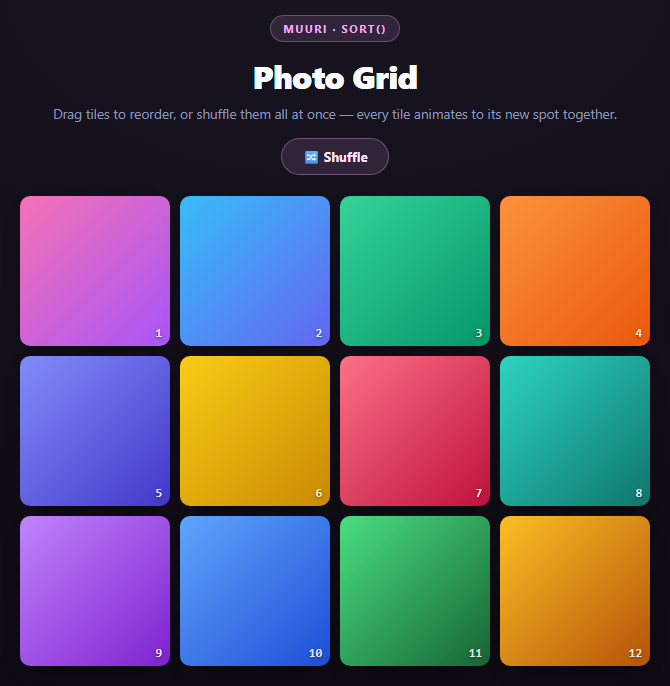
This grid supports two completely different ways of reordering the same set of tiles: dragging one tile by hand, and clicking "Shuffle" to randomize all twelve at once. Both end up calling the same underlying layout engine, which is why they compose without conflict.
Drag reordering
dragEnabled: true plus dragSortHeuristics gives every tile the same live-reflow drag behavior covered in the dashboard widgets snippet: pick up a tile, and the others continuously preview a new packed order as you move, settling into place on release. Because every tile here is the same size (25% width, square aspect ratio), the packing is simpler than a mixed-size dashboard — it's effectively a reflowing single-size grid, closer to rearranging playing cards than fitting variable boxes.
The Shuffle button and .sort()
grid.sort(function () { return Math.random() - 0.5; }, { layout: 'positions' })
.sort() takes a comparator function — exactly like Array.prototype.sort — and re-orders Muuri's internal item list according to it. Passing Math.random() - 0.5 as the comparator is a classic (if statistically imperfect) trick: for any pair of items, the comparator returns a positive or negative number essentially at random, so repeated pairwise comparisons during the sort produce a shuffled order. It's the same idiom you'd use to shuffle a plain JS array with .sort(), just handed to Muuri's item list instead.
The second argument, { layout: 'positions' }, tells Muuri to immediately trigger a layout pass using the new sort order once sorting completes. Without it, .sort() would reorder Muuri's internal bookkeeping but leave every tile visually exactly where it was — the whole point of the button is that *all twelve tiles animate to new positions simultaneously*, which only happens when the layout is explicitly re-triggered off the new order.
Why this looks different from a typical CSS shuffle
A naive way to "shuffle" a CSS grid is to re-render the DOM in a new order and let the browser's grid algorithm place everything fresh — which means every tile just teleports, because there's no continuous position to animate from. Because Muuri already tracks each tile's current (x, y) pixel position (the same absolute-positioning mechanism described in the filterable masonry grid snippet), a re-sort is just "compute new target coordinates for the existing DOM nodes and transition each one from where it already is" — nothing is destroyed or re-created, so all twelve tiles can visibly cross paths as they swap.
Reusing it
Replace the gradient placeholders with real <img> tags (respecting aspect-ratio and object-fit: cover so the tile shape stays consistent), or use .sort() with a real comparator — sort by upload date, file size, or a rating field — instead of a random one, and you get an animated "apply sort order" button instead of a shuffle.
Build with AI
Build, Understand, Optimize, and Extend It With AI
Ask an AI assistant like Claude to walk through exactly what grid.sort()'s two arguments do independently — the comparator reordering the internal list versus { layout: 'positions' } triggering the visible animation — since conflating them is the most common mistake when adding a custom sort. Then ask what would happen if you called sort() without the layout option (the order changes internally but nothing visibly moves until some other event triggers a layout). Good extensions: replace the random comparator with a real field (upload date, a rating baked into a data attribute, file size), add a second button that reverses the current order rather than shuffling, or swap the gradient placeholders for lazy-loaded real images while keeping aspect-ratio so tile geometry never shifts. Pair this with the dashboard widgets snippet to compare uniform-size drag reflow against mixed-size drag reflow.
Prompt to recreate it
Copy this into your AI assistant of choice to build the effect from scratch, or as a jumping-off point for your own variant:
Build a drag-reorderable photo tile grid with a shuffle button using Muuri (v0.9, from a CDN) in plain HTML, CSS, and JavaScript.

Requirements:
- Generate 12 square tiles from a JS array of CSS gradient strings (no external images), each tile showing its position number in a corner label, laid out as absolutely-positioned Muuri items at 25% width (aspect-ratio: 1) in a 4-column grid.
- Initialize Muuri with dragEnabled: true, dragSortHeuristics with a sortInterval, and layoutDuration/layoutEasing, so tiles can be manually dragged and the rest of the grid live-reflows during the drag (not just snapping at drop).
- Add a "Shuffle" button. Its click handler must call grid.sort() with a comparator function that returns Math.random() - 0.5 (the standard array-shuffle idiom applied to Muuri's item list), and pass { layout: 'positions' } as the second argument so Muuri immediately re-runs layout with the new order and animates every tile to its new spot in one coordinated batch.
- In the explanation content, be explicit that { layout: 'positions' } is what makes the shuffle visually animate at all — sort() alone only reorders Muuri's internal item list without moving anything on screen — and explain why tiles smoothly cross paths rather than teleporting (because Muuri tracks each tile's live absolute-positioned coordinates and only needs to compute and transition to new target coordinates, never destroying/recreating DOM nodes).
- Style it as a dark, colorful grid of rounded square tiles with a subtle shadow, and a pill-shaped Shuffle button above the grid with a hover state.
- Keep all JavaScript in var/function style, no ES modules, and make the grid responsive (drop to 3 columns at narrow widths).
Want to tighten it up first? Run this prompt through the AI Prompt Studio to score it across 8 quality dimensions, catch anti-patterns, and tune the wording for Claude, ChatGPT, or Gemini before you paste it in.
Source Code
<div class="mpg-stage">
  <div class="mpg-head">
    <span class="mpg-tag">Muuri · sort()</span>
    <h2>Photo Grid</h2>
    <p>Drag tiles to reorder, or shuffle them all at once — every tile animates to its new spot together.</p>
  </div>
  <button class="mpg-shuffle" id="mpgShuffle">🔀 Shuffle</button>
  <div class="mpg-grid" id="mpgGrid"></div>
</div>*{box-sizing:border-box;margin:0;padding:0}
body{font-family:system-ui,-apple-system,sans-serif;background:radial-gradient(120% 100% at 50% 0%,#181420,#0b0810);color:#fff;min-height:100vh;padding:32px 24px}
.mpg-stage{width:min(640px,96vw);margin:0 auto;display:flex;flex-direction:column;align-items:center;gap:16px}
.mpg-head{text-align:center}
.mpg-tag{display:inline-block;font-size:11px;font-weight:700;letter-spacing:.14em;text-transform:uppercase;color:#f0abfc;background:rgba(240,171,252,.12);border:1px solid rgba(240,171,252,.3);padding:5px 12px;border-radius:99px;margin-bottom:12px}
.mpg-head h2{font-size:clamp(24px,5vw,32px);font-weight:800;letter-spacing:-.02em}
.mpg-head p{font-size:13.5px;color:#8e97b8;margin-top:7px}
.mpg-shuffle{padding:9px 20px;border-radius:99px;border:1px solid rgba(240,171,252,.35);background:rgba(240,171,252,.12);color:#fbe3ff;font:700 13px system-ui;cursor:pointer;transition:background .18s}
.mpg-shuffle:hover{background:rgba(240,171,252,.22)}
.mpg-grid{position:relative;width:100%}
.mpg-item{position:absolute;width:25%;padding:5px;cursor:grab;z-index:1}
.mpg-item.muuri-item-dragging{z-index:5;cursor:grabbing}
.mpg-item.muuri-item-releasing{z-index:4}
.mpg-tile{aspect-ratio:1;border-radius:10px;position:relative;overflow:hidden;box-shadow:0 8px 20px -12px rgba(0,0,0,.8)}
.mpg-tile::after{content:attr(data-n);position:absolute;bottom:6px;right:8px;font:800 12px ui-monospace,monospace;color:rgba(255,255,255,.85);text-shadow:0 1px 3px rgba(0,0,0,.5)}
@media (max-width:520px){.mpg-item{width:33.333%}}var grads = [
'linear-gradient(135deg,#f472b6,#a855f7)',
'linear-gradient(135deg,#38bdf8,#6366f1)',
'linear-gradient(135deg,#34d399,#059669)',
'linear-gradient(135deg,#fb923c,#ea580c)',
'linear-gradient(135deg,#818cf8,#4338ca)',
'linear-gradient(135deg,#facc15,#ca8a04)',
'linear-gradient(135deg,#fb7185,#be123c)',
'linear-gradient(135deg,#2dd4bf,#0f766e)',
'linear-gradient(135deg,#c084fc,#7e22ce)',
'linear-gradient(135deg,#60a5fa,#1d4ed8)',
'linear-gradient(135deg,#4ade80,#166534)',
'linear-gradient(135deg,#fbbf24,#b45309)',
];
var gridEl = document.getElementById('mpgGrid');
grads.forEach(function (grad, i) {
var el = document.createElement('div');
el.className = 'mpg-item';
el.innerHTML = '<div class="mpg-tile" data-n="' + (i + 1) + '" style="background:' + grad + '"></div>';
gridEl.appendChild(el);
});
var grid = new Muuri('#mpgGrid', {
dragEnabled: true,
layoutDuration: 350,
layoutEasing: 'ease-out',
dragSortHeuristics: { sortInterval: 40 },
});
document.getElementById('mpgShuffle').addEventListener('click', function () {
grid.sort(function () {
return Math.random() - 0.5;
}, { layout: 'positions' });
});Step by step
How to Use
- 1Add the Muuri CDNInclude muuri.min.js from the CDN panel — a single script tag, no build step.
- 2Paste HTML, CSS, and JSTwelve square gradient tiles build themselves and pack into a 4-column grid.
- 3Drag a tiledragEnabled and drag-sort heuristics live-reflow the other tiles as you move one.
- 4Click Shufflegrid.sort() with a random comparator and { layout: 'positions' } animates all tiles at once.
- 5Combine bothManually drag a few tiles, then shuffle — the sort always operates on the current order.
- 6Swap in real photosReplace the gradient divs with <img> tags using aspect-ratio and object-fit: cover.
Real-world uses
Common Use Cases
Got questions?
Frequently Asked Questions
sort() accepts a comparator exactly like Array.prototype.sort. Returning Math.random() - 0.5 gives each pairwise comparison during the sort a roughly 50/50 chance of coming out positive or negative, which reorders the internal item list into an effectively shuffled sequence — the same trick commonly used to shuffle a plain JS array.
sort() by itself only reorders Muuri's internal bookkeeping of item order — it does not move anything on screen. Passing { layout: 'positions' } tells Muuri to immediately run a layout pass using the freshly sorted order, which is what makes every tile animate to its new position right away instead of silently reordering with no visual change.
Muuri computes a full new layout (a complete set of target x/y coordinates) in a single pass and animates every item toward its own target simultaneously and independently. There is no per-item queueing — it is one batched layout operation, which is why a shuffle reads as one coordinated animation rather than a sequence.
Muuri already knows each tile's current pixel position because every item is absolutely positioned via a JS-computed transform. Re-sorting only changes the target coordinates; the DOM nodes themselves are never destroyed or recreated, so the browser can smoothly transition each tile's transform from its old value to its new one.
Yes — replace the comparator with a real one, e.g. function (a, b) { return b.getElement().dataset.rating - a.getElement().dataset.rating; }, reading whatever data attribute holds the sort key off each item's DOM element. The { layout: 'positions' } option works identically regardless of what the comparator does.
They're independent Muuri features operating on the same item list: dragEnabled handles manual drag, sort() handles programmatic reordering, and filter() (from the filterable masonry grid snippet) handles visibility. All three can be active on one Muuri instance simultaneously since they all just produce a new target layout that gets animated the same way.