Learn Coding Visually
Learn to code with interactive, live-preview playgrounds — HTML, CSS, JavaScript, React & more.
 HTML Playground42 lessons · Click-based · Live preview
 CSS PlaygroundLearn CSS with a live editor
 JavaScript Playground60 lessons · DOM · Async · Canvas
 React PlaygroundLearn React with a live code editor
 GSAP PlaygroundLearn GSAP animation interactively
 SVG Playground44 lessons · shapes · paths · animation
 SCSS Playground45 lessons · Sass modules · tokens
 Tailwind PlaygroundLearn Tailwind CSS with a live editor
 Bootstrap 5 Playground50 lessons · live preview
Popmotion Drag Inertia Card — Momentum Drag Snippet
Popmotion Drag Inertia Card · Cards · Plain HTML, CSS & JS · Live preview
What's included
Features
About this UI Snippet
Popmotion Drag Inertia Card — Real Momentum from Pointer Velocity
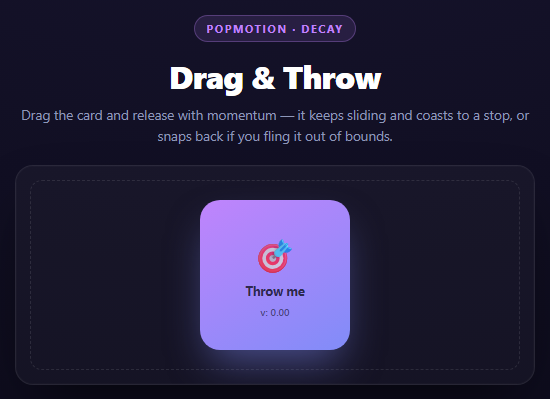
A drag interaction that stops dead the instant you release the mouse feels wrong, because nothing in the physical world does that. Momentum scrolling, thrown objects, flicked cards — they all keep moving after the force stops, decelerating gradually. This snippet reproduces that with Popmotion's animate() decay type, which is a small physics simulation rather than a fixed-duration tween.
Tracking velocity yourself, because the browser doesn't
Pointer events give you position, not velocity. To know how fast the card was moving at the moment of release, this snippet keeps a rolling lastPointer record — the previous pointer position and a timestamp — and on every pointermove computes:
velocity.x = ((e.clientX - lastPointer.x) / dt) * 1000;
That's displacement divided by elapsed time, scaled to pixels-per-second. It's recomputed on *every move event*, so by the time pointerup fires, velocity reflects the most recent flick, not an average over the whole drag — flick the card fast at the end of a slow drag and it still throws fast.
Popmotion's decay animation
popmotion.animate({ keyframes: [pos.x], velocity: velocity.x, type: 'decay', power: 0.8, timeConstant: 350, ... })
Decay is Popmotion's model of exponential friction — the same math behind native momentum scrolling. Instead of easing between two fixed keyframes over a fixed duration, it starts from a position and an initial velocity and lets the object glide, decelerating continuously until it drops below restSpeed. Two parameters shape the feel:
- `power` controls the total distance traveled before the animation settles — higher power means the same initial velocity carries the card further. - `timeConstant` controls how quickly the deceleration curve bends — a smaller value stops faster (heavier "friction"), a larger value glides longer.
There's no duration to set, because decay doesn't have a fixed endpoint: it's driven by physics parameters, and the actual settle time falls out of the simulation.
Bounds enforcement mid-decay
The onUpdate callback runs on every animation frame and clamps the reported position into the track's bounds before applying it to the DOM. The moment the *unclamped* value would exceed a bound, snapBack() is triggered: it immediately stops the decay animation (activeAnim.stop()) and starts a spring animation from the current position back to the nearest in-bounds point. Using type: 'spring' here rather than a linear or eased tween means the correction itself has a bit of physical overshoot-and-settle rather than sliding back mechanically — it reads as the card "bouncing" off an invisible wall.
Why two separate animations for x and y
Decay's parameters (power, timeConstant, velocity) are scalar, one-dimensional. Diagonal throws are handled correctly here by running two independent animate() calls, one per axis, each seeded with that axis's own velocity component — so a throw that's mostly horizontal decays differently on x than on the smaller y component, exactly matching how the flick actually happened.
Reusing it
This pattern — track pointer velocity, hand it to animate({ type: 'decay' }) on release, clamp with a spring correction — is the backbone of any "throwable" UI: image carousels, bottom sheets, a Popmotion Swipe-Dismiss Stack. Swap the spring-back for a full off-screen fly-away and you have that exact snippet.
Build with AI
Build, Understand, Optimize, and Extend It With AI
This snippet demonstrates the difference between duration-based and physics-based animation, which is worth exploring further with an AI assistant. Paste the code into Claude and ask it to explain exactly how Popmotion's decay type differs mathematically from its spring type -- decay models exponential friction from an initial velocity with no target endpoint, while spring models a mass-spring-damper system converging on an explicit target. Then ask what would happen if restSpeed were set much lower (the card would coast almost imperceptibly slowly for a long tail before technically stopping) or much higher (it would stop abruptly, looking less like real momentum). To extend it: ask it to add rotation proportional to drag velocity for a more tactile feel, make the snap-back bounce slightly past the boundary before settling (increase spring stiffness/damping asymmetry), or generalize the two-axis decay into a single 2D vector decay so power and timeConstant are shared across both axes instead of applied independently.
Prompt to recreate it
Copy this into your AI assistant of choice to build the effect from scratch, or as a jumping-off point for your own variant:
Build a draggable card with inertial momentum using Popmotion v8 (from a CDN, global object popmotion) in plain HTML, CSS, and JavaScript.

Requirements:
- A single square card sits centered inside a bounded track container. It is draggable with Pointer Events (pointerdown/pointermove/pointerup), using setPointerCapture so the drag keeps tracking if the pointer leaves the card element.
- While dragging, compute the pointer's instantaneous velocity on every pointermove as (change in clientX or clientY) divided by (change in time since the last move event), scaled to pixels per second -- not an average over the whole drag.
- On release, animate the card's position on each axis independently using popmotion.animate({ keyframes: [currentPos], velocity: axisVelocity, type: 'decay', power: 0.8, timeConstant: 350, restSpeed: 30, onUpdate }) so the card continues sliding with realistic deceleration rather than stopping immediately.
- Inside each decay animation's onUpdate, detect when the unclamped position would exceed the track's inner bounds (computed from the track and card bounding rects). When it does, immediately call .stop() on the decay animation and start a new popmotion.animate({ type: 'spring', stiffness: 300, damping: 30 }) from the current position back to the nearest in-bounds value, so an out-of-bounds throw snaps back with a springy bounce instead of a hard stop or a linear slide.
- Apply position updates via CSS transform: translate(x, y) on every onUpdate frame, never left/top.
- Show a small live velocity readout label while dragging.
- Style it as a dark card in a dashed-border bounded track, with a gradient card background and grab/grabbing cursor states.
Want to tighten it up first? Run this prompt through the AI Prompt Studio to score it across 8 quality dimensions, catch anti-patterns, and tune the wording for Claude, ChatGPT, or Gemini before you paste it in.
Source Code
<div class="pdc-stage">
<div class="pdc-head">
<span class="pdc-tag">Popmotion · decay</span>
<h2>Drag & Throw</h2>
<p>Drag the card and release with momentum — it keeps sliding and coasts to a stop, or snaps back if you fling it out of bounds.</p>
</div>
<div class="pdc-track" id="pdcTrack">
<div class="pdc-card" id="pdcCard">
<span class="pdc-emoji">🎯</span>
<span class="pdc-label">Throw me</span>
<span class="pdc-vel" id="pdcVel">v: 0.00</span>
</div>
</div>
</div>*{box-sizing:border-box;margin:0;padding:0}
body{font-family:system-ui,-apple-system,sans-serif;background:radial-gradient(120% 100% at 50% 0%,#181530,#0a0916);color:#fff;min-height:100vh;display:flex;align-items:center;justify-content:center;padding:24px}
.pdc-stage{width:min(520px,94vw);display:flex;flex-direction:column;align-items:center;gap:20px}
.pdc-head{text-align:center}
.pdc-tag{display:inline-block;font-size:11px;font-weight:700;letter-spacing:.14em;text-transform:uppercase;color:#c084fc;background:rgba(192,132,252,.12);border:1px solid rgba(192,132,252,.3);padding:5px 12px;border-radius:99px;margin-bottom:12px}
.pdc-head h2{font-size:clamp(24px,5vw,32px);font-weight:800;letter-spacing:-.02em}
.pdc-head p{font-size:13.5px;color:#8e97b8;margin-top:7px;line-height:1.5}
.pdc-track{position:relative;width:100%;height:220px;background:rgba(255,255,255,.03);border:1px solid rgba(255,255,255,.08);border-radius:18px;overflow:hidden;box-shadow:inset 0 0 0 1px rgba(255,255,255,.02),0 24px 60px -24px rgba(0,0,0,.8)}
.pdc-track::before{content:'';position:absolute;inset:14px;border:1.5px dashed rgba(255,255,255,.1);border-radius:12px;pointer-events:none}
.pdc-card{position:absolute;top:50%;left:50%;width:150px;height:150px;margin:-75px 0 0 -75px;background:linear-gradient(150deg,#c084fc,#818cf8);border-radius:20px;display:flex;flex-direction:column;align-items:center;justify-content:center;gap:6px;cursor:grab;box-shadow:0 20px 40px -10px rgba(129,140,248,.5);user-select:none;touch-action:none}
.pdc-card:active{cursor:grabbing}
.pdc-emoji{font-size:34px}
.pdc-label{font-size:12.5px;font-weight:700;color:rgba(10,9,22,.75)}
.pdc-vel{font-size:10px;font-weight:600;color:rgba(10,9,22,.55);font-variant-numeric:tabular-nums}var track = document.getElementById('pdcTrack');
var card = document.getElementById('pdcCard');
var velLabel = document.getElementById('pdcVel');
var pos = { x: 0, y: 0 };
var dragging = false;
var startPointer = { x: 0, y: 0 };
var startPos = { x: 0, y: 0 };
var lastPointer = { x: 0, y: 0, t: 0 };
var velocity = { x: 0, y: 0 };
var activeAnim = null;
function bounds() {
var t = track.getBoundingClientRect();
var c = card.getBoundingClientRect();
var halfW = c.width / 2;
var halfH = c.height / 2;
return {
minX: -(t.width / 2) + halfW + 10,
maxX: (t.width / 2) - halfW - 10,
minY: -(t.height / 2) + halfH + 10,
maxY: (t.height / 2) - halfH - 10,
};
}
function applyPos() {
card.style.transform = 'translate(' + pos.x + 'px,' + pos.y + 'px)';
}
function stopActive() {
if (activeAnim) { activeAnim.stop(); activeAnim = null; }
}
function clamp(v, min, max) { return Math.max(min, Math.min(max, v)); }
card.addEventListener('pointerdown', function (e) {
stopActive();
dragging = true;
card.setPointerCapture(e.pointerId);
startPointer = { x: e.clientX, y: e.clientY };
startPos = { x: pos.x, y: pos.y };
lastPointer = { x: e.clientX, y: e.clientY, t: performance.now() };
velocity = { x: 0, y: 0 };
});
card.addEventListener('pointermove', function (e) {
if (!dragging) return;
var dx = e.clientX - startPointer.x;
var dy = e.clientY - startPointer.y;
pos.x = startPos.x + dx;
pos.y = startPos.y + dy;
applyPos();
var now = performance.now();
var dt = Math.max(now - lastPointer.t, 1);
velocity.x = ((e.clientX - lastPointer.x) / dt) * 1000; // px/s
velocity.y = ((e.clientY - lastPointer.y) / dt) * 1000;
lastPointer = { x: e.clientX, y: e.clientY, t: now };
velLabel.textContent = 'v: ' + (Math.hypot(velocity.x, velocity.y) / 1000).toFixed(2);
});
function release() {
if (!dragging) return;
dragging = false;
var b = bounds();
// Popmotion's animate() with velocity + power + timeConstant is its decay
// helper: it simulates exponential friction starting from the pointer's
// release velocity, exactly like native momentum scrolling. power controls
// how far the decay travels before settling; timeConstant controls how
// quickly it decelerates.
activeAnim = popmotion.animate({
keyframes: [pos.x],
velocity: velocity.x,
type: 'decay',
power: 0.8,
timeConstant: 350,
restSpeed: 30,
onUpdate: function (x) {
pos.x = clamp(x, b.minX, b.maxX);
applyPos();
// Out-of-bounds during decay: stop the decay and spring back inside.
if (x < b.minX || x > b.maxX) snapBack(b);
},
});
var activeAnimY = popmotion.animate({
keyframes: [pos.y],
velocity: velocity.y,
type: 'decay',
power: 0.8,
timeConstant: 350,
restSpeed: 30,
onUpdate: function (y) {
pos.y = clamp(y, b.minY, b.maxY);
applyPos();
if (y < b.minY || y > b.maxY) snapBack(b);
},
});
velLabel.textContent = 'v: ' + (Math.hypot(velocity.x, velocity.y) / 1000).toFixed(2);
}
function snapBack(b) {
stopActive();
var targetX = clamp(pos.x, b.minX, b.maxX);
var targetY = clamp(pos.y, b.minY, b.maxY);
// Spring back into bounds with Popmotion's spring type so the correction
// itself feels physical instead of teleporting the card back.
activeAnim = popmotion.animate({
keyframes: [pos.x, targetX],
type: 'spring',
stiffness: 300,
damping: 30,
onUpdate: function (x) { pos.x = x; applyPos(); },
});
popmotion.animate({
keyframes: [pos.y, targetY],
type: 'spring',
stiffness: 300,
damping: 30,
onUpdate: function (y) { pos.y = y; applyPos(); },
});
}
card.addEventListener('pointerup', release);
card.addEventListener('pointercancel', release);
applyPos();Step by step
How to Use
- 1Add the Popmotion CDNInclude the popmotion UMD build — it exposes a global popmotion object with animate().
- 2Paste HTML, CSS, and JSA draggable card renders centered in a bounded track.
- 3Drag the cardPointer events update its position directly and a rolling velocity estimate is recomputed each move.
- 4Release with a flickpopmotion.animate({ type: "decay" }) takes over, coasting the card using the release velocity.
- 5Throw it out of boundsonUpdate detects the overshoot mid-decay and switches to a spring animation back inside.
- 6Tune the feelAdjust power and timeConstant to make throws travel further or stop sooner.
Real-world uses
Common Use Cases
Got questions?
Frequently Asked Questions
Velocity is recalculated on every pointermove as (change in position) / (change in time) since the last move event, scaled to px/s. Using total drag distance over total drag time would average out fast flicks with slow starts -- a slow drag ending in a quick flick would report low average speed and throw weakly, which feels wrong. Recomputing per-move captures only the most recent motion.
power scales how far the animation travels in total before it settles -- think of it as inversely related to friction strength. timeConstant controls the shape of the deceleration curve in milliseconds -- roughly, how long it takes the velocity to fall to about a third of its starting value. Lower timeConstant stops sooner; higher power (at the same velocity) travels further.
Popmotion's decay type operates on a single scalar keyframe with a single velocity value. A diagonal throw has different velocity components on each axis, so it needs two independent decay simulations, each seeded with that axis's own velocity, to decelerate realistically rather than moving in a straight diagonal line regardless of the actual flick angle.
The decay animation's onUpdate callback checks the unclamped position every frame. The instant it would exceed a bound, the code calls activeAnim.stop() to cancel the decay immediately and starts a new spring animation from the current (just-over-the-line) position back to the nearest in-bounds point -- there is no gap frame, so the handoff between decay and spring is continuous.
Yes -- apply additional transforms (scale, rotate) inside the same pointermove/onUpdate handlers alongside translate, typically driven by drag distance or velocity magnitude, and Popmotion animate() calls can run in parallel for those properties too, each with its own type (spring, decay, or a fixed tween).
Keep pos and velocity in a ref (not state, to avoid re-renders on every pointermove) and apply the transform imperatively to a DOM ref in the move handler, exactly as this snippet does. Call popmotion.animate() from the pointerup handler the same way; there is nothing framework-specific about Popmotion itself since it operates directly on values you feed into onUpdate.