Learn Coding Visually
Learn to code with interactive, live-preview playgrounds — HTML, CSS, JavaScript, React & more.
 HTML Playground42 lessons · Click-based · Live preview
 CSS PlaygroundLearn CSS with a live editor
 JavaScript Playground60 lessons · DOM · Async · Canvas
 React PlaygroundLearn React with a live code editor
 GSAP PlaygroundLearn GSAP animation interactively
 SVG Playground44 lessons · shapes · paths · animation
 SCSS Playground45 lessons · Sass modules · tokens
 Tailwind PlaygroundLearn Tailwind CSS with a live editor
 Bootstrap 5 Playground50 lessons · live preview
Popmotion Swipe-Dismiss Stack — Tinder-Style Card Deck Snippet
Popmotion Swipe-Dismiss Stack · Cards · Plain HTML, CSS & JS · Live preview
What's included
Features
About this UI Snippet
Popmotion Swipe-Dismiss Stack — Velocity-Carried Dismissal, Explained
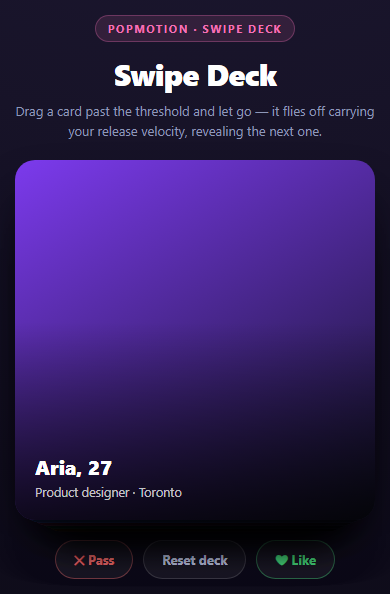
A convincing swipe-to-dismiss deck needs three things working together: a drag that tilts and offsets the card, a threshold decision about whether the drag counts as a dismissal, and — the part that's easy to get wrong — an exit animation that actually continues the motion the user started, instead of resetting to a fixed "fly away" tween. This snippet handles all three with Popmotion.
Threshold decision at release
Every pointermove updates pos.x/pos.y directly and applies a rotation proportional to horizontal offset (pos.x / 18 degrees) so the card visibly tilts as it's dragged, like a card pivoting from your thumb. On pointerup, the only decision that matters is one comparison:
var pastThreshold = Math.abs(pos.x) > THRESHOLD;
Past the threshold, the card is dismissed. Under it, it springs back to center. This binary branch is the entire "swipe logic" — everything else is animation.
Why the exit uses decay, seeded with real velocity
The naive dismissal animation is a fixed tween: animate translateX from wherever the card is to some far-off value over, say, 300ms. That looks fine for a slow deliberate swipe but wrong for a fast flick — the card visibly *decelerates* into the tween's easing curve even though the user just flung it at speed. This snippet instead reuses the release velocity (vx, tracked the same way as in the Popmotion Drag Inertia Card) as the starting velocity of a decay animation:
popmotion.animate({ keyframes: [pos.x], velocity: Math.abs(vx) > 40 ? vx : dir * 900, type: 'decay', power: 0.6, timeConstant: 300, onUpdate, onComplete })
A hard flick keeps its speed into the exit; a slow drag that merely crossed the threshold gets a velocity floor (dir * 900) so it doesn't limp off-screen too slowly — the ternary guarantees a *minimum* exit speed regardless of how the threshold was crossed, while still respecting a genuinely fast flick's higher velocity.
Stamps as a threshold visualization
likeStamp.style.opacity = pos.x > 0 ? t : 0 where t = Math.min(Math.abs(pos.x) / THRESHOLD, 1) fades in a "Like"/"Nope" stamp proportionally to how close the drag is to the dismissal threshold — it reaches full opacity exactly when pos.x reaches THRESHOLD, giving a visual preview of what will happen if the user lets go right now.
Promoting the next card
onComplete: advanceDeck fires only once the decay animation actually finishes (falls below its rest speed), not the instant the drag ends — so the flung card is genuinely off-screen before it's removed from the DOM. advanceDeck() then removes the top card's element, shifts the data array, and re-numbers the remaining cards' z-index/scale/offset so the second card becomes the new top — animated into place with its own small spring rather than an instant CSS snap, so the deck settles rather than jump-cutting.
Reusing it
This threshold-plus-velocity-carried-exit pattern generalizes to any swipe-to-act UI: email archive/delete swipes, image approve/reject queues, onboarding card stacks. Pair it with the Popmotion Drag Inertia Card for the single-card version of the same velocity tracking without the deck logic.
Build with AI
Build, Understand, Optimize, and Extend It With AI
This snippet combines several Popmotion techniques (drag tracking, decay, spring, threshold logic) into one interaction, so it's a good candidate for a guided walkthrough with an AI assistant. Paste the code into Claude and ask it to trace the full lifecycle of a single swipe from pointerdown to the next card being promoted, identifying exactly where the threshold decision happens and why onComplete rather than pointerup is what triggers advanceDeck(). Then ask what would go wrong if the velocity floor (dir * 900) were removed entirely -- slow deliberate drags past the threshold would produce a decay animation too weak to actually clear the viewport, leaving a dismissed card visibly stuck near the edge. To extend it: ask it to add a third dismissal direction (swipe up to "super-like"), add haptic-style scale feedback proportional to drag distance, generalize the deck to load more cards lazily as the stack thins, or add a subtle rotation-based shadow that intensifies as the stamp opacity increases.
Prompt to recreate it
Copy this into your AI assistant of choice to build the effect from scratch, or as a jumping-off point for your own variant:
Build a Tinder-style swipeable card stack using Popmotion v8 (from a CDN, global object popmotion) in plain HTML, CSS, and JavaScript.

Requirements:
- Render a stack of at least 5 cards absolutely positioned on top of each other, each showing a name/subtitle over a gradient background. Cards behind the top one are visually offset with a slight vertical translateY and scale reduction so the stack reads as a deck, with z-index descending by position.
- Only the frontmost card is draggable, using Pointer Events (pointerdown/pointermove/pointerup) with setPointerCapture. While dragging, apply translate(x, y) plus a rotation proportional to horizontal offset (e.g. x / 18 degrees) so the card tilts like it is pivoting from a thumb.
- Track horizontal pointer velocity on every pointermove the same way a drag-inertia card would: (change in clientX) / (change in time) scaled to px/s.
- Show a "Like" stamp that fades in when dragging right and a "Nope" stamp that fades in when dragging left, with opacity proportional to how close the drag is to a fixed pixel threshold (e.g. 110px), reaching full opacity exactly at the threshold.
- On release: if the drag distance exceeds the threshold, animate the card off-screen using popmotion.animate({ type: 'decay', velocity: <the tracked release velocity, with a sane minimum floor so slow-but-past-threshold drags still exit fully>, power, timeConstant, onUpdate, onComplete }). Only once onComplete fires, remove the card from the DOM/data array and promote the next card into the top slot with a small spring animation on its scale/offset. If the drag distance does NOT exceed the threshold, spring the card back to its original position and rotation using type: 'spring'.
- Add Like/Pass buttons below the deck that trigger the identical decay-based exit programmatically (as if the user had swiped), plus a Reset button that rebuilds the full deck.
- Show a dashed-border empty state once all cards are dismissed.
- Style it as a dark themed deck with rounded cards, a bottom gradient overlay for text legibility, and pill-shaped action buttons.
Want to tighten it up first? Run this prompt through the AI Prompt Studio to score it across 8 quality dimensions, catch anti-patterns, and tune the wording for Claude, ChatGPT, or Gemini before you paste it in.
Source Code
<div class="psd-stage">
  <div class="psd-head">
    <span class="psd-tag">Popmotion · swipe deck</span>
    <h2>Swipe Deck</h2>
    <p>Drag a card past the threshold and let go — it flies off carrying your release velocity, revealing the next one.</p>
  </div>
  <div class="psd-deck" id="psdDeck"></div>
  <div class="psd-actions">
    <button class="psd-btn is-no" id="psdNo">✕ Pass</button>
    <button class="psd-btn is-reset" id="psdReset">Reset deck</button>
    <button class="psd-btn is-yes" id="psdYes">❤ Like</button>
  </div>
</div>*{box-sizing:border-box;margin:0;padding:0}
body{font-family:system-ui,-apple-system,sans-serif;background:radial-gradient(120% 100% at 50% 0%,#1c1730,#0c0a16);color:#fff;min-height:100vh;display:flex;align-items:center;justify-content:center;padding:24px}
.psd-stage{width:min(360px,94vw);display:flex;flex-direction:column;align-items:center;gap:20px}
.psd-head{text-align:center}
.psd-tag{display:inline-block;font-size:11px;font-weight:700;letter-spacing:.14em;text-transform:uppercase;color:#f472b6;background:rgba(244,114,182,.12);border:1px solid rgba(244,114,182,.3);padding:5px 12px;border-radius:99px;margin-bottom:12px}
.psd-head h2{font-size:clamp(24px,5vw,30px);font-weight:800;letter-spacing:-.02em}
.psd-head p{font-size:13px;color:#8e97b8;margin-top:7px;line-height:1.5}
.psd-deck{position:relative;width:100%;height:360px}
.psd-card{position:absolute;inset:0;border-radius:20px;padding:20px;display:flex;flex-direction:column;justify-content:flex-end;gap:4px;cursor:grab;user-select:none;touch-action:none;box-shadow:0 24px 50px -18px rgba(0,0,0,.7);background-size:cover;background-position:center}
.psd-card:active{cursor:grabbing}
.psd-card::after{content:'';position:absolute;inset:0;border-radius:20px;background:linear-gradient(to top,rgba(0,0,0,.75),rgba(0,0,0,0) 55%);z-index:0}
.psd-card-name{position:relative;z-index:1;font-size:20px;font-weight:800}
.psd-card-sub{position:relative;z-index:1;font-size:12.5px;color:rgba(255,255,255,.75)}
.psd-stamp{position:absolute;top:22px;z-index:1;font-size:13px;font-weight:800;letter-spacing:.06em;text-transform:uppercase;padding:6px 12px;border-radius:8px;border:3px solid;opacity:0;transform:rotate(-18deg)}
.psd-stamp.like{left:20px;color:#4ade80;border-color:#4ade80}
.psd-stamp.nope{right:20px;color:#f87171;border-color:#f87171;transform:rotate(18deg)}
.psd-empty{position:absolute;inset:0;display:flex;align-items:center;justify-content:center;flex-direction:column;gap:8px;border:1.5px dashed rgba(255,255,255,.14);border-radius:20px;color:#5c6486;font-size:13px}
.psd-actions{display:flex;gap:10px}
.psd-btn{padding:10px 18px;border-radius:99px;border:1px solid rgba(255,255,255,.14);background:rgba(255,255,255,.05);color:#c3cbe8;font:700 13px system-ui;cursor:pointer;transition:transform .12s,background .15s}
.psd-btn:active{transform:scale(.94)}
.psd-btn.is-yes{color:#4ade80;border-color:rgba(74,222,128,.4)}
.psd-btn.is-no{color:#f87171;border-color:rgba(248,113,113,.4)}
.psd-btn:hover{background:rgba(255,255,255,.1)}var PEOPLE = [
{ name: 'Aria, 27', sub: 'Product designer · Toronto', color: '#7c3aed' },
{ name: 'Kai, 31', sub: 'Backend engineer · Austin', color: '#2563eb' },
{ name: 'Noor, 25', sub: 'Illustrator · Berlin', color: '#db2777' },
{ name: 'Theo, 29', sub: 'Product manager · Lisbon', color: '#059669' },
{ name: 'Mila, 26', sub: 'Data scientist · Seattle', color: '#d97706' },
];
var deck = document.getElementById('psdDeck');
var THRESHOLD = 110;
var stackData = [];
function gradientFor(hex) {
return 'linear-gradient(150deg,' + hex + ',#111225)';
}
function buildDeck() {
deck.innerHTML = '';
stackData = PEOPLE.slice();
stackData.forEach(function (person, i) { renderCard(person, i); });
}
function renderCard(person, indexFromTop) {
var card = document.createElement('div');
card.className = 'psd-card';
card.style.background = gradientFor(person.color);
card.style.zIndex = String(100 - indexFromTop);
var scale = 1 - indexFromTop * 0.04;
var lift = indexFromTop * 10;
card.style.transform = 'translateY(' + lift + 'px) scale(' + scale + ')';
card.dataset.baseTransform = card.style.transform;
card.innerHTML =
'<span class="psd-stamp like">Like</span>' +
'<span class="psd-stamp nope">Nope</span>' +
'<span class="psd-card-name">' + person.name + '</span>' +
'<span class="psd-card-sub">' + person.sub + '</span>';
deck.appendChild(card);
if (indexFromTop === 0) wireTopCard(card);
}
function showEmpty() {
var empty = document.createElement('div');
empty.className = 'psd-empty';
empty.innerHTML = '<span style="font-size:30px">🃏</span><span>That’s everyone — reset the deck</span>';
deck.appendChild(empty);
}
function wireTopCard(card) {
var dragging = false;
var start = { x: 0, y: 0 };
var pos = { x: 0, y: 0 };
var last = { x: 0, t: 0 };
var vx = 0;
var likeStamp = card.querySelector('.psd-stamp.like');
var nopeStamp = card.querySelector('.psd-stamp.nope');
var anim = null;
function apply() {
var rot = pos.x / 18;
card.style.transform = 'translate(' + pos.x + 'px,' + pos.y + 'px) rotate(' + rot + 'deg)';
var t = Math.min(Math.abs(pos.x) / THRESHOLD, 1);
likeStamp.style.opacity = pos.x > 0 ? t : 0;
nopeStamp.style.opacity = pos.x < 0 ? t : 0;
}
card.addEventListener('pointerdown', function (e) {
if (anim) anim.stop();
dragging = true;
card.setPointerCapture(e.pointerId);
start = { x: e.clientX, y: e.clientY };
last = { x: e.clientX, t: performance.now() };
});
card.addEventListener('pointermove', function (e) {
if (!dragging) return;
pos.x = e.clientX - start.x;
pos.y = e.clientY - start.y;
apply();
var now = performance.now();
var dt = Math.max(now - last.t, 1);
vx = ((e.clientX - last.x) / dt) * 1000;
last = { x: e.clientX, t: now };
});
function settle() {
if (!dragging) return;
dragging = false;
var pastThreshold = Math.abs(pos.x) > THRESHOLD;
if (pastThreshold) {
var dir = pos.x > 0 ? 1 : -1;
var flyTo = dir * (window.innerWidth || 800);
// Fly the card off-screen using its release velocity as the starting
// velocity of a decay animation -- a hard flick continues fast, a slow
// drag past the threshold drifts off more gently, and either way the
// motion carries over from the drag instead of restarting from zero.
anim = popmotion.animate({
keyframes: [pos.x],
velocity: Math.abs(vx) > 40 ? vx : dir * 900,
type: 'decay',
power: 0.6,
timeConstant: 300,
onUpdate: function (x) {
card.style.transform = 'translate(' + x + 'px,' + pos.y + 'px) rotate(' + (x / 18) + 'deg)';
},
onComplete: advanceDeck,
});
} else {
// Under threshold: spring back to center, restoring rotation and
// clearing the like/nope stamp opacity as it returns.
anim = popmotion.animate({
keyframes: [pos.x, 0],
type: 'spring',
stiffness: 320,
damping: 24,
onUpdate: function (x) {
pos.x = x;
apply();
},
});
popmotion.animate({
keyframes: [pos.y, 0],
type: 'spring',
stiffness: 320,
damping: 24,
onUpdate: function (y) { pos.y = y; apply(); },
});
}
}
card.addEventListener('pointerup', settle);
card.addEventListener('pointercancel', settle);
}
function advanceDeck() {
var top = deck.querySelector('.psd-card');
if (top) top.remove();
stackData.shift();
var remaining = deck.querySelectorAll('.psd-card');
remaining.forEach(function (card, i) {
card.style.zIndex = String(100 - i);
var scale = 1 - i * 0.04;
var lift = i * 10;
var target = 'translateY(' + lift + 'px) scale(' + scale + ')';
// Promote the next card into place with a spring so the deck settles
// rather than snapping instantly into the gap left by the swiped card.
popmotion.animate({
keyframes: [0, 1],
type: 'spring',
stiffness: 260,
damping: 22,
onUpdate: function (v) {
card.style.transform = target;
card.style.opacity = String(0.7 + v * 0.3);
},
});
if (i === 0) wireTopCard(card);
});
if (stackData.length === 0) showEmpty();
}
function programmaticSwipe(dir) {
var top = deck.querySelector('.psd-card');
if (!top) return;
popmotion.animate({
keyframes: [0, dir * (window.innerWidth || 800)],
type: 'decay',
velocity: dir * 900,
power: 0.6,
timeConstant: 300,
onUpdate: function (x) {
top.style.transform = 'translate(' + x + 'px,0px) rotate(' + (x / 18) + 'deg)';
},
onComplete: advanceDeck,
});
}
document.getElementById('psdYes').addEventListener('click', function () { programmaticSwipe(1); });
document.getElementById('psdNo').addEventListener('click', function () { programmaticSwipe(-1); });
document.getElementById('psdReset').addEventListener('click', buildDeck);
buildDeck();Step by step
How to Use
- 1Add the Popmotion CDNInclude the popmotion UMD build for the global popmotion.animate function.
- 2Paste HTML, CSS, and JSA five-card deck renders with the frontmost card active and draggable.
- 3Drag a card sidewaysIt tilts and offsets with the pointer, and a Like/Nope stamp fades in as you approach the threshold.
- 4Release past the thresholdThe card flies off using a decay animation seeded with your release velocity.
- 5Release under the thresholdA spring animation pulls the card back to center instead of dismissing it.
- 6Use the buttons or resetPass/Like buttons trigger the same programmatic dismissal; Reset deck rebuilds the stack.
Real-world uses
Common Use Cases
Got questions?
Frequently Asked Questions
The drag handler recomputes vx (horizontal velocity in px/s) on every pointermove the same way the Popmotion Drag Inertia Card does. On release past the threshold, that vx is passed directly as the velocity option to a decay-type animate() call, so a hard flick continues fast off-screen and a slower drag gets a minimum floor velocity (dir * 900) so it does not crawl.
A drag can cross the threshold slowly -- someone drags deliberately and stops just past 110px with near-zero velocity. Using raw vx in that case would produce a decay animation that barely moves, leaving the card stranded near the threshold instead of exiting. The Math.abs(vx) > 40 ? vx : dir * 900 ternary guarantees the exit always has enough speed to actually leave the screen.
Removing it immediately would cut the exit animation short -- the card would vanish mid-flight instead of visibly leaving the screen. advanceDeck() is only called from the decay animation's onComplete callback, which Popmotion fires once the simulated velocity drops below its rest threshold, guaranteeing the fly-off animation is finished first.
It is computed directly from the current x offset every frame: rotate(pos.x / 18deg). Since pos.x already updates on every pointermove and every decay/spring onUpdate, the rotation is always in sync with position with no extra animation call needed -- it is a derived value, not an independently animated one.
pointerdown calls anim.stop() first if a spring-back animation is still running, cancelling it and letting the new drag take over from wherever the card currently is -- there is no fighting between the in-flight spring and the new pointer-driven position because the spring is explicitly stopped before dragging resumes.
Keep the stack data in component state for rendering the list of people, but drive the top card's live drag position and animation through a ref and imperative style.transform writes exactly as this snippet does -- animating per-frame position through component state would cause excessive re-renders. Call advanceDeck-equivalent state updates (shift the array) only from onComplete, after the exit animation finishes.