Learn Coding Visually
Learn to code with interactive, live-preview playgrounds — HTML, CSS, JavaScript, React & more.
 HTML Playground42 lessons · Click-based · Live preview
 CSS PlaygroundLearn CSS with a live editor
 JavaScript Playground60 lessons · DOM · Async · Canvas
 React PlaygroundLearn React with a live code editor
 GSAP PlaygroundLearn GSAP animation interactively
 SVG Playground44 lessons · shapes · paths · animation
 SCSS Playground45 lessons · Sass modules · tokens
 Tailwind PlaygroundLearn Tailwind CSS with a live editor
 Bootstrap 5 Playground50 lessons · live preview
Velocity.js Staggered Card Reveal — Manual Delay Loop Snippet
Velocity.js Staggered Card Reveal · Cards · Plain HTML, CSS & JS · Live preview
What's included
Features
About this UI Snippet
Velocity.js Staggered Card Reveal — The Manual Delay Loop, Explained
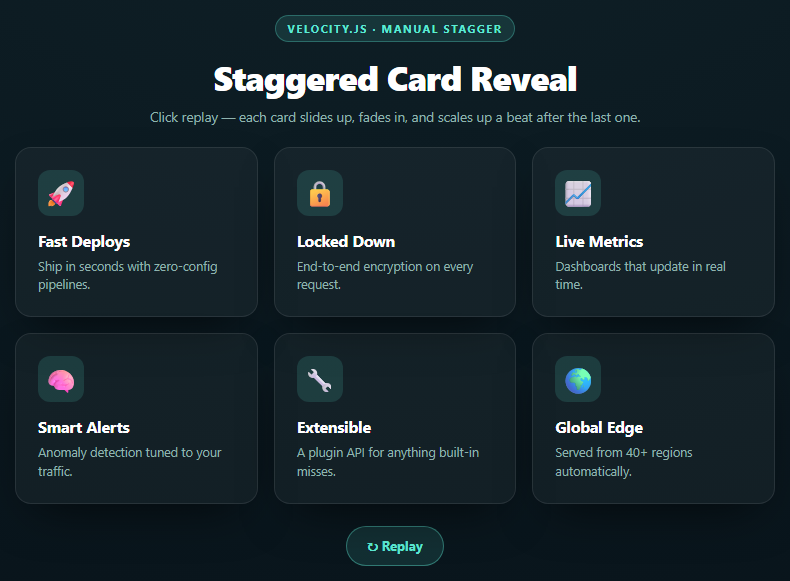
Velocity.js has a built-in stagger option, but it only works when you pass a single element list to a single Velocity() call. Sometimes you want more control per element — different starting values, or the ability to reset state before replaying — and the cleanest way to get that is a plain for loop that calls Velocity() once per card with an incrementing delay. This snippet uses that pattern deliberately, because it generalizes to cases the built-in stagger can't reach.
The reset-then-animate two-step
js
Velocity(cards, { opacity: 0, translateY: 28, scale: 0.94 }, { duration: 0 });
for (var i = 0; i < cards.length; i++) {
  Velocity(cards[i], { opacity: 1, translateY: 0, scale: 1 }, { duration: 620, easing: [180, 18], delay: i * 90 });
}
The first call has duration: 0 — it's not an animation, it's an instant style write that snaps every card back to its hidden, offset, shrunk state. This matters for the replay button: without this reset, clicking replay while cards are already visible would animate from their current (visible) values to the same visible values, and nothing would appear to happen. Doing the reset as its own zero-duration Velocity() call, rather than inline CSS, keeps it going through Velocity's queue so it's guaranteed to apply before the staggered calls below it start (Velocity calls on the same element queue in order by default).
Why a loop instead of the stagger option
Velocity's stagger option computes delay = index * staggerValue internally for you when you pass a list of elements to one call. The manual loop here does exactly the same math (delay: i * 90) but issues one Velocity() call per card. That's strictly more code for the same visual result on a uniform grid — but it's the pattern to reach for the moment any card needs to deviate: a featured card that arrives with a different scale, a filtered-out card skipped from the loop, or a data-driven delay computed from something other than array index (e.g. distance from a click point, or a server-provided priority field). The built-in stagger can't express any of those; the loop can, because you control the body.
The spring-flavored easing without a full spring
easing: [180, 18] is Velocity's two-number custom spring shorthand — tension and friction — the same mechanism used for the elastic menu, tuned here to a subtler wobble that suits a settle-into-place feel rather than an obviously bouncy one. Lower tension than a menu's snap-open curve makes the motion read as "gentle drop" instead of "spring toy."
Reusing it
Feed cardData from a real API response and the grid, the loop, and the animation all keep working unchanged — the DOM generation and the reveal are already decoupled. Swap the per-card delay: i * 90 for a 2D grid stagger (row/column math) the way the anime.js ripple grid does, if the layout grows past one row and you want a diagonal wave instead of a left-to-right cascade.
Build with AI
Build, Understand, Optimize, and Extend It With AI
This snippet is a useful case study in when to write animation math by hand versus reach for a library helper. Paste it into an AI assistant like Claude and ask it to explain exactly why the duration: 0 reset call is necessary for the Replay button to work, and what visually happens if you delete it (nothing appears to change on the second click). Then ask it to compare this manual delay-loop approach against Velocity's built-in stagger option — same visual result here, but ask where the built-in option becomes insufficient. For extension, ask it to change the delay formula to a 2D grid-based stagger (row/column, diagonal), make cards animate out in reverse order when a "collapse" button is clicked, or replace the fixed cardData array with a real fetch() call that renders and animates whatever comes back.
Prompt to recreate it
Copy this into your AI assistant of choice to build the effect from scratch, or as a jumping-off point for your own variant:
Build a "staggered card reveal" grid using Velocity.js (v2, from a CDN, no jQuery) in plain HTML, CSS, and JavaScript.

Requirements:
- Render 6 feature cards (icon, title, description) from a plain JavaScript array of objects into a 3-column responsive CSS grid (collapsing to 1 column on narrow screens), each card a rounded, bordered panel with a soft shadow.
- Implement the reveal as a plain for loop that calls Velocity() once per card (not the built-in stagger option), animating opacity, translateY, and scale from a hidden/offset/shrunk state to visible/0/full-scale, with delay set explicitly to index * 90 milliseconds so the loop generalizes to non-uniform per-card delays later.
- Use a custom spring easing array like [180, 18] (tension, friction) for a gentle settle rather than a linear or standard ease curve.
- Before the stagger loop runs, call Velocity() once on the full card list with duration: 0 to instantly reset every card back to its hidden starting values — explain in a code comment that this is required so a Replay button can re-trigger the animation from scratch instead of animating from already-visible values to the same visible values.
- Add a Replay button that calls the same reveal function again.
- Play the reveal automatically once on page load.
- Style it as a dark teal-accented theme with rounded cards, soft shadows, and a pill-shaped replay button.
Want to tighten it up first? Run this prompt through the AI Prompt Studio to score it across 8 quality dimensions, catch anti-patterns, and tune the wording for Claude, ChatGPT, or Gemini before you paste it in.
Source Code
<div class="vsc-stage">
  <div class="vsc-head">
    <span class="vsc-tag">velocity.js · manual stagger</span>
    <h2>Staggered Card Reveal</h2>
    <p>Click replay — each card slides up, fades in, and scales up a beat after the last one.</p>
  </div>
  <div class="vsc-grid" id="vscGrid"></div>
  <button class="vsc-replay" id="vscReplay">↻ Replay</button>
</div>*{box-sizing:border-box;margin:0;padding:0}
body{font-family:system-ui,-apple-system,sans-serif;background:radial-gradient(120% 100% at 50% 0%,#0f2027,#08131a);color:#fff;min-height:100vh;display:flex;align-items:center;justify-content:center;padding:24px}
.vsc-stage{width:min(760px,94vw);display:flex;flex-direction:column;align-items:center;gap:22px}
.vsc-head{text-align:center}
.vsc-tag{display:inline-block;font-size:11px;font-weight:700;letter-spacing:.14em;text-transform:uppercase;color:#5eead4;background:rgba(94,234,212,.12);border:1px solid rgba(94,234,212,.3);padding:5px 12px;border-radius:99px;margin-bottom:12px}
.vsc-head h2{font-size:clamp(24px,5vw,34px);font-weight:800;letter-spacing:-.02em}
.vsc-head p{font-size:13.5px;color:#8fb3ae;margin-top:7px}
.vsc-grid{display:grid;grid-template-columns:repeat(3,1fr);gap:16px;width:100%}
@media (max-width:640px){.vsc-grid{grid-template-columns:1fr}}
.vsc-card{background:rgba(255,255,255,.04);border:1px solid rgba(255,255,255,.09);border-radius:16px;padding:22px;box-shadow:0 20px 50px -20px rgba(0,0,0,.7)}
.vsc-icon{font-size:26px;width:46px;height:46px;display:flex;align-items:center;justify-content:center;border-radius:12px;background:rgba(94,234,212,.14);margin-bottom:14px}
.vsc-card h3{font-size:15.5px;font-weight:700;margin-bottom:6px}
.vsc-card p{font-size:12.5px;color:#8fb3ae;line-height:1.5}
.vsc-replay{padding:10px 20px;border-radius:99px;border:1px solid rgba(94,234,212,.4);background:rgba(94,234,212,.12);color:#5eead4;font:700 13px system-ui;cursor:pointer}
.vsc-replay:hover{background:rgba(94,234,212,.2)}var cardData = [
{ icon: '🚀', title: 'Fast Deploys', text: 'Ship in seconds with zero-config pipelines.' },
{ icon: '🔒', title: 'Locked Down', text: 'End-to-end encryption on every request.' },
{ icon: '📈', title: 'Live Metrics', text: 'Dashboards that update in real time.' },
{ icon: '🧠', title: 'Smart Alerts', text: 'Anomaly detection tuned to your traffic.' },
{ icon: '🔧', title: 'Extensible', text: 'A plugin API for anything built-in misses.' },
{ icon: '🌍', title: 'Global Edge', text: 'Served from 40+ regions automatically.' },
];
var grid = document.getElementById('vscGrid');
cardData.forEach(function (d) {
var card = document.createElement('div');
card.className = 'vsc-card';
card.innerHTML = '<div class="vsc-icon">' + d.icon + '</div><h3>' + d.title + '</h3><p>' + d.text + '</p>';
grid.appendChild(card);
});
var cards = grid.querySelectorAll('.vsc-card');
function reveal() {
// Reset every card to its hidden starting state before the stagger loop begins,
// otherwise a second play starts from wherever the last animation left off.
Velocity(cards, { opacity: 0, translateY: 28, scale: 0.94 }, { duration: 0 });
for (var i = 0; i < cards.length; i++) {
Velocity(cards[i], { opacity: 1, translateY: 0, scale: 1 }, {
duration: 620,
easing: [180, 18],
delay: i * 90
});
}
}
document.getElementById('vscReplay').addEventListener('click', reveal);
reveal();Step by step
How to Use
- 1Add the Velocity.js CDNInclude velocity-animate from the CDN panel — no jQuery dependency.
- 2Paste HTML, CSS, and JSSix feature cards render from a JS data array and play their entrance immediately.
- 3Watch the staggerCards slide up, fade in, and scale to full size roughly 90ms apart.
- 4Click ReplayA zero-duration reset snaps all cards back to hidden before the stagger plays again.
- 5Adjust the timingChange the 90 in delay: i * 90 to speed up or slow down the cascade.
- 6Swap in real dataReplace cardData with content from your API — the render and animation logic are unchanged.
Real-world uses
Common Use Cases
Got questions?
Frequently Asked Questions
Velocity's stagger option computes delay = index * value automatically, but only for one uniform Velocity() call across a list. The manual loop does the same math explicitly, which is necessary the moment any card needs different values, a skipped index, or a delay computed from something other than array position.
It's an instant, non-animated style write that resets every card to its hidden, offset, shrunk starting state. It exists so the Replay button works correctly — without it, clicking replay while cards are already visible would animate from visible values to the same visible values, producing no visible change.
It's Velocity's custom spring shorthand: [tension, friction]. 180 tension with 18 friction produces a soft settle with barely-visible overshoot, tuned gentler than the snappier spring used on interactive menu opens where more bounce reads as intentional feedback.
Keeping cardData as plain data means the same render loop works whether the six cards are hardcoded or come from a fetch() response, and it keeps the reveal animation logic completely decoupled from the content — you can change the copy without touching the animation code at all.
No — Velocity queues animations per element by default, so a duration: 0 reset followed immediately by a staggered animation call always applies in that order for each card, even if you click Replay again mid-animation. The new reset call simply cuts in front of whatever was still animating.
Compute delay from row and column instead of flat index — e.g. delay: (row + col) * 60 for a diagonal wave, or delay: Math.hypot(row - centerRow, col - centerCol) * 60 for a radial one, the same idea anime.stagger's grid option automates.