

Learn Coding Visually
Learn to code with interactive, live-preview playgrounds — HTML, CSS, JavaScript, React & more.
 HTML Playground42 lessons · Click-based · Live preview
 CSS PlaygroundLearn CSS with a live editor
 JavaScript Playground60 lessons · DOM · Async · Canvas
 React PlaygroundLearn React with a live code editor
 GSAP PlaygroundLearn GSAP animation interactively
 SVG Playground44 lessons · shapes · paths · animation
 SCSS Playground45 lessons · Sass modules · tokens
 Tailwind PlaygroundLearn Tailwind CSS with a live editor
 Bootstrap 5 Playground50 lessons · live preview
SortableJS Ranked List Reorder — Drag-to-Rank Snippet
SortableJS Ranked List Reorder · Misc · Plain HTML, CSS & JS · Live preview
What's included
Features
About this UI Snippet
SortableJS Ranked List Reorder — How the Badges Stay in Sync
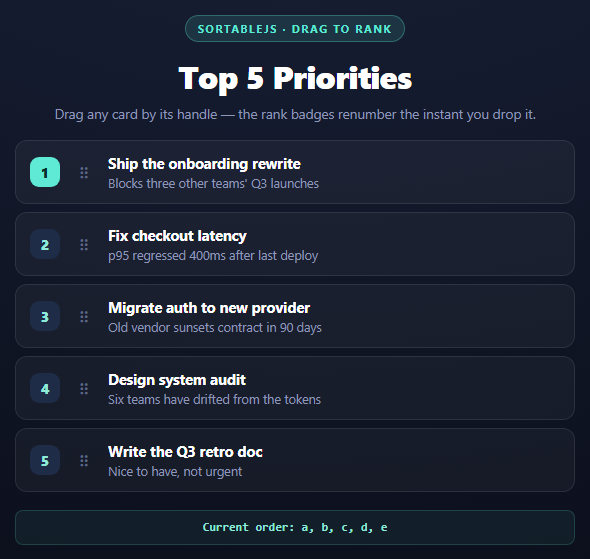
A plain drag-and-drop list is easy — the hard part is a list that carries *meaning* in its order, like "Top 5 priorities," where the number next to each item has to be correct after every drag, not just the position in the DOM.
This snippet uses SortableJS, a dependency-free drag-and-drop library that works directly on native DOM nodes (no virtual list, no data binding), and pairs it with a small renumbering function that runs after every drop.
Why the badges are recalculated, not moved
SortableJS's job ends the moment it reorders the <li> elements in the DOM — it never touches their content. The rank number is baked into a <span class="srl-badge"> inside each item, so if you only relied on Sortable's reordering, the badge numbers would travel *with* the card and stay wrong (item "a" would still say "1" even after being dragged to position 3).
The fix is the onEnd callback:
onEnd: function () { renumber(); }
onEnd fires once, after the drop animation settles and the DOM already reflects the new order. renumber() then just walks the list top to bottom with querySelectorAll('.srl-item') and writes i + 1 into each badge — it doesn't need to know anything about what moved, only what the final order is. This is a deliberately "dumb" strategy: instead of tracking deltas or diffing old vs. new position, it treats the DOM as the single source of truth and recomputes badges from scratch every time. For a 5-item list that's essentially free, and it can never drift out of sync because there's no incremental state to get wrong.
The handle constraint
handle: '.srl-handle' restricts dragging to the ⠿ grip icon rather than the whole card. Without a handle, clicking anywhere on the card — including a future "edit" button or a text selection — would immediately start a drag, which fights with normal interaction. Sortable listens for pointerdown only inside elements matching the handle selector, so the rest of the card stays a normal, clickable surface.
Visual feedback classes
chosenClass and ghostClass are plain CSS class names Sortable toggles automatically: sortable-chosen is applied to the item actively being dragged (used here to highlight its border), and sortable-ghost is applied to the placeholder left behind in the original list while dragging (used here to fade it to 35% opacity). Neither requires any JS — they're just hooks for CSS, which is why Sortable stays so light while still feeling polished.
Reusing it
Swap the five hardcoded <li> items for a mapped-over data array in React or Vue, and read the new order back inside onEnd via evt.newIndex/evt.oldIndex or by re-reading Array.from(list.children).map(el => el.dataset.id) — exactly what renumber() already does. Pair it with a multi-column drag board when items need to move between groups, not just within one.
Build with AI
Build, Understand, Optimize, and Extend It With AI
This snippet is small enough to extend in one sitting. Paste it into an AI assistant like Claude and ask why renumber() recomputes every badge from scratch instead of tracking which two items swapped — the answer (statelessness makes drift impossible) is a good general lesson for derived UI state. Then ask it to add a "reset order" button that restores the original a-b-c-d-e sequence, or to persist the order to localStorage so a refresh keeps the last arrangement. For a bigger extension, ask it to add a second, unranked "someday" list below with its own Sortable instance and a shared group so items can be dragged out of the ranked list entirely, which is exactly the mechanism the multi-column drag board snippet uses across four columns.
Prompt to recreate it
Copy this into your AI assistant of choice to build the effect from scratch, or as a jumping-off point for your own variant:
Build a "drag to rank" list using SortableJS (v1.15, from a CDN) in plain HTML, CSS, and JavaScript.

Requirements:
- Render a vertical list of 5 items, each an <li> with a numbered rank badge (1 through 5), a drag handle icon, a title, and a short description.
- Initialize SortableJS on the list container with: animation: 150, handle set to the drag-handle element's class (so dragging only starts from the handle, not anywhere on the card), a chosenClass applied to the item being dragged, and a ghostClass applied to the placeholder left in its original spot.
- In the onEnd callback, recompute every badge's number by walking the list's current children top to bottom and writing index + 1 into each one's badge element — do not try to track which two items swapped; just recompute from the final DOM order every time, since that keeps the badges impossible to desync.
- Also update a small readout line below the list showing the current order of item ids joined by commas, using each item's data-id attribute, so the current sequence is visible for debugging.
- Style it as a dark card-based list with a rounded container, a subtle border, and a highlighted top badge for rank 1, using only vanilla CSS (no framework).
- Keep all JavaScript in var/function style, no ES modules, and make sure the handle has touch-action: none so dragging works smoothly on mobile without triggering page scroll.
Want to tighten it up first? Run this prompt through the AI Prompt Studio to score it across 8 quality dimensions, catch anti-patterns, and tune the wording for Claude, ChatGPT, or Gemini before you paste it in.
Source Code
<div class="srl-stage">
  <div class="srl-head">
    <span class="srl-tag">SortableJS · drag to rank</span>
    <h2>Top 5 Priorities</h2>
    <p>Drag any card by its handle — the rank badges renumber the instant you drop it.</p>
  </div>
  <ol class="srl-list" id="srlList">
    <li class="srl-item" data-id="a">
      <span class="srl-badge">1</span>
      <span class="srl-handle" aria-label="drag handle">⠿</span>
      <div class="srl-body">
        <strong>Ship the onboarding rewrite</strong>
        <span>Blocks three other teams' Q3 launches</span>
      </div>
    </li>
    <li class="srl-item" data-id="b">
      <span class="srl-badge">2</span>
      <span class="srl-handle" aria-label="drag handle">⠿</span>
      <div class="srl-body">
        <strong>Fix checkout latency</strong>
        <span>p95 regressed 400ms after last deploy</span>
      </div>
    </li>
    <li class="srl-item" data-id="c">
      <span class="srl-badge">3</span>
      <span class="srl-handle" aria-label="drag handle">⠿</span>
      <div class="srl-body">
        <strong>Migrate auth to new provider</strong>
        <span>Old vendor sunsets contract in 90 days</span>
      </div>
    </li>
    <li class="srl-item" data-id="d">
      <span class="srl-badge">4</span>
      <span class="srl-handle" aria-label="drag handle">⠿</span>
      <div class="srl-body">
        <strong>Design system audit</strong>
        <span>Six teams have drifted from the tokens</span>
      </div>
    </li>
    <li class="srl-item" data-id="e">
      <span class="srl-badge">5</span>
      <span class="srl-handle" aria-label="drag handle">⠿</span>
      <div class="srl-body">
        <strong>Write the Q3 retro doc</strong>
        <span>Nice to have, not urgent</span>
      </div>
    </li>
  </ol>
  <div class="srl-out" id="srlOut">Current order: a, b, c, d, e</div>
</div>*{box-sizing:border-box;margin:0;padding:0}
body{font-family:system-ui,-apple-system,sans-serif;background:radial-gradient(120% 100% at 50% 0%,#182036,#0a0d18);color:#fff;min-height:100vh;display:flex;align-items:center;justify-content:center;padding:24px}
.srl-stage{width:min(560px,94vw);display:flex;flex-direction:column;align-items:center;gap:18px}
.srl-head{text-align:center}
.srl-tag{display:inline-block;font-size:11px;font-weight:700;letter-spacing:.14em;text-transform:uppercase;color:#5eead4;background:rgba(94,234,212,.12);border:1px solid rgba(94,234,212,.3);padding:5px 12px;border-radius:99px;margin-bottom:12px}
.srl-head h2{font-size:clamp(24px,5vw,32px);font-weight:800;letter-spacing:-.02em}
.srl-head p{font-size:13.5px;color:#8e97b8;margin-top:7px}
.srl-list{width:100%;list-style:none;display:flex;flex-direction:column;gap:8px}
.srl-item{display:flex;align-items:center;gap:12px;background:rgba(255,255,255,.04);border:1px solid rgba(255,255,255,.09);border-radius:12px;padding:12px 14px;cursor:default}
.srl-item.sortable-chosen{border-color:#5eead4;background:rgba(94,234,212,.08)}
.srl-item.sortable-ghost{opacity:.35}
.srl-badge{flex:0 0 30px;height:30px;border-radius:9px;background:#1e2c48;color:#8ee9d8;display:flex;align-items:center;justify-content:center;font-weight:800;font-size:14px;transition:background .2s,color .2s}
.srl-item:nth-child(1) .srl-badge{background:#5eead4;color:#052e2b}
.srl-handle{cursor:grab;color:#5c6785;font-size:16px;padding:4px 6px;touch-action:none;user-select:none}
.srl-handle:active{cursor:grabbing}
.srl-body{display:flex;flex-direction:column;gap:2px;min-width:0}
.srl-body strong{font-size:14.5px}
.srl-body span{font-size:12.5px;color:#8e97b8}
.srl-out{font:600 12px/1.4 ui-monospace,monospace;color:#8ee9d8;background:rgba(94,234,212,.06);border:1px solid rgba(94,234,212,.18);padding:8px 14px;border-radius:8px;width:100%;text-align:center}var list = document.getElementById('srlList');
var out = document.getElementById('srlOut');
function renumber() {
var items = list.querySelectorAll('.srl-item');
var ids = [];
items.forEach(function (item, i) {
item.querySelector('.srl-badge').textContent = i + 1;
ids.push(item.dataset.id);
});
out.textContent = 'Current order: ' + ids.join(', ');
}
new Sortable(list, {
animation: 150,
handle: '.srl-handle',
chosenClass: 'sortable-chosen',
ghostClass: 'sortable-ghost',
onEnd: function () {
renumber();
},
});Step by step
How to Use
- 1Add the SortableJS CDNInclude Sortable.min.js from the CDN panel — a single script tag, no build step.
- 2Paste HTML, CSS, and JSA 5-item ranked list renders with rank badges 1 through 5.
- 3Drag any item by its ⠿ handleOnly the handle starts a drag, so the rest of the card stays clickable.
- 4Drop it into a new positiononEnd fires and renumber() rewrites every badge from top to bottom.
- 5Watch the output lineThe text below the list mirrors the current id order for debugging.
- 6Swap in real dataRender items from an array and read the new order from the DOM inside onEnd.
Real-world uses
Common Use Cases
Got questions?
Frequently Asked Questions
SortableJS only reorders DOM nodes — it has no idea a <span class="srl-badge"> inside an item is supposed to represent that item's position. The badge text is just markup, so it stays wherever it was written unless something explicitly rewrites it, which is what the onEnd-triggered renumber() function does.
onUpdate only fires when the item actually changes position within the same list, and onSort fires on any sort-related DOM mutation including ones from a linked group. onEnd fires reliably once per user interaction, after the drop animation completes and the DOM is in its final state, which is the simplest hook to recompute derived state like rank badges from.
Without handle, any pointerdown on the item starts a drag — including clicks meant for buttons, links, or text selection inside the card. Setting handle: '.srl-handle' tells Sortable to only initiate a drag when the pointer goes down inside that specific element, leaving the rest of the card free for normal interaction.
Inside onEnd, after (or instead of) calling renumber(), read the order with Array.from(list.children).map(el => el.dataset.id) and send that array to your API. Because renumber() already does this DOM walk for the badges, it is cheap to also return the id array from a shared helper and reuse it for both jobs.
Yes, but treat Sortable as an escape hatch: create the Sortable instance once in a useEffect on a container ref, and inside onEnd read the DOM order and push it into React state rather than letting Sortable and React fight over who owns the list markup. Re-render from that state; do not let React re-render the list on every drag frame.
Yes. SortableJS uses pointer events, which unify mouse and touch, and touch-action: none on the handle prevents the browser from interpreting a drag start as a page scroll gesture on mobile.