

Learn Coding Visually
Learn to code with interactive, live-preview playgrounds — HTML, CSS, JavaScript, React & more.
 HTML Playground42 lessons · Click-based · Live preview
 CSS PlaygroundLearn CSS with a live editor
 JavaScript Playground60 lessons · DOM · Async · Canvas
 React PlaygroundLearn React with a live code editor
 GSAP PlaygroundLearn GSAP animation interactively
 SVG Playground44 lessons · shapes · paths · animation
 SCSS Playground45 lessons · Sass modules · tokens
 Tailwind PlaygroundLearn Tailwind CSS with a live editor
 Bootstrap 5 Playground50 lessons · live preview
Konva Interactive Node Graph — Live-Updating Canvas Diagram Snippet
Konva Interactive Node Graph · Dashboards · Plain HTML, CSS & JS · Live preview
What's included
Features
About this UI Snippet
Konva Interactive Node Graph — Retained Shapes vs. Manual Redraw
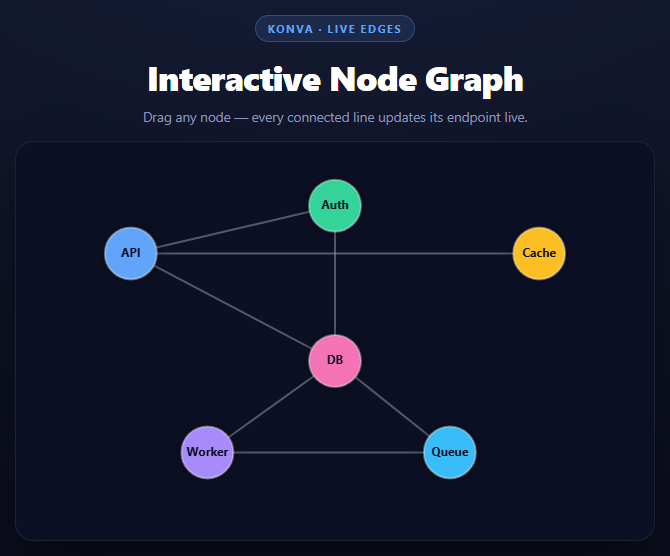
A node-link graph is the clearest possible demonstration of why Konva's retained-shape model is worth the abstraction over a raw <canvas> 2D context. In raw canvas, there is no persistent "node" or "edge" — only pixels. Moving one circle means clearing the entire canvas and redrawing every shape from scratch, every single frame, because the canvas has no memory of what was there before. Konva instead keeps every circle, group, and line as a real, addressable JavaScript object that persists between frames.
Nodes as groups, not just circles
Each node is a Konva.Group containing a Konva.Circle and a Konva.Text label, with draggable: true set on the *group*. Grouping means the circle and its label always move together under one drag gesture, and — critically for this snippet — the group's x()/y() accessors give you a single, authoritative position for "where is this node right now" without averaging or reconciling the positions of its children.
Edges reference nodes directly, not by coordinate snapshot
edgeLines is built by mapping each [fromId, toId] pair to { line, from: nodesById[fromId], to: nodesById[toId] } — storing the actual Konva.Group objects, not a copy of their coordinates at creation time. This is the pattern that makes live updates trivial: because from and to are live references, reading e.from.x() later always returns the node's *current* position, wherever it has since been dragged to.
Updating only what moved
function updateEdgesFor(node) { edgeLines.forEach(function (e) { if (e.from === node || e.to === node) { e.line.points([...]); } }); }
On every dragmove event (which fires continuously while the pointer moves, not just once at the end), this filters to only the edges touching the node currently being dragged and rewrites their points array with each endpoint's live coordinates. Konva's Line.points() setter accepts a flat [x1, y1, x2, y2] array and the line redraws using it — no need to manually clear and re-stroke a path.
Why edges and nodes live on separate layers
edgeLayer sits beneath nodeLayer, both as children of the stage, so edges always render under node circles without manual z-index bookkeeping. Because a Konva Layer is its own canvas, calling edgeLayer.batchDraw() during a drag only repaints the lines' canvas — the node layer's canvas (containing every circle and label) isn't touched unless a node's own layer is separately redrawn, which nodeLayer.batchDraw() in dragstart handles for the z-order change.
The contrast with raw canvas
Written against a bare <canvas>, this same interaction requires you to maintain your own array of node positions, your own hit-testing to determine which node was clicked (checking distance from the pointer to every node's center), and a full ctx.clearRect + redraw-everything cycle on every mousemove. Konva's retained shapes give you hit-testing, dragging, and selective redraws as built-in behavior — this snippet's entire interactive logic is under a dozen lines.
Build with AI
Build, Understand, Optimize, and Extend It With AI
This snippet's core lesson is retained-mode rendering, so that's the most productive place to start a conversation. Paste the code into an AI assistant like Claude and ask it to explain precisely how storing direct Konva.Group references on each edge (rather than coordinate snapshots) is what makes updateEdgesFor work without any manual synchronization step, and then ask it to sketch what the equivalent code would look like against a raw <canvas> 2D context \u2014 tracking node positions in a plain array, hit-testing by distance on mousedown, and redrawing everything from scratch on every mousemove. That contrast is the whole point of a retained-mode library. To extend it: add a simple force-directed auto-layout using a Konva.Animation loop, support adding new nodes and edges at runtime via a form, add directional arrowheads to the edges, or add a minimap showing the full graph when it's zoomed or panned.
Prompt to recreate it
Copy this into your AI assistant of choice to build the effect from scratch, or as a jumping-off point for your own variant:
Build an interactive node-link graph using Konva.js (v9, from a CDN) in plain HTML, CSS, and JavaScript.

Requirements:
- Define the graph as plain data: a NODES array (id, label, initial x/y, color) and an EDGES array of [fromId, toId] pairs.
- A Konva.Stage with two layers: an edgeLayer (drawn first, beneath) and a nodeLayer (drawn second, on top).
- Build each node as a Konva.Group (draggable: true) containing a Konva.Circle (with a fill color, subtle stroke, and drop shadow) and a centered Konva.Text label, and store each group in an object keyed by node id.
- Build each edge as a Konva.Line whose points come from the current x/y of its two connected node groups at creation time, but store the edge as an object holding direct references to the two Konva.Group objects (not a coordinate snapshot), alongside the Line.
- On each node group's dragmove event, filter the edges array to only those referencing the dragged node, and update each matching line's points via line.points([fromNode.x(), fromNode.y(), toNode.x(), toNode.y()]) so connected edges track the node live and continuously while dragging (not just once on drag end).
- On dragstart, call group.moveToTop() so the dragged node always renders above the others.
- Add grab/grabbing cursor feedback tied to hover and drag state.
- Use layer.batchDraw() for redraws rather than layer.draw().
- Include at least 6 nodes and 7 edges so the graph has some real structure, and style it as a dark dashboard-style panel with colorful nodes and muted gray edge lines.
Want to tighten it up first? Run this prompt through the AI Prompt Studio to score it across 8 quality dimensions, catch anti-patterns, and tune the wording for Claude, ChatGPT, or Gemini before you paste it in.
Source Code
<div class="kng-stage">
  <div class="kng-head">
    <span class="kng-tag">Konva · live edges</span>
    <h2>Interactive Node Graph</h2>
    <p>Drag any node — every connected line updates its endpoint live.</p>
  </div>
  <div id="kngContainer" class="kng-container"></div>
</div>*{box-sizing:border-box;margin:0;padding:0}
body{font-family:system-ui,-apple-system,sans-serif;background:radial-gradient(120% 100% at 50% 0%,#161d38,#080a14);color:#fff;min-height:100vh;display:flex;align-items:center;justify-content:center;padding:24px}
.kng-stage{width:min(640px,94vw);display:flex;flex-direction:column;align-items:center;gap:16px}
.kng-head{text-align:center}
.kng-tag{display:inline-block;font-size:11px;font-weight:700;letter-spacing:.14em;text-transform:uppercase;color:#60a5fa;background:rgba(96,165,250,.12);border:1px solid rgba(96,165,250,.3);padding:5px 12px;border-radius:99px;margin-bottom:12px}
.kng-head h2{font-size:clamp(24px,5vw,34px);font-weight:800;letter-spacing:-.02em}
.kng-head p{font-size:13.5px;color:#8e97b8;margin-top:7px}
.kng-container{width:100%;aspect-ratio:8/5;border-radius:18px;overflow:hidden;background:#0c1024;border:1px solid rgba(255,255,255,.08);box-shadow:0 24px 60px -24px rgba(0,0,0,.8)}var container = document.getElementById('kngContainer');
var width = container.clientWidth || 600;
var height = container.clientHeight || 375;
var stage = new Konva.Stage({ container: 'kngContainer', width: width, height: height });
var edgeLayer = new Konva.Layer();
var nodeLayer = new Konva.Layer();
stage.add(edgeLayer);
stage.add(nodeLayer);
var NODES = [
{ id: 'api', label: 'API', x: width * 0.18, y: height * 0.28, color: '#60a5fa' },
{ id: 'auth', label: 'Auth', x: width * 0.5, y: height * 0.16, color: '#34d399' },
{ id: 'db', label: 'DB', x: width * 0.5, y: height * 0.55, color: '#f472b6' },
{ id: 'cache', label: 'Cache', x: width * 0.82, y: height * 0.28, color: '#fbbf24' },
{ id: 'worker', label: 'Worker', x: width * 0.3, y: height * 0.78, color: '#a78bfa' },
{ id: 'queue', label: 'Queue', x: width * 0.68, y: height * 0.78, color: '#38bdf8' }
];
var EDGES = [
['api', 'auth'], ['api', 'db'], ['api', 'cache'],
['db', 'worker'], ['worker', 'queue'], ['queue', 'db'], ['auth', 'db']
];
// Konva keeps shapes as persistent, addressable objects (the "retained
// mode" model) rather than pixels on a canvas, so each node's Konva.Circle
// can be looked up by id and its live x/y read directly \u2014 no need to
// track positions in a parallel data structure or redraw the whole scene.
var nodesById = {};
NODES.forEach(function (n) {
var group = new Konva.Group({ x: n.x, y: n.y, draggable: true });
var circle = new Konva.Circle({
radius: 26,
fill: n.color,
stroke: 'rgba(255,255,255,0.35)',
strokeWidth: 2,
shadowColor: 'black',
shadowBlur: 12,
shadowOpacity: 0.45
});
var label = new Konva.Text({
text: n.label,
fontSize: 12,
fontStyle: '700',
fontFamily: 'system-ui, sans-serif',
fill: '#0b0f22',
width: 60,
align: 'center',
x: -30,
y: -6
});
group.add(circle);
group.add(label);
nodeLayer.add(group);
nodesById[n.id] = group;
});
var edgeLines = EDGES.map(function (pair) {
var a = nodesById[pair[0]];
var b = nodesById[pair[1]];
var line = new Konva.Line({
points: [a.x(), a.y(), b.x(), b.y()],
stroke: 'rgba(148,163,184,0.5)',
strokeWidth: 2
});
edgeLayer.add(line);
return { line: line, from: a, to: b };
});
function updateEdgesFor(node) {
edgeLines.forEach(function (e) {
if (e.from === node || e.to === node) {
e.line.points([e.from.x(), e.from.y(), e.to.x(), e.to.y()]);
}
});
}
NODES.forEach(function (n) {
var group = nodesById[n.id];
// dragmove fires continuously while the pointer moves, so recomputing
// just this node's connected edges here \u2014 not the whole graph \u2014
// is what keeps the drag responsive even as the graph grows.
group.on('dragmove', function () {
updateEdgesFor(group);
edgeLayer.batchDraw();
});
group.on('dragstart', function () {
group.moveToTop();
nodeLayer.batchDraw();
});
group.on('mouseenter', function () { stage.container().style.cursor = 'grab'; });
group.on('mousedown', function () { stage.container().style.cursor = 'grabbing'; });
group.on('dragend', function () { stage.container().style.cursor = 'grab'; });
});
edgeLayer.draw();
nodeLayer.draw();Step by step
How to Use
- 1Add the Konva CDNInclude konva.min.js from the CDN panel — it attaches a global Konva object.
- 2Paste HTML, CSS, and JSA 6-node graph renders with its edges pre-connected.
- 3Drag any nodeEvery line touching that node recomputes its endpoint on every dragmove tick.
- 4Watch z-order on dragThe dragged node moves to the top of its layer so it never renders behind another.
- 5Edit NODES and EDGESAdd or remove entries in the two arrays — the graph rebuilds from them.
- 6Adapt to real dataSwap the label/color per node for live metrics, and add a click handler for details.
Real-world uses
Common Use Cases
Got questions?
Frequently Asked Questions
Each edge object stores direct references to its two Konva.Group node objects (from and to), not a copy of their coordinates. Reading e.from.x()/e.from.y() at draw time always returns wherever that node currently is, so the line endpoint is always live.
dragmove fires many times per second while a node is being dragged. Recomputing every edge in the graph on every tick wastes work on lines that are not connected to the node that moved; filtering to only edges where from or to matches the dragged node keeps the update proportional to that node\u2019s degree, not the whole graph.
Grouping the circle and its text label means both move together under a single draggable interaction and share one position \u2014 group.x()/group.y() \u2014 which is exactly the value the edges need to read.
Each layer is backed by its own canvas. Keeping edges on their own layer means dragging or moving a node only requires repainting the edges\u2019 canvas and the node layer separately, and it establishes z-order (edges beneath nodes) without manual stacking logic.
Run a simple force simulation (repulsion between all nodes, attraction along edges) in a Konva.Animation loop, updating each node\u2019s x/y every frame and calling updateEdgesFor after each node update, instead of relying on drag for positioning.
Attach a click listener to each group (group.on(\"click\", function() {...})) alongside the existing drag listeners \u2014 Konva shapes support multiple event types independently, so click and drag do not conflict.