


Learn Coding Visually
Learn to code with interactive, live-preview playgrounds — HTML, CSS, JavaScript, React & more.
 HTML Playground42 lessons · Click-based · Live preview
 CSS PlaygroundLearn CSS with a live editor
 JavaScript Playground60 lessons · DOM · Async · Canvas
 React PlaygroundLearn React with a live code editor
 GSAP PlaygroundLearn GSAP animation interactively
 SVG Playground44 lessons · shapes · paths · animation
 SCSS Playground45 lessons · Sass modules · tokens
 Tailwind PlaygroundLearn Tailwind CSS with a live editor
 Bootstrap 5 Playground50 lessons · live preview
CountUp.js Pricing Toggle — update() vs new CountUp() Explained
CountUp.js Pricing Toggle · Pricing · Plain HTML, CSS & JS · Live preview
What's included
Features
About this UI Snippet
CountUp.js Pricing Toggle — Why .update() Is the Right Tool, Not new CountUp()
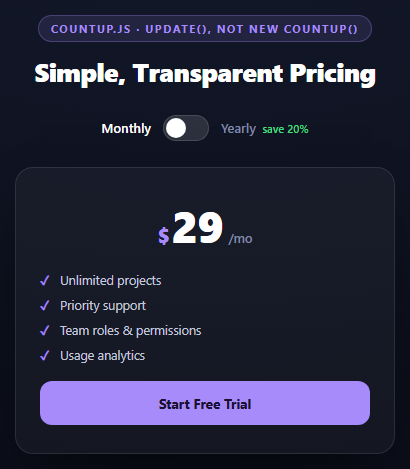
The naive way to animate a pricing toggle with CountUp.js is to construct a brand-new CountUp instance every time the user clicks — pass the new target price, call .start(). It works exactly once and then breaks the second time: every count-up starts its animation from 0, because a freshly constructed instance has no memory of what was previously displayed. Toggling monthly → yearly would show 0 → 23, correct enough by luck; toggling yearly → monthly again would show 0 → 29 — a visible flash down to zero before counting back up, on every single click. This snippet exists to show the actual fix.
One instance, created once
js
var counter = new countUp.CountUp('cptPrice', MONTHLY, { duration: 0.6, useEasing: true });
counter.start();
The CountUp instance is created exactly once, outside the click handler, at module scope. It plays its normal first animation (0 → 29) on page load. From that point on, the instance is never recreated — it's held onto and reused for the lifetime of the page.
.update() animates from wherever the number currently is
js
counter.update(target);
CountUp's .update(newEndVal) method tells the existing instance to animate from its current displayed value to a new target, using the same duration and easing configuration it was constructed with. Because the instance already knows its current value internally (it's tracking its own animation frame state), calling .update(23) while it's showing 29 produces a smooth 29 → 23 count-down, and calling .update(29) afterward produces a smooth 23 → 29 count-up — never a detour through zero. This is the entire fix, and it's a one-line difference from the broken version: reuse the instance and call .update() instead of constructing a new one.
CountUp naturally handles counting down, not just up
Despite the library's name, .update() works symmetrically in both directions — it's really "animate to a new value," and whether that's numerically higher or lower than the current one is irrelevant to the API. The easing (useEasing: true, the default) applies the same deceleration curve regardless of direction, so counting down from a higher plan price to a lower one feels exactly as polished as counting up.
Reusing it
This exact instance-reuse pattern is the right approach anywhere a displayed number needs to change repeatedly in response to user interaction — a shopping cart total as items are added/removed, a quantity stepper, a currency converter. The rule is always the same: construct CountUp once per numeric element, call .update() on every subsequent change.
Build with AI
Build, Understand, Optimize, and Extend It With AI
This snippet's whole value is a subtle lifecycle bug and its fix, so it rewards being asked to reproduce the broken version before appreciating the correct one. Paste the code into an AI assistant like Claude and ask it to first rewrite the toggle handler the "naive" way — constructing a new CountUp instance inside the click handler each time — and explain exactly why that version visibly flashes to $0 on every click. Then have it explain why .update() avoids that entirely. For extension, ask it to add a discount percentage badge that itself counts up when yearly is selected, animate the strikethrough monthly price alongside the yearly one for comparison, or generalize the single-price toggle into a 3-tier pricing table where all three prices update() in sync on one shared toggle.
Prompt to recreate it
Copy this into your AI assistant of choice to build the effect from scratch, or as a jumping-off point for your own variant:
Build a "monthly/yearly pricing toggle" using CountUp.js (v2, from a CDN, global countUp.CountUp) in plain HTML, CSS, and JavaScript.

Requirements:
- A pricing card with a large animated price display (currency symbol, number, and a "/mo" suffix that changes text depending on billing period), a short feature list, and a CTA button.
- An accessible switch-style toggle (role="switch", aria-checked reflecting state) between "Monthly" and "Yearly (save 20%)" labels, with a sliding knob.
- Create the CountUp instance exactly ONCE, at page load (outside any click handler), and call .start() to animate the initial monthly price in from 0.
- On every toggle click, do NOT construct a new CountUp instance. Instead call the existing instance's .update(newValue) method with the appropriate price (a lower "yearly, shown as monthly-equivalent" value or the original monthly value). Add a code comment explicitly explaining that constructing a fresh CountUp on every click would reset its internal tracked value, causing the displayed price to visibly animate from 0 on every single toggle instead of smoothly transitioning between the two real numbers.
- Keep a single isYearly boolean as the source of truth, updating the toggle's aria-checked, both labels' active styling, the suffix text, and the counter target from it.
- Style it as a dark theme with a purple accent color, a centered pricing card with a soft shadow, and a smooth sliding toggle switch.
Want to tighten it up first? Run this prompt through the AI Prompt Studio to score it across 8 quality dimensions, catch anti-patterns, and tune the wording for Claude, ChatGPT, or Gemini before you paste it in.
Source Code
<div class="cpt-stage">
<div class="cpt-head">
<span class="cpt-tag">countup.js · update(), not new CountUp()</span>
<h2>Simple, Transparent Pricing</h2>
</div>
<div class="cpt-switch">
<span class="cpt-switch-lbl is-on" id="cptMonthlyLbl">Monthly</span>
<button class="cpt-toggle" id="cptToggle" role="switch" aria-checked="false">
<span class="cpt-knob"></span>
</button>
<span class="cpt-switch-lbl" id="cptYearlyLbl">Yearly <em>save 20%</em></span>
</div>
<div class="cpt-card">
<div class="cpt-price"><span>$</span><span id="cptPrice">29</span><span class="cpt-per" id="cptPer">/mo</span></div>
<ul class="cpt-list">
<li>Unlimited projects</li>
<li>Priority support</li>
<li>Team roles & permissions</li>
<li>Usage analytics</li>
</ul>
<button class="cpt-cta">Start Free Trial</button>
</div>
</div>*{box-sizing:border-box;margin:0;padding:0}
body{font-family:system-ui,-apple-system,sans-serif;background:radial-gradient(120% 100% at 50% 0%,#151b2e,#080a13);color:#fff;min-height:100vh;display:flex;align-items:center;justify-content:center;padding:24px}
.cpt-stage{width:min(380px,94vw);display:flex;flex-direction:column;align-items:center;gap:26px}
.cpt-head{text-align:center}
.cpt-tag{display:inline-block;font-size:11px;font-weight:700;letter-spacing:.14em;text-transform:uppercase;color:#a78bfa;background:rgba(167,139,250,.12);border:1px solid rgba(167,139,250,.3);padding:5px 12px;border-radius:99px;margin-bottom:12px}
.cpt-head h2{font-size:clamp(20px,5vw,26px);font-weight:800;letter-spacing:-.02em}
.cpt-switch{display:flex;align-items:center;gap:12px}
.cpt-switch-lbl{font-size:13px;color:#8189a8;font-weight:600}
.cpt-switch-lbl.is-on{color:#fff}
.cpt-switch-lbl em{font-style:normal;color:#4ade80;font-size:11px;margin-left:3px}
.cpt-toggle{width:46px;height:26px;border-radius:99px;background:rgba(255,255,255,.12);border:1px solid rgba(255,255,255,.14);position:relative;cursor:pointer}
.cpt-toggle[aria-checked="true"]{background:#a78bfa}
.cpt-knob{position:absolute;top:2px;left:2px;width:20px;height:20px;border-radius:50%;background:#fff;transition:transform .22s cubic-bezier(.5,0,0,1)}
.cpt-toggle[aria-checked="true"] .cpt-knob{transform:translateX(20px)}
.cpt-card{width:100%;background:rgba(255,255,255,.04);border:1px solid rgba(255,255,255,.1);border-radius:18px;padding:28px 24px;display:flex;flex-direction:column;align-items:center;gap:18px;box-shadow:0 24px 60px -24px rgba(0,0,0,.8)}
.cpt-price{display:flex;align-items:baseline;font-weight:800;letter-spacing:-.02em}
.cpt-price span:first-child{font-size:20px;color:#a78bfa;margin-right:2px}
.cpt-price #cptPrice{font-size:44px}
.cpt-per{font-size:13px;color:#8189a8;font-weight:600;margin-left:5px}
.cpt-list{list-style:none;width:100%;display:flex;flex-direction:column;gap:9px}
.cpt-list li{font-size:12.5px;color:#c3c7dd;padding-left:20px;position:relative}
.cpt-list li::before{content:'✓';position:absolute;left:0;color:#a78bfa;font-weight:700}
.cpt-cta{width:100%;padding:13px;border-radius:12px;border:none;background:#a78bfa;color:#1a1030;font:700 13.5px system-ui;cursor:pointer}var MONTHLY = 29;
var YEARLY_MONTHLY_EQUIV = 23; // 20% off, billed yearly but shown as a per-month figure
var priceEl = document.getElementById('cptPrice');
var perEl = document.getElementById('cptPer');
var toggle = document.getElementById('cptToggle');
var monthlyLbl = document.getElementById('cptMonthlyLbl');
var yearlyLbl = document.getElementById('cptYearlyLbl');
// One CountUp instance, reused for the life of the page. Creating a fresh
// "new countUp.CountUp()" on every toggle click would reset its internal
// start value to 0 each time, so the price would always count up FROM ZERO
// instead of smoothly transitioning between the two real price points.
var counter = new countUp.CountUp('cptPrice', MONTHLY, { duration: 0.6, useEasing: true });
counter.start();
var isYearly = false;
toggle.addEventListener('click', function () {
isYearly = !isYearly;
toggle.setAttribute('aria-checked', String(isYearly));
monthlyLbl.classList.toggle('is-on', !isYearly);
yearlyLbl.classList.toggle('is-on', isYearly);
perEl.textContent = isYearly ? '/mo, billed yearly' : '/mo';
var target = isYearly ? YEARLY_MONTHLY_EQUIV : MONTHLY;
counter.update(target);
});Step by step
How to Use
- 1Add the CountUp.js CDNInclude the countUp.umd.js build from the CDN panel.
- 2Paste HTML, CSS, and JSA pricing card renders with the monthly price, counting up from 0 on load.
- 3Click the toggleThe price smoothly animates to the yearly-equivalent figure using .update(), not a restart.
- 4Toggle backThe price counts back up to the monthly figure — never dropping to 0 in between.
- 5Change the price pointsEdit the MONTHLY and YEARLY_MONTHLY_EQUIV constants at the top of the script.
- 6Reuse the pattern elsewhereApply the same single-instance + .update() approach to a cart total or quantity stepper.
Real-world uses
Common Use Cases
Got questions?
Frequently Asked Questions
A freshly constructed CountUp instance has no memory of what value is currently displayed, so it always animates FROM 0 by default. Every toggle click would show the price flash down to $0 and count back up, rather than transitioning smoothly between the two real price points — which is the exact bug this snippet's approach avoids.
The CountUp instance tracks its own current displayed value internally as part of its animation state. Calling .update(newValue) tells it to animate from that internally-tracked current value to the new target, using the same duration and easing it was originally configured with — no need to pass or track the starting value yourself.
Yes — despite the library's name, update() is direction-agnostic: it animates to whatever value you pass, whether that's higher or lower than the current one. The easing curve applies symmetrically, so a yearly-to-monthly toggle (price going up) looks as smooth as monthly-to-yearly (price going down).
It applies CountUp's default easing function (an ease-out curve) to the count animation instead of a linear frame-by-frame increment, so the number decelerates as it approaches its target rather than ticking up at a constant rate. It's on by default but set explicitly here for clarity.
A single source of truth in JS avoids having to parse the toggle's aria-checked attribute or CSS class back out every time you need to know the current state; it's simpler to drive the DOM attributes and labels FROM the JS variable each click than to derive the variable from the DOM.
Create the CountUp instance once in a useEffect/onMounted with an empty dependency array (so it truly runs only once), store it in a ref, and call counter.current.update(newValue) from your toggle handler instead of recreating the instance on every state change — the same core rule applies regardless of framework.