Source Code
<div class="container py-5 text-center">
<h1 class="bsprice-title">Simple, transparent pricing</h1>
<p class="bsprice-sub">Every plan includes unlimited projects and community support.</p>
<div class="bsprice-toggle-row">
<span class="bsprice-toggle-label" id="bspriceMonthlyLabel">Monthly</span>
<div class="form-check form-switch bsprice-switch">
<input class="form-check-input" type="checkbox" role="switch" id="bspriceToggle">
</div>
<span class="bsprice-toggle-label" id="bspriceAnnualLabel">Annual <span class="badge bg-success-subtle text-success-emphasis ms-1">Save 20%</span></span>
</div>
<div class="row justify-content-center g-4 mt-2">
<div class="col-md-6 col-lg-4">
<div class="card bsprice-card h-100">
<div class="card-body">
<h5 class="text-uppercase text-muted small fw-bold mb-3">Starter</h5>
<div class="bsprice-amount"><span class="bsprice-num" data-monthly="0" data-annual="0">$0</span><span class="bsprice-period">/mo</span></div>
<p class="text-muted small mb-4">For solo projects just getting started.</p>
<ul class="list-unstyled bsprice-features text-start">
<li>✓ 1 project</li>
<li>✓ Community support</li>
<li>✓ 1 GB storage</li>
</ul>
<button class="btn btn-outline-dark w-100">Get started</button>
</div>
</div>
</div>
<div class="col-md-6 col-lg-4">
<div class="card bsprice-card bsprice-featured h-100">
<span class="badge bg-dark bsprice-pill">Most popular</span>
<div class="card-body">
<h5 class="text-uppercase text-white-50 small fw-bold mb-3">Pro</h5>
<div class="bsprice-amount"><span class="bsprice-num" data-monthly="24" data-annual="19">$24</span><span class="bsprice-period">/mo</span></div>
<p class="text-white-50 small mb-4">For growing teams that need more room.</p>
<ul class="list-unstyled bsprice-features text-start">
<li>✓ Unlimited projects</li>
<li>✓ Priority support</li>
<li>✓ 100 GB storage</li>
</ul>
<button class="btn btn-light w-100 fw-bold">Get started</button>
</div>
</div>
</div>
<div class="col-md-6 col-lg-4">
<div class="card bsprice-card h-100">
<div class="card-body">
<h5 class="text-uppercase text-muted small fw-bold mb-3">Team</h5>
<div class="bsprice-amount"><span class="bsprice-num" data-monthly="79" data-annual="63">$79</span><span class="bsprice-period">/mo</span></div>
<p class="text-muted small mb-4">For teams that need SSO and audit logs.</p>
<ul class="list-unstyled bsprice-features text-start">
<li>✓ Everything in Pro</li>
<li>✓ SSO & audit log</li>
<li>✓ 1 TB storage</li>
</ul>
<button class="btn btn-outline-dark w-100">Get started</button>
</div>
</div>
</div>
</div>
</div>body { background: #fff; }
.bsprice-title { font-weight: 800; letter-spacing: -0.02em; }
.bsprice-sub { color: #6b7280; margin-bottom: 28px; }
.bsprice-toggle-row {
display: inline-flex;
align-items: center;
gap: 12px;
margin-bottom: 36px;
}
.bsprice-toggle-label { font-size: 14px; font-weight: 600; color: #9ca3af; transition: color .15s; }
.bsprice-toggle-label.bsprice-active { color: #111827; }
.bsprice-switch .form-check-input { width: 2.6em; height: 1.4em; cursor: pointer; }
.bsprice-card {
border: 1px solid #eceef1;
border-radius: 14px;
position: relative;
transition: transform .2s ease, box-shadow .2s ease;
}
.bsprice-card:hover { transform: translateY(-4px); box-shadow: 0 14px 32px rgba(15,23,42,.08); }
.bsprice-featured {
background: #111827;
color: #fff;
border-color: #111827;
}
.bsprice-pill {
position: absolute;
top: -12px;
left: 50%;
transform: translateX(-50%);
font-size: 11px;
}
.bsprice-amount { display: flex; align-items: baseline; justify-content: center; gap: 3px; margin-bottom: 6px; }
.bsprice-num { font-size: 40px; font-weight: 800; transition: opacity .12s ease; }
.bsprice-num.bsprice-swap { opacity: 0; }
.bsprice-period { font-size: 13px; color: inherit; opacity: .6; }
.bsprice-features li { padding: 5px 0; font-size: 13.5px; }const toggle = document.getElementById('bspriceToggle');
const monthlyLabel = document.getElementById('bspriceMonthlyLabel');
const annualLabel = document.getElementById('bspriceAnnualLabel');
const nums = document.querySelectorAll('.bsprice-num');
toggle.addEventListener('change', () => {
const annual = toggle.checked;
monthlyLabel.classList.toggle('bsprice-active', !annual);
annualLabel.classList.toggle('bsprice-active', annual);
nums.forEach(el => {
// Fade the number out, swap the digits while invisible, fade back in —
// avoids the price just snapping to a new value with no transition.
el.classList.add('bsprice-swap');
setTimeout(() => {
const value = annual ? el.dataset.annual : el.dataset.monthly;
el.textContent = '$' + value;
el.classList.remove('bsprice-swap');
}, 120);
});
});
// Start in the "monthly active" visual state.
monthlyLabel.classList.add('bsprice-active');Learn Coding Visually
Learn to code with interactive, live-preview playgrounds — HTML, CSS, JavaScript, React & more.
 HTML Playground42 lessons · Click-based · Live preview
 CSS PlaygroundLearn CSS with a live editor
 JavaScript Playground60 lessons · DOM · Async · Canvas
 React PlaygroundLearn React with a live code editor
 GSAP PlaygroundLearn GSAP animation interactively
 SVG Playground44 lessons · shapes · paths · animation
 SCSS Playground45 lessons · Sass modules · tokens
 Tailwind PlaygroundLearn Tailwind CSS with a live editor
 Bootstrap 5 Playground50 lessons · live preview
Bootstrap Pricing Table with Monthly/Annual Toggle — Free Snippet
Bootstrap Pricing Table with Monthly/Annual Toggle · Pricing · Plain HTML, CSS & JS · Live preview
What's included
Features
About this UI Snippet
Bootstrap Pricing Table with Monthly/Annual Toggle — HTML, CSS & JavaScript
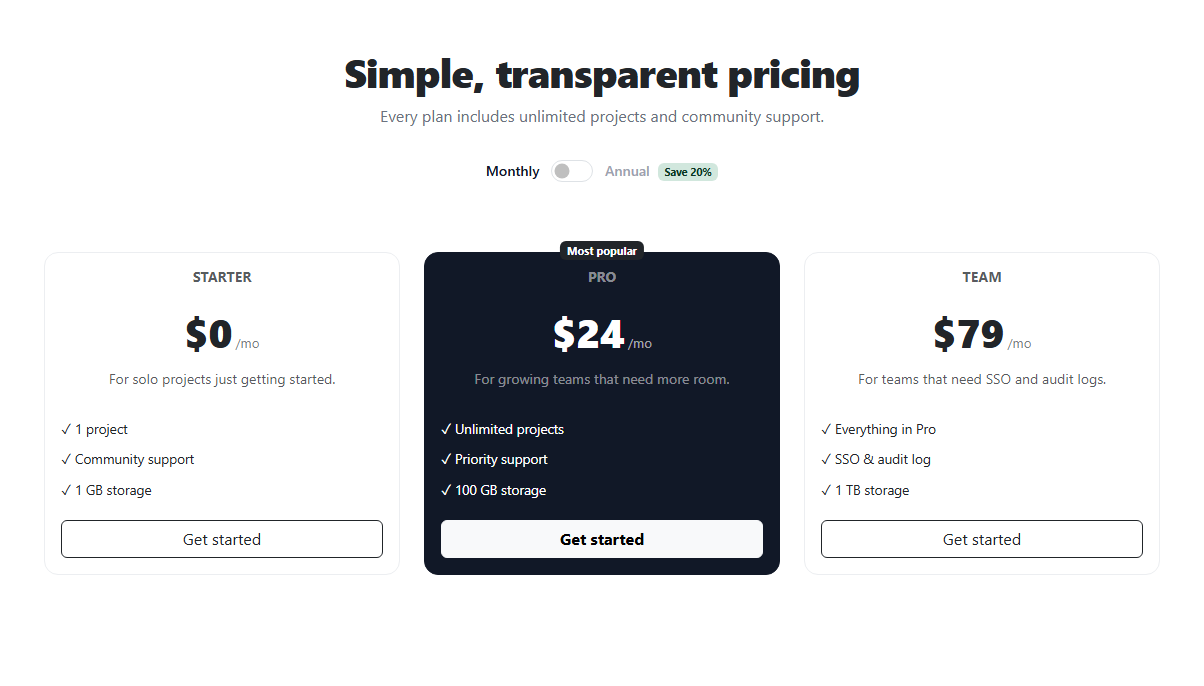
A SaaS pricing page's most important interactive element is usually the billing toggle — the switch that recalculates every plan's price between monthly and annual (discounted) rates. This snippet builds that toggle on real Bootstrap 5.3: the actual .form-check.form-switch component for the switch itself, and a genuine three-card .card grid for the pricing tiers, loaded from the real Bootstrap CDN.
Where the two prices come from
Every plan's price element carries two data attributes — data-monthly and data-annual — holding that plan's rate under each billing cycle. There's no separate calculation or percentage-off math happening in JavaScript; the annual rate is simply whatever value is written into data-annual, which keeps the logic dead simple and the numbers exactly what you intended, rather than computed and potentially rounded incorrectly at runtime.
The fade-swap transition
Flipping the switch doesn't just replace the price text instantly — each .bsprice-num element gets a .bsprice-swap class (which fades its opacity to 0 via CSS transition), waits 120ms for that fade to complete, swaps in the new digits from the relevant data attribute, then removes the class to fade back in. That short pause is what turns a jarring instant number-swap into a price that visibly "updates" rather than glitches.
The featured plan
The middle "Pro" card breaks from the other two — a dark background, a "Most popular" pill badge positioned to straddle its top edge, and a lifted transform on hover — the standard visual technique for directing a visitor's eye toward the plan you actually want most people to choose, without needing to disable or grey out the other options.
Build with AI
Build, Understand, Optimize, and Extend It With AI
Hand this snippet's HTML, CSS, and JS to an AI coding assistant like Claude and ask it to add a third billing option (e.g. a 2-year plan with a steeper discount) by extending the toggle into a segmented control instead of a binary switch, or to animate the featured card's badge with a subtle pulse to draw more attention. It's also a good snippet to ask the assistant to convert into a React component that takes a plans array as a prop, deriving the monthly/annual display from props and toggle state instead of reading data attributes off the DOM.
Prompt to recreate it
Copy this into your AI assistant of choice to build the effect from scratch, or as a jumping-off point for your own variant:
Build a Bootstrap 5.3 pricing table with a working monthly/annual billing toggle, using the real Bootstrap CDN framework (bootstrap.min.css and bootstrap.bundle.min.js), not custom CSS made to resemble Bootstrap.

Requirements:
- Three pricing cards in a responsive Bootstrap grid (row/col-md-6/col-lg-4), each with a plan name, a price, a short description, a feature list, and a CTA button. The middle card should be visually featured (elevated, dark background, a "Most popular" badge).
- A real Bootstrap form-switch toggle (form-check-input with role="switch") above the cards, with labels on either side indicating "Monthly" and "Annual", the active label visually bolded based on the current toggle state.
- Each plan's price element must store its monthly and annual rates as data attributes (not computed via a percentage at runtime) — toggling the switch should read the correct data attribute and update the displayed price for all three plans simultaneously.
- The price update on toggle must not be instant — fade the price out via a CSS opacity transition, swap the digits while invisible, then fade back in, so the change reads as smooth rather than jarring.
- The layout must be fully responsive, stacking the three cards to a single column on mobile using Bootstrap's grid classes alone.
Want to tighten it up first? Run this prompt through the AI Prompt Studio to score it across 8 quality dimensions, catch anti-patterns, and tune the wording for Claude, ChatGPT, or Gemini before you paste it in.
Step by step
How to Use
- 1Load the snippetClick "Bootstrap Pricing Table with Monthly/Annual Toggle" in the sidebar Library tab. The preview loads with the Monthly rate showing on all three cards.
- 2Flip the toggleClick the switch — all three prices fade out, swap to their annual (discounted) rate, and fade back in, and the active label bolds to match.
- 3Flip it backClick again to confirm it correctly reverts every price back to its monthly rate.
- 4Edit the pricesIn the HTML panel, change any .bsprice-num's data-monthly and data-annual attributes and its starting $X text — the toggle picks up new values automatically, no JS changes needed.
- 5Add a fourth tierCopy one .col-md-6.col-lg-4 card block and adjust its content — the toggle logic applies to any number of .bsprice-num elements on the page.
- 6Export in your formatClick "HTML" for a standalone file, "JSX" for React, or "Tailwind" for React + Tailwind CSS.
Real-world uses
Common Use Cases
Got questions?
Frequently Asked Questions
Yes — the switch is Bootstrap's actual form-check-input with role="switch" (form-switch styling), and the pricing cards use the real .card component, both loaded from the genuine Bootstrap 5.3 CDN, not custom-styled imitations.
It isn't calculated at runtime — each price's annual rate is a fixed value written directly into a data-annual attribute. This avoids rounding surprises and means you always see exactly the number you set, not a computed percentage that might come out oddly.
An instant text swap on a toggle click reads as a glitch. Fading the price out, updating the digits while invisible, then fading back in over about 250ms total makes the change feel intentional and smooth rather than jarring.
Yes — copy one of the existing .col-md-6.col-lg-4 card blocks, update its content and data-monthly/data-annual values. The toggle's change listener queries all .bsprice-num elements on the page, so a new card is picked up automatically.
Yes — it's a real checkbox input styled by Bootstrap's form-switch classes, so it's natively focusable, togglable with the keyboard, and announced correctly by screen readers, unlike a purely decorative div-based toggle.
Move the bsprice-featured class and the "Most popular" badge span to a different card's .card element — the dark styling and pill badge positioning are pure CSS tied to that class, independent of which column it's in.