

Learn Coding Visually
Learn to code with interactive, live-preview playgrounds — HTML, CSS, JavaScript, React & more.
 HTML Playground42 lessons · Click-based · Live preview
 CSS PlaygroundLearn CSS with a live editor
 JavaScript Playground60 lessons · DOM · Async · Canvas
 React PlaygroundLearn React with a live code editor
 GSAP PlaygroundLearn GSAP animation interactively
 SVG Playground44 lessons · shapes · paths · animation
 SCSS Playground45 lessons · Sass modules · tokens
 Tailwind PlaygroundLearn Tailwind CSS with a live editor
 Bootstrap 5 Playground50 lessons · live preview
Interact.js Resizable Panel — Draggable + Resizable Snippet
Interact.js Resizable Panel · Layouts · Plain HTML, CSS & JS · Live preview
What's included
Features
About this UI Snippet
Interact.js Resizable Panel — The data-x/data-y Pattern Explained
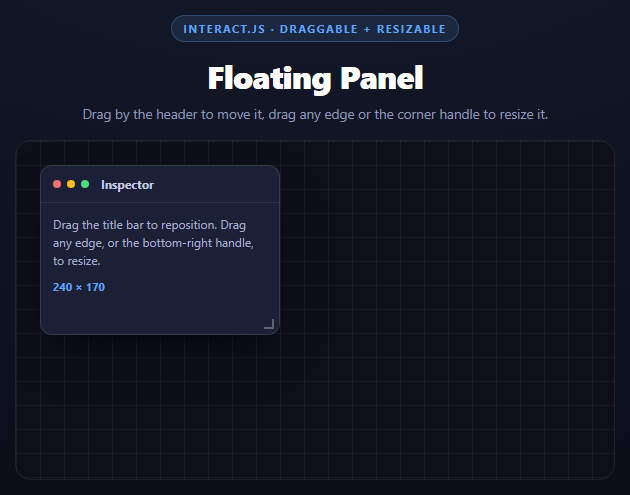
Making an element draggable is easy with raw pointer events. Making it *also* resizable from any edge, without the drag and resize logic corrupting each other's sense of "where the element currently is," is the part that trips people up. interact.js solves this with a specific idiom worth understanding on its own: tracking position in data-x/data-y attributes rather than reading getBoundingClientRect() every event.
Why not just read the DOM each move event?
A tempting approach is: on every move event, call target.getBoundingClientRect(), add the delta, and write the new position. The problem is that getBoundingClientRect() forces the browser to synchronously recompute layout if anything is dirty — doing that on every single pointermove (which can fire dozens of times per second) is a measurable performance cost, and it also means you're trusting the *rendered* position rather than a value your own code owns.
The data attribute pattern
Instead, this snippet keeps its own running total in attributes on the element:
var x = (parseFloat(target.getAttribute('data-x')) || 0) + event.dx; target.style.transform = 'translate(' + x + 'px,' + y + 'px)'; target.setAttribute('data-x', x);
event.dx/event.dy are the incremental pixel deltas interact.js computes for you between this event and the last one. The element's *actual* position is whatever data-x/data-y currently say, applied via a CSS transform, and every subsequent event just adds its delta onto that stored number. No layout read, ever — just arithmetic on a value you already have, applied as a compositor-friendly transform.
resizable() and event.rect / event.deltaRect
The tricky part of resize is that dragging the top or left edge changes the element's effective origin, not just its size — the bottom-right corner stays put while the top-left corner moves toward or away from it. interact.js hands you both pieces of information pre-computed:
target.style.width = event.rect.width + 'px'; target.style.height = event.rect.height + 'px'; x += event.deltaRect.left; y += event.deltaRect.top;
event.rect is the panel's already-computed new bounding box for this frame — no manual math against the previous size. event.deltaRect is specifically the *change* in each edge's position since the last event, so deltaRect.left is non-zero only when the left edge itself moved (dragging the right edge alone leaves it at 0). Adding deltaRect.left/deltaRect.top onto the tracked x/y keeps the position attributes correct regardless of which edge was grabbed — dragging the bottom-right corner never touches x/y at all, while dragging the top-left corner updates both.
Constraining size with a modifier, not manual clamping
interact.modifiers.restrictSize({ min: {...}, max: {...} }) is a plugin-style modifier passed into resizable()'s config — interact.js applies the clamp internally before your move listener even runs, so event.rect never reports a size outside the allowed range in the first place. This is simpler and less error-prone than checking and clamping event.rect.width/height yourself inside the listener.
Scoping drag to the header only
draggable({ allowFrom: '.irp-panel-head', ... }) restricts which part of the element can initiate a drag — without it, grabbing anywhere on the panel body (including its resize handles) would also start a move, conflicting with resize gestures. allowFrom is a single option rather than manual event-target filtering.
Reusing it
This exact data-x/data-y plus edges/deltaRect pattern is the standard interact.js recipe for any floating, resizable UI element — dashboard widgets, modal windows, split-pane dividers. Pair it with an Interact.js Drag-Drop Kanban to see the same library's dropzone API for cross-container dragging instead of free positioning.
Build with AI
Build, Understand, Optimize, and Extend It With AI
This snippet is a compact reference for interact.js's most reused idiom, so it pays off to use an AI assistant to test your understanding of it. Paste the code into Claude and ask it to walk through, event by event, what happens to data-x, data-y, and the panel's width/height during a resize drag that starts on the top edge and ends up slightly past the top-left corner into the left edge -- tracing exactly when deltaRect.left and deltaRect.top become non-zero. Then ask what would go wrong if the resize listener wrote to target.style.left/top instead of using a transform (it would fight with the draggable's own transform-based positioning, since both would be trying to control position through different CSS properties). To extend it: ask it to add snapping to the grid shown in the background using interact.modifiers.snap, add a double-click on the header to maximize/restore the panel, or extend this into multiple independent panels that can be dragged and resized without interfering with each other.
Prompt to recreate it
Copy this into your AI assistant of choice to build the effect from scratch, or as a jumping-off point for your own variant:
Build a single floating panel that is both draggable by its header and resizable from any edge or corner, using interact.js (from a CDN, global function interact) in plain HTML, CSS, and JavaScript.

Requirements:
- The panel has a header bar (with a title) and a body, absolutely positioned inside a bounded canvas-like container with a dotted or grid background.
- Configure interact(panel).draggable({ allowFrom: '<header selector>', listeners: { move } }) so only the header can initiate a drag, not the body or resize handles.
- In the drag move listener, do NOT call getBoundingClientRect(). Instead read the running position from data-x/data-y attributes on the element (defaulting to 0), add event.dx/event.dy to them, apply the result via CSS transform: translate(x, y), and write the new values back to the data attributes.
- Configure .resizable({ edges: { left: true, right: true, top: true, bottom: true }, listeners: { move }, modifiers: [interact.modifiers.restrictSize({ min: {...}, max: {...} })] }) on the same element so it can be resized from any of the four edges (and, implicitly, the corners).
- In the resize move listener, set the element's width/height directly from event.rect.width/event.rect.height, and separately update the tracked data-x/data-y by ADDING event.deltaRect.left and event.deltaRect.top to them (applying the result via the same transform) -- this is essential so that resizing from the top or left edge repositions the panel correctly instead of only the bottom-right handle working properly.
- Show a live "width x height" readout that updates on every resize move event.
- Style it as a dark floating panel with a colored dot header (like macOS traffic lights), rounded corners, and a small visible resize handle icon in the bottom-right corner, sitting on a subtle dotted-grid dark canvas background.
- Add a code comment explaining why data-x/data-y plus transform is used instead of reading/writing left/top or getBoundingClientRect on every event.
Want to tighten it up first? Run this prompt through the AI Prompt Studio to score it across 8 quality dimensions, catch anti-patterns, and tune the wording for Claude, ChatGPT, or Gemini before you paste it in.
Source Code
<div class="irp-stage">
  <div class="irp-head">
    <span class="irp-tag">interact.js · draggable + resizable</span>
    <h2>Floating Panel</h2>
    <p>Drag by the header to move it, drag any edge or the corner handle to resize it.</p>
  </div>
  <div class="irp-canvas" id="irpCanvas">
    <div class="irp-panel" id="irpPanel" data-x="0" data-y="0">
      <div class="irp-panel-head" id="irpPanelHead">
        <span class="irp-dot red"></span><span class="irp-dot yellow"></span><span class="irp-dot green"></span>
        <span class="irp-panel-title">Inspector</span>
      </div>
      <div class="irp-panel-body">
        <p>Drag the title bar to reposition. Drag any edge, or the bottom-right handle, to resize.</p>
        <div class="irp-readout" id="irpReadout">240 × 170</div>
      </div>
      <div class="irp-handle"></div>
    </div>
  </div>
</div>*{box-sizing:border-box;margin:0;padding:0}
body{font-family:system-ui,-apple-system,sans-serif;background:radial-gradient(120% 100% at 50% 0%,#151a2c,#0a0c16);color:#fff;min-height:100vh;display:flex;align-items:center;justify-content:center;padding:24px}
.irp-stage{width:min(600px,94vw);display:flex;flex-direction:column;align-items:center;gap:18px}
.irp-head{text-align:center}
.irp-tag{display:inline-block;font-size:11px;font-weight:700;letter-spacing:.14em;text-transform:uppercase;color:#60a5fa;background:rgba(96,165,250,.12);border:1px solid rgba(96,165,250,.3);padding:5px 12px;border-radius:99px;margin-bottom:12px}
.irp-head h2{font-size:clamp(24px,5vw,32px);font-weight:800;letter-spacing:-.02em}
.irp-head p{font-size:13.5px;color:#8e97b8;margin-top:7px}
.irp-canvas{position:relative;width:100%;height:340px;background:
linear-gradient(rgba(255,255,255,.05) 1px,transparent 1px) 0 0/24px 24px,
linear-gradient(90deg,rgba(255,255,255,.05) 1px,transparent 1px) 0 0/24px 24px,
#0d0f1a;
border:1px solid rgba(255,255,255,.08);border-radius:16px;overflow:hidden}
.irp-panel{position:absolute;top:24px;left:24px;width:240px;height:170px;background:#1b2036;border:1px solid rgba(255,255,255,.12);border-radius:12px;box-shadow:0 20px 44px -14px rgba(0,0,0,.7);display:flex;flex-direction:column;touch-action:none;min-width:180px;min-height:120px}
.irp-panel-head{display:flex;align-items:center;gap:6px;padding:10px 12px;border-bottom:1px solid rgba(255,255,255,.08);cursor:move;user-select:none}
.irp-dot{width:8px;height:8px;border-radius:50%}
.irp-dot.red{background:#f87171}
.irp-dot.yellow{background:#fbbf24}
.irp-dot.green{background:#4ade80}
.irp-panel-title{margin-left:6px;font-size:12px;font-weight:700;color:#c3cbe8}
.irp-panel-body{padding:12px;font-size:12px;color:#a7aecb;line-height:1.5;flex:1}
.irp-readout{margin-top:10px;font-size:11px;font-weight:700;color:#60a5fa;font-variant-numeric:tabular-nums}
.irp-handle{position:absolute;right:2px;bottom:2px;width:16px;height:16px;cursor:nwse-resize}
.irp-handle::after{content:'';position:absolute;right:3px;bottom:3px;width:8px;height:8px;border-right:2px solid rgba(255,255,255,.3);border-bottom:2px solid rgba(255,255,255,.3)}var panel = document.getElementById('irpPanel');
var readout = document.getElementById('irpReadout');
function updateReadout() {
readout.textContent = Math.round(panel.offsetWidth) + ' × ' + Math.round(panel.offsetHeight);
}
// interact.js's standard pattern: never read getBoundingClientRect() inside
// the move handler. Instead keep the running x/y in data attributes on the
// element and apply position purely as a transform, using the dx/dy the
// library hands you each event -- this avoids layout reads (which force a
// synchronous reflow) on every pointermove.
interact(panel)
.draggable({
allowFrom: '.irp-panel-head',
listeners: {
move: function (event) {
var target = event.target;
var x = (parseFloat(target.getAttribute('data-x')) || 0) + event.dx;
var y = (parseFloat(target.getAttribute('data-y')) || 0) + event.dy;
target.style.transform = 'translate(' + x + 'px,' + y + 'px)';
target.setAttribute('data-x', x);
target.setAttribute('data-y', y);
},
},
})
.resizable({
// Enable resizing from all four edges plus implicitly the corners
// (interact.js treats a corner as the intersection of two edges).
edges: { left: true, right: true, top: true, bottom: true },
listeners: {
move: function (event) {
var target = event.target;
var x = parseFloat(target.getAttribute('data-x')) || 0;
var y = parseFloat(target.getAttribute('data-y')) || 0;
// event.rect already has the new width/height computed by
// interact.js from the drag delta on whichever edge was grabbed --
// no manual math against the previous size is needed.
target.style.width = event.rect.width + 'px';
target.style.height = event.rect.height + 'px';
// Resizing from the top or left edge moves the panel's origin, not
// just its size -- event.deltaRect carries exactly that offset, so
// it is added onto the tracked x/y the same way a drag would be.
x += event.deltaRect.left;
y += event.deltaRect.top;
target.style.transform = 'translate(' + x + 'px,' + y + 'px)';
target.setAttribute('data-x', x);
target.setAttribute('data-y', y);
updateReadout();
},
},
modifiers: [
interact.modifiers.restrictSize({
min: { width: 180, height: 120 },
max: { width: 480, height: 340 },
}),
],
inertia: false,
});
updateReadout();Step by step
How to Use
- 1Add the interact.js CDNInclude the interact.min.js UMD build for the global interact function.
- 2Paste HTML, CSS, and JSA floating panel renders on a dotted-grid canvas at a fixed starting position.
- 3Drag the title bardraggable({ allowFrom }) moves the panel using tracked data-x/data-y attributes.
- 4Drag any edge or the corner handleresizable({ edges }) resizes it, using event.rect for size and event.deltaRect for origin shift.
- 5Watch the size readoutThe live width × height label updates on every resize move event.
- 6Try dragging the top-left cornerNotice the panel resizes and repositions simultaneously, handled by deltaRect.left/top.
Real-world uses
Common Use Cases
Got questions?
Frequently Asked Questions
Reading getBoundingClientRect() forces a synchronous layout recalculation, which is expensive to do on every pointermove event. Reading back a CSS transform string would require parsing it. Storing the running x/y as plain numbers in data attributes avoids both -- it is pure arithmetic on values your own code already owns, updated by simply adding event.dx/event.dy each move.
event.rect is the panel's full new bounding box for this event -- its final width, height, left, and top after this drag step. event.deltaRect is specifically the CHANGE in each edge's position since the previous event -- so deltaRect.left is only non-zero when the left edge itself was the one being dragged. That distinction is why deltaRect.left/top, not rect.left/top, is what gets added onto the tracked data-x/data-y.
Resizing from the bottom-right corner only changes width and height -- the top-left corner (the panel's effective origin) does not move. event.deltaRect.left and .top are both 0 in that case, so adding them onto x and y is a no-op, and only target.style.width/height change.
It is passed as a modifier in the resizable() config's modifiers array. interact.js applies size modifiers internally before your move listener runs, clamping event.rect.width/height to the given min/max before you ever read them -- so the listener code never needs its own clamping logic.
allowFrom restricts which part of the element can START a drag gesture -- here, only the header, so grabbing the panel body or its resize handle does not also move the whole panel. resizable() instead relies on its edges configuration and interact.js's own edge-detection margin around the element's border to decide when a resize (rather than a drag) should start, so it does not need an allowFrom equivalent.
Call interact(ref.current).draggable(...).resizable(...) once inside a useEffect (React) or onMounted (Vue) against the panel's DOM ref, keeping data-x/data-y as real DOM attributes exactly as in vanilla JS -- interact.js operates directly on the DOM node, so there is nothing framework-specific about the configuration itself, only where you attach it.