You Might Also Like
Learn Coding Visually
Learn to code with interactive, live-preview playgrounds — HTML, CSS, JavaScript, React & more.
 HTML Playground42 lessons · Click-based · Live preview
 CSS PlaygroundLearn CSS with a live editor
 JavaScript Playground60 lessons · DOM · Async · Canvas
 React PlaygroundLearn React with a live code editor
 GSAP PlaygroundLearn GSAP animation interactively
 SVG Playground44 lessons · shapes · paths · animation
 SCSS Playground45 lessons · Sass modules · tokens
 Tailwind PlaygroundLearn Tailwind CSS with a live editor
 Bootstrap 5 Playground50 lessons · live preview
Scroll Transformation Story — Free GSAP ScrollTrigger Before/After Wipe Reveal
Scroll Transformation Story · Scroll · Plain HTML, CSS & JS · Live preview
What's included
Features
About this UI Snippet
Scroll Transformation Story — A Before/After Wipe Driven by Scroll Position
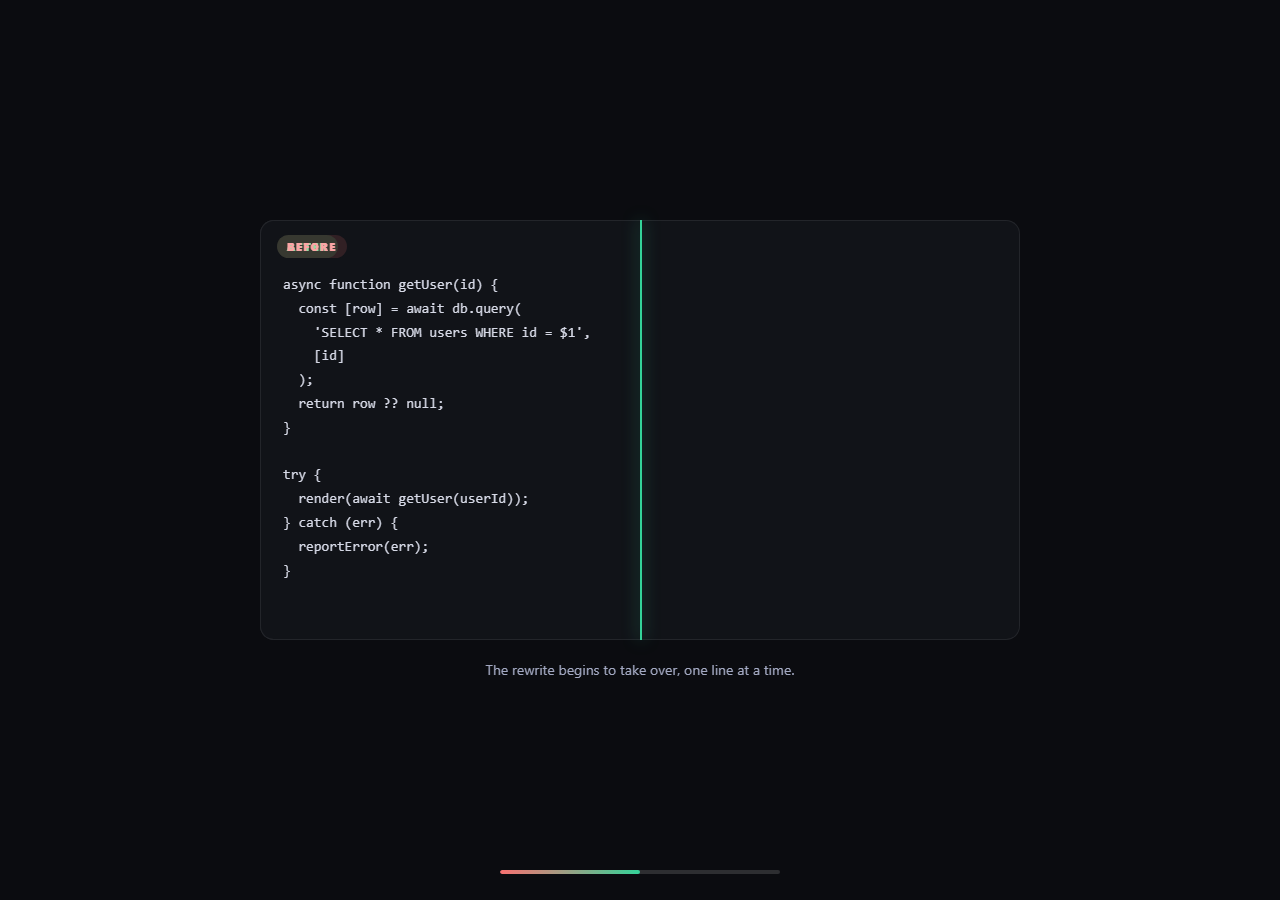
A drag-to-compare slider needs a visitor to actively operate it. This snippet instead ties the same "before becomes after" wipe directly to scroll position, so the transformation narrates itself as part of reading the page — scroll down and the rewrite visibly overtakes the legacy code; scroll back up and it retreats, exactly in step.
`clip-path: inset()` as a scrubbed wipe, not a crossfade
The "after" panel sits stacked exactly on top of the "before" panel and starts with clip-path: inset(0 100% 0 0) — fully clipped away from its right edge. A single ScrollTrigger with scrub: 0.4 writes a new inset(0 N% 0 0) value every scroll update, where N shrinks from 100 to 0 as self.progress climbs from 0 to 1. Unlike an opacity crossfade, a clip-path wipe never shows both versions blended together mid-transition — at any given scroll position, the frame shows a hard, honest split between exactly how much "before" and how much "after" is visible, which reads far more clearly as a literal transformation in progress.
One progress value drives three synchronized elements
The same self.progress inside onUpdate sets the clip-path percentage, positions a glowing divider line at the identical edge (divider.style.left = pct + '%'), and fills a progress bar — three visibly different UI pieces, one shared number, so nothing can drift out of alignment the way separately-triggered animations might.
Threshold-based captions, not per-frame text
Captions live in a small array of { at, text } pairs and are resolved each update by finding the highest at value the current progress has passed — a lightweight step function layered on top of a continuous scrub, giving discrete narrative beats ("the rewrite begins to take over...") without needing a second ScrollTrigger or a character-by-character tween.
Why `scrub` instead of a triggered one-shot wipe
Using scrub (rather than a played-once tween triggered on enter) makes the wipe bidirectional and exploratory by nature — a visitor can scroll slowly and watch the exact code line where the transformation crosses, or scroll back up to compare a specific point again, which a fire-once reveal can't offer.
Customizing it
Swap the two <pre> code blocks for any other before/after content — a UI screenshot pair, a paragraph of edited copy, a data table — the wipe mechanic only cares that both panels are the same size and stacked. For a visitor-controlled (rather than scroll-controlled) version of the same clip-path idea, see scroll before/after; this snippet is the narrative, hands-off counterpart.
Build with AI
Build, Understand, Optimize, and Extend It With AI
Paste this snippet's HTML, CSS, and JS into an AI coding assistant like Claude and ask it to explain why a clip-path wipe communicates a before/after transformation more clearly than an opacity crossfade, and how driving the wipe percentage, the divider line's position, and the progress bar from the same single self.progress value inside one onUpdate callback keeps all three permanently in sync. The same assistant can help extend the pattern — ask it to add a second wipe axis (vertical instead of horizontal) for a different visual metaphor, layer in a subtle particle or glow effect right at the divider line, or add syntax-highlighting to the code panels using a highlighting library loaded alongside GSAP. Treat the code as a working starting point for your own scroll-driven transformation narrative.
Prompt to recreate it
Copy this into your AI assistant of choice to build the effect from scratch, or as a jumping-off point for your own variant:
Build a "scroll transformation story" in plain HTML, CSS, and JavaScript using GSAP with its ScrollTrigger plugin, loaded from a CDN with no bundler.

Requirements:
- A pinned section containing two same-size panels stacked exactly on top of each other (position: absolute, inset: 0) representing a "before" state and an "after" state — any equal-size content works, such as two code blocks, two screenshots, or two paragraphs of text — plus a thin divider line element and a caption text element, preceded by an intro section and followed by an outro section.
- Give the "after" panel an initial clip-path of inset(0 100% 0 0), fully hiding it from its right edge, so only the "before" panel underneath is visible at the very start.
- Create a single ScrollTrigger on the pinned section with scrub enabled (a fractional value for slight easing lag), and inside its onUpdate callback, compute the clip-path's right-inset percentage as 100 minus the current scroll progress percentage, so the "after" panel's clip-path right inset shrinks from 100% to 0% in exact proportion to how far the visitor has scrolled through the pinned section — creating a hard-edged horizontal wipe rather than an opacity blend.
- In that same onUpdate callback, position a visible divider line's left offset to match the exact same progress percentage used for the clip-path, and update a separate progress bar fill's width from the same percentage — all three should be derived from one shared progress value so they can never fall out of sync with each other.
- Also in the same onUpdate callback, update a caption text element by checking the current scroll progress against a small ordered array of threshold-and-text pairs, displaying whichever caption's threshold is the highest one the current progress has already reached or passed — giving discrete narrative text changes layered on top of the continuous scrub-driven wipe.
- Ensure scrolling back up smoothly reverses the wipe, the divider position, the progress bar, and the captions, entirely through the scrub-driven ScrollTrigger with no separate reverse-direction logic required.
Want to tighten it up first? Run this prompt through the AI Prompt Studio to score it across 8 quality dimensions, catch anti-patterns, and tune the wording for Claude, ChatGPT, or Gemini before you paste it in.
Step by step
How to Use
- 1Add GSAP and ScrollTriggerLoad both from the CDN and call gsap.registerPlugin(ScrollTrigger).
- 2Paste the HTML, CSS, and JSThe "after" panel starts fully clipped away behind the "before" panel.
- 3Scroll into the pinned sectionA clip-path wipe reveals the "after" state in exact step with scroll progress.
- 4Watch the divider and captionsThe glowing line and caption text update from the same progress value.
- 5Scroll back upThe wipe retreats smoothly, since scrub ties it directly to scroll position.
- 6Swap in your own contentReplace the two code panels with any equal-size before/after pair.
Real-world uses
Common Use Cases
Got questions?
Frequently Asked Questions
Animating opacity would blend both versions together at every point mid-transition, which reads ambiguously — the reader can't tell exactly how much has changed at any given scroll position. clip-path: inset() instead shows a hard edge: everything left of the divider is definitively "after" and everything right of it is definitively "before," with no blending, which communicates a literal, honest transformation rather than a soft fade.
All three are derived from the exact same self.progress value on every scroll update, rather than each having its own separate trigger or calculation. That guarantees they can never visually drift apart from each other — the divider line is mathematically guaranteed to sit exactly on the wipe's actual edge, because both are computed from the same number in the same function call.
The captions array stores threshold points (the at value, from 0 to 1) alongside their text, and every onUpdate call loops through the array to find the highest threshold the current progress has already passed. This is a simple step function layered on top of the single continuous scrub value — no additional ScrollTrigger instances or timeline segments are needed to get discrete text changes at specific scroll points.
Yes — the mechanic only requires that the "before" and "after" panels are the same size and stacked in the same position, which the CSS already sets up with position: absolute; inset: 0. Replace the <pre> code blocks with <img> tags, screenshots, or any other content of matching dimensions and the same clip-path scrub logic keeps working unchanged.
Create the ScrollTrigger inside a mount effect (useEffect, onMounted, or ngAfterViewInit) after both panels have rendered, and write the clip-path, divider position, and caption text as direct style/DOM updates inside onUpdate rather than through component state, since state updates at scroll-frame frequency would cause excessive re-renders. Call .kill() on the ScrollTrigger instance in the cleanup function.