You Might Also Like
Learn Coding Visually
Learn to code with interactive, live-preview playgrounds — HTML, CSS, JavaScript, React & more.
 HTML Playground42 lessons · Click-based · Live preview
 CSS PlaygroundLearn CSS with a live editor
 JavaScript Playground60 lessons · DOM · Async · Canvas
 React PlaygroundLearn React with a live code editor
 GSAP PlaygroundLearn GSAP animation interactively
 SVG Playground44 lessons · shapes · paths · animation
 SCSS Playground45 lessons · Sass modules · tokens
 Tailwind PlaygroundLearn Tailwind CSS with a live editor
 Bootstrap 5 Playground50 lessons · live preview
Pixel Platformer Game — Free HTML CSS JS Snippet
Pixel Platformer Game · Games · Plain HTML, CSS & JS · Live preview
What's included
Features
About this UI Snippet
Pixel Platformer — Gravity, One-Way Platforms and a Scrolling Camera on Canvas
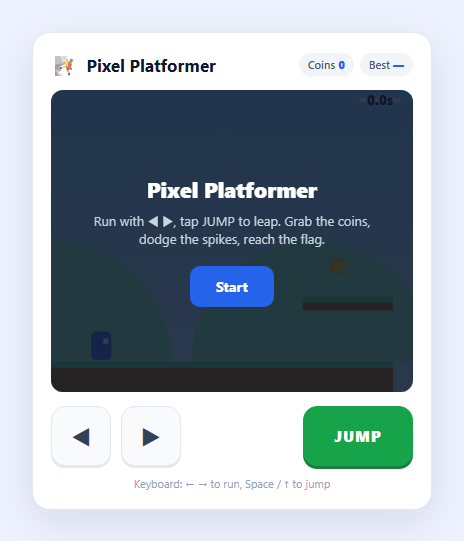
A side-scrolling platformer is the classic proving ground for 2D game physics because it forces you to solve, in a small space, the three problems every action game shares: applying gravity every frame, resolving collisions so the character stands on solid ground instead of falling through it, and moving a camera that follows the player through a level larger than the screen. This snippet implements all three on a single HTML5 <canvas>, and controls the character with an on-screen ◀ ▶ D-pad and a JUMP button so it plays with a thumb on a phone as naturally as with the arrow keys.
A stable fixed-timestep loop
Platformer physics is sensitive to frame timing: a variable step can let a fast-moving character tunnel straight through a thin platform. To avoid that, the loop accumulates elapsed time and runs the physics update() in fixed 1/60-second steps, draining the accumulator with a while loop before each paint. Rendering still happens once per frame, but the simulation always advances in the same discrete increments, so jump height, run speed and collision behaviour are identical whether the display refreshes at 60Hz or 120Hz.
Gravity and one-way platform collision
Every step, gravity is added to the character's vertical velocity, the velocity is added to position, and then each platform is tested. The key detail is that platforms are *one-way from the top*: a landing only registers when the player is moving downward (vy >= 0) and their previous-frame bottom edge was at or above the platform surface. That single guard lets the character jump up *through* a floating platform and land on it coming down — the expected feel of a platformer — instead of being blocked from below. Horizontal movement uses acceleration toward a target speed with friction when no direction is held, so the character eases to a stop rather than snapping.
Jump as a discrete action, run as a held state
Run and jump are deliberately different input types. Left and right are *held states* — the D-pad buttons and arrow keys toggle keys.left/keys.right, read every step. Jump is a *discrete action* fired once on press: the JUMP button uses pointerdown (not a held flag) and only launches the character when onGround is true, which prevents mid-air double jumps and matches how a jump button should behave. Both control schemes call the same requestJump() function.
A camera that follows through a wide level
The level is far wider than the canvas. The camera's x-offset tracks the player's centre and is clamped to the level bounds so it never scrolls past the start or end, and the whole world is drawn through a single ctx.translate(-cam, 0). Parallax hills scroll at a fraction of the camera speed for depth. Coins, spikes and a goal flag complete the level: collecting coins updates a counter, touching a spike or falling off the world ends the run, and reaching the flag finishes the level and records the completion time to localStorage as a personal best.
Build with AI
Build, Understand, Optimize, and Extend It With AI
Paste this snippet's HTML, CSS and JS into an AI assistant like Claude and ask it to walk through the fixed-timestep loop, the one-way platform collision guard, and the clamped follow-camera. It is a strong base to extend: ask for moving platforms, patrolling enemies with stomp-to-defeat, mid-level checkpoints, a double-jump or wall-jump, multiple levels loaded from a data file, or sprite-sheet animation for the character. You could also ask it to add coyote time and jump buffering for a more forgiving feel, or to port the loop into a React component using useRef and useEffect for the animation-frame lifecycle. Treat it as a working prototype to question and rebuild rather than a finished engine.
Prompt to recreate it
Copy this into your AI assistant of choice to build the effect from scratch, or as a jumping-off point for your own variant:
Build a mobile-friendly side-scrolling platformer game on an HTML5 canvas in plain HTML, CSS and JavaScript — no frameworks.

Requirements:
- A character affected by gravity that runs left/right and jumps. Provide an on-screen ◀ ▶ D-pad plus a JUMP button for touch, AND keyboard controls (arrows + Space/Up). Left/right are held states; JUMP is a discrete action fired on press that only works when the character is on the ground (no double jump).
- Use Pointer Events for the buttons. Run the physics on a FIXED timestep (fixed 1/60-second steps drained via an accumulator each frame) so jump height and speed are consistent across refresh rates and fast falls do not tunnel through thin platforms.
- Implement gravity plus velocity integration, with acceleration toward a target run speed and friction when no direction is held. Platforms must be one-way: the character lands on them when falling from above but can jump up through them from below.
- The level is wider than the canvas. Add a camera that follows the player and is clamped to the level bounds, drawn with ctx.translate. Include a parallax background layer.
- Add collectible coins (with a counter), spike hazards and a fall-off-the-world condition that end the run, and a goal flag that completes the level. Persist the best completion time in localStorage with defensive try/catch, and show start / death / level-complete overlays.
- Keep the level layout as editable data arrays (platforms, spikes, coins, flag) near the top of the file.
Want to tighten it up first? Run this prompt through the AI Prompt Studio to score it across 8 quality dimensions, catch anti-patterns, and tune the wording for Claude, ChatGPT, or Gemini before you paste it in.
Step by step
How to Use
- 1Start the levelTap "Start" to call startGame(), which resets the player to the left edge, clears the coin state and begins the fixed-timestep requestAnimationFrame loop.
- 2Run with the D-padHold ◀ or ▶ (or the Left/Right arrow keys) to run. These set keys.left / keys.right, read every physics step; releasing applies friction so the character eases to a stop rather than stopping dead.
- 3Jump with the JUMP buttonTap JUMP (or Space / ↑). Jump is a discrete action fired on pointerdown and only works when the character is on the ground, so there is no accidental double jump. You can jump up through a platform and land on it on the way down.
- 4Collect coins, dodge spikesGrab the bobbing gold coins to raise the counter in the header. Touching a red spike, or falling off the bottom of the world, ends the run and shows a retry screen.
- 5Reach the flagGet to the green flag at the far right to finish the level. Your completion time is shown and, if it beats your stored best, saved to localStorage under pixel-platformer-best.
- 6Edit the levelThe platforms, spikes, coins and flag are plain data arrays near the top of the JS. Add or move objects there, and tune GRAV, MOVE and JUMP_V to change the game feel.
Real-world uses
Common Use Cases
Got questions?
Frequently Asked Questions
Platformer collision is sensitive to how far an object moves in a single step. With a large variable step, a fast-falling character can move entirely past a thin platform between two frames and tunnel through it. Running the physics in fixed 1/60-second steps (draining an accumulator each frame) keeps every jump and collision identical regardless of frame rate and avoids that tunnelling, while drawing still happens once per rendered frame.
Platforms are one-way. A landing is only registered when the player is moving downward (vy >= 0) and their bottom edge in the previous step was at or above the platform surface. When jumping upward, vy is negative so the collision is ignored, letting the character pass through from below; on the way down the guard becomes true and the character lands on top.
Running is a continuous state, so the D-pad buttons and arrow keys toggle boolean flags read every step. Jumping is a one-shot action: the JUMP button fires on pointerdown and only launches when onGround is true. Treating it as a discrete event (rather than a held flag) prevents the character from repeatedly jumping or double-jumping while the button is held down.
The camera x-offset is set to centre the player, then clamped with Math.max(0, Math.min(LEVEL_W - W, ...)) so it never scrolls before the start or past the end of the level. The whole world is rendered through a single ctx.translate(-cam, 0), so every object is drawn in level coordinates and the camera math lives in one place.
The platforms, spikes and coins arrays and the flag object near the top of the JS are plain data in level (world) coordinates. Add, remove or reposition entries there to build a new layout, adjust LEVEL_W if you make it longer, and tune GRAV, MOVE and JUMP_V to change how the character handles.