Source Code
<div class="emc">
  <div class="emc-bar">
    <span>New message</span>
    <div class="emc-winbtns"><i></i><i></i><i></i></div>
  </div>

  <div class="emc-field">
    <label for="emcTo">To</label>
    <div class="emc-chips" id="emcChips">
      <input type="text" id="emcTo" placeholder="Add recipients…" aria-label="Recipients">
    </div>
    <button class="emc-cc" id="emcCcBtn" type="button">Cc</button>
  </div>

  <div class="emc-field emc-ccrow" id="emcCcRow">
    <label for="emcCc">Cc</label>
    <input class="emc-plain" type="text" id="emcCc" placeholder="Carbon copy…" aria-label="Cc recipients">
  </div>

  <div class="emc-field">
    <label for="emcSub">Subject</label>
    <input class="emc-plain" type="text" id="emcSub" placeholder="Subject" aria-label="Subject">
  </div>

  <textarea class="emc-body" id="emcBody" placeholder="Write your message…" aria-label="Message body"></textarea>

  <div class="emc-foot">
    <div class="emc-tools">
      <button type="button" title="Bold"><b>B</b></button>
      <button type="button" title="Italic"><i>I</i></button>
      <button type="button" title="Attach file">
        <svg viewBox="0 0 24 24" aria-hidden="true"><path d="M21.44 11.05l-9.19 9.19a6 6 0 0 1-8.49-8.49l9.19-9.19a4 4 0 0 1 5.66 5.66l-9.2 9.19a2 2 0 0 1-2.83-2.83l8.49-8.48"/></svg>
      </button>
      <button type="button" title="Insert link">
        <svg viewBox="0 0 24 24" aria-hidden="true"><path d="M10 13a5 5 0 0 0 7.54.54l3-3a5 5 0 0 0-7.07-7.07l-1.72 1.71"/><path d="M14 11a5 5 0 0 0-7.54-.54l-3 3a5 5 0 0 0 7.07 7.07l1.71-1.71"/></svg>
      </button>
    </div>
    <div class="emc-send-group">
      <span class="emc-status" id="emcStatus"></span>
      <button class="emc-send" id="emcSend" type="button" disabled>
        Send
        <svg viewBox="0 0 24 24" aria-hidden="true"><line x1="22" y1="2" x2="11" y2="13"/><polygon points="22 2 15 22 11 13 2 9 22 2"/></svg>
      </button>
    </div>
  </div>
</div>
* { box-sizing: border-box; margin: 0; padding: 0; }
body { font-family: system-ui, -apple-system, sans-serif; background: #e8edf4; min-height: 100vh; display: flex; align-items: center; justify-content: center; padding: 24px; }
.emc { width: min(520px, 100%); background: #fff; border-radius: 16px; box-shadow: 0 18px 50px rgba(15, 23, 42, 0.18); overflow: hidden; display: flex; flex-direction: column; }
.emc-bar {
display: flex; align-items: center; justify-content: space-between;
padding: 11px 16px; background: #0f172a; color: #e2e8f0;
font-size: 13px; font-weight: 700;
}
.emc-winbtns { display: flex; gap: 6px; }
.emc-winbtns i { width: 10px; height: 10px; border-radius: 50%; background: #334155; }
.emc-field { display: flex; align-items: center; gap: 10px; padding: 8px 16px; border-bottom: 1px solid #f1f5f9; }
.emc-field label { font-size: 12.5px; font-weight: 600; color: #94a3b8; flex-shrink: 0; width: 44px; }
.emc-chips { flex: 1; display: flex; flex-wrap: wrap; gap: 6px; align-items: center; min-width: 0; }
.emc-chips input, .emc-plain {
flex: 1; min-width: 120px; border: none; outline: none;
font-family: inherit; font-size: 13.5px; color: #0f172a; padding: 5px 0; background: none;
}
.emc-chip {
display: inline-flex; align-items: center; gap: 6px;
padding: 3px 5px 3px 10px; border-radius: 999px;
background: #eef2ff; border: 1px solid #e0e7ff;
font-size: 12.5px; font-weight: 600; color: #4338ca;
animation: emcChip 0.2s ease both;
}
@keyframes emcChip { from { opacity: 0; transform: scale(0.85); } to { opacity: 1; transform: none; } }
.emc-chip.bad { background: #fef2f2; border-color: #fecaca; color: #b91c1c; }
.emc-chip button {
width: 16px; height: 16px; border: none; border-radius: 50%; cursor: pointer;
background: rgba(67, 56, 202, 0.14); color: inherit;
font-size: 11px; line-height: 1; display: flex; align-items: center; justify-content: center;
}
.emc-chip.bad button { background: rgba(185, 28, 28, 0.12); }
.emc-cc { border: none; background: none; cursor: pointer; font-family: inherit; font-size: 12.5px; font-weight: 600; color: #64748b; padding: 4px 6px; border-radius: 6px; }
.emc-cc:hover { background: #f1f5f9; }
.emc-ccrow { display: none; }
.emc-ccrow.show { display: flex; }
.emc-body {
flex: 1; min-height: 150px; resize: vertical;
border: none; outline: none; padding: 14px 16px;
font-family: inherit; font-size: 13.5px; line-height: 1.6; color: #0f172a;
}
.emc-foot { display: flex; align-items: center; justify-content: space-between; padding: 10px 12px 12px 16px; border-top: 1px solid #f1f5f9; }
.emc-tools { display: flex; gap: 2px; }
.emc-tools button {
width: 32px; height: 32px; border: none; border-radius: 8px; background: none; cursor: pointer;
font-family: inherit; font-size: 13px; color: #64748b;
display: flex; align-items: center; justify-content: center; transition: background 0.15s;
}
.emc-tools button:hover { background: #f1f5f9; }
.emc-tools svg { width: 15px; height: 15px; fill: none; stroke: currentColor; stroke-width: 2; stroke-linecap: round; stroke-linejoin: round; }
.emc-send-group { display: flex; align-items: center; gap: 10px; }
.emc-status { font-size: 12px; font-weight: 600; color: #16a34a; }
.emc-send {
display: inline-flex; align-items: center; gap: 7px;
padding: 9px 20px; border: none; border-radius: 10px;
background: #6366f1; color: #fff; font-family: inherit; font-size: 13.5px; font-weight: 700; cursor: pointer;
transition: background 0.2s, opacity 0.2s, transform 0.15s;
}
.emc-send:hover:not(:disabled) { background: #4f46e5; transform: translateY(-1px); }
.emc-send:disabled { opacity: 0.45; cursor: not-allowed; }
.emc-send svg { width: 14px; height: 14px; fill: none; stroke: currentColor; stroke-width: 2; stroke-linecap: round; stroke-linejoin: round; }const chipsWrap = document.getElementById('emcChips');
const toInput = document.getElementById('emcTo');
const ccBtn = document.getElementById('emcCcBtn');
const ccRow = document.getElementById('emcCcRow');
const subject = document.getElementById('emcSub');
const bodyEl = document.getElementById('emcBody');
const sendBtn = document.getElementById('emcSend');
const status = document.getElementById('emcStatus');
const recipients = []; // { email, valid }
const EMAIL_RE = /^[^\s@]+@[^\s@]+\.[^\s@]+$/;
function updateSend() {
const hasValid = recipients.some(r => r.valid);
sendBtn.disabled = !(hasValid && bodyEl.value.trim());
}
function addChip(raw) {
const email = raw.trim().replace(/,$/, '');
if (!email) return;
if (recipients.some(r => r.email === email)) return; // no duplicates
const valid = EMAIL_RE.test(email);
recipients.push({ email, valid });
const chip = document.createElement('span');
chip.className = 'emc-chip' + (valid ? '' : ' bad');
chip.title = valid ? email : 'Invalid address';
chip.innerHTML = email + '<button type="button" aria-label="Remove ' + email + '">×</button>';
chip.querySelector('button').addEventListener('click', () => {
recipients.splice(recipients.findIndex(r => r.email === email), 1);
chip.remove();
updateSend();
});
chipsWrap.insertBefore(chip, toInput);
updateSend();
}
toInput.addEventListener('keydown', (e) => {
if (e.key === 'Enter' || e.key === ',' || (e.key === 'Tab' && toInput.value.trim())) {
e.preventDefault();
addChip(toInput.value);
toInput.value = '';
} else if (e.key === 'Backspace' && !toInput.value) {
// Backspace on empty input removes the last chip
const last = chipsWrap.querySelector('.emc-chip:last-of-type');
if (last) last.querySelector('button').click();
}
});
toInput.addEventListener('blur', () => { addChip(toInput.value); toInput.value = ''; });
// Paste a comma/space separated list -> chips
toInput.addEventListener('paste', (e) => {
e.preventDefault();
const text = (e.clipboardData || window.clipboardData).getData('text');
text.split(/[,;\s]+/).forEach(addChip);
});
ccBtn.addEventListener('click', () => {
ccRow.classList.toggle('show');
if (ccRow.classList.contains('show')) document.getElementById('emcCc').focus();
});
bodyEl.addEventListener('input', updateSend);
sendBtn.addEventListener('click', () => {
sendBtn.disabled = true;
status.textContent = 'Sending…';
status.style.color = '#64748b';
setTimeout(() => {
status.textContent = 'Sent ✓';
status.style.color = '#16a34a';
setTimeout(() => {
// Reset the composer
[...chipsWrap.querySelectorAll('.emc-chip')].forEach(c => c.remove());
recipients.length = 0;
subject.value = ''; bodyEl.value = ''; status.textContent = '';
updateSend();
}, 1400);
}, 1200);
});Learn Coding Visually
Learn to code with interactive, live-preview playgrounds — HTML, CSS, JavaScript, React & more.
 HTML Playground42 lessons · Click-based · Live preview
 CSS PlaygroundLearn CSS with a live editor
 JavaScript Playground60 lessons · DOM · Async · Canvas
 React PlaygroundLearn React with a live code editor
 GSAP PlaygroundLearn GSAP animation interactively
 SVG Playground44 lessons · shapes · paths · animation
 SCSS Playground45 lessons · Sass modules · tokens
 Tailwind PlaygroundLearn Tailwind CSS with a live editor
 Bootstrap 5 Playground50 lessons · live preview
Email Composer — Free HTML CSS JS Form Snippet
Email Composer · Forms · Plain HTML, CSS & JS · Live preview
What's included
Features
About this UI Snippet
Email Composer — Gmail-Style Compose Window with Recipient Chips and Validation
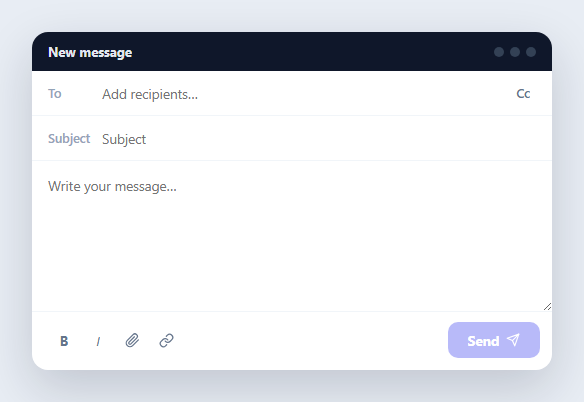
The compose window is one of the most interaction-dense forms on the web, and its heart is the recipient chip input: type an address, press Enter or comma, and it solidifies into a removable pill — invalid ones flagged red, duplicates rejected, pasted lists split automatically, and Backspace on an empty field deleting the last chip. This component builds a complete Gmail-style composer around that input in HTML, CSS, and vanilla JavaScript, with a collapsible Cc row, formatting toolbar, live send-button gating, and a sending → sent status cycle.
The chip input mechanics
The To field is a flex-wrap container holding chips plus a borderless text input that flexes to fill the remaining space (flex: 1; min-width: 120px), so typing always happens "after" the chips and wraps to new lines naturally as chips accumulate. Three commit triggers convert text into a chip: Enter, comma, and Tab-with-content (all with preventDefault so the comma never lands in the input and Tab doesn't escape the field mid-entry); blur also commits, so half-typed addresses aren't silently lost when the user clicks into Subject. Each chip is inserted with insertBefore(chip, toInput) so the input stays last.
Validation and duplicate rejection
Every committed address is tested against a pragmatic email regex — anything shaped something@domain.tld. Failures still become chips, but with a .bad class rendering them red with an "Invalid address" tooltip: keeping invalid entries visible (rather than refusing them) matches Gmail's behaviour and lets users spot typos instead of wondering where their input went. The recipients array is the single source of truth; duplicate strings are rejected before a chip is ever created, and each chip's remove button splices its entry back out.
Paste-to-chips
Pasting "a@x.com, b@y.com; c@z.com" into a naive input yields one useless string. The composer intercepts paste, reads the clipboard text, splits on commas, semicolons, and whitespace with one regex, and runs each token through addChip() — so pasting a list from a spreadsheet or another email instantly produces validated chips. This is the single highest-value behaviour in any recipient field and takes six lines.
Send gating and the status cycle
The Send button stays disabled until the form is actually sendable: at least one *valid* recipient and a non-empty body (checked via recipients.some(r => r.valid) — red chips alone don't count). Clicking Send disables the button, shows "Sending…", then "Sent ✓", then resets the whole composer — chips removed, array cleared, fields emptied — modelling the full optimistic-send lifecycle you would wire to your mail API. The Cc row is hidden until its toggle is clicked, and focuses its input on reveal, exactly as Gmail defers rarely-used fields.
Small details that sell it
Chips animate in with a quick scale-fade; the remove buttons carry per-chip aria-labels ("Remove ava@x.com") for screen readers; Backspace-on-empty reuses the remove button's own click handler so there is exactly one deletion code path; and the toolbar buttons are real focusable buttons with tooltips, ready to wire to document.execCommand alternatives or a rich-text engine like the rich text editor snippet.
Customisation
Wire Send to your backend (the recipients array and field values are all you need for the payload), extend the chip logic to the Cc row by calling the same setup on it, swap the indigo accent, and connect the attach button to a file dropzone. For address book suggestions while typing, combine the input with the mention autocomplete pattern.
Build with AI
Build, Understand, Optimize, and Extend It With AI
Instead of tracing the chip commit logic by hand, paste this snippet's HTML, CSS, and JS into an AI coding assistant like Claude and ask it to explain exactly why addChip() is called from three different triggers (Enter/comma/Tab keydown, blur, and paste) yet still only creates one chip per unique address, and how the recipients array stays the single source of truth that both the validity check and the duplicate check rely on. The same assistant can help you optimize it, for instance checking whether the pragmatic EMAIL_RE regex is too permissive or too strict for real-world addresses compared to a more thorough validation approach. It's also useful for extending the composer: ask it to add autocomplete suggestions from a contacts list as the user types, support drag-and-drop file attachments with a progress indicator, or wire the Cc row's input through the exact same chip logic as the To field instead of leaving it a plain text input. Treat the code less like a finished artifact and more like a starting point for a conversation.
Prompt to recreate it
Copy this into your AI assistant of choice to build the effect from scratch, or as a jumping-off point for your own variant:
Build an email compose window in plain HTML, CSS, and JavaScript with no library, centered on a recipient chip input.

Requirements:
- A recipients field built as a flex-wrap container holding removable chip elements plus a plain borderless text input as its last child, where the input is flex-sized to always claim the remaining space on its current line so it visually continues right after the most recently added chip.
- Commit typed text into a chip on three separate triggers: pressing Enter, typing a comma, or pressing Tab while there is text in the field (all three must prevent their default browser behavior), and also commit on blur so a half-typed address isn't silently lost when focus moves elsewhere.
- Validate every committed address against an email-shaped regular expression; invalid addresses must still become chips but marked with a distinct visual style (e.g. red background) and a tooltip explaining it's invalid, rather than being silently rejected or blocking the commit.
- Maintain a single array as the source of truth for all recipients (each entry storing the address and whether it's valid), reject exact duplicate addresses before creating a second chip for the same address, and give every chip a small remove button that splices it out of that array and deletes the chip element.
- Intercept paste events on the recipients input, read the pasted plain text, split it on commas, semicolons, and any whitespace (including newlines) in one pass, and run every resulting token through the same single-address commit function used for typed entries, so pasting a column of addresses from a spreadsheet produces one validated chip per address.
- Add a collapsible Cc row hidden by default that expands and autofocuses its input when a toggle button is clicked, a subject field, a message body textarea, and a Send button that stays disabled until there is at least one valid (not merely present) recipient chip and non-empty body text, then on click runs through a disabled → "Sending..." → "Sent" status sequence before clearing all fields and chips back to the initial empty state.
Want to tighten it up first? Run this prompt through the AI Prompt Studio to score it across 8 quality dimensions, catch anti-patterns, and tune the wording for Claude, ChatGPT, or Gemini before you paste it in.
Step by step
How to Use
- 1Paste the HTML, CSS, and JSA compose window renders with a dark title bar, To field, hidden Cc row, Subject, message body, formatting toolbar, and a disabled Send button.
- 2Add recipientsType an address and press Enter, comma, or Tab — it becomes an indigo chip. Type something invalid and the chip turns red with an "Invalid address" tooltip.
- 3Paste a listPaste several addresses separated by commas, semicolons, or spaces — they split into individual validated chips instantly.
- 4Edit the chip setClick a chip's × to remove it, or press Backspace in the empty input to pop the last chip. Duplicates are silently rejected.
- 5Reveal Cc and composeClick Cc to expand the carbon-copy row (it autofocuses); Send enables only once a valid recipient and body text both exist.
- 6SendClick Send — the status runs "Sending…" then "Sent ✓" and the composer resets; replace the timeout with your mail API call.
Real-world uses
Common Use Cases
Got questions?
Frequently Asked Questions
The To field is a flex-wrap container where chips and the input are siblings; the input has flex: 1 with min-width: 120px, so it always claims the leftover space on the current line and wraps below when chips fill a row. New chips are inserted with insertBefore(chip, toInput), keeping the input as the last child — typing therefore always continues after the most recent chip, exactly like Gmail.
Silently refusing input makes users think the field is broken, and blocking commits mid-typing interrupts flow. Following Gmail, the composer accepts the entry, marks it .bad (red with an "Invalid address" tooltip), and simply excludes it from send-gating — recipients.some(r => r.valid) requires at least one good address. The user sees the typo, clicks ×, and retypes, with no lost work.
A paste listener calls preventDefault, reads e.clipboardData.getData('text'), and splits it with /[,;\s]+/ — one regex covering commas, semicolons, and any whitespace including newlines. Each token runs through the same addChip() used for typed entries, so validation and duplicate rejection apply uniformly. Pasting a column of emails from a spreadsheet produces a clean chip per address.
Everything you need is already collected: recipients (filter to r.valid ones), the Cc input's value, subject.value, and bodyEl.value. In the click handler, replace the first setTimeout with fetch('/api/send', { method: 'POST', body: JSON.stringify(payload) }), keep the "Sending…" state while awaiting, show "Sent ✓" on success, and restore the button with an error message on failure instead of resetting.
Hold recipients as an array in state and render chips with a map — addChip and remove become state updates, and insertBefore disappears since the framework controls order. Keyboard handling moves to onKeyDown on the input; the paste handler stays but pushes to state. Derive the Send disabled prop from the same validity check. The flex-wrap chip layout and animations are pure CSS and port unchanged to any framework, Angular included.