
Learn Coding Visually
Learn to code with interactive, live-preview playgrounds — HTML, CSS, JavaScript, React & more.
 HTML Playground42 lessons · Click-based · Live preview
 CSS PlaygroundLearn CSS with a live editor
 JavaScript Playground60 lessons · DOM · Async · Canvas
 React PlaygroundLearn React with a live code editor
 GSAP PlaygroundLearn GSAP animation interactively
 SVG Playground44 lessons · shapes · paths · animation
 SCSS Playground45 lessons · Sass modules · tokens
 Tailwind PlaygroundLearn Tailwind CSS with a live editor
 Bootstrap 5 Playground50 lessons · live preview
Mention Autocomplete (@mention) — HTML CSS JS Snippet
Mention Autocomplete · Forms · Plain HTML, CSS & JS · Live preview
What's included
Features
About this UI Snippet
Mention Autocomplete — @mention Popup, Keyboard Navigation & Mention Chip
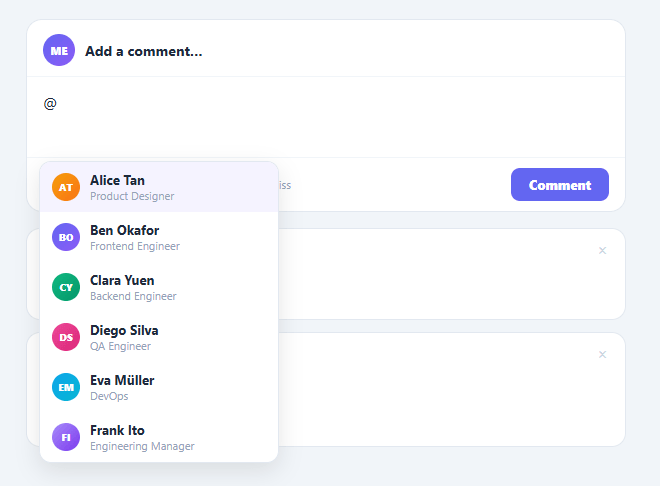
An @mention autocomplete is a fundamental feature of any collaborative tool — used in project management (Linear, Jira), chat (Slack, Discord), comments (GitHub, Notion), and document editors. It extends the autocomplete input into a contenteditable. It is a frequently-searched UI pattern because contenteditable-based autocomplete involves several non-obvious browser API interactions: reading the caret position, finding the @-trigger in the text before it, inserting a non-editable chip, and moving the cursor past it. This snippet provides a complete, working implementation.
The trigger detection
onInput() runs on every keystroke in the contenteditable. It calls getCaretRange() to get the current selection range, then getQueryBeforeCaret() to scan backward from the caret in the current text node for an @ sign. If an @ is found with no whitespace between it and the caret, it extracts the characters after the @ as the search query and opens the popup. Any whitespace between @ and the caret, or no @, closes the popup — so typing a space after a partial mention dismisses the dropdown.
Filtering the user list
The popup filters the users array by name using a case-insensitive includes check. Results render immediately as the user types, updating on every character. The selectedIdx tracks which item is highlighted, and both the data-source (window.__filteredUsers) and the rendered list stay in sync.
Keyboard navigation
onKeyDown intercepts ArrowUp, ArrowDown, Enter, and Escape while the popup is open. Arrow keys move selectedIdx and re-render the popup list with the new highlight. Enter calls insertMention() on the selected user. Escape hides the popup and clears the mention range. All other keys fall through to the browser's normal editing behaviour.
Inserting the mention chip
insertMention() uses the saved mentionRange to find the @ character, selects from the @ to the caret (the partial text the user typed), deletes it, and inserts a non-editable span with class "mention". A non-breaking space after the chip moves the caret out of the span so the next character typed starts normal text rather than extending the mention. This is the standard mention-chip insertion technique: replace the trigger + typed text with a chip, then position the cursor after it.
The comment feed
sendComment() reads the editor's innerHTML (which contains both plain text and mention spans), wraps it in a comment thread card with a timestamp, and prepends it to the feed. The mention chips are preserved in the submitted HTML so they remain highlighted in the posted comment.
Accessibility and production considerations
In a production implementation you would replace contenteditable with a proper rich text editor or a library (ProseMirror, Tiptap, Slate) for full accessibility and cross-browser reliability. The snippet demonstrates the core browser APIs and the mention-insertion technique that any implementation builds on.
Build with AI
Build, Understand, Optimize, and Extend It With AI
You don't have to reason through the Selection and Range API calls alone. Paste this snippet's HTML, CSS, and JS into an AI coding assistant like Claude and ask it to walk through exactly how getQueryBeforeCaret scans backward from the caret offset to find the last unbroken at-sign, or why the mention chip needs contentEditable set to false plus a trailing non-breaking space to behave as an atomic unit. The same assistant can help optimize it — checking whether showPopup should debounce its full re-render on every keystroke once the user list grows past a few hundred entries, or whether filtering with startsWith first and includes as a fallback avoids noisy partial matches. It's equally useful for extending the behavior: ask it to support mentioning by typing a hashtag for tags, fetch users from a real API instead of the hardcoded array, or restrict mentions to only channel members. Treat the code less like a finished artifact and more like a starting point for a conversation.
Prompt to recreate it
Copy this into your AI assistant of choice to build the effect from scratch, or as a jumping-off point for your own variant:
Build an "at-mention autocomplete" for a contenteditable comment box in plain HTML, CSS, and JavaScript using only the Selection and Range APIs — no libraries, no textarea.

Requirements:
- A contenteditable div that shows a placeholder via the CSS colon-empty colon-colon-before content trick, plus an absolutely positioned popup list anchored below it.
- On every input event, get the current caret with window.getSelection().getRangeAt(0), and only look inside the active text node (bail out if the range's start container isn't a text node). Slice that node's text up to the caret offset and search backward for the most recent at-sign with lastIndexOf. If there is any whitespace between that at-sign and the caret, treat it as no active mention and close the popup.
- When an at-sign with no trailing whitespace is found, treat everything after it as a live search query, filter a list of users by that query (case-insensitive), and render the filtered results in the popup with an avatar, name, and role per row, highlighting one row as the keyboard-selected item.
- Support ArrowUp and ArrowDown to move the selected index and re-render the list, Enter to insert the currently selected user, and Escape to dismiss the popup, all intercepted in a keydown handler that only acts while the popup is open.
- On selection, delete the typed "at-sign plus query" text using a saved Range, insert a new inline span element for the mention that has contentEditable set to false and a class marking it visually distinct (e.g. background tint, bold), then insert a literal non-breaking space text node immediately after it and move the caret to just after that space, so the user's next keystroke starts plain text rather than editing inside the chip.
- Persist mention data as a data attribute (e.g. the user's id) on the chip span so the mentioned users can be extracted later from the editor's innerHTML when the comment is submitted.
Want to tighten it up first? Run this prompt through the AI Prompt Studio to score it across 8 quality dimensions, catch anti-patterns, and tune the wording for Claude, ChatGPT, or Gemini before you paste it in.
Source Code
<div class="wrap">
  <div class="card">
    <div class="editor-head">
      <div class="avatar-row">
        <div class="av" style="background:linear-gradient(135deg,#6366f1,#8b5cf6)">ME</div>
        <span class="name">Add a comment…</span>
      </div>
    </div>
    <div class="editor-wrap">
      <div class="editor" id="editor" contenteditable="true" data-placeholder="Type @ to mention someone…" oninput="onInput(event)" onkeydown="onKeyDown(event)"></div>
      <div class="mention-popup" id="popup" style="display:none">
        <div class="popup-list" id="popupList"></div>
      </div>
    </div>
    <div class="editor-footer">
      <span class="hint">Press @ to mention · Enter to select · Esc to dismiss</span>
      <button class="send-btn" onclick="sendComment()">Comment</button>
    </div>
  </div>
  <div class="comment-feed" id="feed"></div>
</div>
* { box-sizing: border-box; margin: 0; padding: 0; }
body { font-family: system-ui, sans-serif; background: #f1f5f9; min-height: 100vh; padding: 40px 20px; display: flex; align-items: flex-start; justify-content: center; }
.wrap { width: 100%; max-width: 600px; }
.card { background: #fff; border-radius: 16px; border: 1.5px solid #e2e8f0; overflow: visible; margin-bottom: 16px; }
.editor-head { padding: 14px 16px 10px; display: flex; align-items: center; gap: 10px; border-bottom: 1px solid #f1f5f9; }
.avatar-row { display: flex; align-items: center; gap: 10px; }
.av { width: 32px; height: 32px; border-radius: 50%; display: flex; align-items: center; justify-content: center; font-size: 11px; font-weight: 800; color: #fff; flex-shrink: 0; }
.name { font-size: 14px; font-weight: 700; color: #1e293b; }
.editor-wrap { position: relative; }
.editor { min-height: 80px; padding: 14px 16px; font-size: 15px; color: #1e293b; outline: none; line-height: 1.6; }
.editor:empty::before { content: attr(data-placeholder); color: #94a3b8; pointer-events: none; }
.mention { background: #ede9fe; color: #6d28d9; border-radius: 4px; padding: 1px 3px; font-weight: 700; }
.mention-popup { position: absolute; left: 12px; top: 100%; z-index: 50; width: 240px; background: #fff; border: 1.5px solid #e2e8f0; border-radius: 12px; box-shadow: 0 8px 24px rgba(0,0,0,0.1); overflow: hidden; margin-top: 4px; }
.popup-item { display: flex; align-items: center; gap: 10px; padding: 9px 12px; cursor: pointer; transition: background 0.1s; }
.popup-item:hover, .popup-item.active { background: #f5f3ff; }
.popup-av { width: 28px; height: 28px; border-radius: 50%; display: flex; align-items: center; justify-content: center; font-size: 10px; font-weight: 800; color: #fff; flex-shrink: 0; }
.popup-info { flex: 1; min-width: 0; }
.popup-name { font-size: 13px; font-weight: 700; color: #1e293b; }
.popup-role { font-size: 11px; color: #94a3b8; }
.popup-empty { padding: 12px 16px; font-size: 13px; color: #94a3b8; text-align: center; }
.editor-footer { display: flex; align-items: center; justify-content: space-between; padding: 10px 16px; border-top: 1px solid #f1f5f9; }
.hint { font-size: 11px; color: #94a3b8; }
.send-btn { background: #6366f1; color: #fff; border: none; padding: 8px 18px; border-radius: 9px; font-size: 13px; font-weight: 800; cursor: pointer; font-family: inherit; }
.send-btn:hover { background: #4f46e5; }
.comment-feed { display: flex; flex-direction: column; gap: 12px; }
.comment-card { background: #fff; border-radius: 14px; border: 1px solid #e2e8f0; padding: 14px 16px; animation: slideIn 0.2s ease; }
@keyframes slideIn { from { opacity: 0; transform: translateY(-6px); } to { opacity: 1; transform: translateY(0); } }
.comment-meta { display: flex; align-items: center; gap: 8px; margin-bottom: 8px; }
.comment-name { font-size: 13px; font-weight: 700; color: #0f172a; }
.comment-time { font-size: 12px; color: #94a3b8; }
.comment-body { font-size: 14px; color: #334155; line-height: 1.6; }
.comment-card { position: relative; }
.delete-btn { position: absolute; top: 12px; right: 14px; background: none; border: none; color: #cbd5e1; font-size: 16px; cursor: pointer; line-height: 1; padding: 2px 4px; border-radius: 6px; transition: all 0.12s; }
.delete-btn:hover { color: #ef4444; background: #fef2f2; }var users = [
{ id:1, name:'Alice Tan', role:'Product Designer', initials:'AT', bg:'linear-gradient(135deg,#f59e0b,#f97316)' },
{ id:2, name:'Ben Okafor', role:'Frontend Engineer', initials:'BO', bg:'linear-gradient(135deg,#6366f1,#8b5cf6)' },
{ id:3, name:'Clara Yuen', role:'Backend Engineer', initials:'CY', bg:'linear-gradient(135deg,#10b981,#059669)' },
{ id:4, name:'Diego Silva', role:'QA Engineer', initials:'DS', bg:'linear-gradient(135deg,#ec4899,#db2777)' },
{ id:5, name:'Eva Müller', role:'DevOps', initials:'EM', bg:'linear-gradient(135deg,#0ea5e9,#06b6d4)' },
{ id:6, name:'Frank Ito', role:'Engineering Manager',initials:'FI', bg:'linear-gradient(135deg,#a78bfa,#7c3aed)' },
];
var mentionRange = null;
var selectedIdx = 0;
var query = '';
function getCaretRange() {
var sel = window.getSelection();
if (!sel || sel.rangeCount === 0) return null;
return sel.getRangeAt(0);
}
function getQueryBeforeCaret(range) {
var node = range.startContainer;
if (node.nodeType !== Node.TEXT_NODE) return null;
var text = node.textContent.slice(0, range.startOffset);
var atIdx = text.lastIndexOf('@');
if (atIdx === -1) return null;
var between = text.slice(atIdx + 1);
if (/\s/.test(between)) return null;
return { text: between, atIdx: atIdx, node: node };
}
function onInput() {
var range = getCaretRange();
if (!range) { hidePopup(); return; }
var info = getQueryBeforeCaret(range);
if (!info) { hidePopup(); return; }
mentionRange = range.cloneRange();
query = info.text;
selectedIdx = 0;
showPopup(info.text);
}
function showPopup(q) {
var filtered = users.filter(function(u) {
return u.name.toLowerCase().startsWith(q.toLowerCase()) || u.name.toLowerCase().includes(q.toLowerCase());
});
var list = document.getElementById('popupList');
var popup = document.getElementById('popup');
if (!filtered.length) {
list.innerHTML = '<div class="popup-empty">No match for @' + q + '</div>';
} else {
list.innerHTML = filtered.map(function(u, i) {
return '<div class="popup-item' + (i === selectedIdx ? ' active' : '') + '" onclick="insertMention(' + u.id + ')">' +
'<div class="popup-av" style="background:' + u.bg + '">' + u.initials + '</div>' +
'<div class="popup-info"><div class="popup-name">' + u.name + '</div><div class="popup-role">' + u.role + '</div></div>' +
'</div>';
}).join('');
}
popup.style.display = 'block';
window.__filteredUsers = filtered;
}
function hidePopup() {
document.getElementById('popup').style.display = 'none';
mentionRange = null;
window.__filteredUsers = null;
}
function onKeyDown(e) {
var popup = document.getElementById('popup');
if (popup.style.display === 'none') return;
var filtered = window.__filteredUsers || [];
if (e.key === 'ArrowDown') { e.preventDefault(); selectedIdx = Math.min(selectedIdx + 1, filtered.length - 1); showPopup(query); }
else if (e.key === 'ArrowUp') { e.preventDefault(); selectedIdx = Math.max(selectedIdx - 1, 0); showPopup(query); }
else if (e.key === 'Enter' && filtered.length) { e.preventDefault(); insertMention(filtered[selectedIdx].id); }
else if (e.key === 'Escape') { hidePopup(); }
}
function insertMention(userId) {
var user = users.find(function(u) { return u.id === userId; });
if (!user || !mentionRange) { hidePopup(); return; }
var range = mentionRange.cloneRange();
var node = range.startContainer;
var caretOffset = range.startOffset;
var atIdx = node.textContent.lastIndexOf('@', caretOffset);
range.setStart(node, atIdx);
range.setEnd(node, caretOffset);
var sel = window.getSelection();
sel.removeAllRanges();
sel.addRange(range);
var mention = document.createElement('span');
mention.className = 'mention';
mention.dataset.uid = user.id;
mention.contentEditable = 'false';
mention.textContent = '@' + user.name;
range.deleteContents();
range.insertNode(mention);
var space = document.createTextNode('\u00A0');
mention.after(space);
var newRange = document.createRange();
newRange.setStartAfter(space);
newRange.collapse(true);
sel.removeAllRanges();
sel.addRange(newRange);
hidePopup();
}
function sendComment() {
var editor = document.getElementById('editor');
var content = editor.innerHTML.trim();
if (!content || content === '') return;
var feed = document.getElementById('feed');
var now = new Date().toLocaleTimeString('en-US', { hour: 'numeric', minute: '2-digit' });
var card = document.createElement('div');
card.className = 'comment-card';
card.innerHTML =
'<button class="delete-btn" title="Delete comment" onclick="deleteComment(this)">×</button>' +
'<div class="comment-meta"><div class="av" style="background:linear-gradient(135deg,#6366f1,#8b5cf6)">ME</div><span class="comment-name">You</span><span class="comment-time">' + now + '</span></div>' +
'<div class="comment-body">' + content + '</div>';
feed.prepend(card);
editor.innerHTML = '';
}
function deleteComment(btn) {
var card = btn.closest('.comment-card');
card.style.transition = 'opacity 0.15s, transform 0.15s';
card.style.opacity = '0';
card.style.transform = 'translateY(-4px)';
setTimeout(function() { card.remove(); }, 150);
}Step by step
How to Use
- 1Type @ to trigger the popupClick the editor and type @ followed by any letters. The popup appears instantly, filtered to matching team members.
- 2Navigate with keyboardUse arrow keys to move the highlight up and down. Press Enter to insert the selected mention. Press Escape to dismiss.
- 3Click to selectClick any user in the popup to insert their mention chip at the caret position.
- 4Post the commentClick Comment to add the message (with mention chips) to the feed below the editor.
- 5Customise the user listReplace the users array with your own team members: { id, name, role, initials, bg }. In production, fetch from your users API filtered by the query string.
- 6Export for your frameworkClick "React" for a component using useRef for the contenteditable and useState for popup state. Click "Vue" for a Vue 3 SFC with a reactive mention state.
Real-world uses
Common Use Cases
Got questions?
Frequently Asked Questions
getQueryBeforeCaret() gets the text of the current text node and slices it to the caret offset, giving only the text typed before the cursor on the current node. It calls lastIndexOf("@") on that slice to find the most recent @ sign. If a whitespace character exists between the @ and the caret, it returns null (no active mention query). Otherwise, it returns the characters between the @ and the caret as the search query. This handles cases like "@Al" mid-word correctly.
Setting contentEditable="false" on the mention span makes it behave as an atomic unit in the editor — the user cannot position the caret inside it, partially select it, or type inside the mention text. The cursor jumps over it as a whole, which is the expected UX for mention chips in every major editor. A non-breaking space (\u00A0) is inserted after the chip to give the cursor a landing position immediately after the mention without being inside it.
Query the editor for all mention spans after submission: editor.querySelectorAll(".mention[data-uid]"). Map over them to extract parseInt(span.dataset.uid) for each. This gives you the array of mentioned user IDs to pass to your notification API alongside the comment content. To store the comment in a database, save the innerHTML (which preserves the chips) or convert to a structured format where mention nodes carry the user ID as a property.
Use a contenteditable div with a ref. In an onChange handler (the oninput equivalent, using onInput in JSX), call getSelection() to find the caret and detect the @-query. Keep popupOpen (boolean), query (string), users (filtered array), and selectedIdx (number) in useState. The popup renders as an absolutely-positioned div. insertMention() manipulates the DOM via the ref, inserts the chip, and repositions the cursor. The main challenge is that React's synthetic events and virtual DOM can conflict with direct contenteditable DOM manipulation — always work through the ref, not via JSX rendering of the editor content. For the Tailwind version, click "Tailwind" to get the same markup with utility classes instead of a scoped stylesheet.