More Forms Snippets
AI Prompt Composer — Chat Input HTML CSS JS Snippet
AI Prompt Composer · Forms · Plain HTML, CSS & JS · Live preview
What's included
Features
onInput sets height to auto then scrollHeight (capped at 180px), so it expands and — crucially — shrinks as you edit.onKey sends on Enter and preventDefaults the newline, while Shift+Enter inserts a line break — the chat convention.MAX plus an approximate token count (chars ÷ 4), turning red and blocking send over the limit.updateSend enables Send when there is text OR an attachment, and disables it past the character cap.:focus-within lights up the whole composer so the textarea, toolbar, and controls read as one input.About this UI Snippet
AI Prompt Composer — Auto-Grow Textarea, Model Picker, Attachments & Token Counter
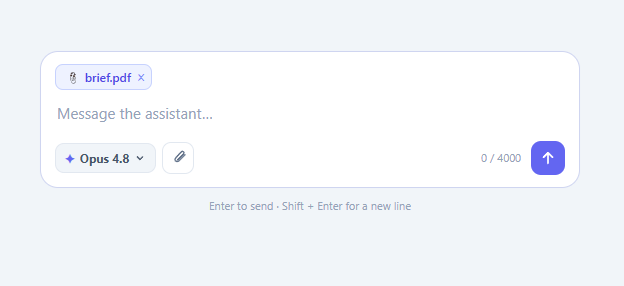
Every AI product needs a great prompt composer — the input box where users type, attach context, pick a model, and send. It looks simple but has real interaction depth: the textarea must grow with the content (then cap and scroll), Enter should send while Shift+Enter inserts a newline, a counter should track length and approximate tokens, attachments need to be added and removed, and Send must be disabled when there is nothing to send. This snippet implements all of it in plain HTML, CSS, and vanilla JavaScript.
Auto-growing textarea
onInput resets the textarea height to auto and sets it to scrollHeight, capped at a max (180px) after which it scrolls. Resetting to auto first is the key trick — without it the textarea can only ever grow, never shrink when you delete lines. This gives the now-standard composer feel: one line to start, expanding smoothly as you type a paragraph, then scrolling for very long prompts.
Enter to send, Shift+Enter for newline
onKey intercepts Enter: pressing it alone calls send (and preventDefault stops the newline), while Shift+Enter falls through to insert a line break. This is the convention users expect from chat and AI interfaces, and getting it right is what makes the composer feel native.
Live character and token counter
onInput updates a counter showing characters against a MAX and an approximate token count (Math.ceil(length / 4) — the rough chars-per-token heuristic). It turns red past the limit and the Send button disables, mirroring how real AI apps cap context length.
Model picker and attachments
A model pill cycles through options (Opus 4.8, Sonnet 4.6, Haiku 4.5) on click — the model-selector affordance every multi-model app has. The attach button adds removable file chips that animate in with a pop; updateSend enables Send when there is either text or an attachment, so you can send a file with no message. Each chip has a × that removes it and re-evaluates the Send state.
Send and reset
send clears the text, collapses the textarea, removes attachments, resets the counter, disables Send, and shows a confirmation toast naming the chosen model — standing in for dispatching the message. The whole box lights up with a focus ring via :focus-within so the composite reads as one control.
Replace send with your real API call (stream the response into a message list) and you have a production composer. Pair this with an AI chat interface for the conversation view, a chat UI for messaging, or an auto-resize textarea for simpler inputs.
Step by step
How to Use
- 1Paste HTML, CSS, and JSA prompt composer appears with a single-line input, a model pill ("Opus 4.8"), an attach button, a counter, and a disabled Send button.
- 2Type a messageThe textarea grows line by line as you type; the counter shows characters and an approximate token count, and Send enables.
- 3Press Enter to sendEnter sends and clears the box; Shift+Enter inserts a newline instead, exactly like a chat app.
- 4Switch modelsClick the model pill to cycle through Opus 4.8 → Sonnet 4.6 → Haiku 4.5.
- 5Attach filesClick the attach button to add removable file chips; you can send with just an attachment and no text.
- 6SendHit Send — the box resets and a toast confirms "Message sent to <model>".
Real-world uses
Common Use Cases
Got questions?
Frequently Asked Questions
Replace the body of send with your request: read input.value, the selected MODELS[modelIdx], and any attachments, then call your endpoint and stream the response into a message list. Keep the optimistic reset (clear the box immediately) so the UI feels instant, and disable Send while a request is in flight to prevent duplicate submissions.
The chars / 4 estimate is a rough heuristic — real tokenisation depends on the model's tokenizer and the actual text (code and non-English vary a lot). For an accurate count, run the text through the provider's tokenizer (or a token-counting endpoint) and display that instead. The estimate here is fine for a soft "how long is my prompt" gauge.
scrollHeight only reports how tall the content needs to be relative to the current height. If you never reset to auto, the element can grow but never shrink, because its scrollHeight stays inflated by its own current height. Setting height = 'auto' first lets the browser recompute the true content height so the box both grows and collapses correctly.
Wire the attach button to a hidden <input type="file" multiple> and read event.target.files. Render a chip per file (name, size), validate type and size before accepting, and on send upload them (or send as multipart / base64) alongside the prompt. Revoke any object URLs you create for previews to avoid memory leaks.
In React, hold the text, model index, and attachments in useState; auto-grow in an effect or the onChange handler using a ref to the textarea, and handle Enter in onKeyDown. In Vue, use v-model with a watcher for auto-grow. In Angular, [(ngModel)] plus an input handler. The height-reset trick and key handling port unchanged.
AI Prompt Composer — Export as HTML, React, Vue, Angular & Tailwind
<!DOCTYPE html>
<html lang="en">
<head>
<meta charset="UTF-8" />
<meta name="viewport" content="width=device-width, initial-scale=1.0" />
<title>AI Prompt Composer</title>
<style>
*{box-sizing:border-box;margin:0;padding:0}
body{font-family:system-ui,-apple-system,sans-serif;background:#f1f5f9;min-height:100vh;display:flex;align-items:flex-start;justify-content:center;padding:60px 24px}
.ap-card{width:100%;max-width:540px;position:relative}
.ap-box{background:#fff;border:1.5px solid #e2e8f0;border-radius:18px;padding:12px 14px;transition:border-color .15s,box-shadow .15s}
.ap-box:focus-within{border-color:#6366f1;box-shadow:0 0 0 4px rgba(99,102,241,.1)}
.ap-attach{display:flex;flex-wrap:wrap;gap:6px}
.ap-attach:not(:empty){margin-bottom:8px}
.ap-file{display:inline-flex;align-items:center;gap:6px;background:#eef2ff;color:#4f46e5;border:1px solid #c7d2fe;border-radius:8px;padding:4px 6px 4px 9px;font-size:12px;font-weight:600;animation:ap-pop .18s ease}
@keyframes ap-pop{from{transform:scale(.85);opacity:0}to{transform:scale(1);opacity:1}}
.ap-file button{background:none;border:none;color:#818cf8;cursor:pointer;font-size:14px;line-height:1;padding:0}
.ap-file button:hover{color:#4f46e5}
.ap-input{width:100%;border:none;outline:none;resize:none;font-family:inherit;font-size:15px;line-height:1.5;color:#1e293b;background:none;max-height:180px;overflow-y:auto;padding:4px 2px}
.ap-input::placeholder{color:#94a3b8}
.ap-toolbar{display:flex;align-items:center;justify-content:space-between;margin-top:8px}
.ap-left{display:flex;align-items:center;gap:6px}
.ap-model{display:flex;align-items:center;gap:5px;background:#f1f5f9;border:1px solid #e2e8f0;border-radius:9px;padding:6px 9px;font-size:12px;font-weight:700;color:#475569;cursor:pointer;font-family:inherit;transition:background .15s}
.ap-model:hover{background:#e2e8f0}
.ap-spark{color:#6366f1}
.ap-tool{width:32px;height:32px;border-radius:9px;border:1px solid #e2e8f0;background:#fff;color:#64748b;cursor:pointer;display:flex;align-items:center;justify-content:center;transition:background .15s,color .15s}
.ap-tool:hover{background:#f1f5f9;color:#1e293b}
.ap-right{display:flex;align-items:center;gap:10px}
.ap-count{font-size:11px;color:#94a3b8;font-variant-numeric:tabular-nums}
.ap-count.over{color:#ef4444;font-weight:700}
.ap-send{width:34px;height:34px;border-radius:10px;border:none;background:#6366f1;color:#fff;cursor:pointer;display:flex;align-items:center;justify-content:center;transition:background .15s,transform .1s}
.ap-send:hover:not(:disabled){background:#4f46e5}
.ap-send:active:not(:disabled){transform:scale(.9)}
.ap-send:disabled{background:#e2e8f0;color:#94a3b8;cursor:not-allowed}
.ap-hint{font-size:11px;color:#94a3b8;text-align:center;margin-top:10px}
.ap-toast{position:absolute;left:50%;bottom:-44px;transform:translate(-50%,8px);background:#1e293b;color:#fff;font-size:12px;font-weight:700;padding:8px 16px;border-radius:999px;opacity:0;pointer-events:none;transition:opacity .25s,transform .25s}
.ap-toast.show{opacity:1;transform:translate(-50%,0)}
</style>
</head>
<body>
<div class="ap-card">
<div class="ap-box" id="apBox">
<div class="ap-attach" id="apAttach"></div>
<textarea class="ap-input" id="apInput" rows="1" placeholder="Message the assistant…" oninput="onInput(this)" onkeydown="onKey(event)"></textarea>
<div class="ap-toolbar">
<div class="ap-left">
<button class="ap-model" id="apModel" onclick="cycleModel()" type="button">
<span class="ap-spark">✦</span><span id="apModelName">Opus 4.8</span>
<svg width="12" height="12" viewBox="0 0 24 24" fill="none" stroke="currentColor" stroke-width="2.5"><path d="m6 9 6 6 6-6"/></svg>
</button>
<button class="ap-tool" type="button" onclick="attach()" aria-label="Attach file">
<svg viewBox="0 0 24 24" width="17" height="17" fill="none" stroke="currentColor" stroke-width="2" stroke-linecap="round" stroke-linejoin="round"><path d="m21 8-9.2 9.2a3 3 0 0 1-4.2-4.2L16 4a2 2 0 0 1 3 3l-8.5 8.5"/></svg>
</button>
</div>
<div class="ap-right">
<span class="ap-count" id="apCount">0 / 4000</span>
<button class="ap-send" id="apSend" type="button" onclick="send()" disabled aria-label="Send">
<svg viewBox="0 0 24 24" width="18" height="18" fill="none" stroke="currentColor" stroke-width="2.4" stroke-linecap="round" stroke-linejoin="round"><path d="M12 19V5m0 0-6 6m6-6 6 6"/></svg>
</button>
</div>
</div>
</div>
<div class="ap-hint">Enter to send · Shift + Enter for a new line</div>
<div class="ap-toast" id="apToast"></div>
</div>
<script>
var MAX = 4000;
var MODELS = ['Opus 4.8', 'Sonnet 4.6', 'Haiku 4.5'];
var modelIdx = 0;
var FILES = ['brief.pdf', 'mockup.png', 'data.csv', 'notes.md'];
var fileIdx = 0;
var input = document.getElementById('apInput');
var sendBtn = document.getElementById('apSend');
var count = document.getElementById('apCount');
var toastTimer;
function onInput(el) {
el.style.height = 'auto';
el.style.height = Math.min(el.scrollHeight, 180) + 'px';
var len = el.value.length;
var tokens = Math.ceil(len / 4);
count.textContent = len + ' / ' + MAX + (len ? ' · ~' + tokens + ' tokens' : '');
count.classList.toggle('over', len > MAX);
updateSend();
}
function updateSend() {
var hasText = input.value.trim().length > 0;
var hasFiles = document.getElementById('apAttach').children.length > 0;
sendBtn.disabled = (!hasText && !hasFiles) || input.value.length > MAX;
}
function onKey(e) {
if (e.key === 'Enter' && !e.shiftKey) {
e.preventDefault();
send();
}
}
function cycleModel() {
modelIdx = (modelIdx + 1) % MODELS.length;
document.getElementById('apModelName').textContent = MODELS[modelIdx];
}
function attach() {
var box = document.getElementById('apAttach');
var name = FILES[fileIdx % FILES.length]; fileIdx++;
var chip = document.createElement('span');
chip.className = 'ap-file';
chip.innerHTML = '📎 ' + name + '<button type="button" onclick="removeAttach(this)" aria-label="Remove">×</button>';
box.appendChild(chip);
updateSend();
}
function removeAttach(btn) {
btn.closest('.ap-file').remove();
updateSend();
}
function send() {
if (sendBtn.disabled) return;
input.value = '';
input.style.height = 'auto';
document.getElementById('apAttach').innerHTML = '';
count.textContent = '0 / ' + MAX;
count.classList.remove('over');
updateSend();
showToast('Message sent to ' + MODELS[modelIdx]);
}
function showToast(msg) {
var t = document.getElementById('apToast');
t.textContent = msg;
t.classList.add('show');
clearTimeout(toastTimer);
toastTimer = setTimeout(function () { t.classList.remove('show'); }, 1800);
}
</script>
</body>
</html><!DOCTYPE html>
<html lang="en">
<head>
<meta charset="UTF-8" />
<meta name="viewport" content="width=device-width, initial-scale=1.0" />
<title>AI Prompt Composer</title>
<!-- Tailwind CSS v3+ — arbitrary value classes (e.g. bg-[#0f172a]) are valid -->
<script src="https://cdn.tailwindcss.com"></script>
<style>
@keyframes ap-pop{from{transform:scale(.85);opacity:0}to{transform:scale(1);opacity:1}}
* {
box-sizing:border-box;margin:0;padding:0
}
body {
font-family:system-ui,-apple-system,sans-serif;background:#f1f5f9;min-height:100vh;display:flex;align-items:flex-start;justify-content:center;padding:60px 24px
}
.ap-attach:not(:empty) {
margin-bottom:8px
}
.ap-file {
display:inline-flex;align-items:center;gap:6px;background:#eef2ff;color:#4f46e5;border:1px solid #c7d2fe;border-radius:8px;padding:4px 6px 4px 9px;font-size:12px;font-weight:600;animation:ap-pop .18s ease
}
.ap-file button {
background:none;border:none;color:#818cf8;cursor:pointer;font-size:14px;line-height:1;padding:0
}
.ap-file button:hover {
color:#4f46e5
}
.ap-input::placeholder {
color:#94a3b8
}
.ap-count.over {
color:#ef4444;font-weight:700
}
.ap-send:hover:not(:disabled) {
background:#4f46e5
}
.ap-send:active:not(:disabled) {
transform:scale(.9)
}
.ap-send:disabled {
background:#e2e8f0;color:#94a3b8;cursor:not-allowed
}
.ap-toast.show {
opacity:1;transform:translate(-50%,0)
}
</style>
</head>
<body>
<div class="w-full max-w-[540px] relative">
<div class="bg-[#fff] border rounded-[18px] py-3 px-3.5 [transition:border-color_.15s,box-shadow_.15s]" id="apBox">
<div class="ap-attach flex flex-wrap gap-1.5" id="apAttach"></div>
<textarea class="ap-input w-full border-0 outline-none resize-none font-[inherit] text-[15px] leading-normal text-[#1e293b] bg-transparent max-h-[180px] overflow-y-auto py-1 px-0.5" id="apInput" rows="1" placeholder="Message the assistant…" oninput="onInput(this)" onkeydown="onKey(event)"></textarea>
<div class="flex items-center justify-between mt-2">
<div class="flex items-center gap-1.5">
<button class="flex items-center gap-[5px] bg-[#f1f5f9] border border-[#e2e8f0] rounded-[9px] py-1.5 px-[9px] text-xs font-bold text-[#475569] cursor-pointer font-[inherit] [transition:background_.15s] hover:bg-[#e2e8f0]" id="apModel" onclick="cycleModel()" type="button">
<span class="text-[#6366f1]">✦</span><span id="apModelName">Opus 4.8</span>
<svg width="12" height="12" viewBox="0 0 24 24" fill="none" stroke="currentColor" stroke-width="2.5"><path d="m6 9 6 6 6-6"/></svg>
</button>
<button class="w-8 h-8 rounded-[9px] border border-[#e2e8f0] bg-[#fff] text-[#64748b] cursor-pointer flex items-center justify-center [transition:background_.15s,color_.15s] hover:bg-[#f1f5f9] hover:text-[#1e293b]" type="button" onclick="attach()" aria-label="Attach file">
<svg viewBox="0 0 24 24" width="17" height="17" fill="none" stroke="currentColor" stroke-width="2" stroke-linecap="round" stroke-linejoin="round"><path d="m21 8-9.2 9.2a3 3 0 0 1-4.2-4.2L16 4a2 2 0 0 1 3 3l-8.5 8.5"/></svg>
</button>
</div>
<div class="flex items-center gap-2.5">
<span class="ap-count text-[11px] text-[#94a3b8] [font-variant-numeric:tabular-nums]" id="apCount">0 / 4000</span>
<button class="ap-send w-[34px] h-[34px] rounded-[10px] border-0 bg-[#6366f1] text-[#fff] cursor-pointer flex items-center justify-center [transition:background_.15s,transform_.1s]" id="apSend" type="button" onclick="send()" disabled aria-label="Send">
<svg viewBox="0 0 24 24" width="18" height="18" fill="none" stroke="currentColor" stroke-width="2.4" stroke-linecap="round" stroke-linejoin="round"><path d="M12 19V5m0 0-6 6m6-6 6 6"/></svg>
</button>
</div>
</div>
</div>
<div class="text-[11px] text-[#94a3b8] text-center mt-2.5">Enter to send · Shift + Enter for a new line</div>
<div class="ap-toast absolute left-1/2 -bottom-11 [transform:translate(-50%,8px)] bg-[#1e293b] text-[#fff] text-xs font-bold py-2 px-4 rounded-[999px] opacity-0 pointer-events-none [transition:opacity_.25s,transform_.25s]" id="apToast"></div>
</div>
<script>
var MAX = 4000;
var MODELS = ['Opus 4.8', 'Sonnet 4.6', 'Haiku 4.5'];
var modelIdx = 0;
var FILES = ['brief.pdf', 'mockup.png', 'data.csv', 'notes.md'];
var fileIdx = 0;
var input = document.getElementById('apInput');
var sendBtn = document.getElementById('apSend');
var count = document.getElementById('apCount');
var toastTimer;
function onInput(el) {
el.style.height = 'auto';
el.style.height = Math.min(el.scrollHeight, 180) + 'px';
var len = el.value.length;
var tokens = Math.ceil(len / 4);
count.textContent = len + ' / ' + MAX + (len ? ' · ~' + tokens + ' tokens' : '');
count.classList.toggle('over', len > MAX);
updateSend();
}
function updateSend() {
var hasText = input.value.trim().length > 0;
var hasFiles = document.getElementById('apAttach').children.length > 0;
sendBtn.disabled = (!hasText && !hasFiles) || input.value.length > MAX;
}
function onKey(e) {
if (e.key === 'Enter' && !e.shiftKey) {
e.preventDefault();
send();
}
}
function cycleModel() {
modelIdx = (modelIdx + 1) % MODELS.length;
document.getElementById('apModelName').textContent = MODELS[modelIdx];
}
function attach() {
var box = document.getElementById('apAttach');
var name = FILES[fileIdx % FILES.length]; fileIdx++;
var chip = document.createElement('span');
chip.className = 'ap-file';
chip.innerHTML = '📎 ' + name + '<button type="button" onclick="removeAttach(this)" aria-label="Remove">×</button>';
box.appendChild(chip);
updateSend();
}
function removeAttach(btn) {
btn.closest('.ap-file').remove();
updateSend();
}
function send() {
if (sendBtn.disabled) return;
input.value = '';
input.style.height = 'auto';
document.getElementById('apAttach').innerHTML = '';
count.textContent = '0 / ' + MAX;
count.classList.remove('over');
updateSend();
showToast('Message sent to ' + MODELS[modelIdx]);
}
function showToast(msg) {
var t = document.getElementById('apToast');
t.textContent = msg;
t.classList.add('show');
clearTimeout(toastTimer);
toastTimer = setTimeout(function () { t.classList.remove('show'); }, 1800);
}
</script>
</body>
</html>import React, { useEffect } from 'react';
// CSS — optionally move to AIPromptComposer.module.css
const css = `
*{box-sizing:border-box;margin:0;padding:0}
body{font-family:system-ui,-apple-system,sans-serif;background:#f1f5f9;min-height:100vh;display:flex;align-items:flex-start;justify-content:center;padding:60px 24px}
.ap-card{width:100%;max-width:540px;position:relative}
.ap-box{background:#fff;border:1.5px solid #e2e8f0;border-radius:18px;padding:12px 14px;transition:border-color .15s,box-shadow .15s}
.ap-box:focus-within{border-color:#6366f1;box-shadow:0 0 0 4px rgba(99,102,241,.1)}
.ap-attach{display:flex;flex-wrap:wrap;gap:6px}
.ap-attach:not(:empty){margin-bottom:8px}
.ap-file{display:inline-flex;align-items:center;gap:6px;background:#eef2ff;color:#4f46e5;border:1px solid #c7d2fe;border-radius:8px;padding:4px 6px 4px 9px;font-size:12px;font-weight:600;animation:ap-pop .18s ease}
@keyframes ap-pop{from{transform:scale(.85);opacity:0}to{transform:scale(1);opacity:1}}
.ap-file button{background:none;border:none;color:#818cf8;cursor:pointer;font-size:14px;line-height:1;padding:0}
.ap-file button:hover{color:#4f46e5}
.ap-input{width:100%;border:none;outline:none;resize:none;font-family:inherit;font-size:15px;line-height:1.5;color:#1e293b;background:none;max-height:180px;overflow-y:auto;padding:4px 2px}
.ap-input::placeholder{color:#94a3b8}
.ap-toolbar{display:flex;align-items:center;justify-content:space-between;margin-top:8px}
.ap-left{display:flex;align-items:center;gap:6px}
.ap-model{display:flex;align-items:center;gap:5px;background:#f1f5f9;border:1px solid #e2e8f0;border-radius:9px;padding:6px 9px;font-size:12px;font-weight:700;color:#475569;cursor:pointer;font-family:inherit;transition:background .15s}
.ap-model:hover{background:#e2e8f0}
.ap-spark{color:#6366f1}
.ap-tool{width:32px;height:32px;border-radius:9px;border:1px solid #e2e8f0;background:#fff;color:#64748b;cursor:pointer;display:flex;align-items:center;justify-content:center;transition:background .15s,color .15s}
.ap-tool:hover{background:#f1f5f9;color:#1e293b}
.ap-right{display:flex;align-items:center;gap:10px}
.ap-count{font-size:11px;color:#94a3b8;font-variant-numeric:tabular-nums}
.ap-count.over{color:#ef4444;font-weight:700}
.ap-send{width:34px;height:34px;border-radius:10px;border:none;background:#6366f1;color:#fff;cursor:pointer;display:flex;align-items:center;justify-content:center;transition:background .15s,transform .1s}
.ap-send:hover:not(:disabled){background:#4f46e5}
.ap-send:active:not(:disabled){transform:scale(.9)}
.ap-send:disabled{background:#e2e8f0;color:#94a3b8;cursor:not-allowed}
.ap-hint{font-size:11px;color:#94a3b8;text-align:center;margin-top:10px}
.ap-toast{position:absolute;left:50%;bottom:-44px;transform:translate(-50%,8px);background:#1e293b;color:#fff;font-size:12px;font-weight:700;padding:8px 16px;border-radius:999px;opacity:0;pointer-events:none;transition:opacity .25s,transform .25s}
.ap-toast.show{opacity:1;transform:translate(-50%,0)}
`;
export default function AIPromptComposer() {
// Auto-generated escape hatch: the original snippet's vanilla JS runs once
// after mount and queries the rendered DOM. For idiomatic React, lift this
// into state + handlers.
useEffect(() => {
const _listeners = [];
const _originalAddEventListener = EventTarget.prototype.addEventListener;
EventTarget.prototype.addEventListener = function(type, listener, options) {
_listeners.push({ target: this, type, listener, options });
return _originalAddEventListener.call(this, type, listener, options);
};
var MAX = 4000;
var MODELS = ['Opus 4.8', 'Sonnet 4.6', 'Haiku 4.5'];
var modelIdx = 0;
var FILES = ['brief.pdf', 'mockup.png', 'data.csv', 'notes.md'];
var fileIdx = 0;
var input = document.getElementById('apInput');
var sendBtn = document.getElementById('apSend');
var count = document.getElementById('apCount');
var toastTimer;
function onInput(el) {
el.style.height = 'auto';
el.style.height = Math.min(el.scrollHeight, 180) + 'px';
var len = el.value.length;
var tokens = Math.ceil(len / 4);
count.textContent = len + ' / ' + MAX + (len ? ' · ~' + tokens + ' tokens' : '');
count.classList.toggle('over', len > MAX);
updateSend();
}
function updateSend() {
var hasText = input.value.trim().length > 0;
var hasFiles = document.getElementById('apAttach').children.length > 0;
sendBtn.disabled = (!hasText && !hasFiles) || input.value.length > MAX;
}
function onKey(e) {
if (e.key === 'Enter' && !e.shiftKey) {
e.preventDefault();
send();
}
}
function cycleModel() {
modelIdx = (modelIdx + 1) % MODELS.length;
document.getElementById('apModelName').textContent = MODELS[modelIdx];
}
function attach() {
var box = document.getElementById('apAttach');
var name = FILES[fileIdx % FILES.length]; fileIdx++;
var chip = document.createElement('span');
chip.className = 'ap-file';
chip.innerHTML = '📎 ' + name + '<button type="button" onclick="removeAttach(this)" aria-label="Remove">×</button>';
box.appendChild(chip);
updateSend();
}
function removeAttach(btn) {
btn.closest('.ap-file').remove();
updateSend();
}
function send() {
if (sendBtn.disabled) return;
input.value = '';
input.style.height = 'auto';
document.getElementById('apAttach').innerHTML = '';
count.textContent = '0 / ' + MAX;
count.classList.remove('over');
updateSend();
showToast('Message sent to ' + MODELS[modelIdx]);
}
function showToast(msg) {
var t = document.getElementById('apToast');
t.textContent = msg;
t.classList.add('show');
clearTimeout(toastTimer);
toastTimer = setTimeout(function () { t.classList.remove('show'); }, 1800);
}
// Cleanup: restore addEventListener and remove all listeners
return () => {
EventTarget.prototype.addEventListener = _originalAddEventListener;
for (const { target, type, listener, options } of _listeners) {
target.removeEventListener(type, listener, options);
}
};
// Expose handlers used by inline JSX events to the global scope
if (typeof onInput === 'function') window.onInput = onInput;
if (typeof onKey === 'function') window.onKey = onKey;
if (typeof cycleModel === 'function') window.cycleModel = cycleModel;
if (typeof attach === 'function') window.attach = attach;
if (typeof send === 'function') window.send = send;
if (typeof removeAttach === 'function') window.removeAttach = removeAttach;
}, []);
return (
<>
<style>{css}</style>
<div className="ap-card">
<div className="ap-box" id="apBox">
<div className="ap-attach" id="apAttach"></div>
<textarea className="ap-input" id="apInput" rows="1" placeholder="Message the assistant…" onInput={(event) => { onInput(event.currentTarget) }} onKeyDown={(event) => { onKey(event) }}></textarea>
<div className="ap-toolbar">
<div className="ap-left">
<button className="ap-model" id="apModel" onClick={(event) => { cycleModel() }} type="button">
<span className="ap-spark">✦</span><span id="apModelName">Opus 4.8</span>
<svg width="12" height="12" viewBox="0 0 24 24" fill="none" stroke="currentColor" strokeWidth="2.5"><path d="m6 9 6 6 6-6"/></svg>
</button>
<button className="ap-tool" type="button" onClick={(event) => { attach() }} aria-label="Attach file">
<svg viewBox="0 0 24 24" width="17" height="17" fill="none" stroke="currentColor" strokeWidth="2" strokeLinecap="round" stroke-linejoin="round"><path d="m21 8-9.2 9.2a3 3 0 0 1-4.2-4.2L16 4a2 2 0 0 1 3 3l-8.5 8.5"/></svg>
</button>
</div>
<div className="ap-right">
<span className="ap-count" id="apCount">0 / 4000</span>
<button className="ap-send" id="apSend" type="button" onClick={(event) => { send() }} defaultDisabled aria-label="Send">
<svg viewBox="0 0 24 24" width="18" height="18" fill="none" stroke="currentColor" strokeWidth="2.4" strokeLinecap="round" stroke-linejoin="round"><path d="M12 19V5m0 0-6 6m6-6 6 6"/></svg>
</button>
</div>
</div>
</div>
<div className="ap-hint">Enter to send · Shift + Enter for a new line</div>
<div className="ap-toast" id="apToast"></div>
</div>
</>
);
}import React, { useEffect } from 'react';
// Requires Tailwind CSS v3+ — https://tailwindcss.com/docs/installation
// Arbitrary value classes (e.g. bg-[#0f172a]) are valid Tailwind v3+
export default function AIPromptComposer() {
// Auto-generated escape hatch: the original snippet's vanilla JS runs once
// after mount and queries the rendered DOM. For idiomatic React, lift this
// into state + handlers.
useEffect(() => {
const _listeners = [];
const _originalAddEventListener = EventTarget.prototype.addEventListener;
EventTarget.prototype.addEventListener = function(type, listener, options) {
_listeners.push({ target: this, type, listener, options });
return _originalAddEventListener.call(this, type, listener, options);
};
var MAX = 4000;
var MODELS = ['Opus 4.8', 'Sonnet 4.6', 'Haiku 4.5'];
var modelIdx = 0;
var FILES = ['brief.pdf', 'mockup.png', 'data.csv', 'notes.md'];
var fileIdx = 0;
var input = document.getElementById('apInput');
var sendBtn = document.getElementById('apSend');
var count = document.getElementById('apCount');
var toastTimer;
function onInput(el) {
el.style.height = 'auto';
el.style.height = Math.min(el.scrollHeight, 180) + 'px';
var len = el.value.length;
var tokens = Math.ceil(len / 4);
count.textContent = len + ' / ' + MAX + (len ? ' · ~' + tokens + ' tokens' : '');
count.classList.toggle('over', len > MAX);
updateSend();
}
function updateSend() {
var hasText = input.value.trim().length > 0;
var hasFiles = document.getElementById('apAttach').children.length > 0;
sendBtn.disabled = (!hasText && !hasFiles) || input.value.length > MAX;
}
function onKey(e) {
if (e.key === 'Enter' && !e.shiftKey) {
e.preventDefault();
send();
}
}
function cycleModel() {
modelIdx = (modelIdx + 1) % MODELS.length;
document.getElementById('apModelName').textContent = MODELS[modelIdx];
}
function attach() {
var box = document.getElementById('apAttach');
var name = FILES[fileIdx % FILES.length]; fileIdx++;
var chip = document.createElement('span');
chip.className = 'ap-file';
chip.innerHTML = '📎 ' + name + '<button type="button" onclick="removeAttach(this)" aria-label="Remove">×</button>';
box.appendChild(chip);
updateSend();
}
function removeAttach(btn) {
btn.closest('.ap-file').remove();
updateSend();
}
function send() {
if (sendBtn.disabled) return;
input.value = '';
input.style.height = 'auto';
document.getElementById('apAttach').innerHTML = '';
count.textContent = '0 / ' + MAX;
count.classList.remove('over');
updateSend();
showToast('Message sent to ' + MODELS[modelIdx]);
}
function showToast(msg) {
var t = document.getElementById('apToast');
t.textContent = msg;
t.classList.add('show');
clearTimeout(toastTimer);
toastTimer = setTimeout(function () { t.classList.remove('show'); }, 1800);
}
// Cleanup: restore addEventListener and remove all listeners
return () => {
EventTarget.prototype.addEventListener = _originalAddEventListener;
for (const { target, type, listener, options } of _listeners) {
target.removeEventListener(type, listener, options);
}
};
// Expose handlers used by inline JSX events to the global scope
if (typeof onInput === 'function') window.onInput = onInput;
if (typeof onKey === 'function') window.onKey = onKey;
if (typeof cycleModel === 'function') window.cycleModel = cycleModel;
if (typeof attach === 'function') window.attach = attach;
if (typeof send === 'function') window.send = send;
if (typeof removeAttach === 'function') window.removeAttach = removeAttach;
}, []);
return (
<>
<style>{`
@keyframes ap-pop{from{transform:scale(.85);opacity:0}to{transform:scale(1);opacity:1}}
* {
box-sizing:border-box;margin:0;padding:0
}
body {
font-family:system-ui,-apple-system,sans-serif;background:#f1f5f9;min-height:100vh;display:flex;align-items:flex-start;justify-content:center;padding:60px 24px
}
.ap-attach:not(:empty) {
margin-bottom:8px
}
.ap-file {
display:inline-flex;align-items:center;gap:6px;background:#eef2ff;color:#4f46e5;border:1px solid #c7d2fe;border-radius:8px;padding:4px 6px 4px 9px;font-size:12px;font-weight:600;animation:ap-pop .18s ease
}
.ap-file button {
background:none;border:none;color:#818cf8;cursor:pointer;font-size:14px;line-height:1;padding:0
}
.ap-file button:hover {
color:#4f46e5
}
.ap-input::placeholder {
color:#94a3b8
}
.ap-count.over {
color:#ef4444;font-weight:700
}
.ap-send:hover:not(:disabled) {
background:#4f46e5
}
.ap-send:active:not(:disabled) {
transform:scale(.9)
}
.ap-send:disabled {
background:#e2e8f0;color:#94a3b8;cursor:not-allowed
}
.ap-toast.show {
opacity:1;transform:translate(-50%,0)
}
`}</style>
<div className="w-full max-w-[540px] relative">
<div className="bg-[#fff] border rounded-[18px] py-3 px-3.5 [transition:border-color_.15s,box-shadow_.15s]" id="apBox">
<div className="ap-attach flex flex-wrap gap-1.5" id="apAttach"></div>
<textarea className="ap-input w-full border-0 outline-none resize-none font-[inherit] text-[15px] leading-normal text-[#1e293b] bg-transparent max-h-[180px] overflow-y-auto py-1 px-0.5" id="apInput" rows="1" placeholder="Message the assistant…" onInput={(event) => { onInput(event.currentTarget) }} onKeyDown={(event) => { onKey(event) }}></textarea>
<div className="flex items-center justify-between mt-2">
<div className="flex items-center gap-1.5">
<button className="flex items-center gap-[5px] bg-[#f1f5f9] border border-[#e2e8f0] rounded-[9px] py-1.5 px-[9px] text-xs font-bold text-[#475569] cursor-pointer font-[inherit] [transition:background_.15s] hover:bg-[#e2e8f0]" id="apModel" onClick={(event) => { cycleModel() }} type="button">
<span className="text-[#6366f1]">✦</span><span id="apModelName">Opus 4.8</span>
<svg width="12" height="12" viewBox="0 0 24 24" fill="none" stroke="currentColor" strokeWidth="2.5"><path d="m6 9 6 6 6-6"/></svg>
</button>
<button className="w-8 h-8 rounded-[9px] border border-[#e2e8f0] bg-[#fff] text-[#64748b] cursor-pointer flex items-center justify-center [transition:background_.15s,color_.15s] hover:bg-[#f1f5f9] hover:text-[#1e293b]" type="button" onClick={(event) => { attach() }} aria-label="Attach file">
<svg viewBox="0 0 24 24" width="17" height="17" fill="none" stroke="currentColor" strokeWidth="2" strokeLinecap="round" stroke-linejoin="round"><path d="m21 8-9.2 9.2a3 3 0 0 1-4.2-4.2L16 4a2 2 0 0 1 3 3l-8.5 8.5"/></svg>
</button>
</div>
<div className="flex items-center gap-2.5">
<span className="ap-count text-[11px] text-[#94a3b8] [font-variant-numeric:tabular-nums]" id="apCount">0 / 4000</span>
<button className="ap-send w-[34px] h-[34px] rounded-[10px] border-0 bg-[#6366f1] text-[#fff] cursor-pointer flex items-center justify-center [transition:background_.15s,transform_.1s]" id="apSend" type="button" onClick={(event) => { send() }} defaultDisabled aria-label="Send">
<svg viewBox="0 0 24 24" width="18" height="18" fill="none" stroke="currentColor" strokeWidth="2.4" strokeLinecap="round" stroke-linejoin="round"><path d="M12 19V5m0 0-6 6m6-6 6 6"/></svg>
</button>
</div>
</div>
</div>
<div className="text-[11px] text-[#94a3b8] text-center mt-2.5">Enter to send · Shift + Enter for a new line</div>
<div className="ap-toast absolute left-1/2 -bottom-11 [transform:translate(-50%,8px)] bg-[#1e293b] text-[#fff] text-xs font-bold py-2 px-4 rounded-[999px] opacity-0 pointer-events-none [transition:opacity_.25s,transform_.25s]" id="apToast"></div>
</div>
</>
);
}<template>
<div class="ap-card">
<div class="ap-box" id="apBox">
<div class="ap-attach" id="apAttach"></div>
<textarea class="ap-input" id="apInput" rows="1" placeholder="Message the assistant…" @input="onInput($event.currentTarget)" @keydown="onKey($event)"></textarea>
<div class="ap-toolbar">
<div class="ap-left">
<button class="ap-model" id="apModel" @click="cycleModel()" type="button">
<span class="ap-spark">✦</span><span id="apModelName">Opus 4.8</span>
<svg width="12" height="12" viewBox="0 0 24 24" fill="none" stroke="currentColor" stroke-width="2.5"><path d="m6 9 6 6 6-6"/></svg>
</button>
<button class="ap-tool" type="button" @click="attach()" aria-label="Attach file">
<svg viewBox="0 0 24 24" width="17" height="17" fill="none" stroke="currentColor" stroke-width="2" stroke-linecap="round" stroke-linejoin="round"><path d="m21 8-9.2 9.2a3 3 0 0 1-4.2-4.2L16 4a2 2 0 0 1 3 3l-8.5 8.5"/></svg>
</button>
</div>
<div class="ap-right">
<span class="ap-count" id="apCount">0 / 4000</span>
<button class="ap-send" id="apSend" type="button" @click="send()" disabled aria-label="Send">
<svg viewBox="0 0 24 24" width="18" height="18" fill="none" stroke="currentColor" stroke-width="2.4" stroke-linecap="round" stroke-linejoin="round"><path d="M12 19V5m0 0-6 6m6-6 6 6"/></svg>
</button>
</div>
</div>
</div>
<div class="ap-hint">Enter to send · Shift + Enter for a new line</div>
<div class="ap-toast" id="apToast"></div>
</div>
</template>
<script setup>
import { onMounted } from 'vue';
var MAX = 4000;
var MODELS = ['Opus 4.8', 'Sonnet 4.6', 'Haiku 4.5'];
var modelIdx = 0;
var FILES = ['brief.pdf', 'mockup.png', 'data.csv', 'notes.md'];
var fileIdx = 0;
let input;
let sendBtn;
let count;
var toastTimer;
function onInput(el) {
el.style.height = 'auto';
el.style.height = Math.min(el.scrollHeight, 180) + 'px';
var len = el.value.length;
var tokens = Math.ceil(len / 4);
count.textContent = len + ' / ' + MAX + (len ? ' · ~' + tokens + ' tokens' : '');
count.classList.toggle('over', len > MAX);
updateSend();
}
function updateSend() {
var hasText = input.value.trim().length > 0;
var hasFiles = document.getElementById('apAttach').children.length > 0;
sendBtn.disabled = (!hasText && !hasFiles) || input.value.length > MAX;
}
function onKey(e) {
if (e.key === 'Enter' && !e.shiftKey) {
e.preventDefault();
send();
}
}
function cycleModel() {
modelIdx = (modelIdx + 1) % MODELS.length;
document.getElementById('apModelName').textContent = MODELS[modelIdx];
}
function attach() {
var box = document.getElementById('apAttach');
var name = FILES[fileIdx % FILES.length]; fileIdx++;
var chip = document.createElement('span');
chip.className = 'ap-file';
chip.innerHTML = '📎 ' + name + '<button type="button" onclick="removeAttach(this)" aria-label="Remove">×</button>';
box.appendChild(chip);
updateSend();
}
function removeAttach(btn) {
btn.closest('.ap-file').remove();
updateSend();
}
function send() {
if (sendBtn.disabled) return;
input.value = '';
input.style.height = 'auto';
document.getElementById('apAttach').innerHTML = '';
count.textContent = '0 / ' + MAX;
count.classList.remove('over');
updateSend();
showToast('Message sent to ' + MODELS[modelIdx]);
}
function showToast(msg) {
var t = document.getElementById('apToast');
t.textContent = msg;
t.classList.add('show');
clearTimeout(toastTimer);
toastTimer = setTimeout(function () { t.classList.remove('show'); }, 1800);
}
onMounted(() => {
if (typeof removeAttach === 'function') window.removeAttach = removeAttach;
input = document.getElementById('apInput');
sendBtn = document.getElementById('apSend');
count = document.getElementById('apCount');
});
</script>
<style scoped>
*{box-sizing:border-box;margin:0;padding:0}
body{font-family:system-ui,-apple-system,sans-serif;background:#f1f5f9;min-height:100vh;display:flex;align-items:flex-start;justify-content:center;padding:60px 24px}
.ap-card{width:100%;max-width:540px;position:relative}
.ap-box{background:#fff;border:1.5px solid #e2e8f0;border-radius:18px;padding:12px 14px;transition:border-color .15s,box-shadow .15s}
.ap-box:focus-within{border-color:#6366f1;box-shadow:0 0 0 4px rgba(99,102,241,.1)}
.ap-attach{display:flex;flex-wrap:wrap;gap:6px}
.ap-attach:not(:empty){margin-bottom:8px}
.ap-file{display:inline-flex;align-items:center;gap:6px;background:#eef2ff;color:#4f46e5;border:1px solid #c7d2fe;border-radius:8px;padding:4px 6px 4px 9px;font-size:12px;font-weight:600;animation:ap-pop .18s ease}
@keyframes ap-pop{from{transform:scale(.85);opacity:0}to{transform:scale(1);opacity:1}}
.ap-file button{background:none;border:none;color:#818cf8;cursor:pointer;font-size:14px;line-height:1;padding:0}
.ap-file button:hover{color:#4f46e5}
.ap-input{width:100%;border:none;outline:none;resize:none;font-family:inherit;font-size:15px;line-height:1.5;color:#1e293b;background:none;max-height:180px;overflow-y:auto;padding:4px 2px}
.ap-input::placeholder{color:#94a3b8}
.ap-toolbar{display:flex;align-items:center;justify-content:space-between;margin-top:8px}
.ap-left{display:flex;align-items:center;gap:6px}
.ap-model{display:flex;align-items:center;gap:5px;background:#f1f5f9;border:1px solid #e2e8f0;border-radius:9px;padding:6px 9px;font-size:12px;font-weight:700;color:#475569;cursor:pointer;font-family:inherit;transition:background .15s}
.ap-model:hover{background:#e2e8f0}
.ap-spark{color:#6366f1}
.ap-tool{width:32px;height:32px;border-radius:9px;border:1px solid #e2e8f0;background:#fff;color:#64748b;cursor:pointer;display:flex;align-items:center;justify-content:center;transition:background .15s,color .15s}
.ap-tool:hover{background:#f1f5f9;color:#1e293b}
.ap-right{display:flex;align-items:center;gap:10px}
.ap-count{font-size:11px;color:#94a3b8;font-variant-numeric:tabular-nums}
.ap-count.over{color:#ef4444;font-weight:700}
.ap-send{width:34px;height:34px;border-radius:10px;border:none;background:#6366f1;color:#fff;cursor:pointer;display:flex;align-items:center;justify-content:center;transition:background .15s,transform .1s}
.ap-send:hover:not(:disabled){background:#4f46e5}
.ap-send:active:not(:disabled){transform:scale(.9)}
.ap-send:disabled{background:#e2e8f0;color:#94a3b8;cursor:not-allowed}
.ap-hint{font-size:11px;color:#94a3b8;text-align:center;margin-top:10px}
.ap-toast{position:absolute;left:50%;bottom:-44px;transform:translate(-50%,8px);background:#1e293b;color:#fff;font-size:12px;font-weight:700;padding:8px 16px;border-radius:999px;opacity:0;pointer-events:none;transition:opacity .25s,transform .25s}
.ap-toast.show{opacity:1;transform:translate(-50%,0)}
</style>// @ts-nocheck
// Note: vanilla JS DOM manipulation is preserved as-is inside ngAfterViewInit().
// For idiomatic Angular, replace document.getElementById() with @ViewChild() refs
// and move state into component properties with two-way binding.
import { Component, AfterViewInit, ViewEncapsulation } from '@angular/core';
import { CommonModule } from '@angular/common';
@Component({
selector: 'app-a-i-prompt-composer',
standalone: true,
imports: [CommonModule],
encapsulation: ViewEncapsulation.None,
template: `
<div class="ap-card">
<div class="ap-box" id="apBox">
<div class="ap-attach" id="apAttach"></div>
<textarea class="ap-input" id="apInput" rows="1" placeholder="Message the assistant…" (input)="onInput($event.currentTarget)" (keydown)="onKey($event)"></textarea>
<div class="ap-toolbar">
<div class="ap-left">
<button class="ap-model" id="apModel" (click)="cycleModel()" type="button">
<span class="ap-spark">✦</span><span id="apModelName">Opus 4.8</span>
<svg width="12" height="12" viewBox="0 0 24 24" fill="none" stroke="currentColor" stroke-width="2.5"><path d="m6 9 6 6 6-6"/></svg>
</button>
<button class="ap-tool" type="button" (click)="attach()" aria-label="Attach file">
<svg viewBox="0 0 24 24" width="17" height="17" fill="none" stroke="currentColor" stroke-width="2" stroke-linecap="round" stroke-linejoin="round"><path d="m21 8-9.2 9.2a3 3 0 0 1-4.2-4.2L16 4a2 2 0 0 1 3 3l-8.5 8.5"/></svg>
</button>
</div>
<div class="ap-right">
<span class="ap-count" id="apCount">0 / 4000</span>
<button class="ap-send" id="apSend" type="button" (click)="send()" disabled aria-label="Send">
<svg viewBox="0 0 24 24" width="18" height="18" fill="none" stroke="currentColor" stroke-width="2.4" stroke-linecap="round" stroke-linejoin="round"><path d="M12 19V5m0 0-6 6m6-6 6 6"/></svg>
</button>
</div>
</div>
</div>
<div class="ap-hint">Enter to send · Shift + Enter for a new line</div>
<div class="ap-toast" id="apToast"></div>
</div>
`,
styles: [`
*{box-sizing:border-box;margin:0;padding:0}
body{font-family:system-ui,-apple-system,sans-serif;background:#f1f5f9;min-height:100vh;display:flex;align-items:flex-start;justify-content:center;padding:60px 24px}
.ap-card{width:100%;max-width:540px;position:relative}
.ap-box{background:#fff;border:1.5px solid #e2e8f0;border-radius:18px;padding:12px 14px;transition:border-color .15s,box-shadow .15s}
.ap-box:focus-within{border-color:#6366f1;box-shadow:0 0 0 4px rgba(99,102,241,.1)}
.ap-attach{display:flex;flex-wrap:wrap;gap:6px}
.ap-attach:not(:empty){margin-bottom:8px}
.ap-file{display:inline-flex;align-items:center;gap:6px;background:#eef2ff;color:#4f46e5;border:1px solid #c7d2fe;border-radius:8px;padding:4px 6px 4px 9px;font-size:12px;font-weight:600;animation:ap-pop .18s ease}
@keyframes ap-pop{from{transform:scale(.85);opacity:0}to{transform:scale(1);opacity:1}}
.ap-file button{background:none;border:none;color:#818cf8;cursor:pointer;font-size:14px;line-height:1;padding:0}
.ap-file button:hover{color:#4f46e5}
.ap-input{width:100%;border:none;outline:none;resize:none;font-family:inherit;font-size:15px;line-height:1.5;color:#1e293b;background:none;max-height:180px;overflow-y:auto;padding:4px 2px}
.ap-input::placeholder{color:#94a3b8}
.ap-toolbar{display:flex;align-items:center;justify-content:space-between;margin-top:8px}
.ap-left{display:flex;align-items:center;gap:6px}
.ap-model{display:flex;align-items:center;gap:5px;background:#f1f5f9;border:1px solid #e2e8f0;border-radius:9px;padding:6px 9px;font-size:12px;font-weight:700;color:#475569;cursor:pointer;font-family:inherit;transition:background .15s}
.ap-model:hover{background:#e2e8f0}
.ap-spark{color:#6366f1}
.ap-tool{width:32px;height:32px;border-radius:9px;border:1px solid #e2e8f0;background:#fff;color:#64748b;cursor:pointer;display:flex;align-items:center;justify-content:center;transition:background .15s,color .15s}
.ap-tool:hover{background:#f1f5f9;color:#1e293b}
.ap-right{display:flex;align-items:center;gap:10px}
.ap-count{font-size:11px;color:#94a3b8;font-variant-numeric:tabular-nums}
.ap-count.over{color:#ef4444;font-weight:700}
.ap-send{width:34px;height:34px;border-radius:10px;border:none;background:#6366f1;color:#fff;cursor:pointer;display:flex;align-items:center;justify-content:center;transition:background .15s,transform .1s}
.ap-send:hover:not(:disabled){background:#4f46e5}
.ap-send:active:not(:disabled){transform:scale(.9)}
.ap-send:disabled{background:#e2e8f0;color:#94a3b8;cursor:not-allowed}
.ap-hint{font-size:11px;color:#94a3b8;text-align:center;margin-top:10px}
.ap-toast{position:absolute;left:50%;bottom:-44px;transform:translate(-50%,8px);background:#1e293b;color:#fff;font-size:12px;font-weight:700;padding:8px 16px;border-radius:999px;opacity:0;pointer-events:none;transition:opacity .25s,transform .25s}
.ap-toast.show{opacity:1;transform:translate(-50%,0)}
`]
})
export class AIPromptComposerComponent implements AfterViewInit {
ngAfterViewInit(): void {
var MAX = 4000;
var MODELS = ['Opus 4.8', 'Sonnet 4.6', 'Haiku 4.5'];
var modelIdx = 0;
var FILES = ['brief.pdf', 'mockup.png', 'data.csv', 'notes.md'];
var fileIdx = 0;
var input = document.getElementById('apInput');
var sendBtn = document.getElementById('apSend');
var count = document.getElementById('apCount');
var toastTimer;
function onInput(el) {
el.style.height = 'auto';
el.style.height = Math.min(el.scrollHeight, 180) + 'px';
var len = el.value.length;
var tokens = Math.ceil(len / 4);
count.textContent = len + ' / ' + MAX + (len ? ' · ~' + tokens + ' tokens' : '');
count.classList.toggle('over', len > MAX);
updateSend();
}
function updateSend() {
var hasText = input.value.trim().length > 0;
var hasFiles = document.getElementById('apAttach').children.length > 0;
sendBtn.disabled = (!hasText && !hasFiles) || input.value.length > MAX;
}
function onKey(e) {
if (e.key === 'Enter' && !e.shiftKey) {
e.preventDefault();
send();
}
}
function cycleModel() {
modelIdx = (modelIdx + 1) % MODELS.length;
document.getElementById('apModelName').textContent = MODELS[modelIdx];
}
function attach() {
var box = document.getElementById('apAttach');
var name = FILES[fileIdx % FILES.length]; fileIdx++;
var chip = document.createElement('span');
chip.className = 'ap-file';
chip.innerHTML = '📎 ' + name + '<button type="button" onclick="removeAttach(this)" aria-label="Remove">×</button>';
box.appendChild(chip);
updateSend();
}
function removeAttach(btn) {
btn.closest('.ap-file').remove();
updateSend();
}
function send() {
if (sendBtn.disabled) return;
input.value = '';
input.style.height = 'auto';
document.getElementById('apAttach').innerHTML = '';
count.textContent = '0 / ' + MAX;
count.classList.remove('over');
updateSend();
showToast('Message sent to ' + MODELS[modelIdx]);
}
function showToast(msg) {
var t = document.getElementById('apToast');
t.textContent = msg;
t.classList.add('show');
clearTimeout(toastTimer);
toastTimer = setTimeout(function () { t.classList.remove('show'); }, 1800);
}
// Bind inline-handler functions to the component so the template can call them
Object.assign(this, { onInput, updateSend, onKey, cycleModel, attach, removeAttach, send, showToast });
// Expose handlers used by runtime-injected inline markup to window
if (typeof removeAttach === 'function') window.removeAttach = removeAttach;
}
}