Source Code
<div class="cm-field" id="cmField">
  <label class="cm-label">Skills</label>
  <div class="cm-box" id="cmBox">
    <span class="cm-chips" id="cmChips"></span>
    <input type="text" class="cm-input" id="cmInput" placeholder="Add a skill…" autocomplete="off" />
    <ul class="cm-menu" id="cmMenu" role="listbox"></ul>
  </div>
  <p class="cm-hint">Type to filter · Enter to add · Backspace to remove</p>
</div>*{box-sizing:border-box;margin:0;padding:0}
body{font-family:system-ui,-apple-system,sans-serif;background:#0d1018;display:flex;justify-content:center;align-items:flex-start;min-height:100vh;padding:80px 24px}
.cm-field{width:340px}
.cm-label{display:block;color:#aeb6cc;font-size:13px;font-weight:600;margin-bottom:8px}
.cm-box{position:relative;display:flex;flex-wrap:wrap;align-items:center;gap:6px;min-height:48px;padding:7px 9px;background:#161a26;border:1.5px solid #2a3144;border-radius:12px;cursor:text;transition:border-color .16s,box-shadow .16s}
.cm-box.is-focus{border-color:#6366f1;box-shadow:0 0 0 4px rgba(99,102,241,.16)}
.cm-chips{display:contents}
.cm-chip{display:inline-flex;align-items:center;gap:6px;background:#252b3d;color:#e6eaf5;font-size:13px;font-weight:500;padding:5px 6px 5px 10px;border-radius:8px;animation:cmPop .14s ease}
@keyframes cmPop{from{transform:scale(.7);opacity:0}to{transform:scale(1);opacity:1}}
.cm-chip button{background:#39415a;border:0;color:#c0c7da;width:17px;height:17px;border-radius:5px;cursor:pointer;font-size:12px;line-height:1;display:flex;align-items:center;justify-content:center}
.cm-chip button:hover{background:#ef4444;color:#fff}
.cm-input{flex:1;min-width:90px;background:none;border:0;outline:0;color:#fff;font-family:inherit;font-size:14px;padding:5px 2px}
.cm-input::placeholder{color:#5e6680}
.cm-menu{position:absolute;top:calc(100% + 6px);left:0;right:0;list-style:none;background:#1a1f2e;border:1px solid #2c3346;border-radius:11px;padding:5px;max-height:190px;overflow-y:auto;box-shadow:0 16px 40px rgba(0,0,0,.5);z-index:5;display:none}
.cm-menu.is-open{display:block}
.cm-menu li{padding:9px 11px;border-radius:8px;color:#c7cde0;font-size:13px;cursor:pointer}
.cm-menu li.is-active,.cm-menu li:hover{background:#262d40;color:#fff}
.cm-menu li.cm-empty{color:#6b7290;cursor:default}
.cm-hint{font-size:12px;margin-top:8px;color:#6b7290}var ALL = ['JavaScript','TypeScript','React','Vue','Svelte','Node.js','Python','Go','Rust','CSS','HTML','GraphQL','PostgreSQL','Docker','Figma'];
var selected = [];
var active = -1;
var field = document.getElementById('cmField');
var box = document.getElementById('cmBox');
var chips = document.getElementById('cmChips');
var input = document.getElementById('cmInput');
var menu = document.getElementById('cmMenu');
function available() {
var q = input.value.trim().toLowerCase();
return ALL.filter(function (s) {
return selected.indexOf(s) === -1 && s.toLowerCase().indexOf(q) !== -1;
});
}
function renderChips() {
chips.innerHTML = '';
selected.forEach(function (s) {
var chip = document.createElement('span');
chip.className = 'cm-chip';
chip.textContent = s;
var x = document.createElement('button');
x.type = 'button';
x.innerHTML = '×';
x.addEventListener('click', function (e) { e.stopPropagation(); remove(s); });
chip.appendChild(x);
chips.appendChild(chip);
});
}
function renderMenu() {
var list = available();
active = list.length ? Math.min(active, list.length - 1) : -1;
menu.innerHTML = '';
if (!list.length) {
var empty = document.createElement('li');
empty.className = 'cm-empty';
empty.textContent = 'No matches';
menu.appendChild(empty);
return;
}
list.forEach(function (s, i) {
var li = document.createElement('li');
li.textContent = s;
li.setAttribute('role', 'option');
if (i === active) li.className = 'is-active';
li.addEventListener('mousedown', function (e) { e.preventDefault(); add(s); });
menu.appendChild(li);
});
}
function add(s) { selected.push(s); input.value = ''; active = -1; renderChips(); renderMenu(); input.focus(); }
function remove(s) { selected = selected.filter(function (x) { return x !== s; }); renderChips(); renderMenu(); input.focus(); }
function open() { menu.classList.add('is-open'); box.classList.add('is-focus'); renderMenu(); }
function close() { menu.classList.remove('is-open'); box.classList.remove('is-focus'); }
box.addEventListener('click', function () { input.focus(); });
input.addEventListener('focus', open);
input.addEventListener('blur', close);
input.addEventListener('input', function () { active = 0; renderMenu(); });
input.addEventListener('keydown', function (e) {
var list = available();
if (e.key === 'ArrowDown') { active = (active + 1) % list.length; renderMenu(); e.preventDefault(); }
else if (e.key === 'ArrowUp') { active = (active - 1 + list.length) % list.length; renderMenu(); e.preventDefault(); }
else if (e.key === 'Enter' && active > -1 && list[active]) { add(list[active]); e.preventDefault(); }
else if (e.key === 'Backspace' && !input.value && selected.length) { remove(selected[selected.length - 1]); }
});
renderChips();Learn Coding Visually
Learn to code with interactive, live-preview playgrounds — HTML, CSS, JavaScript, React & more.
 HTML Playground42 lessons · Click-based · Live preview
 CSS PlaygroundLearn CSS with a live editor
 JavaScript Playground60 lessons · DOM · Async · Canvas
 React PlaygroundLearn React with a live code editor
 GSAP PlaygroundLearn GSAP animation interactively
 SVG Playground44 lessons · shapes · paths · animation
 SCSS Playground45 lessons · Sass modules · tokens
 Tailwind PlaygroundLearn Tailwind CSS with a live editor
 Bootstrap 5 Playground50 lessons · live preview
Chip Multiselect — Free HTML CSS JS Tag Token Input Field
Chip Multiselect · Forms · Plain HTML, CSS & JS · Live preview
What's included
Features
About this UI Snippet
Chip Multiselect — A Token Input With Filtered Suggestions
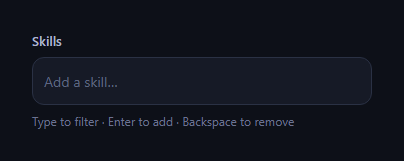
The chip multiselect is the token-style input used for tags, skills, recipients, and categories — each choice becomes a removable chip inside the field, and a filtered dropdown suggests what's left to add as you type. This snippet builds a fully keyboard-operable one with plain HTML, CSS, and vanilla JavaScript, with no dependency.
Chips inside a flex field
The field is a flex container with flex-wrap that holds the chips and a flexible text input that grows to fill the remaining space and drops to the next line when chips fill the row. Clicking anywhere in the box focuses the input, so the whole control behaves like one field. Each chip animates in with a small scale pop and carries a remove button that turns red on hover — the standard token affordances.
A filtered, deduplicated dropdown
As you type, available() returns the source options minus anything already selected and filtered by a case-insensitive substring match, so the menu only ever offers valid, new choices. The menu opens on focus and re-renders on every keystroke, showing a "No matches" row when nothing fits. Because selection removes an item from the available pool, you can't add a duplicate.
Full keyboard control
The input handles a complete keyboard model: Arrow Down and Up move an active highlight through the filtered list (wrapping at the ends), Enter adds the highlighted option, and Backspace on an empty input removes the last chip — the behaviour people expect from Gmail's recipient field. Suggestion clicks use mousedown with preventDefault so the selection happens before the input's blur would close the menu, a subtle but essential detail for click-to-add dropdowns.
State drives the DOM
A selected array is the single source of truth; renderChips() and renderMenu() rebuild their sections from it after every change. Keeping state separate from the DOM means adding, removing, and filtering are simple array operations, and the rendered chips and menu always reflect the current selection.
Focus styling
The box shows a focus ring (accent border plus soft shadow) whenever the input is focused, matching a good text input, and a hint line documents the keyboard shortcuts. These small touches make the control feel finished and discoverable.
Customizing it
Swap the option list for your own data or an async source, allow free-text entries that aren't in the list, cap the number of selections, or restyle the chips. Read selected on submit to get the chosen values. Pair it with a tag input, an autocomplete input, or a multi select dropdown.
Build with AI
Build, Understand, Optimize, and Extend It With AI
Instead of guessing why suggestion clicks sometimes seemed to "not work" in similar widgets you've built before, paste this snippet's HTML, CSS, and JS into an AI coding assistant like Claude and ask it to explain exactly why menu options use mousedown with preventDefault instead of a plain click handler, and how that interacts with the input's blur-triggered close() function. The same assistant can help optimize it — ask whether recomputing available() from scratch (filtering the whole ALL array) on every keystroke and every arrow-key press is wasteful for a much larger option list, and what a debounced or memoized approach would look like. It's also useful for extending the widget: ask it to support adding free-text values that aren't in the predefined list, cap the maximum number of selected chips, or persist the selected array to a hidden form field so it participates in a native form submission. Treat the code less like a finished artifact and more like a starting point for a conversation.
Prompt to recreate it
Copy this into your AI assistant of choice to build the effect from scratch, or as a jumping-off point for your own variant:
Build a "chip multiselect" token input in plain HTML, CSS, and JavaScript — no framework, no library.

Requirements:
- A single flex container that visually behaves like one text field: it holds already-selected values rendered as removable chips (each with its own small × button) plus a text input that flows after the chips and wraps to a new line when the chips fill the row, and clicking anywhere in the container focuses the input.
- A dropdown menu of suggestions built from a fixed source array minus whatever is already selected, filtered by a case-insensitive substring match against the current input text, updating on every keystroke, and showing a distinct "no matches" row when the filtered list is empty.
- Full keyboard control on the input: ArrowDown and ArrowUp move a wrapping active-index highlight through the currently filtered suggestion list, Enter commits the currently highlighted suggestion as a new chip, and Backspace on an empty input removes the most recently added chip.
- Selecting a suggestion by mouse must use a mousedown handler with preventDefault (not a plain click handler) on each menu item, because the input's blur event — which closes the dropdown — fires before a click event would, so without preventDefault the menu would close before the click could register.
- Keep a single array as the source of truth for the current selection, and have both the chip rendering and the suggestion-menu rendering derive entirely from that array plus the current input text — no separate DOM-based bookkeeping of what's selected.
- Each chip must animate in with a brief scale-and-fade entrance when added, and each chip's remove button must visually indicate danger (e.g. turning red) on hover.
Want to tighten it up first? Run this prompt through the AI Prompt Studio to score it across 8 quality dimensions, catch anti-patterns, and tune the wording for Claude, ChatGPT, or Gemini before you paste it in.
Step by step
How to Use
- 1Paste HTML, CSS, and JSAn empty skills field renders with a hint.
- 2Focus and typeA dropdown filters the remaining options.
- 3Press EnterThe highlighted option becomes a chip.
- 4Press BackspaceAn empty input removes the last chip.
- 5Click a chip ×That selection is removed and re-offered.
- 6Swap the optionsReplace the ALL array with your data.
Real-world uses
Common Use Cases
Got questions?
Frequently Asked Questions
The available function returns the source options minus anything already in the selected array, then filters by a case-insensitive substring match on what you have typed. Because chosen items leave the available pool, the dropdown only ever offers valid new choices and you cannot add the same value twice.
When you click a suggestion, the input would blur first and close the menu before a click handler runs. Using mousedown with preventDefault commits the selection before blur fires, so click-to-add works reliably. It is a subtle but essential detail for any dropdown that closes on blur.
Arrow Down and Up move an active highlight through the filtered list and wrap at the ends, Enter adds the highlighted option, and Backspace on an empty input removes the last chip. This matches the recipient-field behaviour people know from email clients, so the control is fully usable without a mouse.
A selected array is the single source of truth. After any add or remove, renderChips and renderMenu rebuild their sections from that array, so the chips and the available suggestions always reflect the current selection. Keeping state separate from the DOM makes every operation a simple array update.
Hold the selected array and the query in state and derive the filtered suggestions with useMemo / computed rather than manual DOM rendering. Map selected to chips and the filtered list to options in your template, and handle the same keydown logic on the input. Use onMouseDown with preventDefault for option clicks so blur does not close the menu first.