You Might Also Like
Learn Coding Visually
Learn to code with interactive, live-preview playgrounds — HTML, CSS, JavaScript, React & more.
 HTML Playground42 lessons · Click-based · Live preview
 CSS PlaygroundLearn CSS with a live editor
 JavaScript Playground60 lessons · DOM · Async · Canvas
 React PlaygroundLearn React with a live code editor
 GSAP PlaygroundLearn GSAP animation interactively
 SVG Playground44 lessons · shapes · paths · animation
 SCSS Playground45 lessons · Sass modules · tokens
 Tailwind PlaygroundLearn Tailwind CSS with a live editor
 Bootstrap 5 Playground50 lessons · live preview
Ghost Text Autocomplete Input — Free HTML CSS JS Snippet
Ghost Text Inline Autocomplete Input · Forms · Plain HTML, CSS & JS · Live preview
What's included
Features
About this UI Snippet
Ghost Text Inline Autocomplete Input — Copilot-Style Suggestion Overlay, Tab-to-Accept & Synced Text Layers
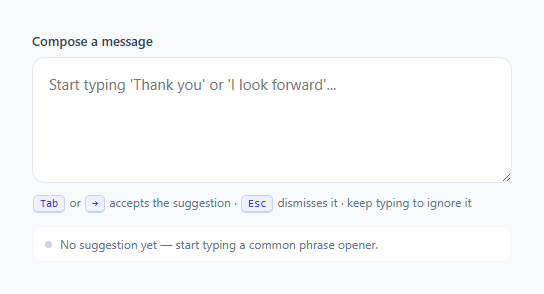
Inline "ghost text" autocomplete is the interaction pattern behind GitHub Copilot, modern AI writing assistants, and command palettes that predict what you are about to type and let you accept it with a single keypress. The core visual idea is simple: as you type, a faint gray continuation appears immediately after your cursor, showing a plausible completion of the current phrase, and pressing Tab (or → when the cursor is already at the end of the text) commits that suggestion instantly. Continuing to type ignores or replaces it, and Escape clears it without accepting. This snippet builds that exact interaction from scratch in vanilla HTML, CSS, and JavaScript.
Why a native input can't do this alone
A native <input> or <textarea> renders a single string of text in a single color — there is no built-in way to render the first N characters in normal black text and the remaining characters in muted gray within the same field. Browsers do not expose a two-tone text API for form controls. So this snippet uses the standard workaround: a synced overlay technique. Two elements occupy the exact same box — a real, editable textarea on top (z-index: 2) and a non-interactive div behind it (.ghost-display) that mirrors the same font, padding, and line-height pixel-for-pixel. The textarea has normal, fully opaque text color so what the user types is always crisp and real. The div behind it contains two spans: .typed, which duplicates the user's current input but is rendered fully transparent (color: transparent), and .ghost, which holds the predicted suffix in a muted gray (#b0b7c3). Because the typed span is invisible and exactly matches the textarea's own rendered text in width, the ghost span lands in precisely the empty space right after the real caret — creating the illusion of a single field with two-tone text, when it is actually two perfectly aligned layers.
Keeping the layers in sync
Every input event re-renders both spans: typedSpan.textContent is set to the live value of the textarea, and ghostSpan.textContent is set to whatever suggestion currently applies. A scroll listener on the real textarea copies its scrollTop onto the overlay div so that if the user types enough to scroll the field, the ghost text scrolls in lockstep rather than drifting out of alignment. This synchronization is the part that makes the overlay technique actually work in production — without it, ghost text would visibly detach from the caret the moment the field scrolls or wraps.
Suggestion matching and acceptance
The suggestion engine here is intentionally simple and local: a small array of common phrase openers (email closings, meeting requests, apologies) is searched on every keystroke for any entry whose lowercase text starts with the user's current lowercase input and is longer than what has been typed so far. The remaining characters of the first match become the ghost suffix. Real products like Copilot replace this array with a language model call, but the rendering and event-handling mechanics — overlay sync, keyboard interception, and accept/dismiss/ignore semantics — are identical regardless of whether the suggestion comes from a static list or an API response.
Why this matters for 2026 interfaces
Inline predictive text is now a baseline expectation in AI-native products: search bars, chat composers, code editors, and even form fields increasingly show the system's best guess before the user finishes typing, making the interface feel anticipatory rather than reactive. Done well, it respects user agency — the suggestion is always visually distinct from committed text, never auto-inserted, and dismissible with a single keypress — which keeps the experience calm and predictable instead of feeling like the interface is taking over. Getting the layering, keyboard handling, and scroll-sync details right, as this snippet does, is what separates a convincing ghost-text field from one that flickers or misaligns under real use.
Build with AI
Build, Understand, Optimize, and Extend It With AI
Paste this snippet's HTML, CSS, and JS into an AI coding assistant like Claude and ask it to trace exactly how the .typed and .ghost spans stay pixel-aligned with the real textarea — specifically why font, padding, and line-height must match exactly between .ghost-display and .ghost-input, and what breaks if they don't. It's also a great snippet to extend with AI help: ask it to replace the static SUGGESTIONS array with a debounced fetch to a real completion API while preserving the accept/dismiss/ignore keyboard behavior, or to add multi-word ghost suggestions that update word-by-word as you type rather than only matching whole known phrases. You can also ask it to add ARIA live-region announcements so screen reader users are told when a suggestion becomes available, since the current implementation is purely visual.
Prompt to recreate it
Copy this into your AI assistant of choice to build the effect from scratch, or as a jumping-off point for your own variant:
Build an inline "ghost text" autocomplete field in plain HTML, CSS, and JavaScript, similar to GitHub Copilot's inline suggestions, using no libraries or contenteditable elements.

Requirements:
- Use a real, fully editable <textarea> for actual typing, layered on top of a non-interactive overlay div that mirrors its exact font, padding, and line-height so the two stay pixel-aligned.
- The overlay must render the user's already-typed text as fully invisible (so it doesn't double up visually) followed by a muted gray span containing the predicted suggestion suffix, so the suggestion visually appears to continue right after the real caret.
- Maintain a small local array of candidate phrases; on every keystroke, find the first entry whose text starts with the current input (case-insensitive) and is longer than what's typed, and show the remaining characters as the ghost suffix.
- Pressing Tab while a suggestion is showing must accept it (append the suffix to the real value and move the caret to the end), and must prevent the default Tab focus-change behavior.
- Pressing the right arrow key must also accept the suggestion, but only when the caret is already at the very end of the typed text — elsewhere it should move the caret normally.
- Pressing Escape must clear the current suggestion without altering the typed text.
- Continuing to type normal characters must silently drop the previous suggestion and recompute a new one from scratch on the updated text.
- If the textarea grows tall enough to scroll, keep the overlay's scroll position synced to the real textarea's scroll position so the ghost text never visually detaches from the caret.
Want to tighten it up first? Run this prompt through the AI Prompt Studio to score it across 8 quality dimensions, catch anti-patterns, and tune the wording for Claude, ChatGPT, or Gemini before you paste it in.
Step by step
How to Use
- 1Type a phrase opener to trigger a suggestionStart typing text that matches the beginning of an entry in the SUGGESTIONS array, such as "Thank you" or "I look forward". The updateSuggestion() function runs on every input event, calls findSuggestion(), and writes the remaining characters into the #ghost-span element.
- 2Accept with Tab or the right arrow keyPress Tab at any time while a suggestion is showing, or press ArrowRight when the caret is at the end of the text, to call acceptSuggestion(). This appends currentSuggestion to input.value and moves the caret to the new end of the field with setSelectionRange().
- 3Dismiss without acceptingPress Escape to call dismissSuggestion(), which clears currentSuggestion and re-renders the overlay so the gray suffix disappears immediately, leaving only what you actually typed.
- 4Extend the suggestion dictionaryAdd or edit strings in the SUGGESTIONS constant at the top of the JS panel. Matching is case-insensitive and prefix-based via String.startsWith(), so order entries so the most useful completion for a given prefix appears first in the array.
- 5Swap the static list for a live APIReplace the synchronous findSuggestion() call inside updateSuggestion() with a debounced fetch to a completion endpoint (or an LLM API), and set currentSuggestion from the response before calling render(). Keep the overlay sync and keyboard handling exactly as-is — only the suggestion source changes.
- 6Export and match your form stylingClick HTML to download a standalone file, or JSX for a React component. Adjust .ghost-input and .ghost-display padding, font-size, and line-height together — they must always match exactly, in both elements, or the ghost text will drift out of alignment with the real caret.
Real-world uses
Common Use Cases
Got questions?
Frequently Asked Questions
Native <input> and <textarea> elements render their entire value as one plain string with a single computed color — there is no CSS selector or API that targets "the last N characters" of a form control's value. Rich, multi-colored inline text requires either a contenteditable element (which introduces its own complexity around selection, paste, and value extraction) or, as this snippet does, a visually identical non-editable element layered behind the real field to carry the extra styling.
Both .ghost-display and .ghost-input must share identical font-family, font-size, line-height, padding, border-width, and white-space/word-wrap rules, and both must occupy the same box via position: absolute; inset: 0 on the overlay inside a position: relative wrapper. Any mismatch — even 1px of padding — causes the ghost text to visibly drift from the real caret position. The scroll listener syncing scrollTop is equally important once the field grows past its visible height.
Yes — the same overlay pattern works with a single-line input; just swap white-space: pre-wrap for white-space: pre and drop the manual row height. The suggestion logic, keyboard handling, and typed/ghost span structure are unchanged. Multi-line textareas need the extra scroll-sync handling this snippet includes because content can grow taller than the visible box.
Debounce the input event (150–300ms is typical), send the current value to your completion endpoint, and set currentSuggestion from the response text before calling render(). Guard against out-of-order responses by tracking a request ID or aborting the previous fetch with an AbortController, since a slow earlier request resolving after a newer one would otherwise overwrite a fresher suggestion with a stale one.
Both trigger a native input event just like typing, so updateSuggestion() runs automatically and recomputes the suggestion against whatever text landed in the field — no special-casing is needed. If you add async completion fetching, make sure the debounce timer also restarts correctly on paste, since large pasted blocks can otherwise fire several rapid input events in succession.