You Might Also Like
Learn Coding Visually
Learn to code with interactive, live-preview playgrounds — HTML, CSS, JavaScript, React & more.
 HTML Playground42 lessons · Click-based · Live preview
 CSS PlaygroundLearn CSS with a live editor
 JavaScript Playground60 lessons · DOM · Async · Canvas
 React PlaygroundLearn React with a live code editor
 GSAP PlaygroundLearn GSAP animation interactively
 SVG Playground44 lessons · shapes · paths · animation
 SCSS Playground45 lessons · Sass modules · tokens
 Tailwind PlaygroundLearn Tailwind CSS with a live editor
 Bootstrap 5 Playground50 lessons · live preview
AI Prompt Suggestion Chips — Free HTML CSS JS Snippet
AI Prompt Suggestion Chips · Forms · Plain HTML, CSS & JS · Live preview
What's included
Features
About this UI Snippet
AI Prompt Suggestion Chips — Starter Prompt Row, Typewriter Fill & Rotating Suggestion Pool
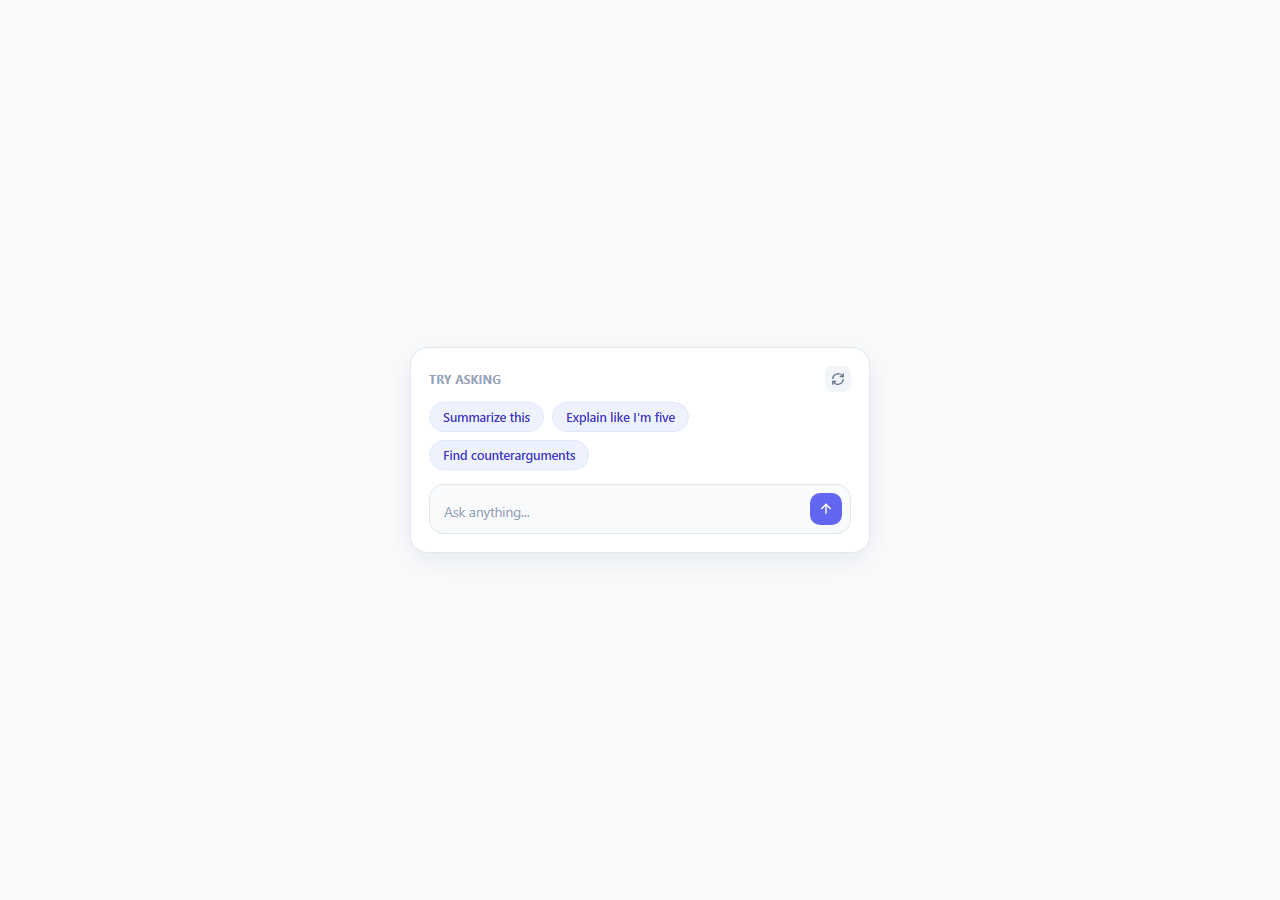
A blank text input is the single biggest source of hesitation in any AI chat interface. Users staring at an empty prompt box with a blinking cursor often don't know what the tool is actually good for, or how to phrase a request that will get a useful answer, and that hesitation is a meaningful drop-off point before a user ever experiences the product's value. Prompt suggestion chips solve this directly: a row of pre-written starter prompts sitting above or below the input gives the user a concrete, one-click way to see the product in action, learn the kind of phrasing that works well, and get moving immediately instead of facing an intimidating blank field.
Why this pattern matters for AI-native products in 2026
As AI chat interfaces become the default entry point for an increasing range of products — not just chatbots, but AI-assisted search, document tools, and analytics dashboards — the products that convert casual visitors into active users are the ones that make the *first* interaction trivially easy. Suggestion chips are a low-cost, high-leverage onboarding technique: they double as implicit documentation (showing users what kinds of requests are supported) while removing the cold-start problem entirely. Crucially, the user stays fully in control — clicking a chip fills the input with editable text rather than silently sending a request on the user's behalf, keeping the interaction transparent and undoable, which matters more as AI-native interfaces increasingly need to demonstrate that the user, not the system, initiates every consequential action.
The typewriter fill-in, not an instant jump
The core interaction detail in this snippet is *how* a chip's text lands in the input. Rather than setting input.value = text instantly, fillPrompt() clears the input, focuses it, and then appends one character at a time via setInterval at a 14ms interval, visually composing the prompt into the field the way a person typing quickly would. This small detail matters more than it might seem: an instant value jump can feel like the interface did something *to* the input behind the user's back, while a visible fill-in reads as the interface *drafting a suggestion for you to review and edit*, reinforcing that the text is a starting point, not a locked-in command. After the fill completes, the cursor is explicitly placed at the end of the text via setSelectionRange, so the user can immediately continue typing or editing without having to click back into the field.
Rotating the suggestion pool without disorienting the user
A single static row of three prompts gets stale fast, so this snippet ships three pools of three suggestions each, cycled by a "regenerate suggestions" icon button. Clicking it does two things simultaneously: it spins the refresh icon 180 degrees via a CSS @keyframes animation for immediate feedback that the click registered, and it fades the chip row out and back in (.swapping toggles opacity: 0 and a small translateY) around the moment the new pool's chips are actually swapped into the DOM, so the transition never shows a jarring instant content swap. The 180ms delay between fading out and rendering the next pool is tuned to be long enough to register as a deliberate transition but short enough that the control still feels responsive rather than sluggish.
Auto-growing input and accessibility
The <textarea> auto-grows as content is typed or filled in, using the standard height: auto then scrollHeight measurement technique capped at 120px, so a longer starter prompt does not get clipped or force a scrollbar inside a single-line-looking field. Each chip is a real <button> element, keyboard-focusable and operable, and the regenerate control has an explicit aria-label since it communicates only through an icon. This pattern generalizes well beyond chat: any freeform input paired with a small set of common, well-phrased starting points benefits from the same low-friction, editable-suggestion approach.
Build with AI
Build, Understand, Optimize, and Extend It With AI
Paste this snippet's HTML, CSS, and JS into an AI coding assistant like Claude and ask it to explain exactly how the character-by-character fillPrompt() function differs from simply setting input.value directly, and why that distinction matters for how "in control" the interaction feels to the user — that's the detail worth understanding before you adapt it. You could also ask the assistant to help you replace the static pools array with suggestions generated dynamically from an API (for example, prompts tailored to whatever document or page the user is currently viewing), while preserving the same spin-and-fade regenerate transition so the swap still feels smooth even with network latency involved. It's also a good candidate for asking the assistant to add a guard against double-clicking a chip mid-animation, or to add a subtle sound-free "typing cursor" caret effect during the fill for extra polish.
Prompt to recreate it
Copy this into your AI assistant of choice to build the effect from scratch, or as a jumping-off point for your own variant:
Build an AI prompt suggestion chip row above a chat-style textarea input, in plain HTML, CSS, and JavaScript.

Requirements:
- Render a row of 3 clickable "starter prompt" chips below or above a textarea input, each built from a simple {label, fullText} data structure so they're easy to reconfigure.
- Clicking a chip must clear the input, focus it, and then fill in the chip's full prompt text with a visible character-by-character typewriter effect (not an instant value assignment), placing the cursor at the end once the fill completes so the user can keep typing immediately.
- Include a "regenerate suggestions" icon button that swaps the current set of 3 chips for a different set from a small rotating pool of prompt sets, with a coordinated icon-spin animation and a fade/slide transition on the chip row so the swap does not feel abrupt.
- The textarea must auto-grow in height as its content grows (from either typing or the typewriter fill), up to a reasonable maximum height, after which it should scroll internally.
- All interactive elements (chips, regenerate button, send button) must be real, keyboard-accessible button elements, and the icon-only regenerate button needs an appropriate aria-label since it has no visible text.
- Keep the component self-contained and framework-free, structured so the prompt pools and the send-button handler can be swapped for real product logic without restructuring the markup.
Want to tighten it up first? Run this prompt through the AI Prompt Studio to score it across 8 quality dimensions, catch anti-patterns, and tune the wording for Claude, ChatGPT, or Gemini before you paste it in.
Step by step
How to Use
- 1Click a suggestion chipClick any chip in the row (e.g. "Summarize this"). The textarea below clears, gains focus, and the chip's full prompt text types itself in character by character via fillPrompt(), landing with the cursor placed at the end so you can keep typing immediately.
- 2Click the regenerate icon for a new setClick the circular arrow button beside "Try asking". The icon spins, the chip row fades out and back in, and a different pool of three prompts from the pools array replaces the current set — cycling through pools[0], pools[1], pools[2] in order.
- 3Add or edit prompt poolsEach pool is an array of { label, text } objects in the pools array — label is the short chip text shown to the user, text is the full prompt that gets typed into the input. Add a new array to pools to extend the rotation, or edit the existing labels/text to match your product's actual use cases.
- 4Tune the typewriter fill speedThe fillPrompt() function types one character every 14ms via setInterval. Lower this value for a faster fill on longer prompts, or raise it slightly for shorter ones — the goal is a fill that reads as deliberate and quick, not slow enough to feel like a delay.
- 5Wire the send button to your actual chat logicThe send-btn in this demo has no attached handler by default. Add a click listener that reads input.value and sends it to your chat API or handler, then clear the textarea and reset its height afterward.
- 6Export and integrate into your input UIClick HTML to download a standalone file, or JSX for a React component. Store the pools array as configuration so product or content teams can update starter prompts without a code change, and consider randomizing pool order per session for variety.
Real-world uses
Common Use Cases
Got questions?
Frequently Asked Questions
An instant value change can feel like the interface silently altered the input without the user's involvement, especially if the user had already started typing something else. A visible, quick typewriter fill reads as the interface actively drafting a suggestion into the field for the user to review, edit, or send as-is — it keeps the interaction feeling collaborative and reversible rather than automatic, which matters for maintaining a sense of user control over what gets submitted.
In this snippet, fillPrompt() clears the input at the start of every call, so clicking a second chip mid-animation restarts the fill with the new text from scratch rather than mixing the two. If you want to guard against rapid double-clicks more explicitly, track the active interval ID in a variable and call clearInterval on it at the start of fillPrompt() before starting a new one.
Three is a practical default — enough to demonstrate range without overwhelming the input area or pushing it visually off balance. If your product supports many distinct use cases, use the regenerate control (as in this snippet) to let users cycle through additional pools rather than showing five or more chips at once, which tends to clutter the input area and dilute the ease of the pattern.
A static, well-chosen set works fine for new users and general onboarding. For returning or high-usage users, personalizing chips based on recent activity, frequently used prompt types, or the current page/document context (e.g. showing "Summarize this contract" only inside a contract viewer) meaningfully increases relevance and click-through, and is a natural next step once the static pattern is in place.
In this snippet it only swaps between three small, locally-defined pools with no network request — it is meant to feel instant. If you want genuinely AI-generated, context-aware suggestions instead of a fixed rotation, you can replace the pools array with an async fetch to your backend, but keep the same spin/fade transition timing so a network-backed regenerate still feels responsive, and consider a loading state on the icon if the request takes more than a couple hundred milliseconds.