You Might Also Like
Learn Coding Visually
Learn to code with interactive, live-preview playgrounds — HTML, CSS, JavaScript, React & more.
 HTML Playground42 lessons · Click-based · Live preview
 CSS PlaygroundLearn CSS with a live editor
 JavaScript Playground60 lessons · DOM · Async · Canvas
 React PlaygroundLearn React with a live code editor
 GSAP PlaygroundLearn GSAP animation interactively
 SVG Playground44 lessons · shapes · paths · animation
 SCSS Playground45 lessons · Sass modules · tokens
 Tailwind PlaygroundLearn Tailwind CSS with a live editor
 Bootstrap 5 Playground50 lessons · live preview
Email Inbox — Mail List UI with Read, Star & Search
Email Inbox · Layouts · Plain HTML, CSS & JS · Live preview
What's included
Features
About this UI Snippet
Email Inbox — Mail List with Unread, Star, Select-All and Search
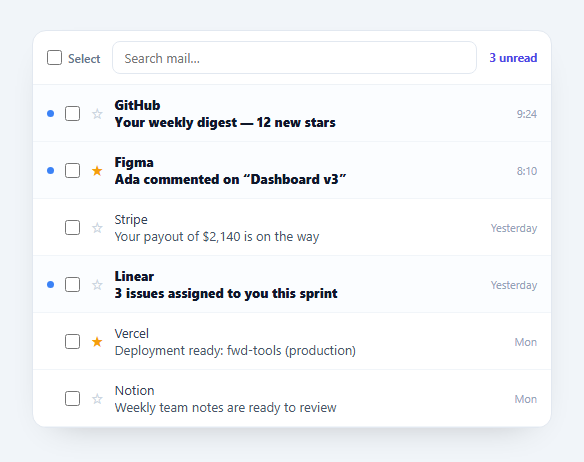
An email inbox list is the dense, interaction-rich list at the heart of any mail or messaging app: unread rows stand out, clicking marks read, stars toggle, a header checkbox selects all, and search filters live. This snippet builds that whole interaction model from a data array, in plain HTML, CSS, and vanilla JavaScript.
Unread emphasis and click-to-read
Unread messages get a bolder sender and subject, a subtle tinted background, and a blue dot; clicking a row marks it read and the emphasis drops away. This read/unread state lives on each message object and drives both the styling and the header's "N unread" counter, so they always agree. It's the core inbox behaviour, reproduced faithfully.
Per-row controls without misfires
Each row carries a checkbox and a star, and both stopPropagation so toggling them doesn't also trigger the row's click-to-read. This event-isolation detail is what stops the classic bug where starring an email accidentally opens it. Stars persist on the message object and re-render in place.
Tri-state select-all
The header checkbox is a proper tri-state control: checked when every message is selected, unchecked when none are, and indeterminate (a dash) when only some are — using the real DOM indeterminate property. Selecting individual rows updates it, and toggling it selects or clears everything, the exact behaviour of Gmail-style bulk selection.
Live search with highlighting
Typing in the search box filters the list by sender and subject as you go, and the matching substring in the subject is wrapped in <b> so you can see why a row matched. An empty-state message appears when nothing matches. Filtering is a view concern over the source array, so selection and read state survive a search.
Data-driven and portable
The entire list renders from a DATA array, so swapping in real messages — or a fetch — is a one-line change, and every interaction mutates that data and re-renders, keeping the UI consistent. It's a compact, dependency-free reference for the inbox list pattern you'd otherwise build piecemeal.
Build with AI
Build, Understand, Optimize, and Extend It With AI
Rather than reasoning through the tri-state logic on your own, paste this snippet's HTML, CSS, and JS into an AI coding assistant like Claude and ask it to explain exactly how syncAll() sets both the checked and indeterminate DOM properties on the header checkbox from the counts of selected versus total messages, and why indeterminate has to be set as a JavaScript property rather than an HTML attribute. The same assistant can help you optimize it, for instance checking whether rebuilding every row's innerHTML on every single keystroke in the search box is wasteful compared to only toggling a hidden class on non-matching rows. It's also useful for extending the inbox: ask it to add swipe-to-archive gestures for touch, support multi-select with Shift-click range selection, or add a bulk-action toolbar that appears only when at least one row is checked. Treat the code less like a finished artifact and more like a starting point for a conversation.
Prompt to recreate it
Copy this into your AI assistant of choice to build the effect from scratch, or as a jumping-off point for your own variant:
Build an email inbox list in plain HTML, CSS, and JavaScript with no library.

Requirements:
- Render every row from a single array of message objects (each with a sender, subject, timestamp, unread flag, and starred flag), where a single render function is the only place that builds the list, rebuilding it whenever the underlying data or the search query changes.
- Give unread messages a distinct bolder visual treatment and a small colored dot, and clicking anywhere on a row (other than its checkbox or star button) must mark that message as read and immediately update both the row's styling and a header count of how many messages remain unread.
- Add a checkbox and a star toggle button to every row, and make sure clicking either one calls stopPropagation so it never also triggers the row's mark-as-read click handler, since starring or selecting a message should not have the side effect of opening it.
- Implement a header "select all" checkbox that reflects three distinct states depending on the current selection: fully checked when every visible message is selected, fully unchecked when none are, and using the native indeterminate DOM property (not just a CSS class) when only some are selected, and make toggling that header checkbox itself select or deselect every message at once.
- Implement a live search input that filters the displayed messages by matching the query against sender and subject text as the user types, wraps the matching substring in the subject in a bold tag so the match is visually obvious, and shows a distinct empty-state message when no messages match, all without mutating the underlying data array or losing any row's selected/read/starred state when the query is cleared.
Want to tighten it up first? Run this prompt through the AI Prompt Studio to score it across 8 quality dimensions, catch anti-patterns, and tune the wording for Claude, ChatGPT, or Gemini before you paste it in.
Step by step
How to Use
- 1Paste HTML, CSS, and JSAn inbox renders with unread rows, stars, and a search bar.
- 2Click a messageIt marks read and the unread count updates.
- 3Star and selectToggle a star or a checkbox without opening the row.
- 4Select allThe header checkbox shows a tri-state and bulk-selects.
- 5SearchFilter by sender or subject with live highlighting.
- 6Use your dataReplace the DATA array with real messages or a fetch.
Real-world uses
Common Use Cases
Got questions?
Frequently Asked Questions
Each message object has an unread flag. Unread rows get bolder text, a tint, and a dot via a class, and clicking a row sets unread to false and re-renders. The header's "N unread" counter is computed from the same data on every render, so the styling and the count can never drift apart.
The row itself has a click handler that marks the message read (and would open it in a real app). Without stopPropagation, clicking the star or checkbox would bubble up and also trigger that handler — so starring an email would open it. Stopping propagation isolates the per-row controls from the row action, which is the correct, expected behaviour.
The header checkbox reflects the selection: checked when all messages are selected, unchecked when none are, and indeterminate (shown as a dash) when only some are — set via the DOM indeterminate property, which cannot be done in HTML. Toggling individual rows recomputes it, and clicking it selects or clears every row.
No. Search only filters which rows are displayed; it does not modify the underlying DATA array or the selection map. So selected and read states persist through a search, and clearing the query restores the full list intact with those states preserved.
Hold the messages and a selection set in state and render rows from them; each interaction updates state and the framework re-renders. Compute the unread count and the select-all tri-state as derived values, setting the indeterminate property via a ref/directive. Filter for search in render. Tailwind users swap the classes for utilities; the data-driven structure is the same.