Learn Coding Visually
Learn to code with interactive, live-preview playgrounds — HTML, CSS, JavaScript, React & more.
 HTML Playground42 lessons · Click-based · Live preview
 CSS PlaygroundLearn CSS with a live editor
 JavaScript Playground60 lessons · DOM · Async · Canvas
 React PlaygroundLearn React with a live code editor
 GSAP PlaygroundLearn GSAP animation interactively
 SVG Playground44 lessons · shapes · paths · animation
 SCSS Playground45 lessons · Sass modules · tokens
 Tailwind PlaygroundLearn Tailwind CSS with a live editor
 Bootstrap 5 Playground50 lessons · live preview
Scroll Progress Circle — Free SVG Reading Ring JS Snippet
Scroll Progress Circle · Scroll · Plain HTML, CSS & JS · Live preview
What's included
Features
About this UI Snippet
Scroll Progress Circle — SVG Reading Progress Ring
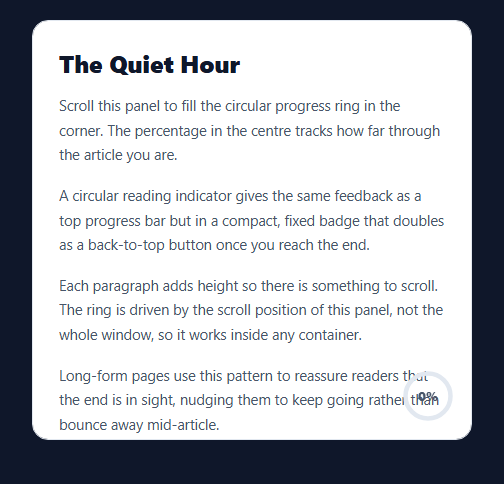
A scroll progress circle is a compact, fixed ring that fills clockwise as a reader moves through an article — the circular cousin of the thin top progress bar, popular on blogs and long-form pages because it doubles as a back-to-top button when complete. This snippet builds one in HTML, CSS, and vanilla JavaScript using a single SVG circle and the stroke-dasharray technique, scoped to a scrollable panel rather than the whole window. No dependency.
The stroke-dasharray ring
Two concentric <circle>s share a radius: a grey track and a colored foreground. The foreground's stroke-dasharray is set to its full circumference (2πr ≈ 125.66 for r=20), and the stroke-dashoffset starts at that same value so none of the stroke shows. Reducing the offset toward zero reveals the stroke proportionally — set offset = circumference × (1 - ratio) and the ring fills exactly to the scroll fraction. The SVG is rotated -90° so the fill begins at the top, not at three o'clock.
Progress from scroll geometry
The fraction is scrollTop / (scrollHeight - clientHeight) — how far you've scrolled divided by the total scrollable distance — clamped to 0–1 so overscroll bounce can't push it past full or below empty. Because it reads the *panel's* metrics, not the document's, the same code works for a sidebar, a modal, or a full-page reader without changes.
rAF-throttled scroll handling
Scroll events fire rapidly, so the handler is throttled with a ticking flag and requestAnimationFrame: it does the DOM writes at most once per frame and ignores intermediate events. That keeps the ring smooth and avoids layout thrash even during fast flicks on a trackpad or touch screen.
Completion state and back-to-top
When the ratio hits ~100% a .done class turns the stroke green with a glow, fades out the percentage, and reveals an up-arrow — and only then does the ring become clickable, scrolling the panel back to the top with scrollTo({ behavior: 'smooth' }). Gating the click on completion means it can't be triggered accidentally mid-read.
Reusing it on a real page
Point the listener at window and read document.documentElement metrics to track the whole page instead of a panel. The ring element is position: sticky here so it stays visible while scrolling its container; switch to fixed for a page-level badge. Everything else — the dash math, the throttle, the completion logic — stays identical.
Build with AI
Build, Understand, Optimize, and Extend It With AI
You don't have to work out the stroke-dasharray geometry by hand. Paste this snippet's HTML, CSS, and JS into an AI coding assistant like Claude and ask it to explain exactly why the circle needs a -90 degree rotation to start its fill at twelve o'clock, or why the stroke-dashoffset formula uses circumference times (1 - ratio) instead of just the ratio directly. The same assistant can help optimize it — asking whether the rAF-throttled ticking flag is doing enough under very fast trackpad flicks, or whether the 0.999 completion threshold should account for sub-pixel rounding on high-DPI screens. It's also useful for extending the effect: ask it to add a second ring showing time-remaining estimated from reading speed, make the ring's color transition through a gradient as it fills rather than snapping to green only at completion, or scope multiple rings to multiple independent scrollable panels on the same page. Treat the code less like a finished artifact and more like a starting point for a conversation.
Prompt to recreate it
Copy this into your AI assistant of choice to build the effect from scratch, or as a jumping-off point for your own variant:
Build a "scroll progress circle" reading indicator in plain HTML, CSS, and JavaScript using only an inline SVG and the native scroll event — no animation library, no canvas.

Requirements:
- A scrollable panel (its own overflow-y: auto container, not the whole window) containing article content, with a sticky circular badge in the corner containing two concentric SVG circles of the same radius: a static grey background track and a colored foreground stroke, plus a centered percentage label.
- Compute the circle's circumference in JavaScript from its radius (2 * Math.PI * r) and set the foreground circle's stroke-dasharray to that value, with stroke-dashoffset initially equal to the same value so no stroke is visible at rest.
- Rotate the whole SVG -90 degrees in CSS so the fill visually begins at the top of the circle rather than at the 3 o'clock position.
- On every scroll event of the panel (not window), compute the scroll ratio as scrollTop divided by (scrollHeight - clientHeight), clamp it strictly between 0 and 1, and set the foreground stroke-dashoffset to circumference times (1 minus that ratio) so the visible stroke length always matches the scrolled fraction.
- Throttle the scroll handler so DOM writes happen at most once per animation frame, using a boolean flag plus requestAnimationFrame rather than a fixed-interval debounce or throttle library.
- Update the centered percentage label's text every time the ratio updates, and once the ratio reaches essentially 100%, toggle a completed state that changes the ring's stroke color, adds a glow, hides the percentage text, and reveals an arrow icon.
- Make the ring clickable only while in the completed state, and clicking it should smooth-scroll the panel back to its top using scrollTo with behavior: smooth.
Want to tighten it up first? Run this prompt through the AI Prompt Studio to score it across 8 quality dimensions, catch anti-patterns, and tune the wording for Claude, ChatGPT, or Gemini before you paste it in.
Source Code
<div class="spc-reader" id="spcReader">
  <article class="spc-article">
    <h1>The Quiet Hour</h1>
    <p>Scroll this panel to fill the circular progress ring in the corner. The percentage in the centre tracks how far through the article you are.</p>
    <p>A circular reading indicator gives the same feedback as a top progress bar but in a compact, fixed badge that doubles as a back-to-top button once you reach the end.</p>
    <p>Each paragraph adds height so there is something to scroll. The ring is driven by the scroll position of this panel, not the whole window, so it works inside any container.</p>
    <p>Long-form pages use this pattern to reassure readers that the end is in sight, nudging them to keep going rather than bounce away mid-article.</p>
    <p>The stroke you see sweeping clockwise is a single SVG circle whose dash offset is recalculated on every scroll frame.</p>
    <p>When the ring completes, it turns green and a small arrow appears — click it to jump back to the top in one smooth motion.</p>
    <p>Keep scrolling. The maths divides how far you have scrolled by the total scrollable distance, clamped between zero and one.</p>
    <p>That ratio maps onto the circle's circumference to set exactly how much of the stroke is drawn.</p>
    <p>You are nearly there. Notice the number climbing toward one hundred percent as the stroke closes the loop.</p>
    <p>And that's the end — the ring is full, glowing, and ready to send you back to the start.</p>
  </article>
  <button type="button" class="spc-ring" id="spcRing" aria-label="Reading progress">
    <svg viewBox="0 0 48 48">
      <circle class="spc-bg" cx="24" cy="24" r="20"></circle>
      <circle class="spc-fg" id="spcFg" cx="24" cy="24" r="20"></circle>
    </svg>
    <span class="spc-pct" id="spcPct">0%</span>
    <svg class="spc-arrow" viewBox="0 0 24 24" fill="none" stroke="currentColor" stroke-width="3" stroke-linecap="round" stroke-linejoin="round"><polyline points="6 14 12 8 18 14"></polyline></svg>
  </button>
</div>*{box-sizing:border-box;margin:0;padding:0}
body{font-family:system-ui,-apple-system,sans-serif;background:#0f172a;color:#0f172a;display:flex;justify-content:center;padding:20px}
.spc-reader{position:relative;width:100%;max-width:440px;height:420px;overflow-y:auto;background:#fff;border:1px solid #e2e8f0;border-radius:16px;scroll-behavior:smooth}
.spc-article{padding:26px 26px 40px}
.spc-article h1{font-size:24px;font-weight:800;margin-bottom:14px}
.spc-article p{font-size:14.5px;line-height:1.7;color:#475569;margin-bottom:16px}
.spc-ring{position:sticky;float:right;bottom:16px;margin-right:16px;width:54px;height:54px;border:none;background:transparent;cursor:default;padding:0;display:flex;align-items:center;justify-content:center}
.spc-ring svg{position:absolute;inset:0;width:54px;height:54px;transform:rotate(-90deg)}
.spc-bg{fill:none;stroke:#e2e8f0;stroke-width:4}
.spc-fg{fill:none;stroke:#6366f1;stroke-width:4;stroke-linecap:round;stroke-dasharray:125.6;stroke-dashoffset:125.6;transition:stroke .25s}
.spc-pct{font-size:12px;font-weight:800;color:#475569;font-variant-numeric:tabular-nums;transition:opacity .2s}
.spc-arrow{position:absolute;width:20px;height:20px;color:#16a34a;opacity:0;transition:opacity .2s}
.spc-reader.done .spc-ring{cursor:pointer}
.spc-reader.done .spc-fg{stroke:#22c55e;filter:drop-shadow(0 0 4px rgba(34,197,94,.6))}
.spc-reader.done .spc-pct{opacity:0}
.spc-reader.done .spc-arrow{opacity:1}var reader = document.getElementById('spcReader');
var fg = document.getElementById('spcFg');
var pctEl = document.getElementById('spcPct');
var ring = document.getElementById('spcRing');
var R = 20;
var CIRC = 2 * Math.PI * R; // ~125.66
fg.style.strokeDasharray = CIRC.toFixed(2);
var ticking = false;
function onScroll() {
if (ticking) return;
ticking = true;
requestAnimationFrame(function () {
var max = reader.scrollHeight - reader.clientHeight;
var ratio = max > 0 ? reader.scrollTop / max : 0;
ratio = Math.max(0, Math.min(1, ratio));
fg.style.strokeDashoffset = (CIRC * (1 - ratio)).toFixed(2);
pctEl.textContent = Math.round(ratio * 100) + '%';
reader.classList.toggle('done', ratio >= 0.999);
ticking = false;
});
}
reader.addEventListener('scroll', onScroll);
ring.addEventListener('click', function () {
if (reader.classList.contains('done')) reader.scrollTo({ top: 0, behavior: 'smooth' });
});
onScroll();Step by step
How to Use
- 1Paste HTML, CSS, and JSA scrollable reader panel renders with a progress ring in the corner.
- 2Scroll the panelThe ring's stroke sweeps clockwise and the center percentage climbs.
- 3Watch the geometryProgress equals scrollTop divided by the total scrollable distance.
- 4Reach the endThe ring turns green, glows, and shows an up-arrow.
- 5Click to returnOnce complete, clicking smooth-scrolls back to the top.
- 6Track the whole pagePoint the listener at window for a page-level badge.
Real-world uses
Common Use Cases
Got questions?
Frequently Asked Questions
The foreground circle's stroke-dasharray is set to its full circumference and its stroke-dashoffset starts at that same value, hiding the stroke. Setting offset = circumference × (1 - ratio) reveals exactly the scrolled fraction of the stroke. The SVG is rotated -90° so the fill starts at the top of the ring.
It is scrollTop divided by (scrollHeight - clientHeight) — distance scrolled over total scrollable distance — clamped between 0 and 1 so overscroll bounce can't exceed full or drop below empty. It reads the panel's own metrics, so the same logic works in a modal, sidebar, or any scroll container.
Scroll events fire many times per frame, and updating the DOM on each one causes jank. A ticking flag plus requestAnimationFrame coalesces them so the offset and percentage are written at most once per frame, keeping the ring smooth during fast scrolling without wasted layout work.
When the ratio reaches about 100%, a .done class turns the stroke green, fades the percentage, and shows an up-arrow. The click handler only scrolls to the top when that class is present, using scrollTo with smooth behavior — so the button can't be triggered before you've finished reading.
Keep a ref to the scroll container, attach the scroll listener in a mount effect (useEffect, onMounted, ngAfterViewInit), and clean it up on unmount. Store the ratio in state and bind strokeDashoffset to circumference × (1 - ratio). For a whole-page version, listen on window and read document.documentElement metrics. Tailwind handles the layout; bind the dash offset inline.