
Learn Coding Visually
Learn to code with interactive, live-preview playgrounds — HTML, CSS, JavaScript, React & more.
 HTML Playground42 lessons · Click-based · Live preview
 CSS PlaygroundLearn CSS with a live editor
 JavaScript Playground60 lessons · DOM · Async · Canvas
 React PlaygroundLearn React with a live code editor
 GSAP PlaygroundLearn GSAP animation interactively
 SVG Playground44 lessons · shapes · paths · animation
 SCSS Playground45 lessons · Sass modules · tokens
 Tailwind PlaygroundLearn Tailwind CSS with a live editor
 Bootstrap 5 Playground50 lessons · live preview
PhysicsProps Friction Pucks — Free GSAP Physics Snippet
PhysicsProps Friction Pucks · Animations · Plain HTML, CSS & JS · Live preview
What's included
Features
About this UI Snippet
PhysicsProps Friction Pucks — Velocity and Friction Instead of End Values
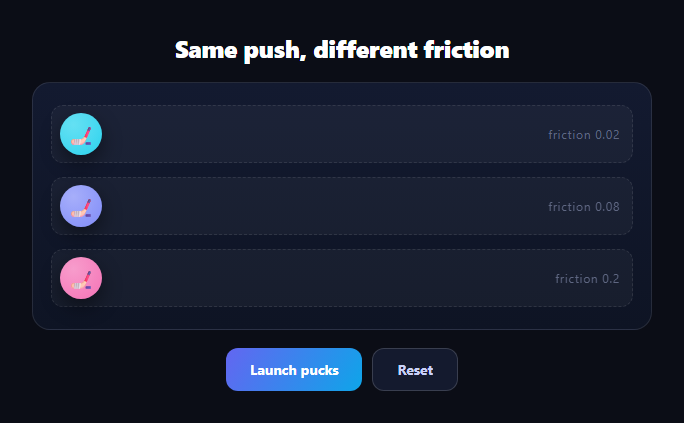
This demo is a physics lesson as UI: three hockey pucks receive the *same* 620px/s launch velocity, but different friction coefficients — 0.02, 0.08, 0.2 — so they glide to three very different stopping points. Nothing specifies where any puck ends; friction decides. That's GSAP's PhysicsPropsPlugin (free on the CDN since 3.13): per-property physics simulation where motion comes from velocity, acceleration, and friction rather than destinations.
physicsProps vs physics2D: the mental model
Where Physics2D simulates a *point moving through 2D space* (one velocity vector plus an angle and gravity), physicsProps applies independent physics to *any individual properties*: give x a velocity and friction, give rotation its own, even drive opacity or a filter value with simulated momentum. It's the general-purpose form — each property gets its own tiny simulation, and they don't need to agree with each other.
Friction is exponential decay, and it shows
Each tick, friction removes a fraction of the remaining velocity — so speed decays exponentially, which is why the pucks' deceleration looks so different from an eased tween's. The 0.02 puck coasts nearly frictionlessly across the lane; 0.08 pulls up around two-thirds in; 0.2 dies within the first stretch. Same push, three visibly honest physics outcomes — the comparison *is* the demo, and it's why identical velocity matters: change one variable, see its effect.
No end values means kill-and-relaunch is the reset pattern
Because physics tweens don't know their destinations, "replay" can't rewind to defined endpoints. The launch handler calls gsap.killTweensOf(puck) then gsap.set(puck, { x: 0 }) — kill whatever simulation is running, teleport home, launch fresh. The reset button does the same but tweens home smoothly. This kill-set-launch idiom is standard for any launch-condition animation.
ease: 'none' again — friction is the easing
As with all physics plugins, easing would remap simulation time and corrupt the decay curve. Linear time in, physics out: the deceleration users see is purely the friction model, which is exactly what makes it look like ice instead of animation.
The spin is a deliberate contrast
Each puck also rotates — but via a plain power2.out tween whose total spin is *derived from* its friction value (slipperier pucks spin more). It demonstrates the boundary: rotation here is choreography (a known end angle, eased), while x is simulation (no known end). Mixing both on one element is normal GSAP practice — properties are independent.
Where acceleration fits
This demo uses velocity + friction, but physicsProps also accepts acceleration per property — a constant force. y with positive acceleration is gravity; x with negative acceleration is a headwind. Velocity + acceleration + friction covers thrown, falling, launched, and decaying motion for any property you can tween.
Customizing it
Make friction user-editable, add lanes, or apply the same model to a scroll position or slider value. Related motion: momentum dragging in drag throw notes (InertiaPlugin is this idea attached to gestures), parabolic bursts in physics 2d burst, bouncing in custom bounce ball, and collision toys in physics balls.
Build with AI
Build, Understand, Optimize, and Extend It With AI
You don't need to reverse-engineer the friction model on your own. Paste this snippet's HTML, CSS, and JS into an AI coding assistant like Claude and ask it to explain exactly how the physicsProps object applies velocity and friction independently to the x property while a separate power2.out tween handles rotation on the same element, and why ease none is required for the x simulation to look right. The same assistant can help optimize it, for example checking whether killTweensOf plus a fresh gsap.set is the cleanest reset pattern here, or whether the rotation amount formula (derived from each puck's friction value) actually produces a visually consistent relationship across all three lanes. It's also useful for extending the effect: ask it to make the friction values user-editable with a slider per lane, add a fourth lane demonstrating acceleration (a headwind or gravity), or turn this into a mini physics quiz where users guess which puck has the lowest friction. Treat the code less like a finished artifact and more like a starting point for a conversation.
Prompt to recreate it
Copy this into your AI assistant of choice to build the effect from scratch, or as a jumping-off point for your own variant:
Build a side-by-side friction comparison demo in plain HTML, CSS, and vanilla JavaScript using GSAP and its PhysicsPropsPlugin (load both from a CDN) — the horizontal motion must come from per-property physics simulation, not from tweening to a fixed end position.

Requirements:
- At least three parallel "lanes," each containing one puck element and a visible label showing that lane's friction coefficient (for example 0.02, 0.08, 0.2).
- A "Launch" button that, for every puck simultaneously, kills any currently running tween on it, resets its x position to zero, and starts a new tween whose physicsProps configuration gives the x property an identical launch velocity across all pucks but a different friction value read from each puck's own data attribute.
- The launch tween's ease must be set to none, since the friction value itself must produce all of the deceleration — document in a comment why adding a separate easing curve would corrupt the simulated decay curve.
- In the same launch action, also spin each puck via a separate, ordinary eased tween (not physics-driven) whose total rotation amount is mathematically derived from that puck's friction value, so slipperier pucks (lower friction) end up spinning more — demonstrating that a physics-simulated property and a normal choreographed property can coexist on one element.
- A "Reset" button that kills any running simulations and smoothly eases every puck back to its starting x position and rotation of zero.
- Style the lanes to look like a rink or track, with a distinct color per puck, so the difference in stopping distance between the three friction values is visually obvious at a glance.
Want to tighten it up first? Run this prompt through the AI Prompt Studio to score it across 8 quality dimensions, catch anti-patterns, and tune the wording for Claude, ChatGPT, or Gemini before you paste it in.
Source Code
<div class="ppp-wrap">
  <h3 class="ppp-title">Same push, different friction</h3>
  <div class="ppp-rink" id="pppRink">
    <div class="ppp-lane"><span class="ppp-label">friction 0.02</span><div class="ppp-puck" data-friction="0.02" style="--pc:#22d3ee">🏒</div></div>
    <div class="ppp-lane"><span class="ppp-label">friction 0.08</span><div class="ppp-puck" data-friction="0.08" style="--pc:#818cf8">🏒</div></div>
    <div class="ppp-lane"><span class="ppp-label">friction 0.2</span><div class="ppp-puck" data-friction="0.2" style="--pc:#f472b6">🏒</div></div>
  </div>
  <div class="ppp-bar">
    <button class="ppp-btn" id="pppLaunch">Launch pucks</button>
    <button class="ppp-btn ppp-ghost" id="pppReset">Reset</button>
  </div>
</div>*{box-sizing:border-box;margin:0;padding:0}
body{font-family:system-ui,-apple-system,sans-serif;background:#0b0d16;color:#fff;min-height:100vh;display:flex;align-items:center;justify-content:center;padding:24px}
.ppp-wrap{display:flex;flex-direction:column;gap:18px;width:min(620px,94vw)}
.ppp-title{text-align:center;font-size:clamp(18px,3vw,24px);font-weight:800;letter-spacing:-.01em}
.ppp-rink{display:flex;flex-direction:column;gap:14px;padding:22px 18px;border-radius:18px;background:linear-gradient(180deg,#131a30,#0e1424);border:1px solid rgba(255,255,255,.1)}
.ppp-lane{position:relative;height:58px;border-radius:12px;background:rgba(255,255,255,.04);border:1px dashed rgba(255,255,255,.1)}
.ppp-label{position:absolute;right:12px;top:50%;transform:translateY(-50%);font-size:11.5px;letter-spacing:.08em;color:#5f6782;font-variant-numeric:tabular-nums}
.ppp-puck{position:absolute;left:8px;top:50%;transform:translateY(-50%);width:42px;height:42px;border-radius:50%;display:flex;align-items:center;justify-content:center;font-size:20px;background:radial-gradient(circle at 32% 28%,color-mix(in srgb,var(--pc) 70%,#fff),var(--pc));box-shadow:0 8px 20px rgba(0,0,0,.45);will-change:transform}
.ppp-bar{display:flex;gap:10px;justify-content:center}
.ppp-btn{padding:11px 24px;border-radius:12px;border:0;background:linear-gradient(120deg,#6366f1,#0ea5e9);color:#fff;font:700 14px system-ui;cursor:pointer}
.ppp-btn:hover{opacity:.9}
.ppp-ghost{background:#141a2e;border:1px solid rgba(255,255,255,.16);color:#c9d2f8}gsap.registerPlugin(PhysicsPropsPlugin);
var pucks = document.querySelectorAll('.ppp-puck');
// physicsProps drives individual properties with velocity + friction:
// identical launch velocity, three frictions, three stopping distances.
function launch() {
pucks.forEach(function (puck) {
gsap.killTweensOf(puck);
gsap.set(puck, { x: 0 });
gsap.to(puck, {
duration: 3,
ease: 'none',
physicsProps: {
x: {
velocity: 620,
friction: Number(puck.getAttribute('data-friction'))
}
}
});
// A little spin that decays with the same friction feel.
gsap.fromTo(puck, { rotation: 0 }, {
rotation: 360 * (0.25 - Number(puck.getAttribute('data-friction'))) * 8,
duration: 3,
ease: 'power2.out'
});
});
}
document.getElementById('pppLaunch').addEventListener('click', launch);
document.getElementById('pppReset').addEventListener('click', function () {
pucks.forEach(function (puck) {
gsap.killTweensOf(puck);
gsap.to(puck, { x: 0, rotation: 0, duration: 0.5, ease: 'power2.inOut' });
});
});Step by step
How to Use
- 1Add the GSAP CDNsInclude gsap and PhysicsPropsPlugin from the CDN panel.
- 2Paste HTML, CSS, and JSThree labeled lanes render with pucks at the start.
- 3Click LaunchAll pucks fire with identical 620px/s velocity.
- 4Compare the stopsFriction alone produces three distances.
- 5Hit ResetPucks tween home, simulations killed cleanly.
- 6Edit the frictionsEach puck's data-friction is its physics.
Real-world uses
Common Use Cases
Got questions?
Frequently Asked Questions
physics2D simulates a point in 2D space — one velocity with an angle, plus gravity — ideal for particles and projectiles. physicsProps runs an independent simulation per property: x can have velocity and friction while rotation has its own, and any tweenable property (even opacity) can carry momentum. It's the general-purpose plugin; physics2D is the specialized ballistic one.
Each tick, friction removes a proportional share of the remaining velocity, producing exponential decay — fast at first, asymptotically settling. That's why 0.02 coasts across the lane while 0.2 dies early despite identical launches, and why the motion reads as ice rather than an eased tween: eases are time-symmetric curves; decay is a force.
Physics tweens have no recorded end values — the destination emerges from simulation. So replays use the kill-set-launch idiom: killTweensOf clears any running simulation, set() teleports the puck home, and a fresh tween launches new physics. Reversing or seeking a physics tween replays its integrated history, but "restart from rest" requires the explicit reset.
To demonstrate that simulated and choreographed properties coexist on one element: x is physics (unknown end), rotation is a standard power2.out tween whose total spin is derived from the friction value, so slipperier pucks visibly spin longer. GSAP treats each property independently, letting you mix simulation with designed motion freely.
Yes — each property accepts acceleration alongside velocity and friction. Positive acceleration on y is gravity (a thrown-up element rises, slows, and falls), negative acceleration on x is a headwind fighting the launch, and combining all three per property models most everyday motion without a physics engine.
Register the plugin at module scope and trigger launches from event handlers against refs — no mount effect needed for click-driven physics, though a cleanup should killTweensOf each puck so simulations die on unmount. Keep positions out of framework state entirely; the simulation owns x. Lanes, pucks, and buttons all express directly as Tailwind utilities.