You Might Also Like
Learn Coding Visually
Learn to code with interactive, live-preview playgrounds — HTML, CSS, JavaScript, React & more.
 HTML Playground42 lessons · Click-based · Live preview
 CSS PlaygroundLearn CSS with a live editor
 JavaScript Playground60 lessons · DOM · Async · Canvas
 React PlaygroundLearn React with a live code editor
 GSAP PlaygroundLearn GSAP animation interactively
 SVG Playground44 lessons · shapes · paths · animation
 SCSS Playground45 lessons · Sass modules · tokens
 Tailwind PlaygroundLearn Tailwind CSS with a live editor
 Bootstrap 5 Playground50 lessons · live preview
Scramble Text Links — Free GSAP ScrambleText Snippet
Scramble Text Links · Animations · Plain HTML, CSS & JS · Live preview
What's included
Features
About this UI Snippet
Scramble Text Links — Decode-Style Hovers With ScrambleTextPlugin
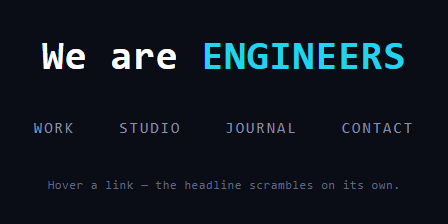
The scramble effect — text dissolving into random glyphs and resolving into a new word, like a terminal decrypting itself — is a staple of studio portfolios and cyberpunk UIs. This snippet applies GSAP's ScrambleTextPlugin (free on the CDN since 3.13) in its two canonical roles: nav links that scramble-in-place on hover, and a headline that auto-cycles through roles by way of glyph noise.
How the plugin resolves text
scrambleText doesn't just flash random characters: it locks in correct characters progressively from left to right while the not-yet-resolved remainder keeps cycling through the chars set. That left-to-right lock is what reads as "decoding" rather than noise — at 50% progress, the first half of the word is legible and stable while the tail still churns. speed controls how fast the churn cycles glyphs (1.4 on the links makes short words feel electric), independent of the tween's duration, which controls how fast the lock-in front advances.
Hover scrambling targets the link's own text
Each link stores its label in data-text and scrambles *to itself* on mouseenter. That's the trick for hover effects: the element's current text is the destination, so the animation is pure transition with no content change — and repeated hovers restart cleanly because the target equals the resting state. Locking width matters less here since each link resolves to its original length, but the monospace font guarantees the churn never shifts siblings.
revealDelay makes the headline cycle read as replacement
The role cycler uses revealDelay: 0.25: for the first quarter second the *entire* word churns before the lock-in front starts advancing. Without it, the first letters of the new word would appear almost instantly and the transition would read as a fast edit; with it, there's a beat of full chaos that sells "the old word is being destroyed" before the new one assembles. chars: 'upperAndLowerCase' adds case noise to the churn, contrasting with the links' cleaner 'upperCase' set.
min-width in ch units prevents layout pumping
Cycling between ENGINEERS and DREAMERS changes string length, and mid-scramble the displayed text length fluctuates too. The .stl-role span reserves min-width: 9ch (the longest role) so the headline's layout never pumps as words churn — in a monospace font, ch units map exactly to character counts, making the reservation precise.
The loop is delayedCall, not setInterval
Each cycle schedules the next via gsap.delayedCall(1.4, nextRole) from its own onComplete. Chaining beats a fixed interval because the dwell time is measured *after* the scramble finishes — change the duration and the rhythm adapts — and delayedCalls live in GSAP's ticker, so they pause correctly if you ever pause the global timeline.
Monospace is doing quiet work
Proportional fonts make scrambles shimmer in width as wide and narrow glyphs swap — distracting at nav size, unacceptable in a headline. The mono stack keeps every churning frame the same width, which is why terminal aesthetics and scramble effects are natural partners.
Customizing it
Swap the chars set (the plugin accepts any custom string, e.g. Japanese kana or binary), scramble on scroll-into-view instead of hover, or slow speed for a lazier churn. Related text effects: the vanilla text scramble, typed cycling in gsap text rotator, glitching in glitch text, and character entrances in gsap split text.
Build with AI
Build, Understand, Optimize, and Extend It With AI
You do not have to puzzle out the timing relationships between GSAP's scrambleText options by hand. Paste this snippet's HTML, CSS, and JS into an AI coding assistant like Claude and ask it to explain exactly how revealDelay interacts with the tween's duration to control how long a word churns before the left-to-right lock-in front starts advancing, and why the nav links scramble to their own data-text attribute instead of some other target string. The same assistant is useful for optimizing it — ask whether chaining gsap.delayedCall from onComplete is the right pattern if you want the role cycler to also pause when the tab is backgrounded, or whether registering one mouseenter listener per link versus a single delegated listener matters at this scale. It is just as useful for extending the effect — ask it to scramble in a custom glyph set like katakana or binary, trigger the headline cycle on scroll-into-view instead of on a timer, or add a click handler that scrambles a link to a "loading" label before navigating. Treat the code less like a finished artifact and more like a starting point for a conversation.
Prompt to recreate it
Copy this into your AI assistant of choice to build the effect from scratch, or as a jumping-off point for your own variant:
Build a "scramble text" hover and auto-cycling headline effect in plain HTML, CSS, and JavaScript using GSAP and its ScrambleTextPlugin (load both from a CDN, no build step).

Requirements:
- A headline containing a span that automatically cycles through an array of role words (for example ENGINEERS, DESIGNERS, DREAMERS, BUILDERS), and a row of navigation links, each storing its own label text in a data-text attribute.
- Register ScrambleTextPlugin, then on mouseenter of each nav link, run a scrambleText tween that targets the link's own data-text value as the destination — so hovering scrambles the link's text into itself, making repeated hovers restart cleanly with no separate state tracking.
- Give the nav link scramble a distinct chars preset (such as upperCase) and a distinct speed value from the headline cycle, so the two scrambles feel different in churn rate.
- For the headline, write a self-chaining cycle function that advances an index into the roles array, runs a scrambleText tween with a chars preset that includes both cases, uses a revealDelay so the entire word churns in full chaos for a beat before the left-to-right lock-in begins, and schedules the next cycle via gsap.delayedCall from the tween's onComplete rather than a fixed setInterval.
- Use a monospace font for both the nav and the headline, and reserve the headline span's width with a min-width in ch units sized to the longest role word, so the layout never shifts or pumps in width as words of different lengths cycle through.
- Do not implement any manual character-by-character randomization logic yourself — all scrambling and progressive character lock-in must come from the ScrambleTextPlugin's own tween options (chars, speed, revealDelay), not custom setInterval-driven glyph swapping.
Want to tighten it up first? Run this prompt through the AI Prompt Studio to score it across 8 quality dimensions, catch anti-patterns, and tune the wording for Claude, ChatGPT, or Gemini before you paste it in.
Step by step
How to Use
- 1Add the GSAP CDNsInclude gsap and ScrambleTextPlugin from the CDN panel.
- 2Paste HTML, CSS, and JSThe headline begins cycling roles through glyph noise.
- 3Hover a nav linkIt scrambles and decodes back to its own label.
- 4Watch the lock-inCharacters resolve left to right while the tail churns.
- 5Adjust revealDelayMore delay means more full-chaos before resolving.
- 6Change the glyph setchars accepts presets or any custom string.
Real-world uses
Common Use Cases
Got questions?
Frequently Asked Questions
It resolves progressively: correct characters lock in from left to right while only the unresolved remainder keeps cycling through the chars set. That advancing "decode front" is what reads as decryption rather than noise. The speed option controls how fast unresolved glyphs churn, independently of the tween duration that moves the front.
Storing the label in data-text and targeting it makes hover a pure transition — the destination equals the resting state, so repeated hovers restart cleanly with no content management, and mouseleave needs no handler because the text always ends correct. It's the simplest possible integration: one tween per hover, zero state.
It holds the entire string in full churn for that many seconds before the lock-in front starts advancing. Without it, the first characters of the new word appear almost immediately and a word swap reads like a quick edit; with 0.25s of total chaos first, the transition reads as the old word being destroyed and the new one assembling — much stronger for headline cycling.
Two measures: a monospace font, so every churning glyph occupies identical width, and min-width: 9ch on the cycling span, reserving the longest role's width so shorter words don't let the headline contract. In monospace, ch units correspond exactly to character counts, making the reservation precise rather than approximate.
Yes — chars accepts the presets ('upperCase', 'lowerCase', 'upperAndLowerCase') or any literal string of glyphs to cycle through, so '01' gives binary rain vibes and a kana string gives Matrix-style churn. Pick glyphs of similar width if you're not in monospace, or the scramble will visibly breathe.
Register the plugin at module scope; hover tweens can fire straight from event handlers (onMouseEnter and friends) against refs, while the auto-cycler belongs in a mount effect — useEffect, onMounted, or ngAfterViewInit — with its delayedCall killed in the cleanup so the loop dies on unmount. Keep the cycling text out of framework state; the plugin mutates the node directly. The nav itself is trivially Tailwind.