You Might Also Like
Learn Coding Visually
Learn to code with interactive, live-preview playgrounds — HTML, CSS, JavaScript, React & more.
 HTML Playground42 lessons · Click-based · Live preview
 CSS PlaygroundLearn CSS with a live editor
 JavaScript Playground60 lessons · DOM · Async · Canvas
 React PlaygroundLearn React with a live code editor
 GSAP PlaygroundLearn GSAP animation interactively
 SVG Playground44 lessons · shapes · paths · animation
 SCSS Playground45 lessons · Sass modules · tokens
 Tailwind PlaygroundLearn Tailwind CSS with a live editor
 Bootstrap 5 Playground50 lessons · live preview
GSAP Text Rotator — Free TextPlugin Typing Snippet
GSAP Text Rotator · Animations · Plain HTML, CSS & JS · Live preview
What's included
Features
About this UI Snippet
GSAP Text Rotator — Type-and-Delete Word Cycling With TextPlugin
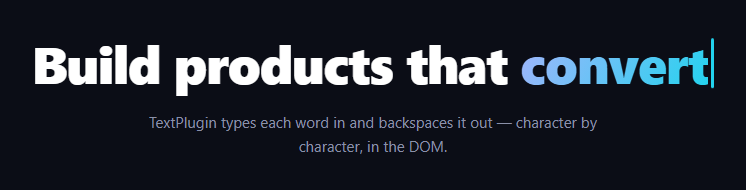
The rotating typed word — "Build products that convert… retain… delight…" — is the hardest-working headline pattern in SaaS. This snippet drives it with GSAP's TextPlugin, which tweens the *string content* of an element the way other plugins tween numbers: each word types in character by character, holds while the caret blinks, then backspaces out, forever. No character spans, no CSS steps() hacks — the DOM's actual text changes per tick.
TextPlugin tweens strings, not styles
gsap.to(el, { text: 'convert' }) interpolates from the element's current text to the target: at 40% progress the element genuinely contains the first 40% of the diff. That's fundamentally different from the width-mask typewriter trick (where full text hides behind a clipped box) — here, copy-pasting mid-animation yields partial text, screen readers see real content states, and no measuring or masking exists. Deleting is just tweening to '', which removes characters from the end — a backspace for free.
Per-word durations keep the typing speed constant
Durations are computed from length: w.length × 0.09 to type, × 0.05 to delete. A fixed one-second duration would type "scale" lazily and "delight" frantically; scaling by character count locks the *per-character* rhythm (~90ms type, ~50ms delete — deletion reads natural when roughly twice as fast, matching how people hammer backspace). ease: 'none' matters too: any easing would make characters appear in accelerating clumps instead of a steady keystroke cadence.
The empty-tween hold is a timeline idiom
Between typing and deleting sits tl.to({}, { duration: 1.3 }) — a tween on an empty object that animates nothing but occupies time. It's the cleanest way to insert a reading pause inside a builder loop (position parameters would need running offsets; delays attach awkwardly to the wrong tween). During the hold, the CSS caret blinks via steps(1), exactly like an idle terminal.
One repeating timeline builds itself from data
The WORDS.forEach loop appends type–hold–delete triplets sequentially onto a single repeat: -1 timeline. Adding a fifth word is adding an array entry; the timeline's total duration self-adjusts. Because the last word deletes back to empty and the first tween types from empty, the loop seam is invisible.
Layout is reserved so the sentence never dances
The slot span holds min-width: 5.4ch (sized past the longest word) with left-aligned text, so the sentence doesn't reflow as words grow and shrink. The gradient on the word survives text changes because background-clip: text is a style on the element — only its text nodes are being rewritten.
Caret is CSS, positioned by layout
The caret is a separate inline-block after the word span, so it naturally rides the text's right edge as characters appear and vanish — no JS positioning. Its steps(1) blink runs continuously; during typing the constant motion masks the blink, and during holds it reads as idle.
Customizing it
Edit WORDS, retune the per-character constants, or use text: { value: w, delimiter: ' ' } to type word-by-word for long phrases. Related: scroll-scrubbed typing in scroll typewriter, glyph-churn transitions in scramble text links, the vanilla typewriter, and slot-machine words in word flip hero.
Build with AI
Build, Understand, Optimize, and Extend It With AI
You don't have to work out the timeline math in your head. Paste this snippet's HTML, CSS, and JS into an AI coding assistant like Claude and ask it to explain exactly why durations are computed from each word's length rather than fixed, or what the empty-object tween tl.to({}, { duration: 1.3 }) is actually doing inside the timeline. The same assistant is useful for optimizing it — ask whether building the whole WORDS.forEach timeline up front scales fine for a list of fifty words or if it should be generated lazily. It's just as handy for extending the effect: ask it to type whole phrases word-by-word using TextPlugin's delimiter option instead of characters, randomize the word order each loop instead of cycling in array order, or sync the caret's blink rate to whether the timeline is currently typing versus holding. Treat the code less like a finished artifact and more like a starting point for a conversation.
Prompt to recreate it
Copy this into your AI assistant of choice to build the effect from scratch, or as a jumping-off point for your own variant:
Build a "type and backspace" word rotator in plain HTML, CSS, and JavaScript using GSAP with its TextPlugin loaded from a CDN — no character-span tricks, no CSS steps() typewriter hack.

Requirements:
- A sentence containing one inline slot span that will hold the rotating word, followed by a separate blinking caret element positioned by normal text flow (not JavaScript positioning).
- An array of words to cycle through.
- Build a single GSAP timeline with repeat set to -1 (infinite). For each word in the array, append three sequential tweens: one that tweens the slot's text property from its current content to the full word (duration computed as word length times a small per-character constant, eased linearly with ease: 'none'), one empty-object tween of a fixed duration that holds the fully-typed word on screen without touching any properties, and one that tweens the slot's text property to an empty string to backspace it out (again duration scaled by word length, at a faster per-character constant than typing).
- The deleting speed constant must be meaningfully faster than the typing speed constant so backspacing feels natural rather than symmetrical.
- Reserve enough horizontal space for the slot (e.g. a min-width in ch units sized to the longest word) so the surrounding sentence never reflows as words grow and shrink.
- The caret should blink continuously and independently via a CSS steps(1) animation, without any JavaScript coordinating it to the typing state.
- Confirm the loop is seamless: the last word deletes back to an empty string and the first word's tween starts from empty, so the repeat point is invisible.
Want to tighten it up first? Run this prompt through the AI Prompt Studio to score it across 8 quality dimensions, catch anti-patterns, and tune the wording for Claude, ChatGPT, or Gemini before you paste it in.
Step by step
How to Use
- 1Add the GSAP CDNsInclude gsap and TextPlugin from the CDN panel.
- 2Paste HTML, CSS, and JSThe first word begins typing immediately.
- 3Watch a full cycleType in, hold with blinking caret, backspace out.
- 4Note the rhythmEvery word types at the same per-character speed.
- 5Edit the WORDS arrayThe timeline rebuilds its loop from your list.
- 6Tune the constants0.09s/char typing, 0.05s/char deleting, 1.3s hold.
Real-world uses
Common Use Cases
Got questions?
Frequently Asked Questions
CSS typewriters hide full text behind an animated clip or width mask — the characters always exist, just invisibly. TextPlugin rewrites the element's actual string per tick, so at 40% progress the DOM contains 40% of the word: selectable, copyable, real. Deleting is tweening to an empty string, which CSS masks can't express as backspacing at all.
A fixed duration types short words slowly and long words frantically. Multiplying length by a per-character constant (0.09s typing, 0.05s deleting) locks the keystroke cadence across the list — and deleting at roughly double speed matches how people actually hold backspace. With ease: 'none', characters land at that steady rhythm instead of clumping.
tl.to({}, { duration: 1.3 }) animates nothing but occupies 1.3 seconds of timeline — a spacer that creates the reading pause between typing and deleting. Inside a data-driven forEach builder it's cleaner than position parameters (which need accumulated offsets) or delays (which attach to the wrong neighbor when you reorder).
It's a separate inline-block element placed after the word span in normal flow, so layout itself repositions it as characters are added and removed — no JavaScript tracking. Its steps(1) blink runs constantly: motion masks it while typing, and during holds it reads as an idle terminal cursor.
Yes — use the object form: text: { value: 'your sentence here', delimiter: ' ' } makes the diff operate on space-separated tokens, so words pop in one at a time. That's the right mode for long phrases where per-character typing would take too long, and it combines with the same length-scaled duration idea using word counts.
Build the timeline in a mount effect — useEffect, onMounted, or ngAfterViewInit — against a ref, and kill it in the cleanup so the infinite repeat dies on unmount. Crucially, don't render the rotating word from framework state: the plugin owns that text node, and a re-render would clobber mid-word frames. Reserve the slot width with a Tailwind min-w-[5.4ch] utility.