You Might Also Like
Learn Coding Visually
Learn to code with interactive, live-preview playgrounds — HTML, CSS, JavaScript, React & more.
 HTML Playground42 lessons · Click-based · Live preview
 CSS PlaygroundLearn CSS with a live editor
 JavaScript Playground60 lessons · DOM · Async · Canvas
 React PlaygroundLearn React with a live code editor
 GSAP PlaygroundLearn GSAP animation interactively
 SVG Playground44 lessons · shapes · paths · animation
 SCSS Playground45 lessons · Sass modules · tokens
 Tailwind PlaygroundLearn Tailwind CSS with a live editor
 Bootstrap 5 Playground50 lessons · live preview
GSAP SplitText Reveal — Free Text Animation Snippet
GSAP SplitText Reveal · Animations · Plain HTML, CSS & JS · Live preview
What's included
Features
About this UI Snippet
GSAP SplitText Reveal — Line, Word, and Character Entrances Done Right
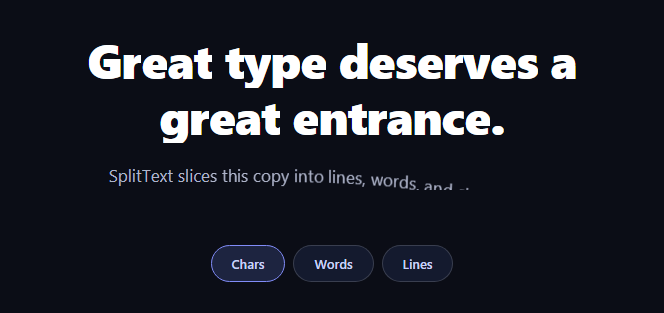
Splitting text into animatable pieces sounds trivial until you hit the real problems: wrapped lines, masking, screen-reader damage, and un-splitting cleanly. GSAP's SplitText plugin (free on the CDN since 3.13, and substantially rewritten in that release) solves all four. This snippet splits a headline and paragraph three switchable ways — characters, words, or lines — each with its own masked rise choreography and a clean revert between modes.
Lines are the hard part — and the plugin's real value
Chars and words can be split with a loop (see the hand-rolled scroll letter stagger); *lines* can't, because line breaks only exist after layout. SplitText measures where the browser actually wrapped the text and wraps each rendered line in its own div — which is why line-by-line reveals, the most editorial of all text entrances, effectively require this plugin. The 3.13 rewrite also re-splits automatically on resize when lines change.
mask: wraps pieces in clip containers for you
The masked rise — text sliding up from behind an invisible sill — normally needs hand-built overflow: hidden wrappers around every piece. Passing mask: 'lines' (or 'words'/'chars') makes SplitText generate those clip wrappers during the split, so yPercent: 110 entrances emerge from nothing with zero custom CSS. This snippet switches the mask to match the active mode, which is why all three feel native rather than one mask fitting all.
revert() is what makes re-splitting safe
Each mode change calls split.revert() before creating a new SplitText. Revert restores the exact original markup — no leftover spans, no nested wrappers from double-splitting, and any text styling returns to its untouched state. Skipping revert is the classic SplitText bug: split a split and your DOM fills with matryoshka spans whose transforms compound unpredictably.
One split exposes all three granularities
type: 'lines,words,chars' builds the full hierarchy in one pass — lines containing words containing chars — and the instance exposes them as arrays (split.chars, split.words, split.lines). The demo animates whichever array matches the button, with per-mode variables: chars get a rotation and tight 15ms stagger, words rise with fades at 40ms, lines sweep up masked at 120ms. Same mechanism, three distinct editorial voices.
Accessibility is handled, not broken
Naive splitting shatters words into meaningless single-letter spans for assistive tech. SplitText 3.13 applies aria-label to the container and hides the fragments from the accessibility tree by default, so screen readers announce the original sentence while sighted users see the choreography.
Why yPercent for the rise
yPercent: 110 displaces each piece by its *own* height, so the same code works at every font size in the clamp() range — a pixel offset would under-hide large headlines and over-travel small paragraph text. Combined with masks, pieces are genuinely invisible until they cross their sill.
Customizing it
Change the per-mode staggers, add from: 'random' scatter, or attach the entrance to a ScrollTrigger for viewport-triggered reveals. Related type effects: scroll-scrubbed characters in scroll letter stagger, typing in scroll typewriter, word emphasis in text reveal on scroll, and the vanilla split text cousin.
Build with AI
Build, Understand, Optimize, and Extend It With AI
You don't have to reverse-engineer SplitText's internals by hand. Paste this snippet's HTML, CSS, and JS into an AI coding assistant like Claude and ask it to walk through why split.revert() must run before every re-split, or exactly what the mask option is generating under the hood to make the masked rise work with zero custom wrapper CSS. The same assistant can help optimize it — ask whether splitting all three granularities (lines, words, chars) up front is wasteful when only one mode's array is animated at a time, or how to avoid a layout thrash if this ran on many elements at once. It's just as useful for extending the effect: ask it to attach the reveal to a ScrollTrigger so it fires on scroll into view instead of on click, add a from: 'random' scatter to the character stagger, or chain a line-by-line reveal into a follow-up scroll-scrubbed effect. Treat the code less like a finished artifact and more like a starting point for a conversation.
Prompt to recreate it
Copy this into your AI assistant of choice to build the effect from scratch, or as a jumping-off point for your own variant:
Build a switchable text-reveal effect in plain HTML, CSS, and JavaScript using GSAP with its SplitText plugin loaded from a CDN — no other libraries.

Requirements:
- A heading and a paragraph, plus three buttons labeled Chars, Words, and Lines that switch the active reveal granularity.
- On each mode change, call revert() on any existing SplitText instance before creating a new one, so repeated switches never nest generated spans inside previously generated spans.
- Create the split with type set to lines, words, and chars together in one call (not three separate splits), and pass a mask option matching the active mode so SplitText generates overflow-clipped wrapper elements automatically instead of you writing manual overflow:hidden containers.
- Animate whichever array (split.chars, split.words, or split.lines) matches the active mode using gsap.from, with yPercent-based vertical displacement (not a fixed pixel offset) so the entrance scales correctly across different font sizes, plus a distinct stagger and duration per mode: characters should use a small stagger with a slight rotation, words a fade plus rise, and lines a slower masked sweep.
- Ensure the original sentence remains announced correctly to screen readers despite the DOM being full of generated per-character and per-word spans.
- Play the default (Chars) mode automatically once on load, and re-play the corresponding mode whenever a button is clicked.
Want to tighten it up first? Run this prompt through the AI Prompt Studio to score it across 8 quality dimensions, catch anti-patterns, and tune the wording for Claude, ChatGPT, or Gemini before you paste it in.
Step by step
How to Use
- 1Add the GSAP CDNsInclude gsap and SplitText from the CDN panel.
- 2Paste HTML, CSS, and JSThe headline plays its character entrance immediately.
- 3Click WordsText reverts, re-splits, and rises word by word.
- 4Click LinesReal wrapped lines sweep up behind masks.
- 5Resize the previewLine splits track the browser's actual wrapping.
- 6Tune the choreographyEach mode's stagger and motion is one object.
Real-world uses
Common Use Cases
Got questions?
Frequently Asked Questions
Because line breaks don't exist in markup — they're a layout outcome that changes with every container width and font load. SplitText measures where the browser actually wrapped the text and wraps each rendered line in a div, and the 3.13 rewrite re-splits automatically when resizing changes the wraps. Chars and words are loopable by hand; lines genuinely aren't.
It makes SplitText wrap each piece (line, word, or char) in an overflow-clipped parent during the split, so yPercent entrances slide in from behind an invisible sill with no hand-written wrapper CSS. This snippet switches the mask to match the active mode — chars clip per-character, lines clip per-line — which keeps each granularity's motion looking native.
revert() restores the element's exact original markup, removing every generated span and wrapper. Splitting an already-split element is the classic SplitText bug: spans nest inside spans, transforms compound, and text metrics drift. Reverting first makes mode switches idempotent — you can toggle chars/words/lines forever without DOM residue.
Hand-rolled splitting does — assistive tech reads single-letter spans as gibberish. SplitText 3.13 handles this by default: it applies an aria-label with the original text to the container and hides the fragment spans from the accessibility tree, so the sentence announces normally while the visual pieces animate.
Yes — type: 'lines,words,chars' builds the full hierarchy in one split, and all three arrays remain valid simultaneously. A common pattern is lines rising masked while their chars carry a secondary rotation, by targeting split.lines and split.chars at overlapping timeline positions. Just animate transforms at one level at a time per property to avoid compounding.
Split in a mount effect (useEffect, onMounted, ngAfterViewInit) after fonts are ready — document.fonts.ready avoids splitting against fallback metrics — and call split.revert() in the cleanup so unmount restores clean markup. Guard StrictMode double-runs by reverting any existing instance first. Keep the text as normal JSX/template content; Tailwind typography classes survive the split untouched.