Top Loading Bar — Route Progress HTML CSS JS Snippet

Top Loading Bar · Loaders · Plain HTML, CSS & JS · Live preview

Share & Support

What's included

Features

Trickle-to-90% model
startBar eases the target up by a shrinking step every 400ms, capped at 90%, faking confident progress for an unknown duration.
Complete and fade
finishBar sets the target to 100%; once eased past 99.5% the bar fades via opacity and resets for the next run.
rAF width tween
A requestAnimationFrame loop eases displayed width toward the target each frame, so the bar glides between trickle steps.
Export-safe animation
Width is set in JS (not a CSS width transition), so the motion is identical in the React + Tailwind export; only the fade uses opacity.
Glowing peg
A ::after with layered box-shadows trails the leading edge, the signature NProgress light effect.
Fixed, top-layer bar
position: fixed; top: 0 with a high z-index keeps the bar above all content during loads.
Manual + auto controls
simulate runs a full start-to-finish cycle; startBar/finishBar let you drive the phases independently.
Re-entrant safe
Guards prevent overlapping starts and the loop resets state on completion, so rapid navigations behave predictably.

About this UI Snippet

Top Loading Bar — Trickle-to-90%, Complete-and-Fade & Glowing Peg
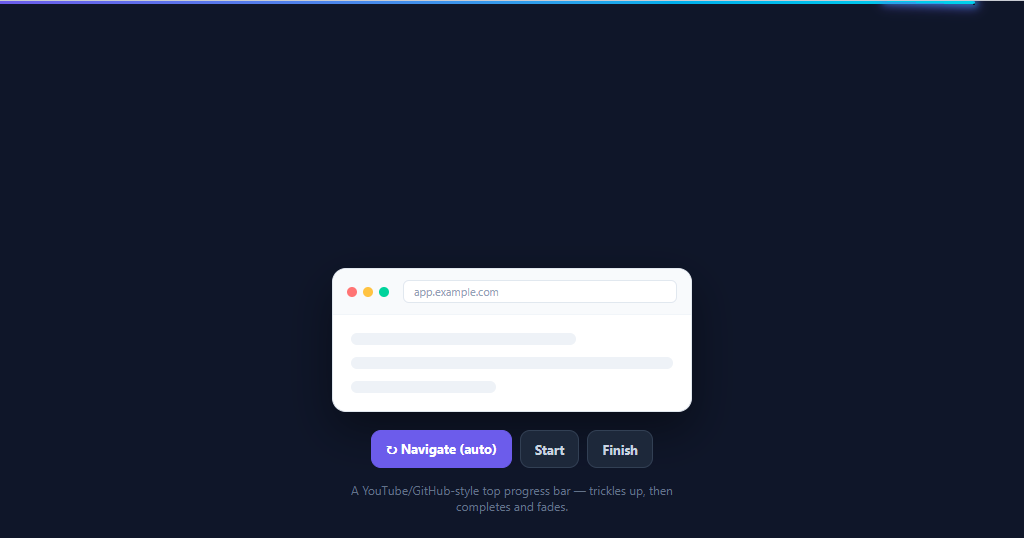
Screenshot of the Top Loading Bar snippet rendered live

The thin progress bar that slides across the top of the page during navigation — popularised by YouTube, GitHub, and the NProgress library — has become the standard signal that "something is loading". It works precisely because the duration of a page load or fetch is unknown: instead of a fake percentage, it trickles quickly toward 90%, holds, and then snaps to 100% and fades once the real work finishes. This snippet implements that behaviour in plain HTML, CSS, and vanilla JavaScript.

The trickle model

A real loader can't know how long a request will take, so this bar fakes confident progress. startBar sets the target to 8% and starts a setInterval "trickle" that nudges the target upward by a shrinking amount every 400ms but never past 90% (target + (0.9 − target) × 0.2). This easing means it races early and slows as it approaches 90%, conveying activity without ever pretending to be done. When the actual work completes, finishBar clears the trickle and sets the target to 100%.

Smooth JS-driven width

A requestAnimationFrame loop eases the *displayed* width toward the target each frame (shown += (target − shown) × 0.14), so the bar glides rather than jumping between trickle steps. The width is set directly in JS rather than via a CSS width transition — deliberately, because utility frameworks like Tailwind don't animate raw width, so a JS tween guarantees identical smoothness across the React and Tailwind exports. Only the final fade uses an opacity transition (which frameworks do animate).

Complete and fade

When finishing and the bar has eased past 99.5%, the loop fades it out via opacity, then resets width to zero after the fade so the next navigation starts clean. The bar is position: fixed at the very top with a high z-index, and a glowing "peg" (::after with layered box-shadows) trails the leading edge — the signature NProgress detail that makes the bar feel like light moving across the screen.

Demo controls

A mock browser window with "Navigate (auto)", "Start", and "Finish" buttons lets you trigger the full cycle or drive the phases manually. simulate runs a realistic start-then-finish after 2.2 seconds.

In a real app you call startBar() when a route change or fetch begins and finishBar() when it resolves (router events, fetch interceptors, or a global request counter). Pair this with a skeleton loader for content placeholders, a progress bar for determinate tasks, or a download button for in-button progress.

Step by step

How to Use

  1. 1
    Paste HTML, CSS, and JSA mock browser window with controls appears, and a thin gradient bar sits ready at the very top of the page.
  2. 2
    Click "Navigate (auto)"The top bar slides in, trickles quickly toward 90% and holds, then after ~2.2s jumps to 100% and fades — a full load cycle.
  3. 3
    Watch the trickleNotice it races early and slows near 90%, never completing until the real work finishes — confident progress for an unknown duration.
  4. 4
    Drive it manuallyClick "Start" to begin trickling and "Finish" to complete and fade, mimicking a route change resolving.
  5. 5
    See the glowing pegA soft glow trails the bar's leading edge as it moves — the signature NProgress light effect.
  6. 6
    Wire it to your appCall startBar() on route-change/fetch start and finishBar() on resolve; the bar handles the rest.

Real-world uses

Common Use Cases

SPA route transitions
Show progress on client-side navigation in React/Vue/Angular routers. Pair with a skeleton loader for the incoming page.
Page and form submissions
Trigger on form submit or full-page navigation so users know the request is in flight.
AJAX / fetch activity
Start on the first in-flight request and finish when the global request count hits zero — an app-wide loading indicator.
Dashboard data refreshes
Signal background data reloads at the top of the page without blocking the UI; complements a realtime line chart.
File and asset loading
Indicate heavy asset or report generation; for in-control progress use a download button.
Multi-step flows and wizards
Show a top-level "working" cue while a step processes, alongside a progress bar for the determinate part.

Got questions?

Frequently Asked Questions

Call startBar() when navigation/fetch begins and finishBar() when it resolves. For routers, use their start/complete events (e.g. Next.js routeChangeStart/routeChangeComplete, Vue Router beforeEach/afterEach). For fetch, wrap your client to increment a counter on request and decrement on response, calling startBar when the counter goes 0→1 and finishBar when it returns to 0.

Most navigations and fetches don't expose a reliable progress value, so a real percentage isn't available. Trickling toward 90% communicates "actively working" without lying about completion, then snapping to 100% on the real finish gives a satisfying, honest end. For downloads that DO report bytes, use a determinate bar like the download button instead.

The width changes in unpredictable steps (each trickle tick), so a fixed-duration CSS transition would stutter. A requestAnimationFrame ease toward the moving target stays smooth. It's also export-safe: Tailwind's transition utility doesn't animate raw width, so a CSS-transition bar would snap in the React + Tailwind build — the JS tween behaves identically everywhere.

Treat them as a finish: call finishBar() in your router's error/abort handler and your fetch's catch/finally so the bar always completes and fades rather than hanging at 90%. If you maintain a request counter, ensure failed requests still decrement it so the count can reach zero.

Keep the bar as a single fixed element and drive it from a small module exposing start/finish (the functions here). In React, call them from a router effect; in Vue from router guards in onMounted; in Angular from Router events in a root component. The trickle and rAF logic are framework-agnostic and port unchanged — or wrap them in a tiny store/service.

Top Loading Bar — Export as HTML, React, Vue, Angular & Tailwind

HTML
<!DOCTYPE html>
<html lang="en">
<head>
  <meta charset="UTF-8" />
  <meta name="viewport" content="width=device-width, initial-scale=1.0" />
  <title>Top Loading Bar</title>
  <style>
    *{box-sizing:border-box;margin:0;padding:0}
    body{font-family:system-ui,-apple-system,sans-serif;background:#0f172a;min-height:100vh;display:flex;align-items:center;justify-content:center;padding:24px}
    
    .tlb-fill{position:fixed;top:0;left:0;height:3px;width:0;background:linear-gradient(90deg,#6366f1,#22d3ee);z-index:9999;opacity:0;transition:opacity .3s ease;border-radius:0 3px 3px 0}
    .tlb-fill::after{content:'';position:absolute;right:0;top:0;height:100%;width:90px;box-shadow:0 0 11px 3px rgba(99,102,241,.7),0 0 6px 2px rgba(34,211,238,.5);transform:rotate(2deg) translateY(-1px)}
    
    .tlb-demo{width:100%;max-width:360px;text-align:center}
    .tlb-window{background:#fff;border:1px solid #e2e8f0;border-radius:14px;overflow:hidden;box-shadow:0 18px 44px rgba(0,0,0,.4);text-align:left}
    .tlb-bar-chrome{display:flex;align-items:center;gap:6px;padding:11px 14px;background:#f8fafc;border-bottom:1px solid #f1f5f9}
    .tlb-dot{width:10px;height:10px;border-radius:50%}
    .tlb-dot.r{background:#f87171}.tlb-dot.y{background:#fbbf24}.tlb-dot.g{background:#34d399}
    .tlb-addr{margin-left:8px;font-size:11px;color:#94a3b8;background:#fff;border:1px solid #e2e8f0;border-radius:6px;padding:3px 10px;flex:1}
    .tlb-body{padding:18px}
    .tlb-skel{height:12px;border-radius:6px;background:#eef2f7;margin-bottom:12px}
    .tlb-skel.l1{width:70%}.tlb-skel.l2{width:100%}.tlb-skel.l3{width:45%;margin-bottom:0}
    
    .tlb-controls{display:flex;gap:8px;justify-content:center;margin-top:18px;flex-wrap:wrap}
    .tlb-btn{padding:9px 14px;background:#1e293b;border:1px solid #334155;color:#cbd5e1;border-radius:10px;font-size:13px;font-weight:700;cursor:pointer;font-family:inherit;transition:background .15s}
    .tlb-btn:hover{background:#334155;color:#fff}
    .tlb-btn.primary{background:#6366f1;border-color:#6366f1;color:#fff}
    .tlb-btn.primary:hover{background:#4f46e5}
    .tlb-hint{font-size:12px;color:#64748b;margin-top:14px}
  </style>
</head>
<body>
  <div class="tlb-fill" id="tlbFill"></div>
  
  <div class="tlb-demo">
    <div class="tlb-window">
      <div class="tlb-bar-chrome"><span class="tlb-dot r"></span><span class="tlb-dot y"></span><span class="tlb-dot g"></span><span class="tlb-addr">app.example.com</span></div>
      <div class="tlb-body">
        <div class="tlb-skel l1"></div><div class="tlb-skel l2"></div><div class="tlb-skel l3"></div>
      </div>
    </div>
    <div class="tlb-controls">
      <button class="tlb-btn primary" onclick="simulate()">↻ Navigate (auto)</button>
      <button class="tlb-btn" onclick="startBar()">Start</button>
      <button class="tlb-btn" onclick="finishBar()">Finish</button>
    </div>
    <p class="tlb-hint">A YouTube/GitHub-style top progress bar — trickles up, then completes and fades.</p>
  </div>
  <script>
    var fill = document.getElementById('tlbFill');
    var shown = 0, target = 0, running = false, finishing = false, raf = null, trickle = null;
    
    function setWidth() { fill.style.width = (shown * 100).toFixed(2) + '%'; }
    
    function loop() {
      shown += (target - shown) * 0.14;
      setWidth();
      if (finishing && shown > 0.995) {
        finishing = false; running = false;
        fill.style.opacity = '0';
        setTimeout(function () { shown = 0; target = 0; setWidth(); }, 320);
        return;
      }
      if (running) raf = requestAnimationFrame(loop);
    }
    
    function startBar() {
      if (running && !finishing) return;
      running = true; finishing = false;
      shown = 0; target = 0.08;
      fill.style.opacity = '1';
      setWidth();
      clearInterval(trickle);
      trickle = setInterval(function () {
        if (target < 0.9) target = Math.min(0.9, target + (0.9 - target) * 0.2 + 0.01);
      }, 400);
      cancelAnimationFrame(raf);
      raf = requestAnimationFrame(loop);
    }
    
    function finishBar() {
      if (!running) return;
      clearInterval(trickle);
      finishing = true;
      target = 1;
    }
    
    function simulate() {
      startBar();
      setTimeout(finishBar, 2200);
    }
  </script>
</body>
</html>
Tailwind
<!DOCTYPE html>
<html lang="en">
<head>
  <meta charset="UTF-8" />
  <meta name="viewport" content="width=device-width, initial-scale=1.0" />
  <title>Top Loading Bar</title>
  <!-- Tailwind CSS v3+ — arbitrary value classes (e.g. bg-[#0f172a]) are valid -->
  <script src="https://cdn.tailwindcss.com"></script>
  <style>
    * {
      box-sizing:border-box;margin:0;padding:0
    }

    body {
      font-family:system-ui,-apple-system,sans-serif;background:#0f172a;min-height:100vh;display:flex;align-items:center;justify-content:center;padding:24px
    }

    .tlb-fill::after {
      content:'';position:absolute;right:0;top:0;height:100%;width:90px;box-shadow:0 0 11px 3px rgba(99,102,241,.7),0 0 6px 2px rgba(34,211,238,.5);transform:rotate(2deg) translateY(-1px)
    }

    .tlb-dot.r {
      background:#f87171
    }

    .tlb-dot.y {
      background:#fbbf24
    }

    .tlb-dot.g {
      background:#34d399
    }

    .tlb-skel.l1 {
      width:70%
    }

    .tlb-skel.l2 {
      width:100%
    }

    .tlb-skel.l3 {
      width:45%;margin-bottom:0
    }

    .tlb-btn.primary {
      background:#6366f1;border-color:#6366f1;color:#fff
    }

    .tlb-btn.primary:hover {
      background:#4f46e5
    }
  </style>
</head>
<body>
  <div class="tlb-fill fixed top-0 left-0 h-[3px] w-0 [background:linear-gradient(90deg,#6366f1,#22d3ee)] z-[9999] opacity-0 [transition:opacity_.3s_ease] rounded-[0 3px 0]" id="tlbFill"></div>
  
  <div class="w-full max-w-[360px] text-center">
    <div class="bg-[#fff] border border-[#e2e8f0] rounded-[14px] overflow-hidden shadow-[0_18px_44px_rgba(0,0,0,.4)] text-left">
      <div class="flex items-center gap-1.5 py-[11px] px-3.5 bg-[#f8fafc] border-b border-b-[#f1f5f9]"><span class="tlb-dot w-2.5 h-2.5 rounded-full r"></span><span class="tlb-dot w-2.5 h-2.5 rounded-full y"></span><span class="tlb-dot w-2.5 h-2.5 rounded-full g"></span><span class="ml-2 text-[11px] text-[#94a3b8] bg-[#fff] border border-[#e2e8f0] rounded-md py-[3px] px-2.5 flex-1">app.example.com</span></div>
      <div class="p-[18px]">
        <div class="tlb-skel h-3 rounded-md bg-[#eef2f7] mb-3 l1"></div><div class="tlb-skel h-3 rounded-md bg-[#eef2f7] mb-3 l2"></div><div class="tlb-skel h-3 rounded-md bg-[#eef2f7] mb-3 l3"></div>
      </div>
    </div>
    <div class="flex gap-2 justify-center mt-[18px] flex-wrap">
      <button class="tlb-btn py-[9px] px-3.5 bg-[#1e293b] border border-[#334155] text-[#cbd5e1] rounded-[10px] text-[13px] font-bold cursor-pointer font-[inherit] [transition:background_.15s] hover:bg-[#334155] hover:text-[#fff] primary" onclick="simulate()">↻ Navigate (auto)</button>
      <button class="tlb-btn py-[9px] px-3.5 bg-[#1e293b] border border-[#334155] text-[#cbd5e1] rounded-[10px] text-[13px] font-bold cursor-pointer font-[inherit] [transition:background_.15s] hover:bg-[#334155] hover:text-[#fff]" onclick="startBar()">Start</button>
      <button class="tlb-btn py-[9px] px-3.5 bg-[#1e293b] border border-[#334155] text-[#cbd5e1] rounded-[10px] text-[13px] font-bold cursor-pointer font-[inherit] [transition:background_.15s] hover:bg-[#334155] hover:text-[#fff]" onclick="finishBar()">Finish</button>
    </div>
    <p class="text-xs text-[#64748b] mt-3.5">A YouTube/GitHub-style top progress bar — trickles up, then completes and fades.</p>
  </div>
  <script>
    var fill = document.getElementById('tlbFill');
    var shown = 0, target = 0, running = false, finishing = false, raf = null, trickle = null;
    
    function setWidth() { fill.style.width = (shown * 100).toFixed(2) + '%'; }
    
    function loop() {
      shown += (target - shown) * 0.14;
      setWidth();
      if (finishing && shown > 0.995) {
        finishing = false; running = false;
        fill.style.opacity = '0';
        setTimeout(function () { shown = 0; target = 0; setWidth(); }, 320);
        return;
      }
      if (running) raf = requestAnimationFrame(loop);
    }
    
    function startBar() {
      if (running && !finishing) return;
      running = true; finishing = false;
      shown = 0; target = 0.08;
      fill.style.opacity = '1';
      setWidth();
      clearInterval(trickle);
      trickle = setInterval(function () {
        if (target < 0.9) target = Math.min(0.9, target + (0.9 - target) * 0.2 + 0.01);
      }, 400);
      cancelAnimationFrame(raf);
      raf = requestAnimationFrame(loop);
    }
    
    function finishBar() {
      if (!running) return;
      clearInterval(trickle);
      finishing = true;
      target = 1;
    }
    
    function simulate() {
      startBar();
      setTimeout(finishBar, 2200);
    }
  </script>
</body>
</html>
React
import React, { useEffect } from 'react';

// CSS — optionally move to TopLoadingBar.module.css
const css = `
*{box-sizing:border-box;margin:0;padding:0}
body{font-family:system-ui,-apple-system,sans-serif;background:#0f172a;min-height:100vh;display:flex;align-items:center;justify-content:center;padding:24px}

.tlb-fill{position:fixed;top:0;left:0;height:3px;width:0;background:linear-gradient(90deg,#6366f1,#22d3ee);z-index:9999;opacity:0;transition:opacity .3s ease;border-radius:0 3px 3px 0}
.tlb-fill::after{content:'';position:absolute;right:0;top:0;height:100%;width:90px;box-shadow:0 0 11px 3px rgba(99,102,241,.7),0 0 6px 2px rgba(34,211,238,.5);transform:rotate(2deg) translateY(-1px)}

.tlb-demo{width:100%;max-width:360px;text-align:center}
.tlb-window{background:#fff;border:1px solid #e2e8f0;border-radius:14px;overflow:hidden;box-shadow:0 18px 44px rgba(0,0,0,.4);text-align:left}
.tlb-bar-chrome{display:flex;align-items:center;gap:6px;padding:11px 14px;background:#f8fafc;border-bottom:1px solid #f1f5f9}
.tlb-dot{width:10px;height:10px;border-radius:50%}
.tlb-dot.r{background:#f87171}.tlb-dot.y{background:#fbbf24}.tlb-dot.g{background:#34d399}
.tlb-addr{margin-left:8px;font-size:11px;color:#94a3b8;background:#fff;border:1px solid #e2e8f0;border-radius:6px;padding:3px 10px;flex:1}
.tlb-body{padding:18px}
.tlb-skel{height:12px;border-radius:6px;background:#eef2f7;margin-bottom:12px}
.tlb-skel.l1{width:70%}.tlb-skel.l2{width:100%}.tlb-skel.l3{width:45%;margin-bottom:0}

.tlb-controls{display:flex;gap:8px;justify-content:center;margin-top:18px;flex-wrap:wrap}
.tlb-btn{padding:9px 14px;background:#1e293b;border:1px solid #334155;color:#cbd5e1;border-radius:10px;font-size:13px;font-weight:700;cursor:pointer;font-family:inherit;transition:background .15s}
.tlb-btn:hover{background:#334155;color:#fff}
.tlb-btn.primary{background:#6366f1;border-color:#6366f1;color:#fff}
.tlb-btn.primary:hover{background:#4f46e5}
.tlb-hint{font-size:12px;color:#64748b;margin-top:14px}
`;

export default function TopLoadingBar() {
  // Auto-generated escape hatch: the original snippet's vanilla JS runs once
  // after mount and queries the rendered DOM. For idiomatic React, lift this
  // into state + handlers.
  useEffect(() => {
    const _listeners = [];
    const _originalAddEventListener = EventTarget.prototype.addEventListener;
    EventTarget.prototype.addEventListener = function(type, listener, options) {
      _listeners.push({ target: this, type, listener, options });
      return _originalAddEventListener.call(this, type, listener, options);
    };
    var fill = document.getElementById('tlbFill');
    var shown = 0, target = 0, running = false, finishing = false, raf = null, trickle = null;
    
    function setWidth() { fill.style.width = (shown * 100).toFixed(2) + '%'; }
    
    function loop() {
      shown += (target - shown) * 0.14;
      setWidth();
      if (finishing && shown > 0.995) {
        finishing = false; running = false;
        fill.style.opacity = '0';
        setTimeout(function () { shown = 0; target = 0; setWidth(); }, 320);
        return;
      }
      if (running) raf = requestAnimationFrame(loop);
    }
    
    function startBar() {
      if (running && !finishing) return;
      running = true; finishing = false;
      shown = 0; target = 0.08;
      fill.style.opacity = '1';
      setWidth();
      clearInterval(trickle);
      trickle = setInterval(function () {
        if (target < 0.9) target = Math.min(0.9, target + (0.9 - target) * 0.2 + 0.01);
      }, 400);
      cancelAnimationFrame(raf);
      raf = requestAnimationFrame(loop);
    }
    
    function finishBar() {
      if (!running) return;
      clearInterval(trickle);
      finishing = true;
      target = 1;
    }
    
    function simulate() {
      startBar();
      setTimeout(finishBar, 2200);
    }
    // Cleanup: restore addEventListener and remove all listeners
    return () => {
      EventTarget.prototype.addEventListener = _originalAddEventListener;
      for (const { target, type, listener, options } of _listeners) {
        target.removeEventListener(type, listener, options);
      }
    };

    // Expose handlers used by inline JSX events to the global scope
    if (typeof simulate === 'function') window.simulate = simulate;
    if (typeof startBar === 'function') window.startBar = startBar;
    if (typeof finishBar === 'function') window.finishBar = finishBar;
  }, []);

  return (
    <>
      <style>{css}</style>
      <div className="tlb-fill" id="tlbFill"></div>
      
      <div className="tlb-demo">
        <div className="tlb-window">
          <div className="tlb-bar-chrome"><span className="tlb-dot r"></span><span className="tlb-dot y"></span><span className="tlb-dot g"></span><span className="tlb-addr">app.example.com</span></div>
          <div className="tlb-body">
            <div className="tlb-skel l1"></div><div className="tlb-skel l2"></div><div className="tlb-skel l3"></div>
          </div>
        </div>
        <div className="tlb-controls">
          <button className="tlb-btn primary" onClick={(event) => { simulate() }}>↻ Navigate (auto)</button>
          <button className="tlb-btn" onClick={(event) => { startBar() }}>Start</button>
          <button className="tlb-btn" onClick={(event) => { finishBar() }}>Finish</button>
        </div>
        <p className="tlb-hint">A YouTube/GitHub-style top progress bar — trickles up, then completes and fades.</p>
      </div>
    </>
  );
}
React + Tailwind
import React, { useEffect } from 'react';
// Requires Tailwind CSS v3+ — https://tailwindcss.com/docs/installation
// Arbitrary value classes (e.g. bg-[#0f172a]) are valid Tailwind v3+

export default function TopLoadingBar() {
  // Auto-generated escape hatch: the original snippet's vanilla JS runs once
  // after mount and queries the rendered DOM. For idiomatic React, lift this
  // into state + handlers.
  useEffect(() => {
    const _listeners = [];
    const _originalAddEventListener = EventTarget.prototype.addEventListener;
    EventTarget.prototype.addEventListener = function(type, listener, options) {
      _listeners.push({ target: this, type, listener, options });
      return _originalAddEventListener.call(this, type, listener, options);
    };
    var fill = document.getElementById('tlbFill');
    var shown = 0, target = 0, running = false, finishing = false, raf = null, trickle = null;
    
    function setWidth() { fill.style.width = (shown * 100).toFixed(2) + '%'; }
    
    function loop() {
      shown += (target - shown) * 0.14;
      setWidth();
      if (finishing && shown > 0.995) {
        finishing = false; running = false;
        fill.style.opacity = '0';
        setTimeout(function () { shown = 0; target = 0; setWidth(); }, 320);
        return;
      }
      if (running) raf = requestAnimationFrame(loop);
    }
    
    function startBar() {
      if (running && !finishing) return;
      running = true; finishing = false;
      shown = 0; target = 0.08;
      fill.style.opacity = '1';
      setWidth();
      clearInterval(trickle);
      trickle = setInterval(function () {
        if (target < 0.9) target = Math.min(0.9, target + (0.9 - target) * 0.2 + 0.01);
      }, 400);
      cancelAnimationFrame(raf);
      raf = requestAnimationFrame(loop);
    }
    
    function finishBar() {
      if (!running) return;
      clearInterval(trickle);
      finishing = true;
      target = 1;
    }
    
    function simulate() {
      startBar();
      setTimeout(finishBar, 2200);
    }
    // Cleanup: restore addEventListener and remove all listeners
    return () => {
      EventTarget.prototype.addEventListener = _originalAddEventListener;
      for (const { target, type, listener, options } of _listeners) {
        target.removeEventListener(type, listener, options);
      }
    };

    // Expose handlers used by inline JSX events to the global scope
    if (typeof simulate === 'function') window.simulate = simulate;
    if (typeof startBar === 'function') window.startBar = startBar;
    if (typeof finishBar === 'function') window.finishBar = finishBar;
  }, []);

  return (
    <>
      <style>{`
* {
  box-sizing:border-box;margin:0;padding:0
}

body {
  font-family:system-ui,-apple-system,sans-serif;background:#0f172a;min-height:100vh;display:flex;align-items:center;justify-content:center;padding:24px
}

.tlb-fill::after {
  content:'';position:absolute;right:0;top:0;height:100%;width:90px;box-shadow:0 0 11px 3px rgba(99,102,241,.7),0 0 6px 2px rgba(34,211,238,.5);transform:rotate(2deg) translateY(-1px)
}

.tlb-dot.r {
  background:#f87171
}

.tlb-dot.y {
  background:#fbbf24
}

.tlb-dot.g {
  background:#34d399
}

.tlb-skel.l1 {
  width:70%
}

.tlb-skel.l2 {
  width:100%
}

.tlb-skel.l3 {
  width:45%;margin-bottom:0
}

.tlb-btn.primary {
  background:#6366f1;border-color:#6366f1;color:#fff
}

.tlb-btn.primary:hover {
  background:#4f46e5
}
      `}</style>
      <div className="tlb-fill fixed top-0 left-0 h-[3px] w-0 [background:linear-gradient(90deg,#6366f1,#22d3ee)] z-[9999] opacity-0 [transition:opacity_.3s_ease] rounded-[0 3px 0]" id="tlbFill"></div>
      
      <div className="w-full max-w-[360px] text-center">
        <div className="bg-[#fff] border border-[#e2e8f0] rounded-[14px] overflow-hidden shadow-[0_18px_44px_rgba(0,0,0,.4)] text-left">
          <div className="flex items-center gap-1.5 py-[11px] px-3.5 bg-[#f8fafc] border-b border-b-[#f1f5f9]"><span className="tlb-dot w-2.5 h-2.5 rounded-full r"></span><span className="tlb-dot w-2.5 h-2.5 rounded-full y"></span><span className="tlb-dot w-2.5 h-2.5 rounded-full g"></span><span className="ml-2 text-[11px] text-[#94a3b8] bg-[#fff] border border-[#e2e8f0] rounded-md py-[3px] px-2.5 flex-1">app.example.com</span></div>
          <div className="p-[18px]">
            <div className="tlb-skel h-3 rounded-md bg-[#eef2f7] mb-3 l1"></div><div className="tlb-skel h-3 rounded-md bg-[#eef2f7] mb-3 l2"></div><div className="tlb-skel h-3 rounded-md bg-[#eef2f7] mb-3 l3"></div>
          </div>
        </div>
        <div className="flex gap-2 justify-center mt-[18px] flex-wrap">
          <button className="tlb-btn py-[9px] px-3.5 bg-[#1e293b] border border-[#334155] text-[#cbd5e1] rounded-[10px] text-[13px] font-bold cursor-pointer font-[inherit] [transition:background_.15s] hover:bg-[#334155] hover:text-[#fff] primary" onClick={(event) => { simulate() }}>↻ Navigate (auto)</button>
          <button className="tlb-btn py-[9px] px-3.5 bg-[#1e293b] border border-[#334155] text-[#cbd5e1] rounded-[10px] text-[13px] font-bold cursor-pointer font-[inherit] [transition:background_.15s] hover:bg-[#334155] hover:text-[#fff]" onClick={(event) => { startBar() }}>Start</button>
          <button className="tlb-btn py-[9px] px-3.5 bg-[#1e293b] border border-[#334155] text-[#cbd5e1] rounded-[10px] text-[13px] font-bold cursor-pointer font-[inherit] [transition:background_.15s] hover:bg-[#334155] hover:text-[#fff]" onClick={(event) => { finishBar() }}>Finish</button>
        </div>
        <p className="text-xs text-[#64748b] mt-3.5">A YouTube/GitHub-style top progress bar — trickles up, then completes and fades.</p>
      </div>
    </>
  );
}
Vue
<template>
  <div class="tlb-fill" id="tlbFill"></div>
  
  <div class="tlb-demo">
    <div class="tlb-window">
      <div class="tlb-bar-chrome"><span class="tlb-dot r"></span><span class="tlb-dot y"></span><span class="tlb-dot g"></span><span class="tlb-addr">app.example.com</span></div>
      <div class="tlb-body">
        <div class="tlb-skel l1"></div><div class="tlb-skel l2"></div><div class="tlb-skel l3"></div>
      </div>
    </div>
    <div class="tlb-controls">
      <button class="tlb-btn primary" @click="simulate()">↻ Navigate (auto)</button>
      <button class="tlb-btn" @click="startBar()">Start</button>
      <button class="tlb-btn" @click="finishBar()">Finish</button>
    </div>
    <p class="tlb-hint">A YouTube/GitHub-style top progress bar — trickles up, then completes and fades.</p>
  </div>
</template>

<script setup>
import { onMounted } from 'vue';

let fill;
var shown = 0, target = 0, running = false, finishing = false, raf = null, trickle = null;
function setWidth() { fill.style.width = (shown * 100).toFixed(2) + '%'; }
function loop() {
  shown += (target - shown) * 0.14;
  setWidth();
  if (finishing && shown > 0.995) {
    finishing = false; running = false;
    fill.style.opacity = '0';
    setTimeout(function () { shown = 0; target = 0; setWidth(); }, 320);
    return;
  }
  if (running) raf = requestAnimationFrame(loop);
}
function startBar() {
  if (running && !finishing) return;
  running = true; finishing = false;
  shown = 0; target = 0.08;
  fill.style.opacity = '1';
  setWidth();
  clearInterval(trickle);
  trickle = setInterval(function () {
    if (target < 0.9) target = Math.min(0.9, target + (0.9 - target) * 0.2 + 0.01);
  }, 400);
  cancelAnimationFrame(raf);
  raf = requestAnimationFrame(loop);
}
function finishBar() {
  if (!running) return;
  clearInterval(trickle);
  finishing = true;
  target = 1;
}
function simulate() {
  startBar();
  setTimeout(finishBar, 2200);
}

onMounted(() => {
  fill = document.getElementById('tlbFill');
});
</script>

<style scoped>
*{box-sizing:border-box;margin:0;padding:0}
body{font-family:system-ui,-apple-system,sans-serif;background:#0f172a;min-height:100vh;display:flex;align-items:center;justify-content:center;padding:24px}

.tlb-fill{position:fixed;top:0;left:0;height:3px;width:0;background:linear-gradient(90deg,#6366f1,#22d3ee);z-index:9999;opacity:0;transition:opacity .3s ease;border-radius:0 3px 3px 0}
.tlb-fill::after{content:'';position:absolute;right:0;top:0;height:100%;width:90px;box-shadow:0 0 11px 3px rgba(99,102,241,.7),0 0 6px 2px rgba(34,211,238,.5);transform:rotate(2deg) translateY(-1px)}

.tlb-demo{width:100%;max-width:360px;text-align:center}
.tlb-window{background:#fff;border:1px solid #e2e8f0;border-radius:14px;overflow:hidden;box-shadow:0 18px 44px rgba(0,0,0,.4);text-align:left}
.tlb-bar-chrome{display:flex;align-items:center;gap:6px;padding:11px 14px;background:#f8fafc;border-bottom:1px solid #f1f5f9}
.tlb-dot{width:10px;height:10px;border-radius:50%}
.tlb-dot.r{background:#f87171}.tlb-dot.y{background:#fbbf24}.tlb-dot.g{background:#34d399}
.tlb-addr{margin-left:8px;font-size:11px;color:#94a3b8;background:#fff;border:1px solid #e2e8f0;border-radius:6px;padding:3px 10px;flex:1}
.tlb-body{padding:18px}
.tlb-skel{height:12px;border-radius:6px;background:#eef2f7;margin-bottom:12px}
.tlb-skel.l1{width:70%}.tlb-skel.l2{width:100%}.tlb-skel.l3{width:45%;margin-bottom:0}

.tlb-controls{display:flex;gap:8px;justify-content:center;margin-top:18px;flex-wrap:wrap}
.tlb-btn{padding:9px 14px;background:#1e293b;border:1px solid #334155;color:#cbd5e1;border-radius:10px;font-size:13px;font-weight:700;cursor:pointer;font-family:inherit;transition:background .15s}
.tlb-btn:hover{background:#334155;color:#fff}
.tlb-btn.primary{background:#6366f1;border-color:#6366f1;color:#fff}
.tlb-btn.primary:hover{background:#4f46e5}
.tlb-hint{font-size:12px;color:#64748b;margin-top:14px}
</style>
Angular
// @ts-nocheck
// Note: vanilla JS DOM manipulation is preserved as-is inside ngAfterViewInit().
// For idiomatic Angular, replace document.getElementById() with @ViewChild() refs
// and move state into component properties with two-way binding.
import { Component, AfterViewInit, ViewEncapsulation } from '@angular/core';
import { CommonModule } from '@angular/common';

@Component({
  selector: 'app-top-loading-bar',
  standalone: true,
  imports: [CommonModule],
  encapsulation: ViewEncapsulation.None,
  template: `
    <div class="tlb-fill" id="tlbFill"></div>
    
    <div class="tlb-demo">
      <div class="tlb-window">
        <div class="tlb-bar-chrome"><span class="tlb-dot r"></span><span class="tlb-dot y"></span><span class="tlb-dot g"></span><span class="tlb-addr">app.example.com</span></div>
        <div class="tlb-body">
          <div class="tlb-skel l1"></div><div class="tlb-skel l2"></div><div class="tlb-skel l3"></div>
        </div>
      </div>
      <div class="tlb-controls">
        <button class="tlb-btn primary" (click)="simulate()">↻ Navigate (auto)</button>
        <button class="tlb-btn" (click)="startBar()">Start</button>
        <button class="tlb-btn" (click)="finishBar()">Finish</button>
      </div>
      <p class="tlb-hint">A YouTube/GitHub-style top progress bar — trickles up, then completes and fades.</p>
    </div>
  `,
  styles: [`
    *{box-sizing:border-box;margin:0;padding:0}
    body{font-family:system-ui,-apple-system,sans-serif;background:#0f172a;min-height:100vh;display:flex;align-items:center;justify-content:center;padding:24px}
    
    .tlb-fill{position:fixed;top:0;left:0;height:3px;width:0;background:linear-gradient(90deg,#6366f1,#22d3ee);z-index:9999;opacity:0;transition:opacity .3s ease;border-radius:0 3px 3px 0}
    .tlb-fill::after{content:'';position:absolute;right:0;top:0;height:100%;width:90px;box-shadow:0 0 11px 3px rgba(99,102,241,.7),0 0 6px 2px rgba(34,211,238,.5);transform:rotate(2deg) translateY(-1px)}
    
    .tlb-demo{width:100%;max-width:360px;text-align:center}
    .tlb-window{background:#fff;border:1px solid #e2e8f0;border-radius:14px;overflow:hidden;box-shadow:0 18px 44px rgba(0,0,0,.4);text-align:left}
    .tlb-bar-chrome{display:flex;align-items:center;gap:6px;padding:11px 14px;background:#f8fafc;border-bottom:1px solid #f1f5f9}
    .tlb-dot{width:10px;height:10px;border-radius:50%}
    .tlb-dot.r{background:#f87171}.tlb-dot.y{background:#fbbf24}.tlb-dot.g{background:#34d399}
    .tlb-addr{margin-left:8px;font-size:11px;color:#94a3b8;background:#fff;border:1px solid #e2e8f0;border-radius:6px;padding:3px 10px;flex:1}
    .tlb-body{padding:18px}
    .tlb-skel{height:12px;border-radius:6px;background:#eef2f7;margin-bottom:12px}
    .tlb-skel.l1{width:70%}.tlb-skel.l2{width:100%}.tlb-skel.l3{width:45%;margin-bottom:0}
    
    .tlb-controls{display:flex;gap:8px;justify-content:center;margin-top:18px;flex-wrap:wrap}
    .tlb-btn{padding:9px 14px;background:#1e293b;border:1px solid #334155;color:#cbd5e1;border-radius:10px;font-size:13px;font-weight:700;cursor:pointer;font-family:inherit;transition:background .15s}
    .tlb-btn:hover{background:#334155;color:#fff}
    .tlb-btn.primary{background:#6366f1;border-color:#6366f1;color:#fff}
    .tlb-btn.primary:hover{background:#4f46e5}
    .tlb-hint{font-size:12px;color:#64748b;margin-top:14px}
  `]
})
export class TopLoadingBarComponent implements AfterViewInit {
  ngAfterViewInit(): void {
    var fill = document.getElementById('tlbFill');
    var shown = 0, target = 0, running = false, finishing = false, raf = null, trickle = null;
    
    function setWidth() { fill.style.width = (shown * 100).toFixed(2) + '%'; }
    
    function loop() {
      shown += (target - shown) * 0.14;
      setWidth();
      if (finishing && shown > 0.995) {
        finishing = false; running = false;
        fill.style.opacity = '0';
        setTimeout(function () { shown = 0; target = 0; setWidth(); }, 320);
        return;
      }
      if (running) raf = requestAnimationFrame(loop);
    }
    
    function startBar() {
      if (running && !finishing) return;
      running = true; finishing = false;
      shown = 0; target = 0.08;
      fill.style.opacity = '1';
      setWidth();
      clearInterval(trickle);
      trickle = setInterval(function () {
        if (target < 0.9) target = Math.min(0.9, target + (0.9 - target) * 0.2 + 0.01);
      }, 400);
      cancelAnimationFrame(raf);
      raf = requestAnimationFrame(loop);
    }
    
    function finishBar() {
      if (!running) return;
      clearInterval(trickle);
      finishing = true;
      target = 1;
    }
    
    function simulate() {
      startBar();
      setTimeout(finishBar, 2200);
    }

    // Bind inline-handler functions to the component so the template can call them
    Object.assign(this, { setWidth, loop, startBar, finishBar, simulate });
  }
}