Source Code
<section class="she-hero" id="sheHero">
  <div class="she-orb she-orb-a" id="sheOrbA"></div>
  <div class="she-orb she-orb-b" id="sheOrbB"></div>
  <div class="she-badge" id="sheBadge">✦ Now in public beta</div>
  <h1 class="she-title" id="sheTitle">Leave a lasting<br>first impression</h1>
  <p class="she-sub" id="sheSub">This hero doesn't just scroll away — every element exits on its own path.</p>
  <div class="she-ctas" id="sheCtas">
    <button class="she-btn she-primary">Get started</button>
    <button class="she-btn she-ghost">Watch demo</button>
  </div>
  <span class="she-cue" id="sheCue">scroll ↓</span>
</section>
<section class="she-next">
  <h2>The next section</h2>
  <p>Scroll back up and watch the hero reassemble piece by piece.</p>
</section>*{box-sizing:border-box;margin:0;padding:0}
body{font-family:system-ui,-apple-system,sans-serif;background:#07080d;color:#fff}
.she-hero{position:relative;min-height:100vh;display:flex;flex-direction:column;align-items:center;justify-content:center;gap:22px;text-align:center;padding:24px;overflow:hidden;background:radial-gradient(85% 75% at 50% 30%,#151b3d,#07080d)}
.she-orb{position:absolute;border-radius:50%;filter:blur(60px);opacity:.5;pointer-events:none}
.she-orb-a{width:340px;height:340px;background:#4f46e5;top:8%;left:12%}
.she-orb-b{width:280px;height:280px;background:#0ea5e9;bottom:10%;right:10%}
.she-badge{font-size:13px;font-weight:600;letter-spacing:.06em;padding:8px 16px;border-radius:99px;background:rgba(129,140,248,.14);border:1px solid rgba(129,140,248,.4);color:#c7d2fe}
.she-title{font-size:clamp(38px,7.4vw,76px);font-weight:800;letter-spacing:-.03em;line-height:1.05}
.she-sub{color:#aeb4ca;font-size:clamp(15px,2.2vw,19px);max-width:480px;line-height:1.6}
.she-ctas{display:flex;gap:12px;flex-wrap:wrap;justify-content:center}
.she-btn{padding:14px 26px;border-radius:12px;border:0;font-size:15px;font-weight:700;cursor:pointer;font-family:inherit}
.she-primary{background:linear-gradient(120deg,#6366f1,#0ea5e9);color:#fff}
.she-ghost{background:transparent;color:#c7d2fe;border:1px solid rgba(199,210,254,.35)}
.she-cue{position:absolute;bottom:26px;font-size:12px;letter-spacing:.18em;text-transform:uppercase;color:#7e88a0}
.she-next{min-height:100vh;display:flex;flex-direction:column;align-items:center;justify-content:center;gap:10px;text-align:center;padding:24px}
.she-next h2{font-size:clamp(26px,4.5vw,44px);font-weight:800;letter-spacing:-.02em}
.she-next p{color:#8a90a8;font-size:15px}gsap.registerPlugin(ScrollTrigger);
// Unpinned exit choreography: as the hero scrolls off, each element
// leaves along its own vector — faster than the page itself.
var tl = gsap.timeline({
scrollTrigger: {
trigger: '#sheHero',
start: 'top top',
end: 'bottom 25%',
scrub: 0.4
}
});
tl.to('#sheBadge', { y: -140, opacity: 0, ease: 'none' }, 0)
.to('#sheTitle', { x: -180, rotation: -4, opacity: 0, ease: 'none' }, 0.05)
.to('#sheSub', { x: 180, rotation: 3, opacity: 0, ease: 'none' }, 0.1)
.to('#sheCtas', { y: 160, scale: 0.85, opacity: 0, ease: 'none' }, 0.15)
.to('#sheOrbA', { x: -260, y: -180, scale: 1.4, opacity: 0, ease: 'none' }, 0)
.to('#sheOrbB', { x: 240, y: 160, scale: 1.4, opacity: 0, ease: 'none' }, 0)
.to('#sheCue', { opacity: 0, ease: 'none', duration: 0.2 }, 0);Learn Coding Visually
Learn to code with interactive, live-preview playgrounds — HTML, CSS, JavaScript, React & more.
 HTML Playground42 lessons · Click-based · Live preview
 CSS PlaygroundLearn CSS with a live editor
 JavaScript Playground60 lessons · DOM · Async · Canvas
 React PlaygroundLearn React with a live code editor
 GSAP PlaygroundLearn GSAP animation interactively
 SVG Playground44 lessons · shapes · paths · animation
 SCSS Playground45 lessons · Sass modules · tokens
 Tailwind PlaygroundLearn Tailwind CSS with a live editor
 Bootstrap 5 Playground50 lessons · live preview
Scroll Hero Exit — Free GSAP Scatter Effect Snippet
Scroll Hero Exit · Scroll · Plain HTML, CSS & JS · Live preview
What's included
Features
About this UI Snippet
Scroll Hero Exit — A Hero That Scatters Instead of Scrolling Away
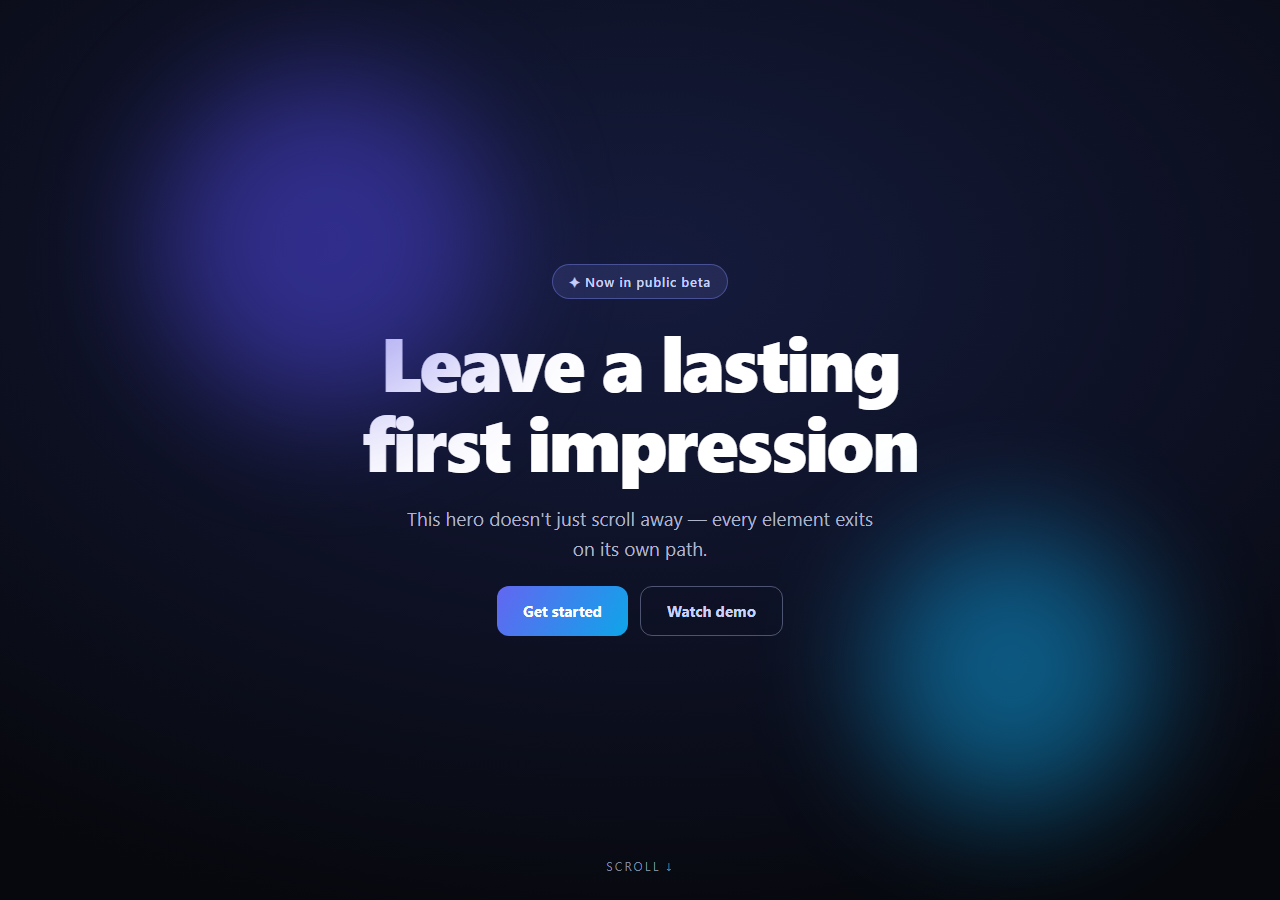
Most heroes just slide off the top of the viewport. The scroll hero exit choreographs the departure: as you scroll away, the badge lifts out, the headline banks left, the subtitle drifts right, the buttons sink, and the background orbs blow outward — each element leaving along its own vector, faster than the page itself. Scroll back and the hero reassembles in reverse. This snippet builds it with GSAP ScrollTrigger (from a CDN) as an *unpinned*, scrubbed exit.
Unpinned: the animation rides the natural scroll
Unlike pinned effects, the hero stays in normal document flow. The trigger maps the hero's own journey off-screen — start: 'top top' to end: 'bottom 25%' — onto the timeline, so the scatter plays *during* the scroll the user was already doing. Nothing hijacks the page or adds scroll length; the exit simply layers extra motion on top of the departure. That's the key difference from a pinned reveal, and it's why the effect feels weightless rather than gated.
Every element gets its own exit vector
The choreography assigns direction by role: the badge exits up (it entered the conversation first, it leaves first), the headline and subtitle split horizontally with small counter-rotations (±3–4°) so they bank like cards being dealt apart, and the CTA row sinks down with a scale-down — receding rather than flying. Splitting the exits is what makes the hero feel *composed of parts* instead of being one flat screenshot sliding away.
Staggered starts create a cascade without hiding anything
Each tween starts slightly later than the last (0, 0.05, 0.1, 0.15) — a tight cascade that reads as sequential departure while ensuring everything is fully gone before the hero's bottom passes 25% of the viewport. Because the whole timeline is scrubbed, a slow scroll shows the full choreography and a fast flick compresses it, both correctly.
The orbs amplify the parallax
The two blurred background orbs travel the *furthest* (±240–260px, scaling up 1.4×) while also fading — moving faster than the foreground content in the opposite screen directions. Since the page itself is scrolling too, the compound motion creates strong depth: background elements appear to blow past the camera as the content departs.
Additive motion, not replacement motion
All exit transforms are relative offsets on top of the element's scrolled position, so at any scrub point the element's screen position is "where scrolling put it, plus its exit displacement." That's why the reassembly on scroll-up looks physical — each piece flies back along the same path onto a hero that's simultaneously scrolling into view.
Transform-only and interruption-safe
Every property is a transform or opacity, so the scatter runs on the compositor even with seven elements moving. With scrub: 0.4, changing direction mid-exit smoothly re-targets — there's no state to desync because scroll position *is* the state.
Customizing it
Retune vectors per element, tighten the cascade, or end earlier (bottom 50%) for a snappier vanish. Pair it with a scroll curtain reveal for the next section's entrance, a scroll letter stagger headline for the hero's own entrance, or compare the pinned scroll zoom hero approach.
Build with AI
Build, Understand, Optimize, and Extend It With AI
You don't have to work out the choreography timing by hand. Paste this snippet's HTML, CSS, and JS into an AI coding assistant like Claude and ask it to explain exactly why the trigger is left unpinned with start: 'top top' and end: 'bottom 25%' instead of pinning the hero, and why each element's exit is additive on top of its scrolled position rather than replacing it. The same assistant can help optimize it — asking whether seven simultaneously scrubbed tweens (two orbs, badge, title, subtitle, CTAs, cue) risk jank on lower-end devices, and whether the small stagger offsets (0, 0.05, 0.1, 0.15) need adjusting for a taller or shorter hero. It's also useful for extending the effect: ask it to add a matching entrance choreography when the hero first loads, make the exit vectors respond to cursor position for a subtle interactive tilt, or reuse the same per-element-vector pattern to scatter a different section's content, like a footer or a card grid. Treat the code less like a finished artifact and more like a starting point for a conversation.
Prompt to recreate it
Copy this into your AI assistant of choice to build the effect from scratch, or as a jumping-off point for your own variant:
Build a "scroll hero exit" effect in plain HTML, CSS, and JavaScript using GSAP and its ScrollTrigger plugin (load both from a CDN, no build step).

Requirements:
- A hero section left in normal, unpinned document flow (no pin: true) containing several independently animatable elements: at least two blurred background orb shapes, a small badge, a headline, a subheading, a row of call-to-action buttons, and a scroll cue.
- One GSAP timeline tied to a single ScrollTrigger scoped to the hero itself, with start at 'top top' and end at roughly 'bottom 25%' of the viewport, and scrub enabled — the exit choreography must play entirely within the hero's own natural scroll-off, adding zero extra scroll distance to the page.
- Give every element its own distinct exit vector: the badge should exit primarily vertically, the headline should exit to one side with a small counter-rotation, the subheading should exit to the opposite side with an opposite small counter-rotation, the CTA row should sink downward with a slight scale-down, and the two background orbs should travel the furthest distance of all elements, scaling up while fading out, in outward-opposite directions from each other.
- Stagger each element's tween start slightly (small increasing offsets like 0, 0.05, 0.1, 0.15 across the timeline) so the departure reads as a quick cascade rather than everything moving in perfect unison, while still completing before the trigger's end point.
- Use ease: 'none' throughout so the scrub itself provides all the smoothing, and restrict every animated property to transforms (x, y, rotation, scale) and opacity only — no properties that would trigger layout or paint.
- Confirm that scrolling back up plays the entire choreography in reverse with no separate "entrance" code, since the scrub ties every element's exit displacement directly to scroll position.
Want to tighten it up first? Run this prompt through the AI Prompt Studio to score it across 8 quality dimensions, catch anti-patterns, and tune the wording for Claude, ChatGPT, or Gemini before you paste it in.
Step by step
How to Use
- 1Add the GSAP CDNsInclude gsap and ScrollTrigger from the CDN panel.
- 2Paste HTML, CSS, and JSA full hero renders with orbs, badge, title, and CTAs.
- 3Scroll down slowlyEach element departs along its own path.
- 4Note the depthBackground orbs outrun the foreground content.
- 5Scroll back upThe hero reassembles piece by piece.
- 6Retune the vectorsEach tween's x/y/rotation is one line to edit.
Real-world uses
Common Use Cases
Got questions?
Frequently Asked Questions
The hero does scroll off normally — the trigger is unpinned — but a scrubbed timeline layers exit transforms on top of that natural departure. Each element's screen position becomes "scrolled position plus its own displacement," so the badge, title, copy, CTAs, and orbs visibly outrun the page along different vectors instead of leaving as one flat block.
Pinning inserts extra scroll distance and gates the user inside the section, which suits reveals but feels heavy for a departure. Mapping the timeline to start: 'top top' / end: 'bottom 25%' spends zero additional scroll: the scatter completes within the exact gesture that was already removing the hero, keeping the page rhythm intact.
Scrub ties timeline progress to scroll position, so moving up simply plays the same timeline backward — every element retraces its exit vector while the hero section scrolls back into view. There's no separate "enter" animation to write and no state to reconcile; scroll position is the single source of truth.
Layered speeds. The blurred orbs travel furthest (±240–260px with a 1.4× scale-up), the headline and copy move moderately with slight counter-rotations, and the CTAs sink modestly — all compounding with the page's own scroll. Different speeds in different directions is classic parallax, applied to an exit instead of an entrance.
Build the timeline in a mount effect — useEffect, onMounted, or ngAfterViewInit — inside gsap.context scoped to the hero ref, targeting child refs or scoped selectors, and revert the context in the cleanup so triggers die on unmount and route changes. The hero's layout, gradients, and buttons translate directly to Tailwind utilities; only the seven tween lines are JavaScript.