You Might Also Like
Learn Coding Visually
Learn to code with interactive, live-preview playgrounds — HTML, CSS, JavaScript, React & more.
 HTML Playground42 lessons · Click-based · Live preview
 CSS PlaygroundLearn CSS with a live editor
 JavaScript Playground60 lessons · DOM · Async · Canvas
 React PlaygroundLearn React with a live code editor
 GSAP PlaygroundLearn GSAP animation interactively
 SVG Playground44 lessons · shapes · paths · animation
 SCSS Playground45 lessons · Sass modules · tokens
 Tailwind PlaygroundLearn Tailwind CSS with a live editor
 Bootstrap 5 Playground50 lessons · live preview
Motion Path Plane — Free GSAP MotionPathPlugin Snippet
Motion Path Plane · Animations · Plain HTML, CSS & JS · Live preview
What's included
Features
About this UI Snippet
Motion Path Plane — Fly Any Element Along an SVG Curve
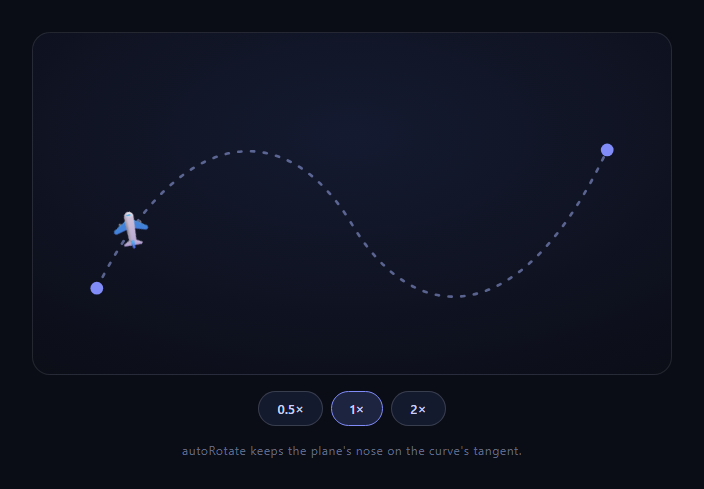
Moving an element along a curve is the animation ask that breaks CSS: keyframes interpolate in straight lines, and offset-path support is inconsistent where you need it most. GSAP's MotionPathPlugin (free on the CDN) makes it one tween: this snippet flies a plane back and forth along a dashed bézier route, nose always tangent to the curve, with buttons that retime the flight live via timeScale.
One config replaces a page of trigonometry
motionPath: { path: '#mppPath', align: '#mppPath', autoRotate: true, alignOrigin: [0.5, 0.5] } does four jobs. path samples the bézier; autoRotate continuously sets rotation to the curve's tangent angle (the derivative work you'd otherwise approximate by sampling two nearby points, as the hand-rolled scroll path follow does); align solves coordinate spaces; and alignOrigin pins the element's center — rather than its top-left corner — onto the path line. Without alignOrigin, the plane would ride the curve by its corner, visibly floating beside the route.
align is the part everyone underestimates
An SVG path's coordinates live in the SVG's viewBox space; the animated element has its own coordinate system, transforms, and origin. align: '#mppPath' measures both and calibrates the tween so the element travels *visually on* the stroked line — accounting for viewBox scaling, existing transforms, and nesting. This is the plugin's quiet superpower: it even lets DOM elements (a div outside the SVG) follow an SVG path, since alignment is computed in screen space.
yoyo makes a patrol route out of one path
repeat: -1, yoyo: true sends the plane out and back forever, and because autoRotate derives from direction of travel, the plane automatically faces backward on return legs — no second path, no manual flip. power1.inOut eases each leg so the plane banks gently out of each endpoint rather than bouncing off it.
timeScale is live retiming, not rebuilding
The speed buttons never touch the motion path: they tween the *tween's* timeScale to 0.5, 1, or 2 over half a second. Animating timeScale (rather than setting it) means speed changes themselves accelerate smoothly — the plane audibly "throttles up" instead of jumping to the new rate. This works because a GSAP tween is itself tweenable, one of the engine's most underused properties.
The route is honest markup
The dashed stroke users see *is* the animation's source of truth — restyle it, and the flight follows any d you paste in from Figma or Illustrator. Endpoint dots are plain circles at the path's terminal coordinates. Nothing about the route lives in JavaScript.
start, end, and partial journeys
Beyond this demo: start/end fractions animate along a sub-segment (start: 0.25, end: 0.75), values beyond 1 loop around closed paths, and start > end reverses direction — all without editing the path. Pair with ScrollTrigger and the same tween scrubs with the page.
Customizing it
Swap the emoji for an SVG plane that points right (autoRotate assumes rightward-facing art; add a fixed rotation offset otherwise), draw your own route, or attach a drawn trail with scroll svg path draw mechanics. Related: scroll-scrubbed path riding in scroll path follow, orbital motion in orbiting icons, and route-based storytelling in scroll timeline dots.
Build with AI
Build, Understand, Optimize, and Extend It With AI
Instead of reverse-engineering the coordinate math by hand, paste this snippet's HTML, CSS, and JS into an AI coding assistant like Claude and ask it to explain precisely what the align and alignOrigin options are compensating for, and why removing alignOrigin would make the plane visibly float off the stroked path rather than ride on top of it. The same assistant can help you optimize it too, for instance asking whether animating timeScale on the tween itself is cheaper than killing and recreating the tween on every speed click, or whether autoRotate's per-frame tangent calculation could become a bottleneck if dozens of elements followed paths simultaneously. It's also useful for extending the effect: ask it to attach a fading trail behind the plane using a second path-drawing animation, support multiple planes on independent staggered schedules along the same route, or sync the flight's progress to scroll position with ScrollTrigger instead of looping automatically. Treat the code less like a finished artifact and more like a starting point for a conversation.
Prompt to recreate it
Copy this into your AI assistant of choice to build the effect from scratch, or as a jumping-off point for your own variant:
Build a "fly along a curve" animation in plain HTML, CSS, and JavaScript using GSAP and its MotionPathPlugin (load both from a CDN) — no offset-path CSS, no manual trigonometry.

Requirements:
- An SVG containing a visible dashed bezier curve (a path element with a multi-point d attribute) and a separate element (an emoji or small group) that will travel along it.
- Animate the traveling element along the curve using GSAP's motionPath configuration, referencing the path by its selector so the route lives in markup, not as coordinates duplicated in JavaScript.
- The traveling element's rotation must continuously match the curve's tangent direction at its current position, so it visibly "banks" into turns rather than staying at a fixed rotation.
- The element's own center point (not its top-left corner or default SVG origin) must be the point that rides exactly on the stroked line — account for whatever alignment/origin configuration the plugin needs so there's no visible offset between the drawn curve and the traveling element's position.
- The animation must repeat indefinitely, alternating direction each pass (so it travels forward then backward along the same curve, forever) with an ease that gently decelerates into each endpoint before reversing.
- Add speed-control buttons (e.g. 0.5x, 1x, 2x) that retime the existing animation's playback rate smoothly over a brief transition, rather than killing and rebuilding the animation from scratch.
Want to tighten it up first? Run this prompt through the AI Prompt Studio to score it across 8 quality dimensions, catch anti-patterns, and tune the wording for Claude, ChatGPT, or Gemini before you paste it in.
Step by step
How to Use
- 1Add the GSAP CDNsInclude gsap and MotionPathPlugin from the CDN panel.
- 2Paste HTML, CSS, and JSThe plane starts flying its dashed route.
- 3Watch the turnsautoRotate keeps the nose on the tangent.
- 4Let it returnyoyo flies the same path backward, heading flipped.
- 5Click 2×timeScale tweens up — the plane throttles smoothly.
- 6Paste your own pathAny d attribute becomes the new route.
Real-world uses
Common Use Cases
Got questions?
Frequently Asked Questions
offset-path can follow a path string, but support gaps (especially older Safari), no autoRotate offset control, awkward coordinate handling for elements outside the SVG, and zero runtime control (no timeScale, no scrubbing, no partial segments) make it fragile for production. MotionPathPlugin normalizes all of it behind one tween that also composes with every other GSAP feature.
It reconciles coordinate systems: the path's points live in the SVG viewBox space while the moving element has its own space, transforms, and origin. align: '#mppPath' measures both in screen space and calibrates the tween so the element rides visually on the stroked line — which is also why a plain div outside the SVG can follow an SVG path perfectly.
autoRotate: true sets the element's rotation to the path's tangent angle at every tick — the same heading math you'd otherwise approximate by sampling two nearby points and taking atan2. Because heading derives from travel direction, the yoyo return leg faces backward automatically. Art must point right by default; autoRotate: 90 style numeric offsets fix art drawn facing up.
They tween the tween: gsap.to(flight, { timeScale: 2, duration: 0.5 }) smoothly accelerates playback rate itself, so the plane throttles up over half a second instead of jumping. Tweens being tweenable is core GSAP — the flight's position, path, and heading logic are untouched; only its clock changes.
Yes — start and end fractions define a sub-segment (start: 0.25, end: 0.75 flies the middle half), start greater than end reverses direction, and on closed paths values beyond 1 wrap for continuous laps. Combined with ScrollTrigger, the same motionPath tween scrubs along the route as the page scrolls.
Register the plugin at module scope, inline the SVG, and create the flight tween in a mount effect — useEffect, onMounted, or ngAfterViewInit — via refs, killing it (or reverting a gsap.context) in the cleanup so the infinite repeat stops on unmount. Keep speed as a ref-held tween handle, not state — buttons call gsap.to(flightRef.current, { timeScale }) directly. The control bar maps straight to Tailwind.