


Learn Coding Visually
Learn to code with interactive, live-preview playgrounds — HTML, CSS, JavaScript, React & more.
 HTML Playground42 lessons · Click-based · Live preview
 CSS PlaygroundLearn CSS with a live editor
 JavaScript Playground60 lessons · DOM · Async · Canvas
 React PlaygroundLearn React with a live code editor
 GSAP PlaygroundLearn GSAP animation interactively
 SVG Playground44 lessons · shapes · paths · animation
 SCSS Playground45 lessons · Sass modules · tokens
 Tailwind PlaygroundLearn Tailwind CSS with a live editor
 Bootstrap 5 Playground50 lessons · live preview
Text Scramble — Free HTML CSS JS Decode Snippet
Text Scramble · Animations · Plain HTML, CSS & JS · Live preview
What's included
Features
About this UI Snippet
Text Scramble — requestAnimationFrame Decode, Iteration Counter & Random Char Pool
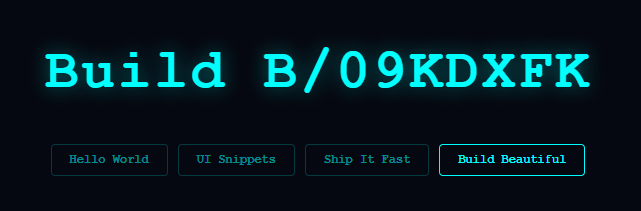
The text scramble effect reveals a word by cycling random characters at each position before "locking in" the correct letter — a matrix-style decode that makes text appear to materialise from noise — pair it with a matrix rain background and glitch text. Used on dark-themed developer tools, hacker aesthetic interfaces, and cyberpunk products. For a simpler character-by-character reveal, see the typewriter.
The scramble algorithm
scramble(target) runs a requestAnimationFrame loop. Each frame: target.split('').map((ch, i) => { if (ch === ' ') return ' '; if (i < iteration) return ch; return chars[Math.floor(Math.random() * chars.length)]; }). Characters at indices below iteration show the correct letter; characters at indices above it show random noise from the 90-character pool. iteration increments by 0.5 each frame — locking two characters every frame but with a fractional counter so the reveal has a gentle pace.
The chars pool
const chars = '!@#$%^&*<>?/|ABCDEFGHIJKLMNOPQRSTUVWXYZabcdefghijklmnopqrstuvwxyz0123456789' — 90 characters combining symbols, letters, and numbers. The variety of character widths creates visible noise that makes the reveal effect more dramatic. Narrow the pool to symbols-only for a pure matrix aesthetic.
cancelAnimationFrame on re-trigger
cancelAnimationFrame(frameReq) at the start of scramble() cancels any in-progress animation before starting a new one. This prevents overlapping decode animations when the user clicks buttons in rapid succession.
The decode algorithm
The scramble effect works by iterating the target text character by character. For each character position, the function either: (a) reveals the final character if the position index is below the current reveal threshold, or (b) shows a random character from a 90-character pool (uppercase, lowercase, digits, symbols). A requestAnimationFrame loop increments the reveal threshold by a fraction each frame. The result is characters "decoding" from random noise into the final text from left to right.
The character pool
The 90-character scramble pool includes uppercase A-Z, lowercase a-z, digits 0-9, and special characters. Using a large, varied pool makes the scramble feel genuinely random and cryptographic. A smaller pool (just digits, or just uppercase) creates a more specific aesthetic — use numbers-only for a hacker terminal effect, use uppercase for a classified document decode feel.
Triggering and cycling
The snippet cycles through multiple words — "DESIGN", "BUILD", "SHIP", "REPEAT" — scrambling between each transition. Each word scrambles in over ~800ms. A setTimeout between words pauses at the final state before beginning the next scramble.
Build with AI
Build, Understand, Optimize, and Extend It With AI
Ask an AI coding assistant like Claude to explain exactly why iteration increases by 0.3 per frame but gets compared with a strict less-than against the character index — walk through a couple of frames by hand together to see how that fractional counter produces the "lock in roughly one letter every few frames" pace. It's a good candidate for a performance conversation too: since scramble() calls Math.random() and rebuilds textContent every single animation frame for the whole string, ask whether that's still cheap at, say, a 500-character target, or whether only the still-scrambling characters should be touched. For extending it, ask for a version where the reveal order is random instead of strictly left-to-right, one where locked characters get a brief color flash the instant they resolve, or one driven by a real async data load instead of a fixed word list. Treat the code less like a finished artifact and more like a starting point for a conversation.
Prompt to recreate it
Copy this into your AI assistant of choice to build the effect from scratch, or as a jumping-off point for your own variant:
Build a "matrix-style" text scramble decode effect in plain HTML, CSS, and JavaScript using only requestAnimationFrame — no CSS animations, no library.

Requirements:
- A single scramble(target) function that, when called, cancels any already-running animation frame loop before starting a new one, so rapid re-triggers never run two decode loops on the same element simultaneously.
- Maintain a fractional "iteration" counter starting at 0 that increases by a small amount (such as 0.3) every animation frame, rather than jumping by whole numbers, so the reveal has a gradual, non-instant pace.
- On every frame, rebuild the displayed text by mapping over each character of the target string: preserve literal spaces as spaces, show the real target character if its index is below the current iteration value, and otherwise show a random character drawn from a large mixed pool of symbols, uppercase letters, lowercase letters, and digits.
- Keep scheduling the next animation frame only while iteration is still less than the target string's length; once every character index is below iteration, the loop must stop on its own without an explicit cancel call.
- Use a monospace font for the display so character width doesn't shift as random noise characters of different visual widths are swapped in and out each frame.
- Wire multiple trigger buttons, each calling scramble with a different target phrase, and confirm that clicking a new button mid-animation cleanly cancels the in-flight decode and starts fresh rather than corrupting the display.
Want to tighten it up first? Run this prompt through the AI Prompt Studio to score it across 8 quality dimensions, catch anti-patterns, and tune the wording for Claude, ChatGPT, or Gemini before you paste it in.
Source Code
<div class="scene">
  <h1 id="text">Hover to decode</h1>
  <div class="buttons">
    <button class="btn" onclick="scramble('Hello World')">Hello World</button>
    <button class="btn" onclick="scramble('UI Snippets')">UI Snippets</button>
    <button class="btn" onclick="scramble('Ship It Fast')">Ship It Fast</button>
    <button class="btn" onclick="scramble('Build Beautiful')">Build Beautiful</button>
  </div>
</div>
* { box-sizing: border-box; margin: 0; padding: 0; }
body { font-family: system-ui, sans-serif; background: #050810; display: flex; align-items: center; justify-content: center; min-height: 100vh; padding: 20px; }
.scene { text-align: center; display: flex; flex-direction: column; align-items: center; gap: 32px; }
h1 {
font-size: clamp(28px, 6vw, 56px);
font-weight: 800;
letter-spacing: 0.05em;
color: #0ff;
font-family: 'Courier New', monospace;
text-shadow: 0 0 20px rgba(0,255,255,0.4);
min-height: 1.3em;
}
.buttons { display: flex; flex-wrap: wrap; gap: 10px; justify-content: center; }
.btn {
padding: 8px 18px; font-size: 12px; font-weight: 600;
font-family: 'Courier New', monospace;
background: transparent; color: #0ff8;
border: 1px solid #0ff3; border-radius: 4px;
cursor: pointer; transition: border-color 0.15s, color 0.15s;
}
.btn:hover { border-color: #0ff; color: #0ff; }const chars = '!@#$%^&*<>?/|ABCDEFGHIJKLMNOPQRSTUVWXYZabcdefghijklmnopqrstuvwxyz0123456789';
const el = document.getElementById('text');
let frame, frameReq;
function scramble(target) {
let iteration = 0;
cancelAnimationFrame(frameReq);
frameReq = requestAnimationFrame(function anim() {
el.textContent = target.split('').map((ch, i) => {
if (ch === ' ') return ' ';
if (i < iteration) return target[i];
return chars[Math.floor(Math.random() * chars.length)];
}).join('');
if (iteration < target.length) {
iteration += 0.3;
frameReq = requestAnimationFrame(anim);
}
});
}
el.addEventListener('mouseenter', () => scramble(el.textContent));
scramble('Hover to decode');Step by step
How to Use
- 1Click the buttonsClick each phrase button to see the scramble decode animation run. Click a different button mid-animation to see it cancel and start fresh.
- 2Update the target phrasesIn the HTML panel, update the button onclick scramble() arguments to your own phrases.
- 3Change the decode speedIn the JS panel, update the iteration increment (currently 0.5) to make the reveal faster or slower.
- 4Narrow the character poolIn the JS panel, edit the chars string to limit it to symbols-only for a purer matrix effect.
- 5Change the text colourUpdate color: #0ff (cyan) on h1 in the CSS panel to your brand colour. The text-shadow colour should match.
- 6Export in your formatClick "HTML" for a standalone file, "JSX" for a React component, or "Tailwind" for a React + Tailwind version.
Real-world uses
Common Use Cases
Got questions?
Frequently Asked Questions
Each frame, characters at index < iteration show the correct target character. Characters at index >= iteration show a random char from the pool. Incrementing iteration by 0.5 each frame reveals approximately one character every two frames.
chars is a string of 90 characters. Math.floor(Math.random() * chars.length) picks a random index. Remove character groups from the string to narrow the noise. Use only symbols for a pure matrix look, or only uppercase letters for a more legible scramble.
If the user clicks a new phrase button before the current animation finishes, a new requestAnimationFrame loop would start while the old one is still running, causing two animations to write to the element simultaneously. cancelAnimationFrame(frameReq) stops the previous loop first.
Call scramble("Your Text") immediately after the JS code. The animation starts running as soon as the script executes.
Add el.addEventListener("mouseenter", () => scramble(el.textContent)) and cancelAnimationFrame(frameReq) on mouseleave. The element scrambles when hovered and cancels when the mouse leaves.
Yes. Click "JSX" for a React component. In React, use useRef for the element and frameReq, and useEffect to attach the scramble logic. Store the target text in a prop and call scramble(target) from the component.