Source Code
<div class="pdc-wrap">
<div class="pdc-toolbar">
<h3>Compare plans</h3>
<label class="pdc-switch">
<input type="checkbox" id="pdcDiffOnly" />
<span class="pdc-slider"></span>
Show only differences
</label>
</div>
<table class="pdc-table" id="pdcTable">
<thead>
<tr>
<th class="pdc-corner">Feature</th>
<th>Starter</th>
<th>Pro</th>
<th>Team</th>
</tr>
</thead>
<tbody id="pdcBody">
<tr><th>Price</th><td>$9/mo</td><td>$29/mo</td><td>$79/mo</td></tr>
<tr><th>Projects</th><td>3</td><td>Unlimited</td><td>Unlimited</td></tr>
<tr><th>Team members</th><td>1</td><td>1</td><td>10</td></tr>
<tr><th>Storage</th><td>10GB</td><td>100GB</td><td>1TB</td></tr>
<tr><th>Export to CSV</th><td>Yes</td><td>Yes</td><td>Yes</td></tr>
<tr><th>API access</th><td>No</td><td>Yes</td><td>Yes</td></tr>
<tr><th>Custom domains</th><td>No</td><td>Yes</td><td>Yes</td></tr>
<tr><th>Email support</th><td>Yes</td><td>Yes</td><td>Yes</td></tr>
<tr><th>Priority support</th><td>No</td><td>No</td><td>Yes</td></tr>
<tr><th>SSO & SAML</th><td>No</td><td>No</td><td>Yes</td></tr>
<tr><th>Uptime SLA</th><td>No</td><td>No</td><td>99.9%</td></tr>
</tbody>
</table>
<p class="pdc-empty" id="pdcEmpty" hidden>Every row is identical across these plans.</p>
</div>*{box-sizing:border-box;margin:0;padding:0}
body{font-family:system-ui,-apple-system,sans-serif;background:#f4f5fb;display:flex;align-items:center;justify-content:center;min-height:100vh;padding:24px}
.pdc-wrap{width:min(640px,96vw)}
.pdc-toolbar{display:flex;align-items:center;justify-content:space-between;margin-bottom:14px}
.pdc-toolbar h3{font-size:18px;font-weight:800;color:#16182a}
.pdc-switch{display:flex;align-items:center;gap:9px;font-size:12.5px;font-weight:600;color:#4a4f66;cursor:pointer;user-select:none}
.pdc-switch input{position:absolute;opacity:0;width:0;height:0}
.pdc-slider{position:relative;width:36px;height:20px;background:#d7dbe7;border-radius:99px;transition:background .15s;flex-shrink:0}
.pdc-slider::before{content:'';position:absolute;top:2px;left:2px;width:16px;height:16px;border-radius:50%;background:#fff;transition:transform .15s;box-shadow:0 1px 3px rgba(0,0,0,.25)}
.pdc-switch input:checked + .pdc-slider{background:#6366f1}
.pdc-switch input:checked + .pdc-slider::before{transform:translateX(16px)}
.pdc-table{width:100%;border-collapse:collapse;background:#fff;border:1px solid #e7e9f2;border-radius:14px;overflow:hidden;font-size:13.5px}
.pdc-table th,.pdc-table td{padding:11px 14px;text-align:center;border-bottom:1px solid #eef0f6}
.pdc-table tbody th{text-align:left;color:#3b4156;font-weight:600;white-space:nowrap}
.pdc-corner{text-align:left;color:#9aa0b4;font-weight:600;font-size:12.5px}
.pdc-table thead th{color:#16182a;font-weight:800;font-size:13.5px;background:#fafafe}
.pdc-table td{color:#4a4f66}
.pdc-table tbody tr:last-child th,.pdc-table tbody tr:last-child td{border-bottom:none}
.pdc-table tr.pdc-hidden-row{display:none}
.pdc-table tr[data-diff="true"] th{color:#4338ca}
.pdc-table tr[data-diff="true"]{background:#fbfaff}
.pdc-empty{margin-top:12px;font-size:12.5px;color:#8a8fac;text-align:center}var toggle = document.getElementById('pdcDiffOnly');
var body = document.getElementById('pdcBody');
var emptyMsg = document.getElementById('pdcEmpty');
var rows = Array.prototype.slice.call(body.querySelectorAll('tr'));
// A row is a "difference" when the plan cells don't all share the same
// text value — compares every cell in the row against the first one.
function markDifferences() {
rows.forEach(function (row) {
var cells = Array.prototype.slice.call(row.querySelectorAll('td'));
var values = cells.map(function (c) { return c.textContent.trim(); });
var allSame = values.every(function (v) { return v === values[0]; });
row.dataset.diff = String(!allSame);
});
}
function applyFilter() {
var diffOnly = toggle.checked;
var visibleCount = 0;
rows.forEach(function (row) {
var isDiff = row.dataset.diff === 'true';
var shouldShow = !diffOnly || isDiff;
row.classList.toggle('pdc-hidden-row', !shouldShow);
if (shouldShow) visibleCount++;
});
emptyMsg.hidden = visibleCount > 0;
}
toggle.addEventListener('change', applyFilter);
markDifferences();
applyFilter();Learn Coding Visually
Learn to code with interactive, live-preview playgrounds — HTML, CSS, JavaScript, React & more.
 HTML Playground42 lessons · Click-based · Live preview
 CSS PlaygroundLearn CSS with a live editor
 JavaScript Playground60 lessons · DOM · Async · Canvas
 React PlaygroundLearn React with a live code editor
 GSAP PlaygroundLearn GSAP animation interactively
 SVG Playground44 lessons · shapes · paths · animation
 SCSS Playground45 lessons · Sass modules · tokens
 Tailwind PlaygroundLearn Tailwind CSS with a live editor
 Bootstrap 5 Playground50 lessons · live preview
Plan Comparison with Differences Toggle — Free "Show Only Differences" Table
Plan Comparison with Differences Toggle · Pricing · Plain HTML, CSS & JS · Live preview
What's included
Features
About this UI Snippet
Plan Comparison with Differences Toggle — Filter Out the Rows That Don't Matter
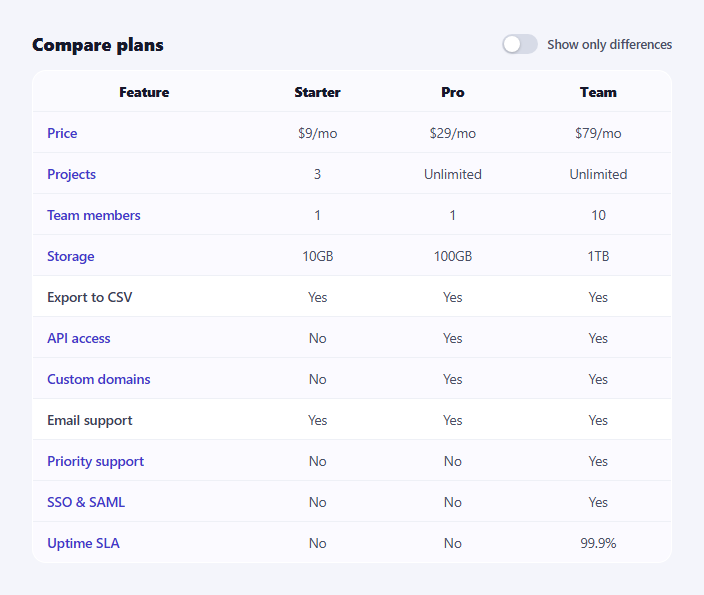
A pricing comparison table with eleven rows is mostly rows where every plan agrees — "Email support: Yes" across the board tells a buyer nothing. This snippet adds a real "show only differences" toggle that filters those identical rows out, so a comparison shopper can scan exactly what's different between plans in a fraction of the reading time.
Comparing values, not hardcoding a diff list
markDifferences() doesn't rely on a manually maintained list of "which rows differ" — it reads every <td> in each row, compares each cell's text against the first cell's text, and marks the row data-diff="true" the moment any value doesn't match. This means the diff detection is derived from the actual table content: edit a cell's text and the diff status recalculates correctly on the next render, with no separate bookkeeping to keep in sync.
Real filtering, verified against the data
Of the eleven rows in the default table, two have identical values across all three plans (Export to CSV and Email support both say "Yes" across every column) and nine genuinely differ (Price, Projects, Team members, Storage, API access, Custom domains, Priority support, SSO & SAML, and Uptime SLA — the ones where Starter, Pro, and Team don't all match). Toggling "Show only differences" hides exactly the two identical rows and keeps exactly the nine differing ones — verifiable by reading straight down each visible column and confirming no two values are the same across a hidden row.
Toggling visibility without re-querying
Once markDifferences() runs, applyFilter() never re-reads cell values — it only reads the data-diff attribute already stamped on each row and toggles a pdc-hidden-row class. This separation means filtering is cheap even on a long table, since the (more expensive) content comparison happens once up front.
An honest empty state
If every row happened to be identical — a legitimate edge case for near-identical plans — the filtered table would show nothing at all, which reads as broken. A message ("Every row is identical across these plans") appears instead whenever the visible row count hits zero, so the UI never looks empty by accident.
Where it fits
Pair it with a pricing feature table for the full always-visible version, sit it below a pricing card grid, or link a "compare plans" CTA from a pricing page straight to it.
Customizing it
Add more plans or rows — the diff logic scales to any column count automatically. Swap the exact-string comparison for a numeric-aware one if you want "$9/mo" and "9" to be treated as equal, or highlight which specific cell differs rather than just the row.
Build with AI
Build, Understand, Optimize, and Extend It With AI
You don't have to write the diff-detection logic from scratch. Paste this snippet's HTML, CSS, and JS into an AI coding assistant like Claude and ask it to explain exactly how markDifferences() reads every plan cell's text in a row, compares each one against the first cell with Array.every, and stamps a data-diff attribute — and why separating that one-time comparison from applyFilter's cheap attribute read keeps filtering fast even as the table grows. The same assistant can help you verify correctness — ask it to trace through the default eleven-row table and confirm which rows it expects to hide, then compare that to what the code actually hides — or extend the widget: ask how to highlight the specific differing cell within a row rather than the whole row, how to make the comparison numeric-aware so "$9/mo" style values compare by number rather than exact string match, or how to add a search box that combines with the differences filter. Treat the code less like a finished artifact and more like a starting point for a conversation.
Prompt to recreate it
Copy this into your AI assistant of choice to build the effect from scratch, or as a jumping-off point for your own variant:
Build a "plan comparison table with a differences toggle" in plain HTML, CSS, and JavaScript with no framework or library, using a real semantic table.

Requirements:
- A comparison table with at least three plan columns and at least eight feature rows, where some rows have the identical value across every plan and other rows genuinely differ between at least one pair of plans.
- Add a toggle switch labeled "Show only differences." When it's off, every row shows. When it's on, only rows where at least one plan's value differs from the others should remain visible; rows where every plan cell has the exact same text should be hidden.
- Implement the difference detection by actually comparing each row's cell text values against each other at runtime (e.g. checking whether every cell in the row matches the first cell) — do not hardcode a fixed list of "which row indexes are different," since that would break if the data changes.
- Separate the (more expensive) content comparison from the (cheap) show/hide toggling: compute and store a per-row "is different" flag once, then have the toggle's change handler only read that stored flag to decide visibility, rather than re-comparing cell text every time the toggle flips.
- Add a fallback message that appears only if the differences filter would leave zero visible rows (i.e. every row is identical across all plans), so the table never appears to render as blank/broken.
- Before finalizing, manually trace through your own table data and confirm you know exactly which rows your logic will hide and which will stay visible when the toggle is switched on.
Want to tighten it up first? Run this prompt through the AI Prompt Studio to score it across 8 quality dimensions, catch anti-patterns, and tune the wording for Claude, ChatGPT, or Gemini before you paste it in.
Step by step
How to Use
- 1Paste HTML, CSS, and JSAll eleven feature rows render, none hidden.
- 2Toggle "Show only differences"Rows where every plan matches (like Email support) disappear.
- 3Count what remainsNine rows stay visible — the ones where at least one plan differs.
- 4Toggle it back offAll eleven rows reappear immediately.
- 5Edit a cell to matchChange a differing cell to match the others — it now hides on filter.
- 6Add a plan or rowThe diff comparison scales automatically to any column or row count.
Real-world uses
Common Use Cases
Got questions?
Frequently Asked Questions
markDifferences() reads the text of every plan cell in a row into an array, then checks with Array.every whether every value matches the first one. If any cell's text differs from the first cell's text, the row is stamped data-diff="true". This is computed from the actual displayed values, not a separate list someone has to keep updated.
Of the eleven default rows, Export to CSV and Email support show "Yes" across all three plans and hide when filtering to differences. The remaining rows — Price, Projects, Team members, Storage, API access, Custom domains, Priority support, SSO & SAML, and Uptime SLA — each have at least one plan whose value doesn't match the others, so they stay visible.
The visible row count would hit zero, so instead of rendering an empty table body, a message reading "Every row is identical across these plans" appears. This is checked every time the filter runs, by counting how many rows remain shown after applying the diff-only filter.
No — the content comparison happens once, in markDifferences(), which stamps each row with a data-diff attribute. Toggling the filter afterward only reads that already-computed attribute and flips a CSS display class, so it stays cheap even on a long table with many rows.
Model the table as a rows array of {label, values: []} objects. Derive each row's isDifferent flag with values.every(v => v === values[0]) in a memoized computation, then filter the rendered rows by that flag and the toggle's checked state. The diff-detection logic is pure and ports over unchanged.