Source Code
<div class="pas-card">
<div class="pas-head">
<h3>Customize your plan</h3>
<p>Start from the base plan, then add only what you need</p>
</div>
<div class="pas-base">
<div class="pas-base-info">
<span class="pas-base-name">Starter plan</span>
<span class="pas-base-desc">Core features, 5 seats included</span>
</div>
<b class="pas-base-price">$29<small>/mo</small></b>
</div>
<ul class="pas-addons" id="pasAddons">
<li class="pas-addon" data-price="12">
<label>
<input type="checkbox" class="pas-check" />
<span class="pas-addon-info">
<span class="pas-addon-name">Advanced analytics</span>
<span class="pas-addon-desc">Cohort reports and custom dashboards</span>
</span>
</label>
<b class="pas-addon-price">+$12<small>/mo</small></b>
</li>
<li class="pas-addon" data-price="18">
<label>
<input type="checkbox" class="pas-check" />
<span class="pas-addon-info">
<span class="pas-addon-name">Priority support</span>
<span class="pas-addon-desc">1-hour response time, dedicated channel</span>
</span>
</label>
<b class="pas-addon-price">+$18<small>/mo</small></b>
</li>
<li class="pas-addon" data-price="9">
<label>
<input type="checkbox" class="pas-check" />
<span class="pas-addon-info">
<span class="pas-addon-name">Extra storage (1TB)</span>
<span class="pas-addon-desc">On top of the 50GB included</span>
</span>
</label>
<b class="pas-addon-price">+$9<small>/mo</small></b>
</li>
<li class="pas-addon" data-price="25">
<label>
<input type="checkbox" class="pas-check" />
<span class="pas-addon-info">
<span class="pas-addon-name">SSO & SAML</span>
<span class="pas-addon-desc">Enterprise single sign-on</span>
</span>
</label>
<b class="pas-addon-price">+$25<small>/mo</small></b>
</li>
</ul>
<div class="pas-total">
<div class="pas-total-row">
<span>Base plan</span>
<span id="pasBaseLine">$29.00</span>
</div>
<div class="pas-total-row" id="pasAddonsLine" hidden>
<span id="pasAddonsLabel">Add-ons (0)</span>
<span id="pasAddonsAmt">$0.00</span>
</div>
<div class="pas-total-row pas-grand">
<span>Total</span>
<b id="pasTotal">$29.00<small>/mo</small></b>
</div>
</div>
</div>*{box-sizing:border-box;margin:0;padding:0}
body{font-family:system-ui,-apple-system,sans-serif;background:#0b0c16;min-height:100vh;display:flex;align-items:center;justify-content:center;padding:24px}
.pas-card{background:#12141f;border:1px solid #23263a;border-radius:18px;padding:24px;width:100%;max-width:420px;box-shadow:0 20px 50px rgba(0,0,0,.45)}
.pas-head h3{font-size:18px;font-weight:800;color:#f4f5fb}
.pas-head p{font-size:12px;color:#8a8fac;margin-top:4px;margin-bottom:18px}
.pas-base{display:flex;align-items:center;justify-content:space-between;background:linear-gradient(135deg,#2a2467,#1a1a33);border:1px solid #34317a;border-radius:12px;padding:13px 15px;margin-bottom:16px}
.pas-base-info{display:flex;flex-direction:column;gap:2px}
.pas-base-name{font-size:13.5px;font-weight:700;color:#f4f5fb}
.pas-base-desc{font-size:11px;color:#a3a6d1}
.pas-base-price{font-size:17px;font-weight:800;color:#c4b5fd;white-space:nowrap}
.pas-base-price small{font-size:10px;font-weight:600;color:#8a8fac}
.pas-addons{list-style:none;display:flex;flex-direction:column;gap:8px;margin-bottom:18px}
.pas-addon{display:flex;align-items:center;justify-content:space-between;gap:10px;background:#171a29;border:1px solid #262a40;border-radius:11px;padding:11px 13px;transition:border-color .15s,background .15s}
.pas-addon:has(.pas-check:checked){border-color:#6366f1;background:#1a1c33}
.pas-addon label{display:flex;align-items:center;gap:10px;cursor:pointer;flex:1;min-width:0}
.pas-check{width:17px;height:17px;flex-shrink:0;accent-color:#6366f1;cursor:pointer}
.pas-addon-info{display:flex;flex-direction:column;gap:1px;min-width:0}
.pas-addon-name{font-size:13px;font-weight:700;color:#e7e8f7}
.pas-addon-desc{font-size:10.5px;color:#787ca0}
.pas-addon-price{font-size:12.5px;font-weight:700;color:#a3a6d1;white-space:nowrap}
.pas-addon-price small{font-size:9.5px;font-weight:600;color:#5f6386}
.pas-addon:has(.pas-check:checked) .pas-addon-price{color:#c4b5fd}
.pas-total{display:flex;flex-direction:column;gap:8px;padding:14px 15px;background:#171a29;border:1px solid #262a40;border-radius:12px}
.pas-total-row{display:flex;align-items:baseline;justify-content:space-between;font-size:12.5px;color:#8a8fac}
.pas-total-row[hidden]{display:none}
.pas-grand{padding-top:9px;border-top:1px dashed #262a40;font-size:14px;color:#e7e8f7;font-weight:700}
.pas-grand b{color:#c4b5fd;font-size:19px;font-variant-numeric:tabular-nums}
.pas-grand b small{font-size:10px;font-weight:600;color:#8a8fac}var BASE_PRICE = 29;
var addonEls = Array.prototype.slice.call(document.querySelectorAll('.pas-addon'));
var baseLineEl = document.getElementById('pasBaseLine');
var addonsLine = document.getElementById('pasAddonsLine');
var addonsLabelEl = document.getElementById('pasAddonsLabel');
var addonsAmtEl = document.getElementById('pasAddonsAmt');
var totalEl = document.getElementById('pasTotal');
function fmtMoney(n) {
return '$' + n.toLocaleString(undefined, { minimumFractionDigits: 2, maximumFractionDigits: 2 });
}
function render() {
var selected = addonEls.filter(function (el) {
return el.querySelector('.pas-check').checked;
});
var addonsTotal = selected.reduce(function (sum, el) {
return sum + Number(el.dataset.price);
}, 0);
var grandTotal = BASE_PRICE + addonsTotal;
baseLineEl.textContent = fmtMoney(BASE_PRICE);
if (selected.length > 0) {
addonsLine.hidden = false;
addonsLabelEl.textContent = 'Add-ons (' + selected.length + ')';
addonsAmtEl.textContent = '+' + fmtMoney(addonsTotal);
} else {
addonsLine.hidden = true;
}
totalEl.innerHTML = fmtMoney(grandTotal) + ' <small>/mo</small>';
}
addonEls.forEach(function (el) {
el.querySelector('.pas-check').addEventListener('change', render);
});
render();Learn Coding Visually
Learn to code with interactive, live-preview playgrounds — HTML, CSS, JavaScript, React & more.
 HTML Playground42 lessons · Click-based · Live preview
 CSS PlaygroundLearn CSS with a live editor
 JavaScript Playground60 lessons · DOM · Async · Canvas
 React PlaygroundLearn React with a live code editor
 GSAP PlaygroundLearn GSAP animation interactively
 SVG Playground44 lessons · shapes · paths · animation
 SCSS Playground45 lessons · Sass modules · tokens
 Tailwind PlaygroundLearn Tailwind CSS with a live editor
 Bootstrap 5 Playground50 lessons · live preview
Pricing Add-On Selector — Free Base Plan + Toggleable Add-Ons Widget
Pricing Add-On Selector · Pricing · Plain HTML, CSS & JS · Live preview
What's included
Features
About this UI Snippet
Pricing Add-On Selector — A Base Plan Plus a Live-Summing Add-On Checklist
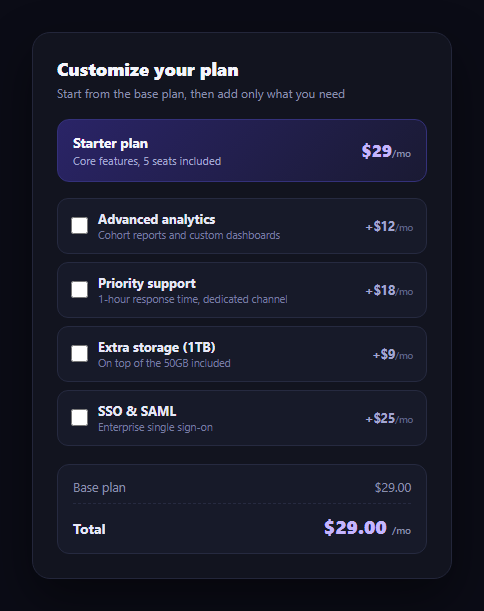
Modular pricing — a base plan plus optional add-ons — lets customers pay only for what they use, but it only works if the running total is obvious and instant. This snippet builds that add-on selector in plain HTML, CSS, and vanilla JavaScript: a fixed base price, a checklist of add-ons each with its own monthly price, and a total that recomputes the moment a checkbox changes.
One source of truth for price
Each add-on's price lives in a single data-price attribute on its list item, read directly from the DOM rather than duplicated in a JavaScript array. render() filters the add-on elements down to the ones whose checkbox is checked, sums their data-price values with reduce, and adds that to the fixed BASE_PRICE constant. Because the price and the checkbox state both live on the same element, there's no separate data model to keep in sync with the markup.
Real, verifiable math
The base plan is $29/mo. The four add-ons are priced at $12 (advanced analytics), $18 (priority support), $9 (extra storage), and $25 (SSO & SAML). Selecting all four adds $12 + $18 + $9 + $25 = $64/mo, for a grand total of $29 + $64 = $93/mo — and selecting any subset sums correctly because the total is always recomputed from scratch off the currently-checked boxes, never incremented or decremented in place.
A line item only when it matters
The add-ons subtotal row stays hidden until at least one add-on is selected, then appears labeled with a live count ("Add-ons (2)") and a "+$" prefixed amount. This keeps the breakdown clean for someone who wants only the base plan, while making the incremental cost fully visible the moment they start customizing.
Visual feedback per row
A checked add-on's row gets a highlighted border and background via a :has() selector targeting its own checkbox, and its price label switches to the accent color — so a glance down the list shows exactly what's included without reading every checkbox state individually.
Where it fits
Pair it with a pricing card for the base tiers, follow it with a usage calculator if some add-ons scale with usage, or route the final total into a plan selector flow at checkout.
Customizing it
Swap in your real base price and add-on catalog, add per-add-on quantity steppers instead of simple checkboxes, or group add-ons into categories with their own subtotals.
Build with AI
Build, Understand, Optimize, and Extend It With AI
You don't have to re-derive the running-total logic by hand. Paste this snippet's HTML, CSS, and JS into an AI coding assistant like Claude and ask it to walk through exactly how render() reads each add-on's price from its data-price attribute, filters to only the checked ones, and sums them with reduce to produce a total that's always recomputed fresh rather than incremented — and why that recompute-from-scratch approach avoids the drift bugs that plague +=/-= running totals. The same assistant can help you extend it: ask how to add per-add-on quantity steppers instead of simple checkboxes, how to group add-ons into labeled categories each with its own subtotal, or how to disable an add-on when a prerequisite add-on isn't selected. Treat the code less like a finished artifact and more like a starting point for a conversation.
Prompt to recreate it
Copy this into your AI assistant of choice to build the effect from scratch, or as a jumping-off point for your own variant:
Build a "pricing add-on selector" widget in plain HTML, CSS, and JavaScript with no framework or library.

Requirements:
- Show a fixed base plan with its own name, short description, and monthly price as a constant.
- Below it, list several optional add-ons as checkboxes, each with a name, a short description, and its own monthly price stored in a data attribute on that add-on's element (not duplicated in a separate JavaScript array).
- Maintain a totals breakdown with: the base plan price, a conditional "add-ons" line that only appears once at least one add-on is checked (showing a live count of how many are selected and their summed price with a "+" prefix), and a grand total.
- On every checkbox change, recompute the grand total from scratch by filtering to the currently checked add-ons and summing their prices with a reduce — do not increment or decrement a running total in place, since that can drift out of sync if events fire unexpectedly.
- Verify your example prices actually add up: pick a base price and at least four add-on prices, and confirm in a comment or your own testing that summing all of them equals the correct grand total, and that any subset also sums correctly.
- Give a checked add-on's row a distinct visual treatment (a highlighted border and background, and a colored price) using a CSS :has() selector reacting to its own checkbox's checked state, without requiring JavaScript to toggle a class for that visual change.
- Format all money values with two decimal places.
Want to tighten it up first? Run this prompt through the AI Prompt Studio to score it across 8 quality dimensions, catch anti-patterns, and tune the wording for Claude, ChatGPT, or Gemini before you paste it in.
Step by step
How to Use
- 1Paste HTML, CSS, and JSA $29/mo base plan renders with four unchecked add-ons.
- 2Check an add-onIts price adds to the total and the add-ons line appears.
- 3Check severalThe total is always base price plus the sum of checked add-ons.
- 4Uncheck oneThe total recomputes down immediately — nothing is left stale.
- 5Verify the mathAll four add-ons checked: $29 + $12 + $18 + $9 + $25 = $93/mo.
- 6Wire up real pricingReplace BASE_PRICE and each data-price with your live catalog.
Real-world uses
Common Use Cases
Got questions?
Frequently Asked Questions
render() filters the add-on list down to elements whose checkbox is checked, sums each one's data-price attribute with Array.reduce, and adds that sum to the fixed BASE_PRICE constant of $29. It's a full recomputation from the current checkbox state every time, not an incremental add or subtract, so the total can never drift out of sync.
The four add-ons are $12, $18, $9, and $25 — summing to $64/mo. Added to the $29/mo base plan, the grand total with every add-on checked is $93/mo. Checking a subset, say analytics and SSO, gives $29 + $12 + $25 = $66/mo.
It only renders once at least one add-on is checked, so someone who wants just the base plan sees a clean two-line total (base price and grand total) instead of a permanent zero-dollar line. The moment a box is checked, the line appears with a live count and a "+$" prefixed subtotal.
A CSS :has() selector on .pas-addon targets rows containing a checked .pas-check input, applying a highlighted border, background tint, and accent-colored price label purely in CSS. No class needs to be toggled by JavaScript for the visual state — only the price total requires script.
Model add-ons as an array of {name, description, price, selected} objects in state. Derive the addons total and grand total with a memoized selector over the selected items, and bind each checkbox's onChange to toggle its item's selected flag. The pricing math is pure and copies over unchanged.