
Learn Coding Visually
Learn to code with interactive, live-preview playgrounds — HTML, CSS, JavaScript, React & more.
 HTML Playground42 lessons · Click-based · Live preview
 CSS PlaygroundLearn CSS with a live editor
 JavaScript Playground60 lessons · DOM · Async · Canvas
 React PlaygroundLearn React with a live code editor
 GSAP PlaygroundLearn GSAP animation interactively
 SVG Playground44 lessons · shapes · paths · animation
 SCSS Playground45 lessons · Sass modules · tokens
 Tailwind PlaygroundLearn Tailwind CSS with a live editor
 Bootstrap 5 Playground50 lessons · live preview
Circular Countdown — SVG Ring Countdown Timer JS
Circular Countdown · Loaders · Plain HTML, CSS & JS · Live preview
What's included
Features
About this UI Snippet
Circular Countdown — A Depleting SVG Ring Timer with Threshold Colours
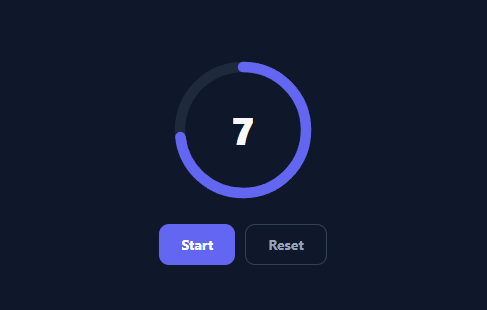
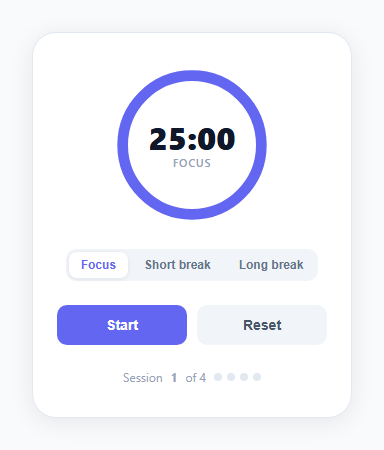
A circular countdown — a ring that empties as the seconds tick down, with the number in the centre — is the timer you see on quizzes, OTP screens, auctions, and "your session expires in…" prompts. This snippet builds it in plain HTML, CSS, SVG, and vanilla JavaScript: a stroke-dashoffset ring synced to a time-accurate countdown, colour shifts as time runs low, and start/reset controls — no library.
The ring is one stroked circle
The progress arc is an SVG circle whose stroke-dasharray is set to its full circumference (2πr), so the entire stroke is one dash exactly as long as the ring. Animating stroke-dashoffset from 0 toward that circumference progressively hides the stroke, emptying the ring. The whole SVG is rotated −90° so the ring depletes from the top, the orientation people expect. This dash-offset technique is the standard, dependency-free way to draw any circular progress or timer.
Time-based, not tick-counting
The countdown computes remaining from a target end timestamp (endAt − Date.now()) on every animation frame, rather than subtracting a fixed amount each tick. This is the crucial correctness detail: a setInterval(…, 1000) that decrements a counter drifts whenever the tab is throttled or a tick is late, so a "10-second" timer can take 11+ seconds. Deriving the remaining time from the wall clock means the timer is always accurate to real elapsed time and self-corrects after any stall — and the ring, driven by the same fraction, stays perfectly in sync with the number.
Smooth ring, honest number
The ring uses a CSS transition on stroke-dashoffset, so between frames it glides continuously rather than stepping, while the centre number shows whole seconds via Math.ceil. Driving the visual with requestAnimationFrame keeps the depletion buttery without a high-frequency interval, and pauses automatically when the tab is hidden (rAF doesn't run in background tabs), then catches up correctly because the time is recomputed from the clock.
Threshold colour shifts
As the remaining fraction crosses 50% and 20%, the ring shifts from its base colour to amber and then red, giving an at-a-glance sense of urgency without reading the number. The thresholds are simple fraction checks toggling classes, with a colour transition so the change eases in rather than snapping.
Start, reset, and a done state
Start kicks off (or resumes from a reset), disabling itself while running; Reset cancels the frame loop and restores the full ring; and on reaching zero the centre swaps to a "Done" state. Because everything derives from DURATION and the end timestamp, you can repurpose it for any length — a 30-second quiz question, a 60-second OTP window, a 5-minute break timer — by changing one constant. It's a complete reference for SVG ring progress and drift-free countdown timing.
Build with AI
Build, Understand, Optimize, and Extend It With AI
Rather than assuming a simple setInterval would work just as well, paste this snippet's HTML, CSS, and JS into an AI coding assistant like Claude and ask it to explain exactly why frame() recomputes remaining from an endAt timestamp instead of subtracting a fixed amount on every tick, and what specific failure mode that design choice prevents. The same assistant can help you verify the edge cases — ask it to trace through what happens if the browser tab is backgrounded for several seconds and then refocused, and confirm the ring snaps to the mathematically correct position rather than a stale one. It's also a good partner for extending the countdown: ask it to add a subtle pulse animation in the final 3 seconds, support pausing (not just resetting) mid-countdown, or expose a callback that fires exactly once when the timer reaches zero so it can be wired into a real quiz or auction flow. Treat the code less like a finished artifact and more like a starting point for a conversation.
Prompt to recreate it
Copy this into your AI assistant of choice to build the effect from scratch, or as a jumping-off point for your own variant:
Build a "circular countdown timer" in plain HTML, CSS, and JavaScript using inline SVG — no library.

Requirements:
- A single SVG circle for the progress ring whose stroke-dasharray is set to its exact circumference (2 * PI * radius, computed in JavaScript from the actual radius, not a hardcoded magic number), overlaid on a static gray track circle, with the whole SVG rotated -90 degrees so depletion starts from the top.
- The countdown must be driven by comparing the current time against a stored target end timestamp (current time plus remaining seconds, computed once when starting) on every animation frame — not by decrementing a counter on a fixed-interval timer — so the timer never drifts even if a frame is delayed or the tab is throttled.
- Drive the frame-by-frame update with requestAnimationFrame (not setInterval), recomputing the remaining time fresh from the target timestamp on every single frame, updating both the ring's stroke-dashoffset and a centered number showing the whole seconds remaining (rounded up, not down, so it never shows 0 while time is still running).
- Animate the ring's stroke-dashoffset changes with a CSS transition so it appears to glide continuously between frames rather than stepping.
- Shift the ring's stroke color through three states based on the fraction of time remaining: a calm default color above 50 percent, a warning color between 20 and 50 percent, and a danger color below 20 percent.
- Provide a Start button that begins or resumes the countdown (disabling itself while running) and a Reset button that cancels the animation frame loop and restores the ring to its full starting state, and show a distinct "done" visual state once the timer reaches zero.
Want to tighten it up first? Run this prompt through the AI Prompt Studio to score it across 8 quality dimensions, catch anti-patterns, and tune the wording for Claude, ChatGPT, or Gemini before you paste it in.
Source Code
<div class="cc-stage">
  <div class="cc-ring">
    <svg viewBox="0 0 120 120" class="cc-svg">
      <circle class="cc-track" cx="60" cy="60" r="54"/>
      <circle class="cc-prog" id="ccProg" cx="60" cy="60" r="54"/>
    </svg>
    <div class="cc-num" id="ccNum">10</div>
  </div>
  <div class="cc-controls">
    <button type="button" class="cc-btn" id="ccStart">Start</button>
    <button type="button" class="cc-btn cc-ghost" id="ccReset">Reset</button>
  </div>
</div>*{box-sizing:border-box;margin:0;padding:0}
body{font-family:system-ui,-apple-system,sans-serif;background:#0f172a;min-height:100vh;display:flex;align-items:center;justify-content:center}
.cc-stage{display:flex;flex-direction:column;align-items:center;gap:24px}
.cc-ring{position:relative;width:140px;height:140px}
.cc-svg{width:140px;height:140px;transform:rotate(-90deg)}
.cc-track{fill:none;stroke:#1e293b;stroke-width:9}
.cc-prog{fill:none;stroke:#6366f1;stroke-width:9;stroke-linecap:round;
stroke-dasharray:339.292;stroke-dashoffset:0;transition:stroke-dashoffset 1s linear,stroke .3s}
.cc-prog.cc-warn{stroke:#f59e0b}
.cc-prog.cc-danger{stroke:#ef4444}
.cc-num{position:absolute;inset:0;display:flex;align-items:center;justify-content:center;font-size:38px;font-weight:800;color:#f8fafc;font-variant-numeric:tabular-nums}
.cc-num.cc-done{font-size:22px;color:#22c55e}
.cc-controls{display:flex;gap:10px}
.cc-btn{background:#6366f1;color:#fff;border:none;border-radius:10px;padding:10px 22px;font-size:14px;font-weight:700;cursor:pointer;font-family:inherit;transition:background .15s}
.cc-btn:hover{background:#4f46e5}
.cc-ghost{background:transparent;border:1.5px solid #334155;color:#94a3b8}
.cc-ghost:hover{background:#1e293b;color:#e2e8f0}var DURATION = 10; // seconds
var CIRCUM = 2 * Math.PI * 54; // r=54 → ~339.292
var prog = document.getElementById('ccProg');
var num = document.getElementById('ccNum');
var startBtn = document.getElementById('ccStart');
var resetBtn = document.getElementById('ccReset');
var remaining = DURATION;
var endAt = 0;
var raf = null;
function paint() {
num.textContent = Math.ceil(remaining);
var frac = remaining / DURATION; // 1 → 0
prog.style.strokeDashoffset = CIRCUM * (1 - frac);
prog.classList.toggle('cc-warn', frac <= 0.5 && frac > 0.2);
prog.classList.toggle('cc-danger', frac <= 0.2);
}
function frame() {
remaining = Math.max(0, (endAt - Date.now()) / 1000);
paint();
if (remaining > 0) {
raf = requestAnimationFrame(frame);
} else {
num.textContent = 'Done';
num.classList.add('cc-done');
startBtn.textContent = 'Start';
startBtn.disabled = false;
}
}
function start() {
if (remaining <= 0) remaining = DURATION;
endAt = Date.now() + remaining * 1000;
num.classList.remove('cc-done');
startBtn.disabled = true;
cancelAnimationFrame(raf);
frame();
}
function reset() {
cancelAnimationFrame(raf);
remaining = DURATION;
num.classList.remove('cc-done');
startBtn.disabled = false;
startBtn.textContent = 'Start';
paint();
}
startBtn.addEventListener('click', start);
resetBtn.addEventListener('click', reset);
paint();Step by step
How to Use
- 1Paste HTML, CSS, and JSA circular countdown renders at 10 with a full ring and Start/Reset buttons.
- 2Start itClick Start — the ring depletes from the top in sync with the centre number.
- 3Watch the colour shiftThe ring turns amber under 50% and red under 20% of the time remaining.
- 4Reset anytimeClick Reset to cancel and restore the full ring and starting number.
- 5Change the durationEdit the DURATION constant for any countdown length.
- 6Hook the done stateRun your action where the timer reaches zero (the "Done" branch).
Real-world uses
Common Use Cases
Got questions?
Frequently Asked Questions
The progress arc is an SVG circle whose stroke-dasharray equals its full circumference (2πr), making the stroke one dash as long as the ring. Increasing stroke-dashoffset toward that circumference progressively hides the stroke, so the ring drains. The SVG is rotated −90° so it empties from the top, and a CSS transition on dashoffset keeps the motion smooth between updates.
A setInterval that subtracts 1 each second drifts: if the tab is throttled or a tick fires late, the timer runs long. Computing remaining = (endAt − Date.now()) / 1000 every frame derives the time from the wall clock, so it's always accurate to real elapsed time and self-corrects after any stall. The ring uses the same value, so visual and number stay in sync.
requestAnimationFrame pauses in hidden tabs, so the loop stops drawing — but because the remaining time is recomputed from the end timestamp, when the tab becomes visible again the timer immediately reflects the correct elapsed time and the ring jumps to the right position. There's no drift and no need for a separate background timer.
Edit the DURATION constant (in seconds). Everything else — the starting number, the ring fraction, the threshold colour points, and the end timestamp — derives from it, so a single change repurposes the timer for a 30-second question, a 60-second OTP window, or a 5-minute break. The circumference constant only depends on the radius, which you'd change in both the CSS and the 2πr calc if resizing the ring.
In React, store remaining in state, run the rAF loop in a useEffect (cancelling on cleanup), and bind the ring's strokeDashoffset and the number; in Vue, use a ref with onMounted/onUnmounted; in Angular, use ngAfterViewInit/ngOnDestroy. The timestamp-based timing and dashoffset math are framework-agnostic — only the loop lifecycle and bindings move into the framework.