Source Code
<div class="td-card">
  <label class="td-lbl">Duration</label>
  <div class="td-input" id="td">
    <div class="td-seg" data-unit="h" data-max="99">
      <button type="button" class="td-up" aria-label="Increase hours">+</button>
      <input type="text" inputmode="numeric" value="01" aria-label="Hours">
      <button type="button" class="td-down" aria-label="Decrease hours">\u2212</button>
      <span class="td-cap">hr</span>
    </div>
    <span class="td-colon">:</span>
    <div class="td-seg" data-unit="m" data-max="59">
      <button type="button" class="td-up" aria-label="Increase minutes">+</button>
      <input type="text" inputmode="numeric" value="30" aria-label="Minutes">
      <button type="button" class="td-down" aria-label="Decrease minutes">\u2212</button>
      <span class="td-cap">min</span>
    </div>
    <span class="td-colon">:</span>
    <div class="td-seg" data-unit="s" data-max="59">
      <button type="button" class="td-up" aria-label="Increase seconds">+</button>
      <input type="text" inputmode="numeric" value="00" aria-label="Seconds">
      <button type="button" class="td-down" aria-label="Decrease seconds">\u2212</button>
      <span class="td-cap">sec</span>
    </div>
  </div>
  <div class="td-out" id="tdOut"></div>
</div>*{box-sizing:border-box;margin:0;padding:0}
body{font-family:system-ui,-apple-system,sans-serif;background:#f1f5f9;color:#0f172a;display:flex;justify-content:center;padding:34px 18px}
.td-card{background:#fff;border:1px solid #e2e8f0;border-radius:16px;padding:22px;width:100%;max-width:340px;text-align:center;box-shadow:0 12px 34px -24px rgba(0,0,0,.3)}
.td-lbl{display:block;font-size:11px;font-weight:700;color:#64748b;text-transform:uppercase;letter-spacing:.05em;margin-bottom:14px;text-align:left}
.td-input{display:flex;align-items:flex-start;justify-content:center;gap:4px}
.td-seg{display:flex;flex-direction:column;align-items:center;gap:4px}
.td-seg button{width:46px;height:22px;border:1px solid #e2e8f0;border-radius:7px;background:#f8fafc;color:#64748b;font-size:14px;font-weight:700;cursor:pointer;line-height:1;font-family:inherit}
.td-seg button:hover{background:#eef2ff;border-color:#c7d2fe;color:#4338ca}
.td-seg button:active{transform:scale(.92)}
.td-seg input{width:46px;text-align:center;border:1px solid #e2e8f0;border-radius:8px;padding:8px 0;font-size:20px;font-weight:800;font-variant-numeric:tabular-nums;font-family:inherit;color:#0f172a;outline:none}
.td-seg input:focus{border-color:#6366f1;background:#f5f7ff}
.td-cap{font-size:10px;font-weight:700;color:#94a3b8;text-transform:uppercase;letter-spacing:.04em}
.td-colon{font-size:20px;font-weight:800;color:#cbd5e1;padding-top:26px}
.td-out{margin-top:18px;font-size:13px;font-weight:600;color:#475569;background:#f8fafc;border:1px solid #e2e8f0;border-radius:10px;padding:10px}
.td-out b{color:#4338ca;font-variant-numeric:tabular-nums}var root = document.getElementById('td');
var out = document.getElementById('tdOut');
var segs = root.querySelectorAll('.td-seg');
function pad(n) { return (n < 10 ? '0' : '') + n; }
function readSeg(seg) { return parseInt(seg.querySelector('input').value, 10) || 0; }
function totalSeconds() {
var h = readSeg(segs[0]), m = readSeg(segs[1]), s = readSeg(segs[2]);
return h * 3600 + m * 60 + s;
}
// Re-distribute a raw total back into clamped h:m:s so segments roll over.
function setFromTotal(total) {
total = Math.max(0, Math.min(99 * 3600 + 59 * 60 + 59, total));
var h = Math.floor(total / 3600);
var m = Math.floor((total % 3600) / 60);
var s = total % 60;
segs[0].querySelector('input').value = pad(h);
segs[1].querySelector('input').value = pad(m);
segs[2].querySelector('input').value = pad(s);
render();
}
function render() {
var t = totalSeconds();
out.innerHTML = '<b>' + t.toLocaleString() + '</b> seconds \u00b7 ' +
pad(readSeg(segs[0])) + ':' + pad(readSeg(segs[1])) + ':' + pad(readSeg(segs[2]));
}
var STEP = { h: 3600, m: 60, s: 1 };
segs.forEach(function (seg) {
var unit = seg.getAttribute('data-unit');
var max = parseInt(seg.getAttribute('data-max'), 10);
var input = seg.querySelector('input');
seg.querySelector('.td-up').addEventListener('click', function () { setFromTotal(totalSeconds() + STEP[unit]); });
seg.querySelector('.td-down').addEventListener('click', function () { setFromTotal(totalSeconds() - STEP[unit]); });
input.addEventListener('input', function () {
input.value = input.value.replace(/[^0-9]/g, '').slice(0, 2);
render();
});
input.addEventListener('blur', function () {
var v = Math.min(max, parseInt(input.value, 10) || 0);
input.value = pad(v);
render();
});
input.addEventListener('keydown', function (e) {
if (e.key === 'ArrowUp') { setFromTotal(totalSeconds() + STEP[unit]); e.preventDefault(); }
else if (e.key === 'ArrowDown') { setFromTotal(totalSeconds() - STEP[unit]); e.preventDefault(); }
});
});
render();Learn Coding Visually
Learn to code with interactive, live-preview playgrounds — HTML, CSS, JavaScript, React & more.
 HTML Playground42 lessons · Click-based · Live preview
 CSS PlaygroundLearn CSS with a live editor
 JavaScript Playground60 lessons · DOM · Async · Canvas
 React PlaygroundLearn React with a live code editor
 GSAP PlaygroundLearn GSAP animation interactively
 SVG Playground44 lessons · shapes · paths · animation
 SCSS Playground45 lessons · Sass modules · tokens
 Tailwind PlaygroundLearn Tailwind CSS with a live editor
 Bootstrap 5 Playground50 lessons · live preview
Time Duration Input — Free HH MM SS Picker JS Snippet
Time Duration Input · Forms · Plain HTML, CSS & JS · Live preview
What's included
Features
About this UI Snippet
Time Duration Input — HH:MM:SS Picker with Rollover
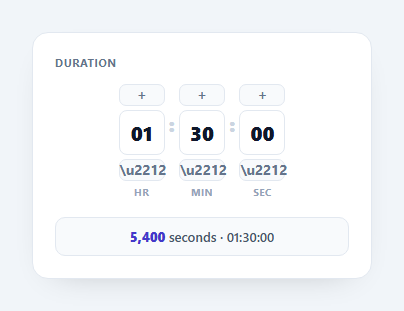
A duration input lets a user enter a length of time — for a timer, a video clip, a cooking step, or a booking — as separate hours, minutes, and seconds fields rather than one confusing number. Unlike a clock time picker, it represents an elapsed span and rolls over correctly: bumping seconds past 59 should add a minute. This snippet builds that in plain HTML, CSS, and vanilla JavaScript with no dependency.
One source of truth: total seconds
The trick that makes rollover and clamping trivial is to treat the whole control as a single total-seconds value and derive the display from it. Stepping any segment converts the current fields to a total, adds the segment's weight (3600, 60, or 1), and calls setFromTotal(), which clamps to a max and re-distributes with Math.floor(total/3600), (total%3600)/60, and total%60. So pressing "+" on seconds at 59 naturally carries into minutes — no special-case carry logic anywhere.
Per-segment steppers and arrow keys
Each segment has up and down buttons and listens for ArrowUp/ArrowDown while focused, all routed through the same total-based stepping. That gives mouse and keyboard users the same increment behaviour, and because everything funnels through setFromTotal(), the segments always stay consistent (you can't end up at 01:60:00).
Forgiving typed input
Typing is sanitized live — non-digits are stripped and the value is capped at two characters — but not aggressively reformatted mid-keystroke. On blur each field is clamped to its max (59 for minutes and seconds) and zero-padded, so users can type freely and always land on a valid, padded value like 05.
Live machine-readable output
The readout shows the total in seconds (with toLocaleString() grouping) alongside the padded HH:MM:SS string — the two forms you actually submit or store. Seconds is the canonical value for APIs and <input type="hidden">, while the formatted string is for display.
Reusing the value
Bind totalSeconds() to your form state and you have a clean integer to persist, compare, or feed into a countdown. The same total can hydrate the control on load via setFromTotal(), so editing an existing duration is symmetric with creating one.
Build with AI
Build, Understand, Optimize, and Extend It With AI
Ask an AI coding assistant like Claude to explain why every stepper button and arrow-key handler routes through totalSeconds() and setFromTotal() instead of incrementing each segment's own value directly — that single-source-of-truth design is exactly what makes 59 seconds plus one automatically roll into a new minute with zero explicit carry logic. It's also worth asking whether clamping to 99 hours in setFromTotal() is the right ceiling for your use case, or whether it should be configurable. For extending it, ask for a version that also accepts pasted "1h 30m" style text and parses it back into the total-seconds model, a compact display mode that only shows non-zero units, or a way to bind two of these side by side and validate that an end duration is longer than a start duration. Treat the code less like a finished artifact and more like a starting point for a conversation.
Prompt to recreate it
Copy this into your AI assistant of choice to build the effect from scratch, or as a jumping-off point for your own variant:
Build a duration input for hours, minutes, and seconds in plain HTML, CSS, and JavaScript that models the value as a single total-seconds number, not three independent fields.

Requirements:
- Three segments (hours, minutes, seconds), each with its own text input, an increment button, and a decrement button, plus a live readout showing both the raw total in seconds and a formatted HH:MM:SS string.
- Implement one function that reads all three segment inputs and combines them into a single total-seconds integer, and one inverse function that takes a total-seconds integer, clamps it between zero and a maximum (such as 99 hours 59 minutes 59 seconds), and redistributes it back into the three zero-padded segment values using division and modulo by 3600 and 60 — this redistribution function must be the only place that writes segment values.
- Every increment and decrement button, and every ArrowUp/ArrowDown keydown on a focused segment, must work by computing the current total, adding or subtracting that segment's unit weight (3600, 60, or 1 second), and passing the result through the single redistribution function — never mutating a segment's displayed value directly.
- While typing, strip non-digit characters live and cap each segment's input length, but only clamp the value to its maximum and re-pad it with a leading zero when the field loses focus, not on every keystroke.
- Confirm that incrementing seconds at 59 correctly carries into minutes, and minutes at 59 correctly carries into hours, purely as a side effect of the redistribution function's floor and modulo math, with no special-cased carry branches anywhere in the code.
Want to tighten it up first? Run this prompt through the AI Prompt Studio to score it across 8 quality dimensions, catch anti-patterns, and tune the wording for Claude, ChatGPT, or Gemini before you paste it in.
Step by step
How to Use
- 1Paste HTML, CSS, and JSHours, minutes, and seconds segments render with steppers and a total.
- 2Use the + and - buttonsEach segment steps by its unit and rolls over into the next.
- 3Type a valueOnly digits are accepted, capped at two per segment.
- 4Press arrow keysArrowUp and ArrowDown step the focused segment.
- 5Read the outputThe total seconds and a padded HH:MM:SS string update live.
- 6Bind the valueUse totalSeconds() as the integer you store or submit.
Real-world uses
Common Use Cases
Got questions?
Frequently Asked Questions
The control treats everything as a single total-seconds number. Stepping a segment converts the fields to a total, adds the unit weight (3600, 60, or 1), then setFromTotal() re-derives hours, minutes, and seconds with floor and modulo. So incrementing seconds at 59 automatically adds a minute — there's no manual carry logic, which is where hand-rolled time inputs usually have bugs.
A time picker selects a clock time (like 14:30, a point in the day), while a duration input represents an elapsed length (like 1 hour 30 minutes). Durations need rollover and an unbounded-ish hours field, and the natural output is total seconds rather than a timestamp, which is what this snippet models.
Reformatting on every keystroke fights the caret and makes typing awkward. Instead, input is sanitized to digits live, and on blur each segment is clamped to its max (59 for minutes and seconds) and zero-padded. Users type freely and always end on a valid, consistently padded value.
Store the integer from totalSeconds(). It's compact, easy to compare and sum, and unambiguous across time zones and formats. Render the HH:MM:SS string only for display, and hydrate the control from a stored total with setFromTotal() when editing an existing duration.
Keep a single totalSeconds value in state and derive the three segment displays from it in render. Step handlers update that one number; setFromTotal becomes setState(clamp(newTotal)). Sanitize typed input in the change handler and clamp on blur. The integer maps directly to your form model, and Tailwind handles the segment layout with flex utilities.