More Forms Snippets
Front-End Coding Playgrounds
Learn to code with interactive, live-preview playgrounds — HTML, CSS, JavaScript, React & more.
 HTML Playground42 lessons · Click-based · Live preview
 CSS PlaygroundLearn CSS with a live editor
 JavaScript Playground60 lessons · DOM · Async · Canvas
 React PlaygroundLearn React with a live code editor
 GSAP PlaygroundLearn GSAP animation interactively
 SVG Playground44 lessons · shapes · paths · animation
 SCSS Playground45 lessons · Sass modules · tokens
 Tailwind PlaygroundLearn Tailwind CSS with a live editor
 Bootstrap 5 Playground50 lessons · live preview
Time Slot Picker — Booking Slots HTML CSS JS Snippet
Time Slot Picker · Forms · Plain HTML, CSS & JS · Live preview
What's included
Features
selectDay calls clearSlot, so switching days never leaves a stale time selected against the wrong date — a common booking bug.disabled attribute plus a struck-through style, so the browser blocks selection accessibly.disabled until a valid slot is chosen, making it impossible to book nothing.selectSlot rewrites the button to "Book Mon · 9:30 AM", so users see exactly what they are committing to.<button>, so the picker is tab-navigable and operable without a mouse by default.confirmBooking switches the button to a green "✓ Booked …" confirmation, closing the loop on the action.booked/disabled, so rendering real per-day slots from an API needs no logic changes.About this UI Snippet
Time Slot Picker — Day Selector, Morning/Afternoon Grids & Selection-Gated Booking
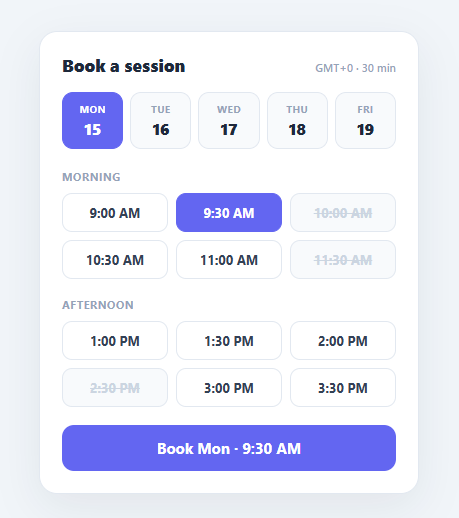
Booking an appointment online comes down to two choices: which day, and which time. A good time-slot picker makes both fast and unambiguous — a compact day selector, time slots grouped into morning and afternoon, clearly disabled slots for times already taken, and a confirm action that only activates once a valid slot is chosen. This snippet implements the complete flow in plain HTML, CSS, and vanilla JavaScript: a day strip, two slot grids, struck-through booked slots, a selection-gated confirm button, and a final booked state.
Day selector that resets the time
The day strip is a row of buttons, each showing a weekday and date. selectDay moves the .active highlight and stores the chosen day, then crucially calls clearSlot — because a time selected for Monday should not carry over when the user switches to Tuesday, where availability differs. Resetting the slot (and disabling the confirm button) on every day change prevents the classic booking bug of confirming a stale time against the wrong date.
Grouped, scannable slot grids
Times are split into "Morning" and "Afternoon" sections, each a three-column grid. Grouping reduces the cognitive load of scanning a long flat list and matches how people think about their day. Each slot is a real <button>, so the grid is keyboard-navigable out of the box.
Honest availability
Booked slots use the native disabled attribute plus a .booked style — greyed and struck through — so they read clearly as unavailable and cannot be focused, hovered into a selectable state, or clicked. Using disabled (not just a CSS class) means the browser enforces the unavailability, which is the correct, accessible way to block a choice rather than relying on a click handler to reject it.
Selection-gated confirm
The confirm button starts disabled reading "Select a time". selectSlot highlights the chosen slot, records it, enables the button, and rewrites its label to a concrete summary — "Book Mon · 9:30 AM" — so the user sees exactly what they are about to book before committing. This is the single most important safeguard: the action is impossible until a real, available slot is selected, and the label removes any doubt about what will be booked. confirmBooking then switches the button to a green "✓ Booked …" state.
The picker is data-light: availability is expressed purely as the presence of the booked/disabled attributes, so rendering real slots from an API (different per day) is a matter of generating the buttons. Pair this with a date picker for longer ranges, a calendar widget for month views, or a shipping method selector style of gated confirmation.
Build with AI
Build, Understand, Optimize, and Extend It With AI
Ask an AI coding assistant like Claude to explain exactly why selectDay() calls clearSlot() every time, and what booking bug that single line of code prevents — it's a small detail with an outsized effect on correctness. It's worth a critical look too: since availability here is just a disabled attribute baked into static markup, ask what would break if two tabs booked the same slot at nearly the same moment, and how you'd add a real server-side reservation check on confirm. For extending the picker, ask for multi-slot selection for booking back-to-back sessions, a way to show a slot's remaining capacity (like "2 of 4 spots left") instead of a binary booked/available, or a loading state on the confirm button while an API call resolves. Treat the code less like a finished artifact and more like a starting point for a conversation.
Prompt to recreate it
Copy this into your AI assistant of choice to build the effect from scratch, or as a jumping-off point for your own variant:
Build an appointment time-slot picker in plain HTML, CSS, and JavaScript with a day selector, grouped time slots, and a confirmation gated on a valid selection — no library.

Requirements:
- A horizontal row of day buttons (weekday plus date) where clicking one moves the active highlight and stores the selected day, and critically also clears any previously selected time slot, so a time chosen for one day can never be silently carried over and confirmed against a different day.
- Time slots grouped into labelled sections (such as Morning and Afternoon), each rendered as a grid of real button elements rather than divs, so the grid is keyboard-focusable by default.
- Some slots must be unavailable, marked with the native disabled attribute (not just a visual class) plus a struck-through, muted style, so the browser itself prevents focusing, hovering into an active-looking state, or clicking them — never rely on a click handler alone to reject a disabled slot.
- A confirm button that starts disabled with placeholder text, and only becomes enabled once a valid slot is selected, at which point its label rewrites itself to a concrete summary combining the selected day and time (e.g. "Book Tue · 2:00 PM") so the user sees exactly what they're about to commit to before clicking.
- Clicking confirm must transition the button into a distinct success state (different background color, checkmark, and a label restating the full booked day and time) rather than simply hiding the form.
- Structure the code so real per-day availability from an API could replace the hardcoded booked/disabled slots without touching the day-selection, slot-selection, or confirm-gating logic at all.
Step by step
How to Use
- 1Paste HTML, CSS, and JSA "Book a session" card appears with five day buttons (Monday active) and morning/afternoon time grids; the confirm button reads "Select a time".
- 2Pick a dayClick another day — it highlights in indigo and any previously selected time is cleared so you cannot confirm a stale slot.
- 3Choose a timeClick an available slot — it highlights and the confirm button unlocks, now reading "Book Tue · 2:00 PM".
- 4See booked slotsNotice the struck-through, greyed times (e.g. 10:00 AM) — they are disabled and cannot be selected.
- 5Confirm the bookingClick the confirm button — it turns green and reads "✓ Booked Tue, Jun 16 · 2:00 PM".
- 6Switch days againPick a different day after selecting — the selection and confirm button reset, ready for a fresh time choice.
Real-world uses
Common Use Cases
Got questions?
Frequently Asked Questions
Render the slot buttons from your API response for the selected day: output a normal <button> for free times and add class="booked" disabled for taken ones. Re-fetch and re-render when selectDay runs (after clearSlot), since availability differs by date. The selection-gating and confirm logic need no changes.
Store and book in UTC, but display slots in the user's local zone. Convert each slot time with Intl.DateTimeFormat using the detected Intl.DateTimeFormat().resolvedOptions().timeZone, and show the zone in the header (this snippet shows a placeholder). Send the UTC timestamp to the server on confirm so there is no ambiguity.
Availability can change between page load and confirm, so re-validate server-side: on confirmBooking, send the slot and have the API atomically reserve it, returning an error if it was just taken. On error, mark that slot booked, clear the selection, and ask the user to pick again. Optionally poll or use websockets to live-update availability.
The buttons are already focusable and respect disabled. Add aria-pressed to reflect the selected slot, group each section with a heading association, and consider arrow-key roving focus within the grid. Announce the confirm label change via an aria-live region so screen-reader users hear the chosen day and time.
In React, hold selectedDay and selectedSlot in useState, derive the confirm label and disabled state from them, and render slots from an availability array. In Vue, use refs with :class/:disabled bindings in a v-for. In Angular, track selection on the component and bind [class.active]/[disabled]. The grid and day-strip CSS port unchanged.