More Forms Snippets
Front-End Coding Playgrounds
Learn to code with interactive, live-preview playgrounds — HTML, CSS, JavaScript, React & more.
 HTML Playground42 lessons · Click-based · Live preview
 CSS PlaygroundLearn CSS with a live editor
 JavaScript Playground60 lessons · DOM · Async · Canvas
 React PlaygroundLearn React with a live code editor
 GSAP PlaygroundLearn GSAP animation interactively
 SVG Playground44 lessons · shapes · paths · animation
 SCSS Playground45 lessons · Sass modules · tokens
 Tailwind PlaygroundLearn Tailwind CSS with a live editor
 Bootstrap 5 Playground50 lessons · live preview
Shipping Method Selector — Radio Cards HTML CSS JS
Shipping Method Selector · Forms · Plain HTML, CSS & JS · Live preview
What's included
Features
<label> wrapping a hidden radio, so clicking anywhere on the card selects it — far more forgiving than a small radio dot.<input type="radio"> is visually hidden but present, keeping arrow-key navigation and screen-reader group semantics intact..sm-radio inner dot scales in with a keyframe on selection, giving a polished control without sacrificing native behaviour.selectShip toggles a .sel class for the selected-card styling, so the highlight behaves identically across framework exports.data-cost, so adding or changing methods is a markup edit — no JavaScript changes needed.subtotal + cost, formatted to two decimals instantly.About this UI Snippet
Shipping Method Selector — Accessible Radio Cards With ETAs, Prices & Live Order Total
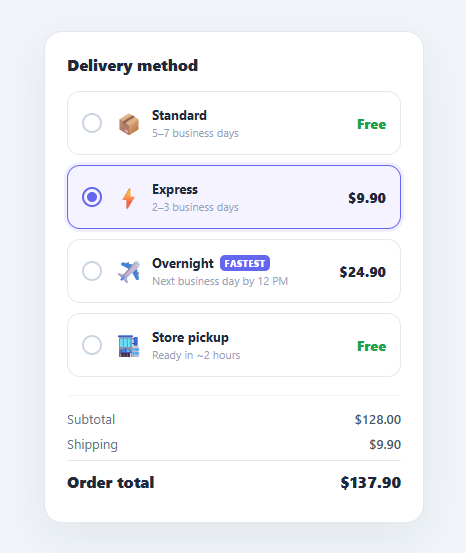
Choosing a delivery method is a small but high-stakes checkout decision: shoppers weigh cost against speed, and the interface has to make that trade-off obvious at a glance. A plain <select> dropdown hides the options and forces a click to compare them; a set of radio cards lays every choice out with its icon, estimated arrival, and price side by side, and updates the order total the instant a selection changes. This snippet implements that pattern in plain HTML, CSS, and vanilla JavaScript: accessible radio cards with a custom-styled control, a highlighted selected state, and a live shipping and order-total recalculation.
Radio cards, not a dropdown
Each option is a <label> wrapping a hidden native <input type="radio">. Wrapping the radio in the label means clicking anywhere on the card selects it — the entire card is the hit target, which is far more forgiving than a tiny radio dot. The native radio is visually hidden but still present, so keyboard users can arrow between options and screen readers announce the group correctly. The visible control is a .sm-radio circle whose inner dot pops in with a small scale animation when its card is selected.
Selected-state highlight
selectShip clears the .sel class from every card and adds it to the chosen one. The selected card gets an indigo border, a tinted background, and a soft focus-ring shadow — the standard "selected card" treatment that reads instantly. Because the highlight is a class toggled in JavaScript (rather than relying solely on :checked CSS), the behaviour is identical across the React, Vue, and Angular exports.
ETAs and pricing in context
Every card shows three things in a fixed layout: an icon, the method name with its estimated arrival ("2–3 business days", "Next business day by 12 PM"), and the price aligned to the right. Free options render their price in green so "Free" stands out as a positive. The fastest option carries a small "Fastest" tag to guide users who optimise for speed. Laying out cost and speed together is what lets shoppers make the trade-off without clicking around.
Live order-total recalculation
Each card carries its shipping cost on a data-cost attribute. When a method is selected, selectShip reads that cost, updates the "Shipping" line (showing "Free" in green for zero-cost methods), and recomputes the "Order total" as subtotal + cost, all formatted with toFixed(2). The total updates the moment the selection changes, so the financial consequence of choosing Overnight over Standard is immediate and clear.
In production you would render the cards from your carrier rate API (costs and ETAs can be dynamic by destination and weight), but the selection and recalculation logic stays exactly the same. Pair this selector with an order summary, a checkout payment form, or a shipping/order tracking timeline after purchase.
Build with AI
Build, Understand, Optimize, and Extend It With AI
You don't need to work out how the hidden radio inputs and the data-cost attributes cooperate on your own. Paste this snippet's HTML, CSS, and JS into an AI coding assistant like Claude and ask it to explain exactly why wrapping the native radio in a label rather than styling the input directly is what makes the whole card clickable, or how selectShip reads data-cost to keep the shipping line and order total in sync from one function. The same assistant can help optimize it, for example checking whether hardcoding SUBTOTAL as a constant would break the total once real cart data is wired in, or whether the cards should be generated from an array instead of static markup as more shipping methods are added. It's also useful for extending the feature: ask it to disable a method with a reason when it's unavailable for an address, add a free-shipping threshold that zeroes out a method's cost automatically, or animate the total's digit change on selection. Treat the code less like a finished artifact and more like a starting point for a conversation.
Prompt to recreate it
Copy this into your AI assistant of choice to build the effect from scratch, or as a jumping-off point for your own variant:
Build an accessible shipping method selector with a live order total in plain HTML, CSS, and JavaScript, no framework, no libraries.

Requirements:
- Each shipping option must be a real label element wrapping a visually-hidden native radio input (not a styled div with a click handler), so the entire card is the click target and the native radios remain keyboard-navigable as one group via the shared name attribute.
- Each option's card must store its cost in a data-cost attribute on the label, display an icon, a name, an estimated delivery time, and a right-aligned price, with zero-cost options displaying "Free" in a distinct color from paid options.
- On selection, a single function must: remove the selected-state class from every option, add it only to the newly selected one, read that option's data-cost, update a "Shipping" line to show either "Free" (styled distinctly) or a formatted dollar amount, and recompute an "Order total" as a fixed subtotal constant plus the selected cost, formatted to two decimal places.
- Style the selected card distinctly (a colored border, a tinted background, and a focus-ring-style box-shadow) purely by toggling one class, so the same highlight logic works identically regardless of which option is chosen.
- Add a small custom radio indicator (a circle) whose inner dot animates in with a scale transition only when its parent option becomes selected, while the real native radio input stays functionally present but visually hidden.
- As a documented extension point in a code comment, show how the SUBTOTAL constant and each card's data-cost would instead be populated dynamically from a cart state and a shipping-rate API response.
Step by step
How to Use
- 1Paste HTML, CSS, and JSA "Delivery method" card appears with four radio-card options; Standard (Free) is pre-selected and highlighted, and the order total reads $128.00.
- 2Click ExpressThe Express card highlights with an indigo border and tinted background, the radio dot pops in, the Shipping line shows $9.90, and the total updates to $137.90.
- 3Click OvernightThe fastest option (tagged "Fastest") highlights and the total jumps to $152.90 — the cost of choosing speed is immediately visible.
- 4Click Store pickupA free method — the Shipping line returns to a green "Free" and the total drops back to $128.00.
- 5Use the keyboardTab to the group and use the arrow keys to move between options — the native radios keep the selector fully keyboard-operable.
- 6Wire in real ratesSet each card's
data-costfrom your carrier API and update the ETA copy; the selection and total logic needs no changes.
Real-world uses
Common Use Cases
Got questions?
Frequently Asked Questions
Render the .sm-opt cards from your rate response, setting each data-cost and the ETA text per method. Rates often depend on destination and cart weight, so re-render the cards when the address changes and call selectShip on the currently checked input to refresh the total with the new costs.
They already are — real <input type="radio"> elements share a name, so they form one group that is keyboard-navigable with arrow keys and announced by screen readers. Add an aria-label or a heading association to the group, and ensure the selected-card styling is not the only indicator by keeping the radio dot visible.
Compute eligibility from the subtotal: if it exceeds your threshold, set the Standard (or Express) card's data-cost to 0, update its price label to "Free", and show a "You unlocked free shipping" note. Recalculate by calling selectShip on the checked input so the total reflects the new cost.
Add a disabled attribute to that card's radio and a .disabled style (dimmed, not-allowed cursor), plus a short reason like "Not available for PO boxes". In selectShip, ignore clicks on disabled options. Re-evaluate availability whenever the shipping address changes.
In React, map an array of methods to radio cards, hold the selected value in useState, and derive the shipping cost and total from it — no manual DOM updates. In Vue, use v-model on the radio group and a computed total. In Angular, bind [(ngModel)] and compute the total in a getter. The card layout and animations port unchanged.