Source Code
<canvas id="ribbonCanvas"></canvas>*{box-sizing:border-box;margin:0;padding:0}
html,body{width:100%;height:100%;overflow:hidden;background:radial-gradient(65% 60% at 50% 45%,#101a30,#03050c)}
#ribbonCanvas{display:block;width:100%;height:100%}const canvas = document.getElementById('ribbonCanvas');
const renderer = new THREE.WebGLRenderer({ canvas, antialias: true, alpha: true });
renderer.setPixelRatio(Math.min(window.devicePixelRatio, 2));
const scene = new THREE.Scene();
const camera = new THREE.PerspectiveCamera(50, 1, 0.1, 40);
camera.position.set(0, 2, 10);
scene.add(new THREE.AmbientLight(0x1e3a5f, 0.6));
const light = new THREE.PointLight(0x38bdf8, 2.4, 30);
light.position.set(4, 5, 6);
scene.add(light);
const light2 = new THREE.PointLight(0xf472b6, 1.6, 30);
light2.position.set(-5, -2, 4);
scene.add(light2);
const POINT_COUNT = 40;
const LENGTH = 16;
// A ribbon is just a TubeGeometry with a flattened, elliptical cross
// section built from a CatmullRomCurve3 — the curve's control points are
// what get animated every frame, and the tube geometry is rebuilt from
// them, which is far simpler than deforming a flat plane mesh directly.
const controlPoints = [];
for (let i = 0; i < POINT_COUNT; i++) {
const x = (i / (POINT_COUNT - 1) - 0.5) * LENGTH;
controlPoints.push(new THREE.Vector3(x, 0, 0));
}
const curve = new THREE.CatmullRomCurve3(controlPoints);
function buildRibbonGeometry() {
// A flattened tube cross-section (radiusY smaller than radiusX would be
// ideal, but CylinderGeometry-style TubeGeometry only takes one radius —
// instead the geometry is scaled on one axis after creation, which is
// cheaper than a custom cross-section shape for this effect).
const geo = new THREE.TubeGeometry(curve, 200, 0.5, 3, false);
geo.scale(1, 0.12, 1);
return geo;
}
let geometry = buildRibbonGeometry();
const material = new THREE.MeshStandardMaterial({
color: 0x60a5fa,
metalness: 0.4,
roughness: 0.25,
side: THREE.DoubleSide,
emissive: 0x1d4ed8,
emissiveIntensity: 0.2,
});
let ribbon = new THREE.Mesh(geometry, material);
scene.add(ribbon);
function resize() {
const w = canvas.clientWidth, h = canvas.clientHeight;
renderer.setSize(w, h, false);
camera.aspect = w / h;
camera.updateProjectionMatrix();
}
let t = 0;
function animate() {
requestAnimationFrame(animate);
t += 0.018;
// Each control point's Y and Z are driven by sine waves whose phase
// depends on that point's position along the ribbon (its index), so the
// undulation visibly travels along the ribbon's length over time rather
// than the whole shape bobbing up and down in unison.
for (let i = 0; i < POINT_COUNT; i++) {
const p = controlPoints[i];
const phase = i * 0.55;
p.y = Math.sin(t + phase) * 1.1;
p.z = Math.cos(t * 0.8 + phase) * 1.4;
}
curve.points = controlPoints;
// Rebuilding TubeGeometry is the correct approach here (unlike a static
// mesh's BufferAttribute mutation) because the tube's cross-sectional
// ring orientation depends on the curve's changing tangent at every
// point — that has to be recalculated by TubeGeometry's own constructor.
ribbon.geometry.dispose();
ribbon.geometry = buildRibbonGeometry();
ribbon.rotation.y = Math.sin(t * 0.15) * 0.25;
renderer.render(scene, camera);
}
resize();
window.addEventListener('resize', resize);
animate();Learn Coding Visually
Learn to code with interactive, live-preview playgrounds — HTML, CSS, JavaScript, React & more.
 HTML Playground42 lessons · Click-based · Live preview
 CSS PlaygroundLearn CSS with a live editor
 JavaScript Playground60 lessons · DOM · Async · Canvas
 React PlaygroundLearn React with a live code editor
 GSAP PlaygroundLearn GSAP animation interactively
 SVG Playground44 lessons · shapes · paths · animation
 SCSS Playground45 lessons · Sass modules · tokens
 Tailwind PlaygroundLearn Tailwind CSS with a live editor
 Bootstrap 5 Playground50 lessons · live preview
Three.js Wave Ribbon — Flowing 3D TubeGeometry Animation
Three.js Wave Ribbon · Animations · Plain HTML, CSS & JS · Live preview
What's included
Features
About this UI Snippet
How to Build a Flowing Three.js Ribbon With Animated TubeGeometry
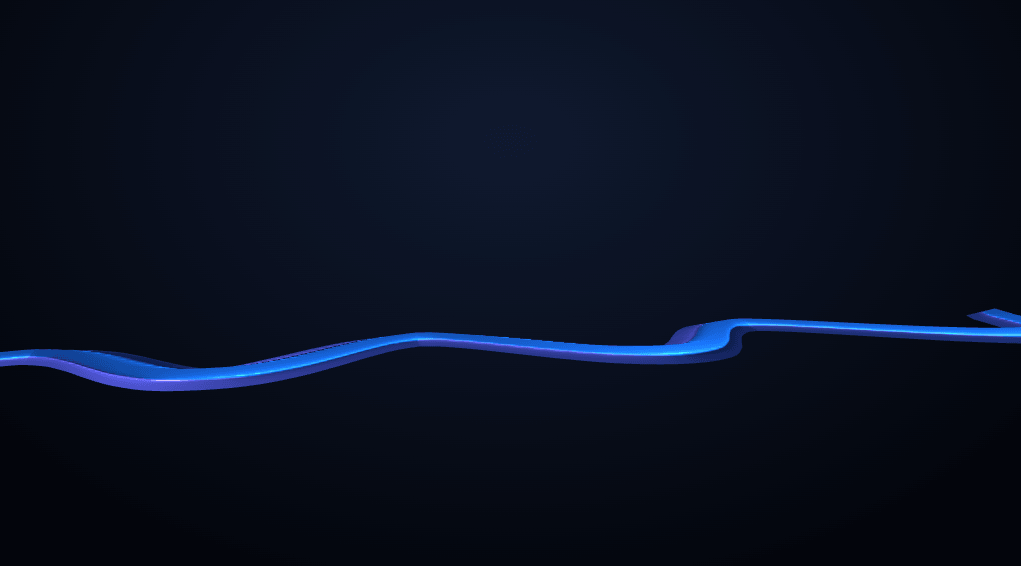
The Three.js Wave Ribbon snippet renders a flattened, glossy ribbon that undulates continuously along its length — the wave visibly traveling from one end to the other rather than the whole shape bobbing in place — by animating the control points of a CatmullRomCurve3 and rebuilding a TubeGeometry from it every frame, using core Three.js loaded from a CDN.
A curve, not a mesh, is the thing being animated
Rather than displacing vertices on a flat plane mesh directly (the technique used in the particle wave and synthwave terrain snippets), this ribbon's actual shape comes from a THREE.CatmullRomCurve3 — a smooth curve interpolated through a small number of control points. TubeGeometry then extrudes a circular cross-section along that curve's entire length, producing the tube-like mesh you actually see. Animating the curve's handful of control points, rather than hundreds of individual mesh vertices, is a far simpler mental model for anything shaped like a rope, cable, or ribbon.
Flattening a round tube into a ribbon with one line
TubeGeometry only supports a circular cross-section natively — there's no built-in "flat ribbon" option. This snippet sidesteps that limitation with one extra line: geometry.scale(1, 0.12, 1), squashing the finished tube geometry down on one axis after it's built. A circular tube squashed to roughly an eighth of its height reads convincingly as a flat ribbon rather than a rounded cable, without needing any custom cross-sectional geometry.
Why the geometry is rebuilt, not mutated in place
Every other snippet in this collection that animates a shape (the particle wave, the morphing blob) mutates an existing BufferGeometry's attributes directly rather than recreating it. TubeGeometry is the exception, and for a specific reason: its triangulated surface depends on the curve's *tangent direction* at every sampled point along its length, which changes in a complex way whenever any control point moves. Recomputing that correctly requires re-running TubeGeometry's own construction logic — which is exactly what calling new THREE.TubeGeometry(curve, ...) again does, followed by disposing the old geometry to free its GPU memory before replacing it.
Phase-per-index is what makes the wave travel
Every control point's Y and Z position is driven by a sine and cosine wave, but each point's phase offset is index * 0.55 — so point 0 and point 10 are always at different points in the wave cycle at any given moment. This staggered phase, growing steadily along the ribbon's points, is what makes the undulation visibly *travel* from one end toward the other, rather than every point moving up and down in unison, which would look like the whole ribbon breathing rather than flowing.
Two lights, two colors, for depth
A blue point light and a pink point light, positioned on opposite sides of the scene, give the glossy MeshStandardMaterial two distinct highlight colors to catch as the ribbon twists — a detail that reads as more dimensional than a single light source would, especially combined with side: THREE.DoubleSide so the ribbon's underside is visible and lit correctly whenever the curve twists it into view.
Where this technique applies
Animated-curve-plus-TubeGeometry is the standard approach for any rope, cable, snake, or flowing-fabric effect in Three.js. Pair this ribbon with a scroll camera path flythrough for a decorative flowing element woven through a scroll sequence, or contrast its smooth, continuous flow against the discrete, segmented look of the DNA helix.
Build with AI
Build, Understand, Optimize, and Extend It With AI
You do not have to work out why TubeGeometry needs special handling by trial and error. Paste this snippet's HTML, CSS, and JS into an AI coding assistant like Claude and ask it to explain exactly why this ribbon rebuilds its geometry every frame instead of mutating a BufferAttribute like the particle wave snippet does, or how the per-control-point phase offset makes the wave visibly travel rather than the whole ribbon bobbing in unison. The same assistant can help optimize it, for instance checking whether the tube's radial segment count could be lowered for a performance gain with minimal visual difference, or whether rebuilding the geometry every other frame instead of every frame would still look smooth. It is also useful for extending the effect: ask it to make the ribbon interactively follow the mouse cursor's horizontal position instead of animating on a fixed clock, add a second, differently-colored ribbon weaving alongside the first, or vary the ribbon's width along its length instead of keeping it constant. Treat the code less like a finished artifact and more like a starting point for a conversation.
Prompt to recreate it
Copy this into your AI assistant of choice to build the effect from scratch, or as a jumping-off point for your own variant:
Build a flowing "wave ribbon" in plain HTML, CSS, and JavaScript using Three.js loaded from a CDN (no bundler, no build step) — a flattened, glossy tube shape that undulates continuously along its length.

Requirements:
- A full-viewport canvas with a WebGLRenderer sized to match it, updated on window resize including camera aspect ratio, lit by ambient light plus at least two differently-colored point lights positioned on opposite sides of the scene.
- Create an array of at least 30 control points spaced evenly along one axis, and build a CatmullRomCurve3 from them.
- Build a TubeGeometry by extruding a circular cross-section along that curve, then flatten the resulting geometry into a ribbon shape by non-uniformly scaling it down significantly on one axis after creation (do not try to build a custom flat cross-section from scratch).
- Render the ribbon with a MeshStandardMaterial that has visible metalness and a moderate glossy finish, rendered with double-sided faces so the underside is correctly lit whenever the ribbon's curve twists it into view.
- Every animation frame, update each control point's position on two axes using sine and cosine functions of a shared, continuously incrementing time value, where each control point's phase within those sine/cosine functions is offset based on its index in the array — so points further along the ribbon are always at a different point in the wave cycle than points near the start.
- After updating the control points, update the curve's points and rebuild the TubeGeometry from scratch using the same construction call as initial setup, explicitly disposing the previous geometry before assigning the newly built one to the mesh, every single frame — do not attempt to mutate the tube geometry's existing buffer attributes directly, since its surface depends on the curve's tangent at every point.
- Add a slow, independent rotation to the ribbon mesh as a whole, separate from the per-control-point wave animation.
Want to tighten it up first? Run this prompt through the AI Prompt Studio to score it across 8 quality dimensions, catch anti-patterns, and tune the wording for Claude, ChatGPT, or Gemini before you paste it in.
Step by step
How to Use
- 1Load the Three.js CDNAdd three.min.js from the CDN panel — TubeGeometry and CatmullRomCurve3 are part of core Three.js.
- 2Paste HTML, CSS, and JSA flowing ribbon appears immediately, undulating continuously along its length.
- 3Watch the wave travelThe undulation visibly moves from one end of the ribbon toward the other, driven by per-point phase offsets.
- 4Tune the wave shapeAdjust the phase multiplier and sine/cosine amplitudes for a tighter, looser, or more twisted flow.
- 5Adjust the ribbon's flatnessChange the 0.12 scale factor for a flatter ribbon or a rounder, more tube-like shape.
- 6Resize the windowRenderer size and camera aspect ratio update automatically.
Real-world uses
Common Use Cases
Got questions?
Frequently Asked Questions
The ribbon's visible shape comes from TubeGeometry extruding a cross-section along a CatmullRomCurve3. Animating the curve's small number of control points is a much simpler mental model for a rope-like or ribbon-like shape than trying to directly displace hundreds of individual mesh vertices while keeping the surface smooth and continuous.
TubeGeometry only natively supports a circular cross-section. After building the tube geometry, a single call to geometry.scale(1, 0.12, 1) squashes it down on one axis, flattening the once-round cross-section into something that reads as a ribbon rather than a rounded cable.
TubeGeometry's triangulated surface depends on the curve's tangent direction at every sampled point along its length, which changes in a complex way whenever any control point moves. Correctly recalculating that requires re-running TubeGeometry's own construction logic, which is why the snippet creates a new geometry each frame (disposing the old one) rather than mutating an existing BufferAttribute in place.
Every control point's position is driven by a sine and cosine wave, but each point's phase offset within that wave grows with its index along the ribbon. Because point 0 and point 20 are always at different phases of the same wave cycle, the undulation visibly propagates from one end toward the other rather than the whole ribbon bobbing up and down in unison.
No, as long as the previous geometry is explicitly disposed before being replaced, which this snippet does with ribbon.geometry.dispose() immediately before assigning the newly built geometry. Skipping that disposal call would leak GPU memory over time, since Three.js does not automatically garbage-collect a geometry object simply because it is no longer referenced by a mesh.
Yes. Click JSX for a React component, Vue for a Vue 3 SFC, Angular for a standalone component, or Tailwind for a React + Tailwind CSS utility-class version. Keep the control points array and curve object in a ref so they persist across renders, rebuild and dispose the geometry inside the same animation loop, and call renderer.dispose() on cleanup.